



For WooCommerce stores shipping to customers across the Nordic region PostNord is a reliable carrier choice. However, generating PostNord shipping label can be time-consuming. You may need to switch between platforms, copy addresses manually, and download labels one by one. These extra steps add unnecessary complexity to your fulfillment workflow.
With the right plugin and proper setup, you can print a PostNord shipping label directly from your WooCommerce Orders page. This article walks you through exactly how to do that.
On This Page
- Why Print PostNord Labels Directly from WooCommerce?
- How to Print PostNord Shipping Labels in WooCommerce
- Real-World Example
- Pro Tips for Managing PostNord Shipping in WooCommerce
- Conclusion
- FAQs
Why Print PostNord Labels Directly from WooCommerce?
Manually creating PostNord shipping labels outside of WooCommerce means logging into a separate portal, entering order details by hand, and downloading each label individually. For stores processing multiple orders daily, this quickly becomes time-consuming and error-prone.
Printing PostNord labels directly from WooCommerce solves this by keeping your entire fulfillment process in one place. Here’s why it makes a difference:
- Saves Time on Every Order: Instead of switching between platforms, you can generate and print PostNord shipping labels straight from your WooCommerce Orders page in just a few clicks.
- Reduces Manual Errors: Customer address details are pulled directly from the WooCommerce order, eliminating the risk of typos or incorrect entries when creating PostNord labels manually.
- Speeds Up Bulk Fulfillment: You can select multiple orders and generate PostNord shipping labels for all of them at once, making high-volume shipping days significantly more manageable.
- Automates Label Generation: With the right plugin, PostNord labels can be automatically generated when an order moves to a specific status, so your team doesn’t have to trigger it manually every time.
- Everything Managed from One Dashboard: From order placement to PostNord label generation and tracking, your entire shipping workflow stays within WooCommerce, no extra tools or portals needed.
How to Print PostNord Shipping Labels in WooCommerce
To start printing PostNord shipping labels directly from WooCommerce, you’ll need to install and activate the PH PostNord Shipping Plugin for WooCommerce with Print Label. This plugin connects your WooCommerce store with PostNord and handles everything from service selection to label generation.
For a step-by-step setup walkthrough, refer to the WooCommerce PostNord Shipping plugin setup guide.
PostNord does not currently support real-time shipping rate fetching in WooCommerce. To display shipping costs at checkout, you can manually configure rates based on weight, destination, or cart value using the WooCommerce Table Rate Shipping Pro Plugin or WooCommerce’s built-in Flat Rate settings.
Once the plugin is installed and your PostNord API credentials are configured:
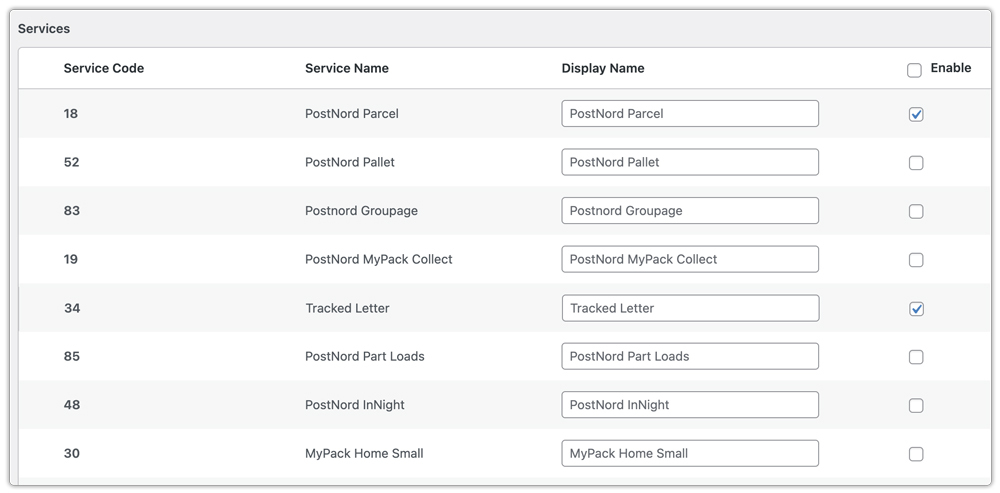
- You can choose from a range of PostNord domestic and international shipping services to fulfill orders across the Nordic region and beyond.
- After a customer places an order, you can generate and print PostNord shipping labels directly from the WooCommerce Orders page with just a few clicks.

For stores handling high order volumes, PostNord labels can be generated in bulk, selecting multiple orders and printing all labels at once.
Real-World Example: WooCommerce Store With PostNord Shipping Label Automation
A mid-sized WooCommerce store based in Sweden sells handmade home decor products and ships to customers across the Nordic regions, processing around 50-80 orders every week.
The Challenges
Before integrating PostNord with WooCommerce, their fulfillment process was entirely manual. They would download order details from WooCommerce, log into the PostNord portal separately, enter each customer’s address by hand, generate the label, and download it individually. For 50+ orders a week, this was consuming hours of their team’s time and occasionally led to shipping errors due to incorrect manual entries.
How They Fixed It
After installing the PH PostNord Shipping Plugin for WooCommerce with Print Label, the process changed completely:
- Generate PostNord shipping labels directly from the WooCommerce Orders page, with the system automatically pulling customer details from each order.
- On busy dispatch days, they use bulk label printing to process all pending orders at once instead of one by one.
- As a result, their weekly fulfillment time dropped significantly, manual errors were eliminated, and the team could focus entirely on packing and dispatch.
Pro Tips for Managing PostNord Shipping in WooCommerce
Here are a few tips to help you get the most out of your PostNord shipping workflow in WooCommerce:
- Keep PostNord API Credentials Up to Date: Expired or incorrect API credentials are one of the most common reasons PostNord label generation fails in WooCommerce. Regularly verify that your credentials are active and correctly entered in the plugin settings.
- Automate Shipment Tracking for PostNord Orders: Once a PostNord shipping label is generated, keep your customers informed with end-to-end tracking updates. While the PostNord Shipping Plugin already supports tracking, for more flexibility, you can use the WooCommerce Shipment Tracking Pro Plugin.
- Manage PostNord Alongside Other Carriers: If your WooCommerce store ships with multiple carriers in addition to PostNord, use the WooCommerce Shipping Services Plugin to manage rate display and label printing for all carriers from a single dashboard.
- Regularly Test Your PostNord Label Setup: Periodically place test orders and generate PostNord shipping labels to ensure everything is working correctly, especially after plugin updates or any changes to your WooCommerce settings.
Conclusion
Printing PostNord shipping labels directly from WooCommerce eliminates the need to switch between platforms. Whether you’re shipping domestically or fulfilling orders across the Nordic region, the PH PostNord Shipping Plugin for WooCommerce keeps everything, from label generation to tracking, managed from a single dashboard.
If you run into any issues or need help setting up PostNord shipping, reach out to PluginHive Support.
FAQs
Do I need a PostNord account to use the WooCommerce plugin?
Yes, you need a registered PostNord business account to use the WooCommerce plugin. It gives you access to shipping labels, live tracking, and other features. Check out this guide to learn how to register for a PostNord account.
Is there a PostNord option for customers to pick up orders from a nearby point?
Yes. MyPack Collect and Service Point Delivery lets customers pick up parcels from nearby service points or lockers. This gives them greater flexibility and convenience.
Does PostNord support returns?
Yes. PostNord offers services like Return Drop-Off and Return to handle both domestic and international returns securely.
Does the PostNord WooCommerce plugin support international shipping?
Yes. The plugin supports both PostNord domestic and international shipping services. Read this to learn more about Domestic and International Shipping with PostNord.
