


If your WooCommerce store ships dozens or hundreds of orders a month, shipping is probably one of your biggest recurring expenses, and it is easy for it to creep up without you noticing. Between carrier surcharges, packaging waste, and rates that do not match what you actually pay carriers, small inefficiencies add up fast.
This article walks through what drives shipping costs, why they tend to run high on WooCommerce stores, and the practical steps and plugins you can use to bring them under control.
On This Page
- What Are WooCommerce Shipping Costs?
- Why Are Shipping Costs High for WooCommerce Stores?
- What Factors Affect WooCommerce Shipping Costs?
- Key Strategies to Reduce Shipping Costs in WooCommerce
- Common Mistakes That Increase Shipping Costs
- A Simple Process to Optimize Your WooCommerce Shipping Cost
- Final Thoughts
- FAQs
What Are WooCommerce Shipping Costs?
WooCommerce shipping costs are whatever it takes to get an order from your warehouse to your customer’s door. This includes the carrier charge itself, packaging, handling time, and any surcharges added along the way.
By default, WooCommerce lets you set flat rates or free shipping, but it does not calculate real carrier costs on its own. That gap is usually where stores start overpaying or undercharging, which is exactly why shipping costs tend to run higher than they need to.
Why Are Shipping Costs High for WooCommerce Stores?
Shipping costs run high for a mix of reasons, and most of them come down to guesswork replacing accurate data.
- Flat or estimated rates: Charging one flat rate for all orders means you either overcharge light packages or absorb losses on heavy ones.
- No live carrier rates: Without a live-rate connection, checkout rates are based on assumptions rather than what the carrier actually charges for that specific package and destination.
- Inefficient packaging: Oversized boxes for small items lead to higher dimensional weight charges.
- Manual rate shopping: Comparing carrier rates by hand for every order is slow, and most stores end up sticking with one carrier out of habit rather than cost.
Once you know which of these apply to your store, it becomes much easier to see which specific factors are pushing your costs up.
What Factors Affect WooCommerce Shipping Costs?
A handful of variables decide what you pay per shipment, and understanding them helps you see where the savings actually are.
- Package weight and dimensions, since most carriers charge based on whichever is higher: actual weight or dimensional weight
- Destination, as domestic, cross-border, and remote-area deliveries are priced differently
- Carrier and service level, since express options cost more than ground or standard delivery
- Order value and product category, which affect insurance and handling fees
- Fuel surcharges and seasonal rate changes, which carriers adjust periodically
These factors interact with each other, which is why a one-size-fits-all flat rate rarely reflects the real cost of shipping any given order.
Key Strategies to Reduce Shipping Costs in WooCommerce
Once you know what is driving your costs, the next step is putting the right tools and rules in place. These strategies work well together, and most stores use more than one at a time.
Optimize Packaging and Apply Dimensional Rules
Carriers charge based on the space a package occupies rather than its true weight alone. Standardize your inventory to 3–5 core box sizes, use poly mailers for soft goods, and utilize advanced box-packing algorithms. Integrations like the FedEx Shipping Plugin with Print Label for WooCommerce and WooCommerce UPS Shipping Plugin with Print Label calculate optimal box configurations automatically during checkout to minimize wasted space.
Display Live, Real-Time Carrier Rates
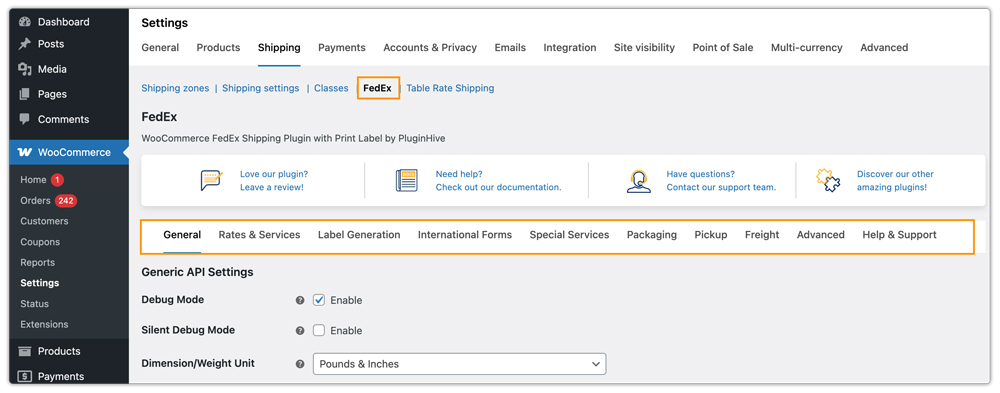
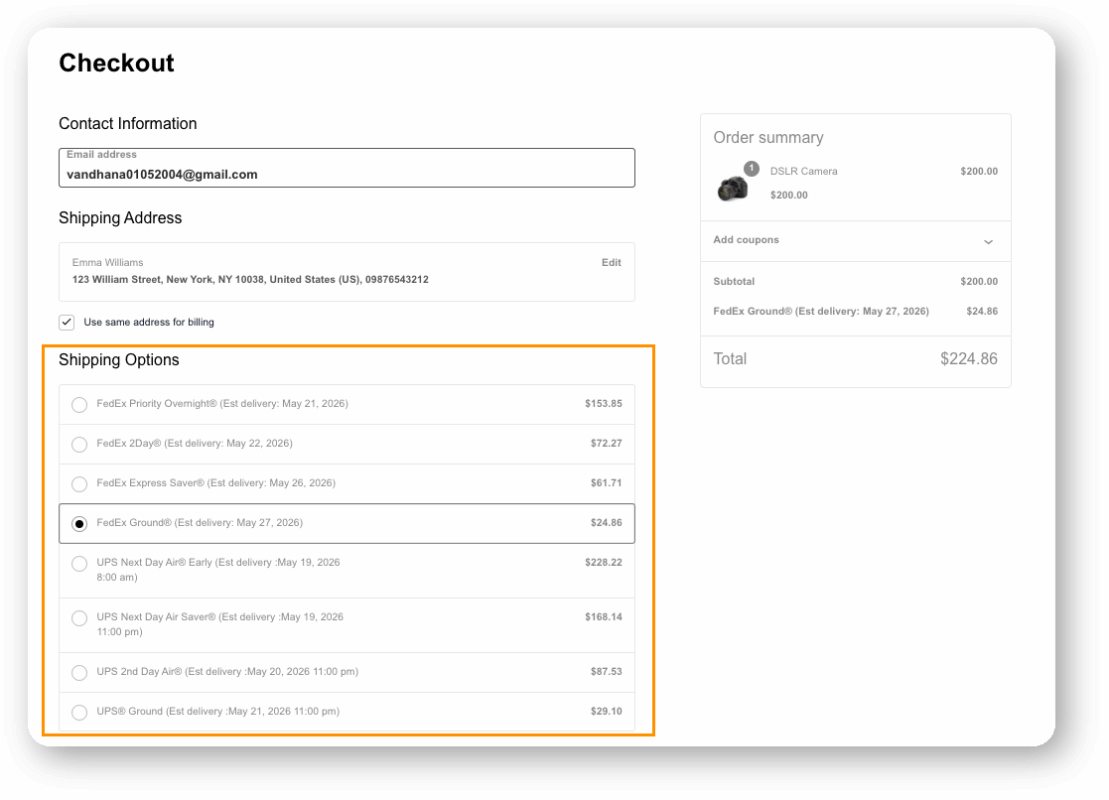
Guessing at a flat rate almost always means overcharging some orders and undercharging others. The Multi-Carrier Shipping Plugin for WooCommerce connects your store directly to carrier APIs, so checkout shows the exact rate instead of an estimate.
Use Table Rate and Multi-Carrier Logic Together
Different carriers tend to be cheaper at different weights and zones. Postal services are often the more economical choice for lightweight packages, while commercial couriers scale better for heavier shipments. The PH Table Rate Shipping Pro Plugin for WooCommerce lets you set conditional rules so orders are automatically routed to the more cost-effective option based on weight, quantity, or destination zone.

Guard Against Address Correction Fees
Carriers charge penalty fees when a delivery address is incomplete or incorrect, and these add up quickly at volume. The WooCommerce UPS Shipping Plugin with Print Label includes an address suggestion option at checkout, which flags likely errors before the order is placed.

Use Region-Specific Carrier Plugins Where Relevant
If a large share of your orders ship to Canada or the UK, dedicated plugins like the Canada Post Shipping Plugin for WooCommerce with Print Label and PH Royal Mail Shipping with Tracking for WooCommerce can fetch more accurate regional rates than a generic setup.
Getting these pieces right individually is useful, but the real savings show up when they are set up together as part of one consistent process rather than as one-off fixes.
Common Mistakes That Increase Shipping Costs
A few recurring mistakes tend to push shipping expenses higher than they need to be.
- Failing to account for packaging weight: Forgetting to add a buffer for the physical weight of boxes, inserts, and dunnage means your calculated rates will fall short of the actual carrier scale measurements.
- Setting flat rates once and never revisiting them. Product mix and carrier pricing both change over time, and rates set a year ago may no longer reflect reality.
- Manual fulfillment workflows: Manually copying and pasting order details into third-party carrier portals wastes labor hours and drastically increases the chance of expensive human error.
- Not comparing carriers regularly. Sticking with a single carrier out of habit means missing out on better rates available elsewhere for certain routes or package types.
Avoiding these mistakes, combined with the strategies above, is what actually keeps shipping costs predictable over time rather than something you have to keep firefighting.
A Simple Process to Optimize Your WooCommerce Shipping Costs
You don’t need to change your entire shipping setup at once. A step-by-step approach makes it easier to identify where you are overspending and fix the biggest issues first.
- Audit your current shipping data: Pull a few months of orders and compare what you charged customers against what you actually paid carriers.
- Connect live rates for your primary carriers: Start with the one or two carriers you use most, then expand once the setup is working smoothly. WooCommerce Shipping Services makes this easier, with real-time rates, bulk label printing, and tracking for 50+ carriers, all from your WooCommerce dashboard.
- Set weight and dimension rules in WooCommerce: Make sure your product weights and package sizes are entered accurately, since inaccurate data throws off every rate calculation downstream. WSS offers multiple packing methods, including box packing, weight-based, and quantity-based, so this data automatically translates into the most efficient packaging choice.
- Test checkout from a customer’s perspective: Place a few test orders to different regions and confirm the rates shown match what you would actually be charged. For a broader look at getting this right, see our guide on optimizing the shipping experience at WooCommerce checkout.
- Review rates quarterly: Carrier pricing changes periodically, so a rate setup that worked well six months ago may need adjusting.
Following this process consistently is usually enough to catch most of the common mistakes that drive shipping costs up in the first place.
Final Thoughts
Minimizing shipping overhead on your WooCommerce store requires a deliberate shift from manual guesswork to automation. By fine-tuning your box sizes, displaying live rates, leveraging localized couriers, and implementing smart conditional shipping rules, you can protect your margins. Utilizing robust tools like PluginHive’s suite of shipping plugins empowers you to scale your business profitably while keeping delivery affordable and transparent for your customers.
If you would like help setting up any of these plugins on your store, the PluginHive support team is ready to assist with configuration and setup.
FAQs
1. How do I set up shipping costs in WooCommerce?
Go to WooCommerce > Settings > Shipping, create a shipping zone for the regions you deliver to, and add a shipping method such as flat rate, free shipping, or local pickup. For accurate, carrier-based costs instead of flat estimates, you can connect a live-rate plugin like the Multi-Carrier Shipping Plugin for WooCommerce.
2. What are the shipping rates for WooCommerce?
WooCommerce itself does not set shipping rates. It gives you the framework to define them, either as a flat rate you set manually, free shipping, or live rates pulled from a carrier through a shipping plugin. The actual rate depends on the method you choose and the carrier you connect.
3. How to minimize shipping costs?
The most effective ways are showing live carrier rates instead of flat estimates, right-sizing your packaging to avoid dimensional weight charges, and using rule-based pricing like table rate shipping where it fits your product catalog better than live rates.
