


Turning a passion for baking into a profitable business is one of the most exciting paths for food entrepreneurs. Whether you are known for artisanal sourdough, intricately decorated wedding cakes, or batches of melt-in-your-mouth chocolate chip cookies, learning how to start an online bakery allows you to reach local customers without the heavy overhead of a traditional brick-and-mortar storefront.
To keep your bakery running smoothly, you need an online platform that can handle perishable inventory, custom dietary requests, and scheduled local deliveries. Building a WooCommerce bakery gives you complete ownership over your brand, ordering schedules, and customer relationships. In this article, you’ll learn how to plan your menu, set up your WooCommerce bakery store, take custom orders, accept payments, and deliver fresh bakes to your customers.
On This Page
- Plan Your Online Bakery Business
- Build Your Online Bakery Website with WooCommerce
- Prepare Your WooCommerce Bakery for Online Orders
- Tips to Grow Your Online Bakery with WooCommerce
- Final Thoughts
- FAQs
Plan Your Online Bakery Business
Before you open your store, get clear on what you’ll sell and how you’ll deliver it. Baked goods are perishable, so a little planning saves a lot of trouble later.
If you’re researching how to start an online bakery, begin by answering these questions:
- What will you sell? Decide whether you’ll offer ready-made items like cookies and cupcakes, custom cakes, or both. Starting with a small menu is easier to manage.
- Who are your customers? Birthday cake buyers, office orders, and wedding clients all expect different things.
- How much can you bake? Set a realistic limit for daily or weekly orders so you never overpromise.
- Where will you deliver? Choose a delivery area, or offer pickup only to begin with.
- What does each item cost you? Add up ingredients, packaging, time, and delivery before you set prices.
Also check the food licensing and labelling rules in your area. Requirements for selling baked goods online vary by location, so confirm them with your local food authority before you launch.
Build Your Online Bakery Website with WooCommerce
WooCommerce is a free plugin that turns a WordPress site into an online store. It gives you full control over your products, prices, and orders. An important step in learning how to start an online bakery is choosing a platform that makes managing these tasks easier.
- Get a domain and hosting: Pick a short, memorable name that matches your bakery, and choose a hosting plan that supports WordPress.
- Install WordPress and WooCommerce: Most hosts offer one-click WordPress installation. Then go to Plugins → Add New, search for WooCommerce, and install and activate it.

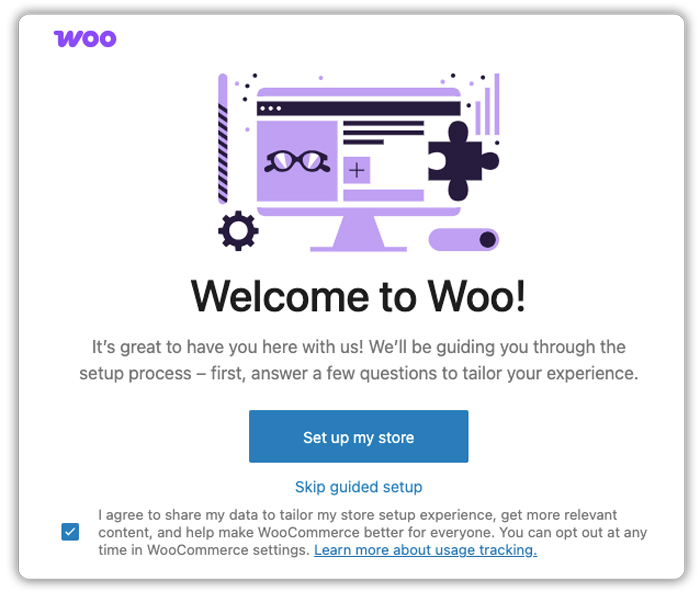
- Run the setup wizard: WooCommerce will ask for your store address, currency, and product type. You can adjust all of this later.
- Choose a theme: Pick a clean, mobile-friendly theme that lets your photos stand out. Many customers will browse from their phones.

- Create the key pages: Your online bakery website needs a Home page, Shop, About, Contact, and a page explaining your delivery areas and order lead times.

Keep the design simple. Good photos and a clear menu matter more than fancy layouts.
Need more help setting up your store? Check out our WooCommerce Tutorial for Novice for a detailed walkthrough of creating and managing a WooCommerce store.
Prepare Your WooCommerce Bakery for Online Orders
Once you understand how to start an online bakery, prepare your store to handle orders, payments, and deliveries. With your website ready, it’s time to set up the parts that keep orders running smoothly.
Let’s go through them one at a time.
Add Bakery Products to Your WooCommerce Store
Go to Products → Add New and create a listing for each item. A few choices make your menu easier to browse:
- Use variable products for sizes and quantities. A chocolate cake can have 500 g and 1 kg options. A cupcake listing can offer a box of 6 or 12.
- Add clear photos and short descriptions. Mention flavours, serving size, and key ingredients. Include allergen details such as nuts, eggs, or gluten.

- Group items into categories. Cakes, cookies, cupcakes, and seasonal specials help customers find what they want quickly.
- Set stock limits. If you can bake 20 dozen cookies a day, set your stock to match.
Offer Customization Options for Bakery Products
Cakes are rarely one-size-fits-all. Customers want to choose a flavour, add a name, or request an eggless version. WooCommerce doesn’t offer these extra fields by default, so you’ll need a plugin.
The PH Product Add-ons for WooCommerce plugin lets you add fields directly on the product page. For a birthday cake, you could set up:
- Dropdown: Choose flavours such as vanilla, chocolate, or red velvet.
- Text field: Enter a personalized birthday message.
- Checkbox: Select options such as eggless cake or gift box, with additional charges.
- File upload: Upload a reference image of the preferred cake design.
- Date picker: Select a preferred pickup or delivery date from a calendar.
- Time picker: Choose a preferred pickup or delivery time.

Each option can have its own price, and the plugin shows the combined total on the product page, cart, and checkout. You can also mark fields like flavour, date, and time as required, so no order comes in with missing details. Conditional logic keeps the page clean. For example, the message box can appear only when the customer ticks “Add a custom message”.

To save time, create one add-on group and assign it to your whole Cakes category. Every new cake will then get the same fields. Once an order arrives, all selections appear in the cart, checkout, and order details, so you know exactly what to bake. For more food-related ideas, see how to customize a WooCommerce restaurant menu with the same plugin.
Here’s how these fields look on the cake’s product page. Customers fill in their choices, and the total price updates as they select options.

Make It Easy for Customers to Pay and Choose Delivery
Payments and delivery are where many bakery orders get stuck, so set them up carefully.
Payments
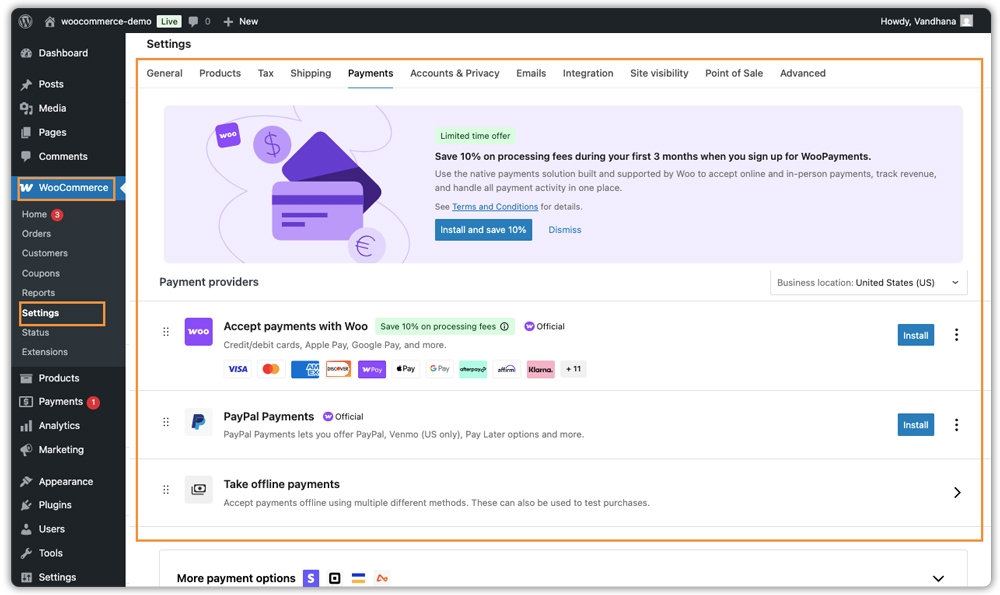
Go to WooCommerce → Settings → Payments and enable the methods your customers prefer, such as cards, PayPal, or local options. For custom or high-value orders like wedding cakes, you can ask for an advance payment. Taking one before you start baking protects you if the customer cancels.
The PH Deposits for WooCommerce plugin lets you collect a percentage deposit at checkout and the balance later. It creates balance orders and tracks what’s pending. Our guide on WooCommerce deposits and partial payments explains how it works.
Delivery
Start with the basics. In WooCommerce → Settings → Shipping, create a delivery zone for your area and a free “Local Pickup” option.

If your delivery charge depends on distance, the PH Table Rate Shipping Pro Plugin for WooCommerce can set different rates by ZIP code. It also lets customers choose between pickup and delivery.
Customers also want to know when their order will arrive. The Estimated Delivery Date plugin can show a delivery date with a cut-off time, so an order placed after 3 PM moves to the next day.
Manage Bakery Orders and Deliveries
Once orders start coming in, a simple routine keeps things organised.
- Check new orders each morning: Go to WooCommerce → Orders and review what’s due today and tomorrow.
- Use order statuses: Move orders from Processing to Completed once they’re delivered or picked up. You can also mark them as On hold if you’re waiting for a balance payment.
- Read customization details before baking: Selected add-ons appear inside each order, so you can check the flavour and message at a glance.
- Keep customers informed: WooCommerce sends automatic emails for new orders and completed orders. You can add a personal note when something needs clarification.
- Follow up on balances: For custom cakes, check pending balance payments a few days before the event date.
Tips to Grow Your Online Bakery with WooCommerce
Once your store is running, a few small habits can help it grow steadily.
- Show your lead time clearly: Say upfront that custom cakes need 48 hours’ notice. This cuts down on last-minute requests you can’t fulfil.
- Offer add-ons that fit naturally: Candles, gift boxes, and greeting cards are easy extras. Our guide on using product add-ons to increase order value has more ideas.
- Create seasonal collections: Make a separate category for festivals, Valentine’s Day, or Christmas, and update it before each season.
- Show real photos: Pictures of your own bakes build more trust than stock images. Add a short gallery of past custom cakes to inspire new orders.
- Collect reviews: Ask happy customers to leave a product review. New visitors often read reviews before placing a first order.
- Claim your Google Business Profile: This helps local customers find you when they search for bakeries nearby.
Small changes like these add up over time and make your bakery easier to find and trust.
Final Thoughts
Learning how to start an online bakery comes down to a few clear steps: plan your menu, build a simple WooCommerce bakery store, and set up customization, payments, and delivery. Start small, test your process with a few orders, and add features as your orders grow. If you need help setting up any of these, contact PluginHive Support.
FAQs
Q: Is a bakery a profitable business?
Yes, it can be. Your profit depends on pricing, ingredient costs, and steady demand. An online bakery also has lower overhead than a physical shop, since you don’t pay for a storefront. Custom cakes can be priced higher because they take more time and design work.
Q: How to sell cakes online?
Set up a WooCommerce bakery store, add each cake as a product with clear photos, and offer customization options like flavour, message, and pickup date. Then enable payment methods and set up delivery or local pickup. This is the simplest way to sell baked goods online from your own website.
Q: How to start a small online bakery?
Start with a few signature items, such as one or two cakes and a type of cookie. Check your local food licensing rules, build a simple online bakery website with WooCommerce, and limit daily orders to what you can bake. You can add more products as your orders grow.
Q: Do I need a license to sell baked goods online?
It depends on where you live. Many regions have food safety and labelling rules for home bakers, so check with your local food authority before you launch.
