


Most WooCommerce store owners spend a lot of time and budget getting a customer to click “buy.” But once the order is placed, many stores go quiet, and customers are left wondering where their order is. A weak post-purchase experience leads to more support tickets, lower repeat purchases, and customers who don’t come back.
This article breaks down what the post-purchase experience means, why it matters for WooCommerce stores, and eight practical ways to improve it, including how a dedicated tracking plugin can help.
On This Page
- What Is the Post-Purchase Experience in WooCommerce?
- Why Does the Post-Purchase Experience Matter?
- 8 Ways to Improve the Post-Purchase Experience in WooCommerce
- How Shipment Tracking Pro Improves the WooCommerce Post-Purchase Experience
- Best Practices for a Better WooCommerce Post-Purchase Experience
- Conclusion
- FAQs
What Is the Post-Purchase Experience in WooCommerce?
The post-purchase experience covers everything that happens after a customer completes checkout on your WooCommerce store. It starts with the order confirmation and continues through processing, shipping, delivery, and anything that follows, including how returns are handled and whether the store follows up afterward. For a WooCommerce store, this isn’t a single email or a single page. It’s a chain of small touchpoints, and how well each one is handled shapes whether the customer trusts your store enough to order again.
Why Does the Post-Purchase Experience Matter?
Store owners tend to focus most of their effort on getting a customer to checkout, and far less on what happens right after. That gap is where most avoidable problems start.
- Silence creates support tickets. Customers who don’t hear from you after checkout default to emailing your support team to ask about their order.
- Uncertainty affects repeat orders. A confusing or silent delivery process makes customers hesitant to order from you again.
- Tracking data protects you in disputes. Proof that an order was delivered helps resolve payment disputes faster.
- The post-purchase phase drives loyalty. A smooth experience after the sale is often what determines whether a customer becomes a repeat buyer.
None of this requires a large overhaul. It usually comes down to a handful of specific gaps in communication, which is what the next section covers.
8 Ways to Improve the Post-Purchase Experience in WooCommerce
A better post-purchase experience comes down to keeping customers informed and making it easy for them to get help when they need it.
1. Send a Clear Order Confirmation: The confirmation email is the first message customers receive after placing an order. Keep it simple with the order number, items purchased, total, and other important details.
2. Keep Customers Updated During Processing: There can be a gap between placing an order and receiving a shipping notification. Let customers know that their order is being prepared and provide an estimated processing time.
3. Let Customers Check Their Order Status: Give customers an easy way to check their order status whenever they want. This can reduce unnecessary questions to your support team.
4. Send Shipment Notifications Automatically: Once an order ships, send tracking details automatically. Automated shipment tracking emails help customers stay informed without having to contact your store.
5. Make Tracking Easy to Access: Make it easy for customers to find their tracking information. A clear tracking page or link helps them follow their shipment without having to search through emails or contact support.
6. Inform Customers About Delivery Delays: Delays can happen, especially during peak shopping seasons. If a delay occurs, let customers know early and provide an updated delivery estimate.
7. Make Your Return Policy Easy to Find: A clear and easy-to-find return policy helps customers understand what to do if they need to return an order.
8. Ask for Feedback After Delivery: Once the order is delivered, ask customers about their experience. This can help you identify issues and encourage customers to leave a review.
You do not need to make all these changes at once. Start with a few important improvements, such as automated shipment notifications, easy tracking, and clear delivery updates, and build from there.
How Shipment Tracking Pro Improves the WooCommerce Post-Purchase Experience
Several of the points above come down to one thing: giving customers visibility into their shipment without extra manual work on your end. This is where Shipment Tracking Pro for WooCommerce fits in.
- Branded, on-site tracking page – customers track their shipment from inside your WooCommerce store instead of being sent to a carrier’s website
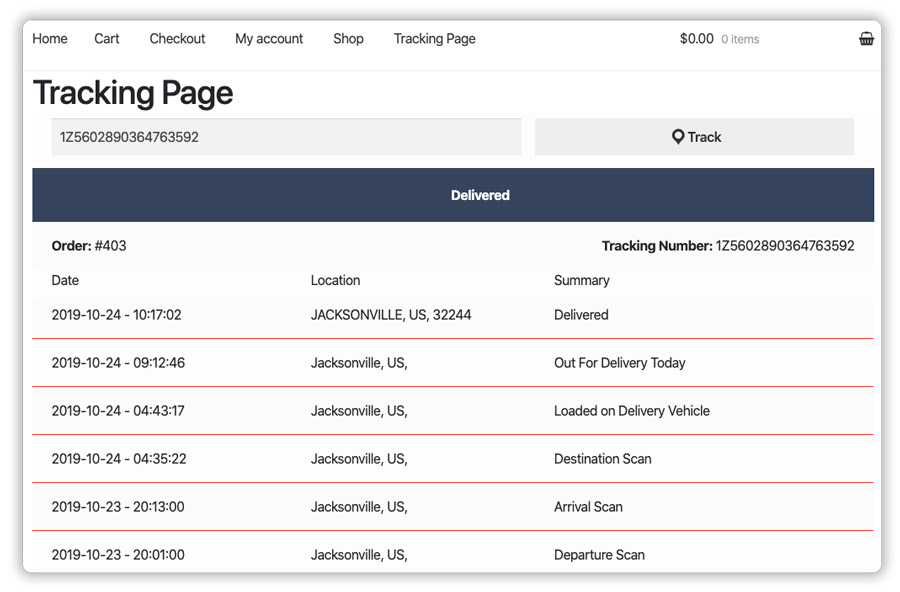
- Multiple carrier support – carriers are pre-populated in the plugin and can be added or removed based on what you use

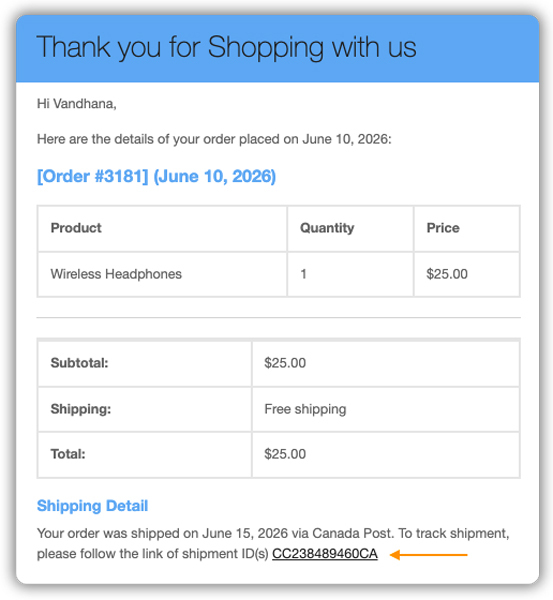
- Automatic tracking emails – tracking details go out to customers automatically as soon as an order is marked complete
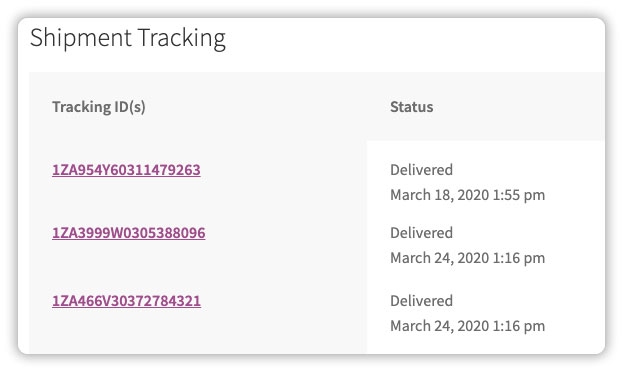
- Tracking visible on My Account – customers can log in and check their order status themselves, cutting down on WISMO emails
- Live tracking notifications – Customers receive shipment status updates as their order moves through the delivery process, so they stay informed without having to repeatedly check the tracking page.

- Bulk tracking import via CSV/FTP – useful for stores processing a high volume of orders, so tracking numbers don’t need to be entered one by one

For setup instructions, refer to the Shipment Tracking Pro setup guide, which walks through configuring carriers, tracking URLs, and notification settings step by step.
You can also read more about how Shipment Tracking Pro improves the overall customer experience for a closer look at the plugin’s workflow.
Best Practices for a Better WooCommerce Post-Purchase Experience
Getting the post-purchase experience right isn’t just about installing a plugin. A few habits make a real difference alongside it.
- Set realistic delivery expectations: Pairing shipment tracking with estimated delivery dates on product and checkout pages helps customers plan ahead and reduces last-minute uncertainty.
- Keep tracking emails simple: Don’t overload the email with promotions; customers just want to know where their order is.
- Review support tickets regularly: If WISMO questions keep coming in for the same carrier or route, that’s usually a sign something in your tracking setup needs a closer look.
- Test the tracking page yourself: Place a test order occasionally to see the tracking experience from a customer’s point of view.
- Update customers proactively during delays: A short heads-up email is far better than letting a customer find out their order is late on their own.
These small adjustments, combined with automated tracking, go a long way in making the post-purchase experience feel consistent every time.
Conclusion
A strong post purchase experience isn’t about doing more after checkout; it’s about keeping customers informed without making them ask. Clear confirmations, proactive tracking, and honest communication around delays and returns cover most of what customers expect from a WooCommerce store. If you’d like help setting up shipment tracking for your store, reach out to PluginHive Support.
FAQs
Q: What is the post-purchase experience in WooCommerce?
It’s everything a customer experiences after checkout, including order confirmation, shipment tracking, delivery, and any follow-up communication from your store.
Q: How can I reduce “Where is my order?” queries in WooCommerce?
Sending proactive tracking updates and giving customers a self-service way to check order status, such as a branded tracking page, significantly cuts down on WISMO tickets. The Shipment Tracking Pro setup guide covers how to configure this.
Q: Does WooCommerce have built-in order tracking?
WooCommerce doesn’t include advanced tracking by default. Store owners typically use a dedicated plugin to add branded tracking pages, automated notifications, and multi-carrier support.
