


India Post remains one of the most widely distributed shipping networks available to WooCommerce sellers in India. With 164,999 post offices, including more than 149,000 in rural areas, its reach extends well beyond major cities. For stores shipping to smaller towns, semi-urban areas, and rural PIN codes, that reach can make India Post a practical alternative to private courier networks.
This guide explains how India Post shipping works for WooCommerce, how its pricing and delivery timelines are structured, and how to connect it to your store.
On This Page
- Why India Post Matters for WooCommerce Sellers in India
- How India Post Shipping Pricing and Delivery Times Work
- India Post vs Private Couriers for WooCommerce Stores
- How to Set Up India Post Shipping in WooCommerce
- Real-World WooCommerce Use Case
- Conclusion
- FAQs
Why India Post Matters for WooCommerce Sellers in India
India Post’s biggest advantage for ecommerce sellers is its reach. Its network covers a large number of rural and semi-urban locations, giving merchants an option for destinations where private courier availability or pricing may not be as convenient.
For a WooCommerce store shipping across India, this means India Post can work alongside private couriers rather than replacing them completely. A merchant can offer different shipping options depending on the customer’s location, delivery requirements, and available rates.
Speed Post is particularly relevant to ecommerce because it provides tracked delivery and supports features such as Cash on Delivery, online tracking, SMS notifications, and optional insurance. India Post also offers other parcel and business shipping services, giving merchants flexibility depending on their account and shipping needs.
How India Post Shipping Pricing and Delivery Times Work
India Post shipping charges vary according to factors such as service, shipment weight, destination, and customer type. For example, the current retail Speed Post Parcel tariff uses four destination categories: Local, Within State, Zone/Metro, and Other States, with rates increasing according to shipment weight.
For Speed Post Parcel, the current retail tariff starts at ₹28 for shipments up to 500g within the local category. Rates then increase based on destination and weight. GST is charged as applicable, and additional services such as Proof of Delivery carry separate charges.
India Post currently lists the following average delivery standards for Speed Post Parcel:
| Route | Average Delivery Time |
|---|---|
| Local | 1-2 days |
| Metro to metro | 1-3 days |
| Same state | 1-4 days |
| Rest of country | 4-5 days |
Delivery to branch offices can take an additional day. International shipping times vary by destination and can also depend on customs processing.
India Post also provides online tracking, SMS delivery information, Cash on Delivery for eligible ecommerce shipments, and other value-added services. Insurance of up to ₹1,00,000 is available as a paid facility, rather than being automatically included with every shipment.
India Post vs Private Couriers for WooCommerce Stores
India Post and private couriers each have advantages, so the better option depends on what a store needs from its shipping network.
- India Post can be particularly useful when destination coverage and shipping cost are important. Its extensive postal network gives merchants an option for customers in locations that may be harder or more expensive to serve through some private courier networks.
- Private couriers, meanwhile, may offer advantages such as scheduled pickups, e-commerce-focused fulfillment services, faster delivery on selected routes, and additional logistics integrations.
There is also no fixed percentage by which India Post is always cheaper. Actual shipping costs depend on the service, weight, and destination.
For many WooCommerce stores, the most practical approach is to offer India Post alongside private couriers. This gives customers another option while allowing merchants to choose the most suitable carrier for each shipment.
How to Set Up India Post Shipping in WooCommerce
The PH India Post Shipping Plugin for WooCommerce with Print Label connects your WooCommerce store with India Post for shipping rate calculation, shipment creation, label generation, and tracking.
Install and activate the plugin to begin with. Follow this guide to configure the plugin in your WooCommerce store: Set Up India Post Shipping for WooCommerce.
Once configured, with this plugin you can:
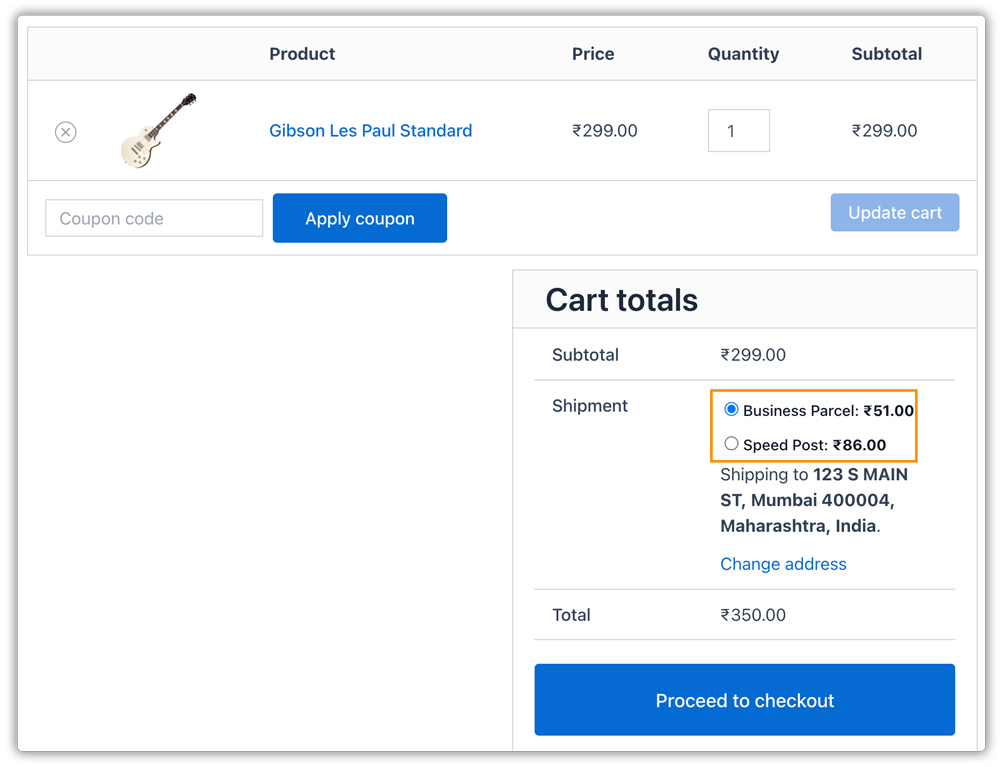
- Display India Post rates at the checkout. The rates are calculated using the order and destination details, allowing customers to see the applicable shipping cost before completing the purchase.
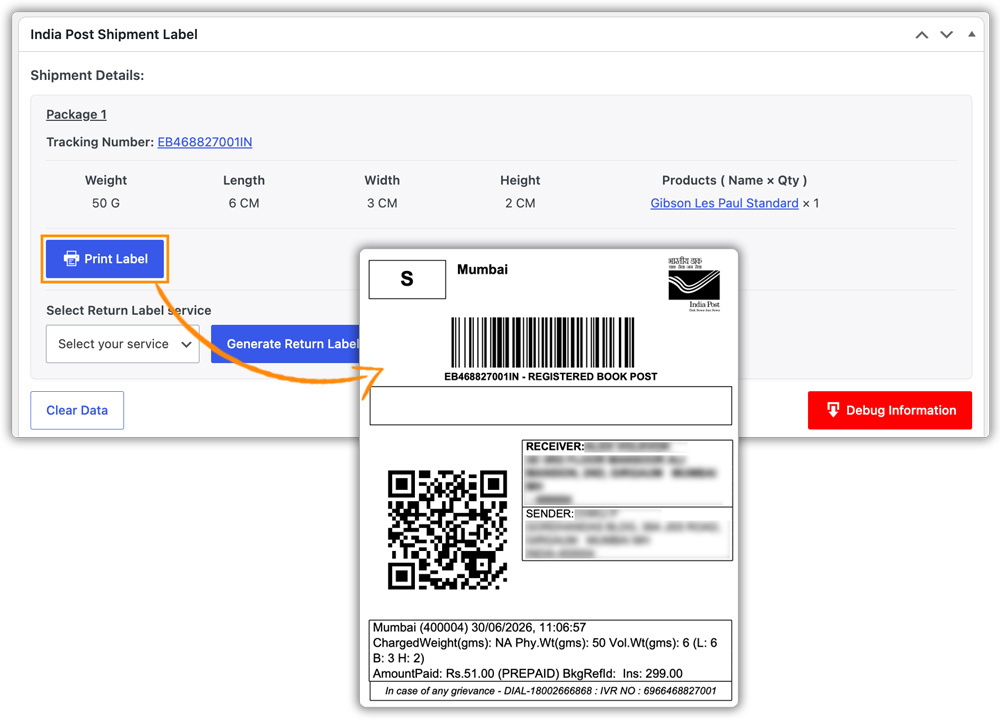
- Print India Post labels from the WooCommerce dashboard. Once an order is placed, the merchant can create the India Post shipment directly from the WooCommerce order page.
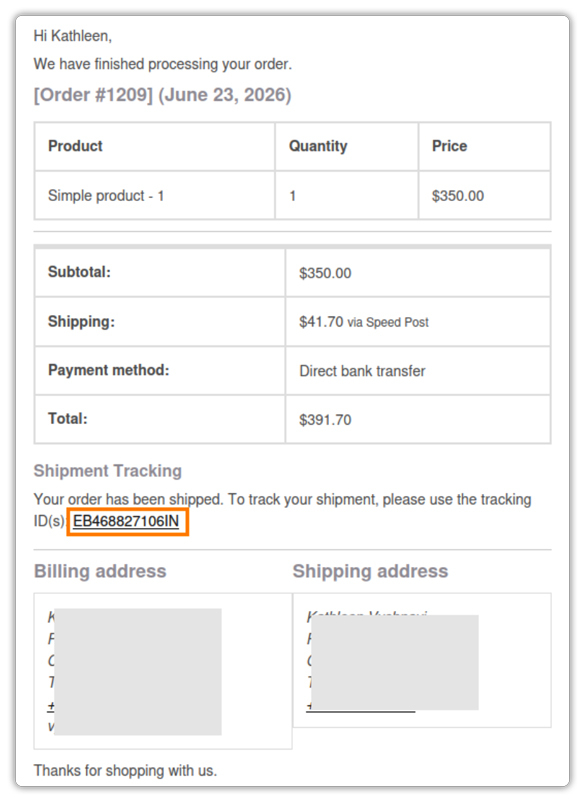
- Send Tracking Details to Customers. Once the shipment is created, the India Post tracking number is added to the WooCommerce order. The tracking information can be included in the WooCommerce order completion email, while customers can also access the tracking details from their Orders page.
Real-World WooCommerce Use Case
A WooCommerce store selling regional handicrafts receives orders from customers across India, including smaller towns and semi-urban locations. Its primary private courier does not provide equally convenient coverage for every destination, and some orders attract higher delivery costs.
The store wants to continue using its private courier where it works well while giving customers another shipping option for destinations where India Post is more suitable.
How the Plugin Helped
The store connected its India Post account using the PH India Post Shipping Plugin for WooCommerce with Print Label. India Post shipping rates could then be displayed at checkout based on the order and destination. When customers selected India Post, the merchant could create the shipment and generate the shipping label directly from the WooCommerce order page.
The Result
- India Post became an additional shipping option alongside the store’s private courier.
- Customers in smaller towns could access another delivery option at checkout.
- The merchant could create shipments and print labels without manually recreating orders.
- Tracking information could be shared through the existing WooCommerce workflow.
- The store could choose between India Post and private courier options based on destination and shipping requirements.
Conclusion
India Post gives WooCommerce sellers broad reach across India, making it a useful shipping option for stores serving customers in different regions. It does not have to replace private couriers. Using multiple carriers gives merchants more flexibility to choose based on destination, cost, and delivery needs. For WooCommerce stores, India Post can be a practical addition to the shipping mix, especially when reaching locations that may have fewer courier options.
Need help setting up India Post in your WooCommerce store? The PluginHive support team can help.
FAQs
Q. How can I create custom shipping rates alongside India Post?
If your store needs shipping rules beyond the rates provided by India Post, the PH Table Rate Shipping Pro Plugin for WooCommerce lets you create custom rates based on factors such as weight, destination, quantity, price, and shipping class.
Q. What if I don’t want India Post to appear for certain orders?
You can use the PH Hide Shipping Methods & Rate Adjustment for WooCommerce plugin to conditionally hide India Post or other shipping methods based on products, categories, shipping classes, destinations, cart value, and other conditions.
Q. How can I show customers when their order is expected to arrive?
The Estimated Delivery Date Plugin For WooCommerce lets you display estimated delivery dates across the store, including product pages, the cart, and checkout. This gives customers an expected delivery timeframe before they place an order.
Q. Can I offer India Post and private courier services at the same checkout?
Yes. WooCommerce stores can offer India Post alongside other shipping carriers. This gives customers multiple options and lets merchants choose shipping methods based on destination, delivery requirements, and cost.
Q. How can I prevent customers from seeing unnecessary shipping options?
For stores with several carriers or shipping methods, the Hide Shipping Methods for WooCommerce plugin can help control which options appear at checkout. You can create rules to hide methods when specific products, destinations, or order conditions apply.
