



India Post prices Speed Post and Business Parcel shipments by weight and destination pincode, so a single flat rate at checkout will always be wrong somewhere- too high for nearby pincodes, too low for distant ones. Displaying live India Post rates at checkout means customers see what their order actually costs to ship, and you stop absorbing the difference.
This guide explains what you need to display India Post shipping rates in WooCommerce, how those rates are calculated, and how to control what customers see using the PH India Post Shipping Plugin for WooCommerce with Print Label.
On This Page
- Why Displaying Live India Post Rates Matters for WooCommerce Stores
- India Post Services: What WooCommerce Merchants Should Know
- What You Need Before Displaying India Post Rates
- How to Display India Post Shipping Rates in WooCommerce
- Real-World WooCommerce Use Case
- Conclusion
- FAQs
Why Displaying Live India Post Rates Matters for WooCommerce Stores
For stores selling across smaller towns and rural India, India Post is often a practical choice. But flat-rate shipping is risky with any carrier that prices by distance: delivery cost varies with where the parcel goes, and a flat number can’t reflect that.
Showing live rates solves both sides of the problem. Customers get an accurate shipping cost before they pay, which reduces cart abandonment from surprise charges, and your store collects what the shipment actually costs instead of averaging losses across orders.
India Post Services: What WooCommerce Merchants Should Know
India Post offers different shipping services for businesses sending orders across India. Understanding the differences helps WooCommerce merchants choose suitable options for their shipping needs.
| India Post Service | Best Suited For | What Merchants Should Know |
|---|---|---|
| Speed Post | Time-sensitive domestic shipments | Designed for faster delivery, subject to destination and service availability. |
| Business Parcel | eCommerce orders and business shipments | Suitable for businesses shipping parcels to customers across India. |
| Registered Post | Eligible articles requiring registration | Offers registration and proof-of-delivery features, subject to the service’s applicable terms. |
The availability, delivery timelines, and pricing of each service depend on the destination, shipment details, and your India Post account.
When configuring live rates in WooCommerce, check which services your business account supports. You will also need the corresponding API credentials and contract details to retrieve rates for the services you want to offer at checkout.
What You Need Before Displaying India Post Rates
Before displaying live India Post shipping rates in WooCommerce, make sure you have the following:
- An India Post Business Account: You need an active business account with the required API credentials.
- An Active India Post Shipping Plugin: Install and activate the PH India Post Shipping Plugin for WooCommerce with Print Label to connect your account and display live shipping rates.
- Product Weight and Dimensions: Add accurate weights to your WooCommerce products. If you use Flexible Box Packing, configure the box dimensions required for package calculations.
Once these requirements are in place, you can configure India Post services and display applicable live shipping rates at checkout.
How to Display India Post Shipping Rates in WooCommerce
Configure the India Post Shipping Plugin in your store. Go through the Setup Guide for India Post Shipping Plugin to connect your India Post account.
Once connected, you can:
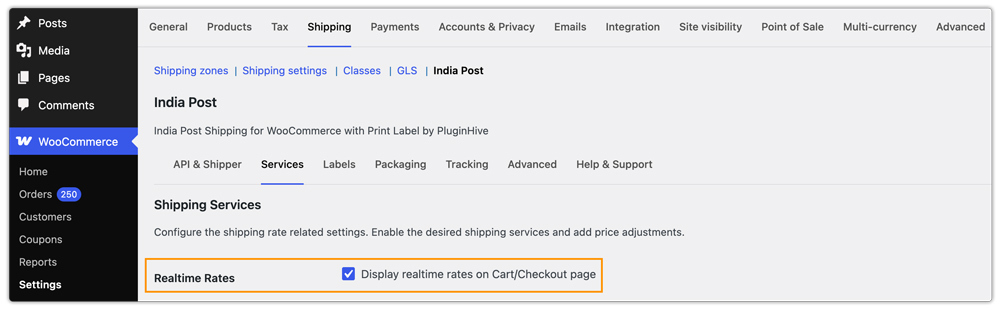
- Enable real-time shipping rates in the plugin settings.
- Enable or disable Speed Post and Business Parcel independently, assign custom display names, and control the order in which they appear at checkout.
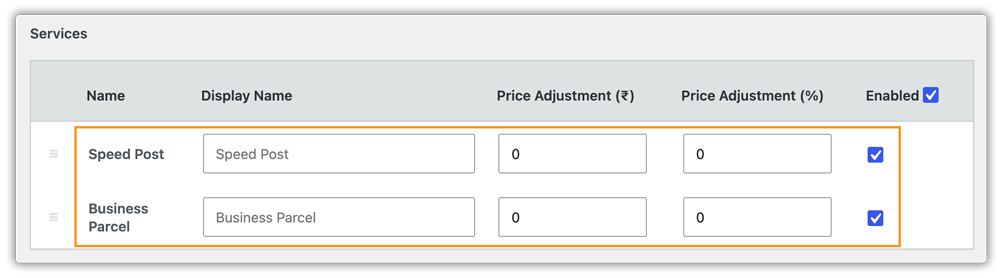
- Add a fixed handling fee or percentage adjustment to each service’s rate to cover packaging costs or offer shipping discounts.

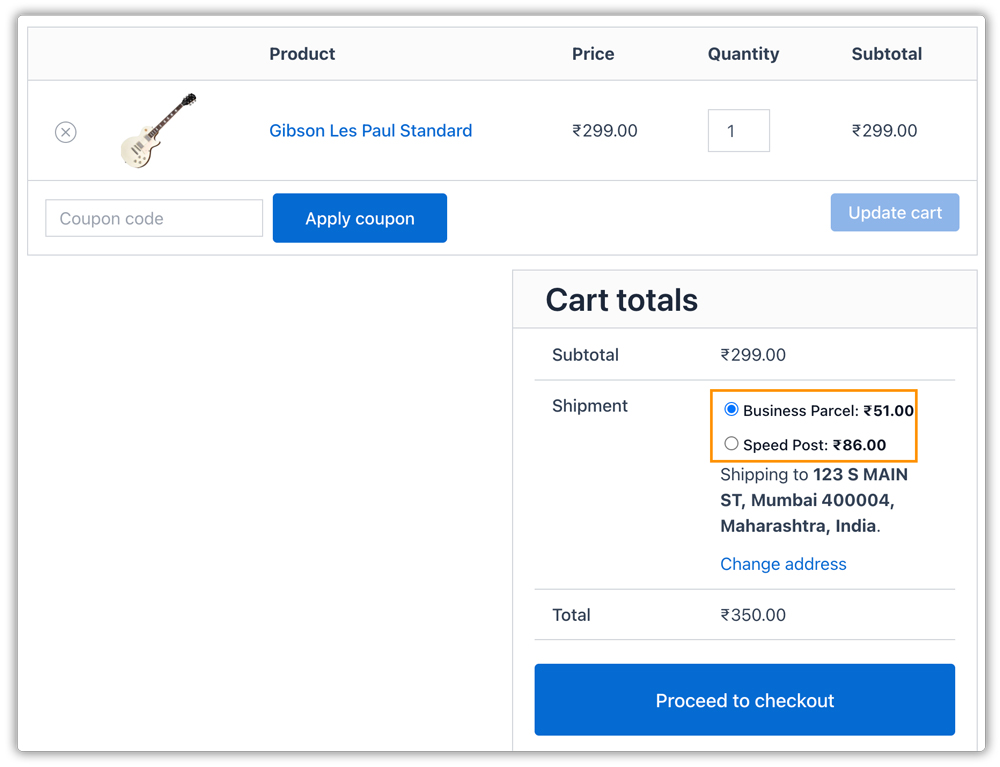
- Once configured, live Speed Post and Business Parcel rates will appear on the cart and checkout pages, calculated based on the shipment details and the customer’s pincode.
Real-World WooCommerce Use Case
A WooCommerce store selling handloom home textiles shipped across India, including many smaller towns, on a single flat shipping rate. Orders to nearby pincodes were overcharged, and some customers abandoned their carts, while orders to far-off pincodes were undercharged and the store absorbed the shortfall.
How the Plugin Helped
The store connected its India Post account through the PH India Post Shipping Plugin, enabled both Speed Post and Business Parcel, and let live rates replace the flat rate. A small handling fee on each service covered packaging materials.
The Result
- Customers saw a shipping cost based on their own pincode, not an average.
- Nearby orders stopped being overcharged, and distant orders stopped being undercharged.
- Customers could choose between a faster Speed Post option and a standard Business Parcel option.
- The store no longer updated rates by hand when India Post pricing changed.
Conclusion
Displaying live India Post shipping rates in WooCommerce helps you charge customers based on their actual shipping costs instead of relying on a flat rate. By considering product weight, packing details, and the delivery pincode, you can provide more accurate rates at checkout and reduce shipping cost discrepancies. Configure the available services and handling adjustments to suit your business needs, and ensure your product shipping details are accurate.
For help with India Post shipping rates or configuration, contact the support team.
FAQs
Q. What happens if India Post rates aren’t available at checkout?
You can configure a fallback rate with the India Post Shipping Plugin that displays when live rates can’t be fetched, so customers can still complete their order.
Q. Can I add a markup or discount to India Post rates?
Yes. Each service can carry a fixed handling fee or a percentage adjustment. If you want to hide a service for specific products or categories, the PH Hide Shipping Methods & Rate Adjustment for WooCommerce plugin lets you do that conditionally.
Q. Can I display India Post rates if my store uses a currency other than INR?
Yes. The plugin supports a currency conversion rate, so India Post’s INR rates are converted for stores that operate in another currency.
Q. Can I show India Post rates alongside free shipping or flat rate?
Yes. The plugin works with all native WooCommerce shipping methods and shipping zones. For custom rules beyond India Post’s own rates, such as weight or price brackets, the PH Table Rate Shipping Pro Plugin for WooCommerce can run alongside it.
Q. Can I show estimated delivery dates next to India Post rates?
The Estimated Delivery Date Plugin for WooCommerce lets you display estimated delivery dates on product pages, the cart, and checkout, so customers see a timeframe along with the rate.
