



Shipping is a key factor in the success of any WooCommerce store, especially in Denmark and Sweden, where customers expect fast and reliable delivery. As a leading logistics provider in the Nordic region, PostNord helps merchants meet these expectations with a wide range of domestic and international services.
This guide covers why PostNord is the right choice for WooCommerce stores, how to integrate it, and how automation can simplify fulfillment.
On This Page
- Why Choose PostNord for WooCommerce?
- Challenges of Using PostNord Without Integration
- Best Way to Integrate PostNord with WooCommerce
- Integrate PostNord Shipping in WooCommerce
- Real-World Scenario
- Conclusion
- FAQs
Why Choose PostNord for WooCommerce?
For WooCommerce merchants in Denmark and Sweden, PostNord is one of the most trusted shipping carriers. It combines extensive coverage across the Nordic region with flexible delivery options that match modern customer expectations.
Here’s why PostNord is a great fit for WooCommerce:
- Strong Local Presence: With a dominant network in Denmark and Sweden, PostNord ensures quick and reliable domestic deliveries.
- Flexible Delivery Options: Offer home delivery, business delivery, and pickup at local parcel shops, giving customers the freedom to choose.
- International Reach: PostNord also connects your WooCommerce store with key global markets, supporting cross-border sales.
- Reliable Tracking: Both merchants and customers can track orders in real time, building trust and transparency.
- Trusted Brand: As the national postal service partner in the Nordics, PostNord is widely recognized and trusted by customers.
With PostNord’s reliability clear, the next step is to understand why integrating it with WooCommerce is so important.
Challenges of Using PostNord in WooCommerce Without Integration
While PostNord is highly reliable, managing it manually in WooCommerce can quickly become overwhelming. Without proper integration, merchants face these challenges:
- Manual Label Creation: Every order requires logging into the PostNord portal to generate labels, which slows down the fulfillment process.
- No Automation: Essential tasks like label generation, tracking updates, or scheduling pickups have to be done manually, increasing workload.
- Tracking Delays: Copying and pasting tracking numbers into WooCommerce or emails takes extra time and can result in errors.
- Operational Inefficiency: As order volume grows, handling shipments manually leads to delays and fulfillment bottlenecks.
- Inventory Management Gaps: Without automation, syncing shipping details with WooCommerce inventory is harder, causing potential mismatches.
- Customer Experience Issues: Lack of tracking updates can reduce customer trust and satisfaction.
- Increased Risk of Errors: Human errors in entering shipment details or updating order statuses are common when processes aren’t automated.
These challenges show why integrating PostNord with WooCommerce is essential to deliver a smoother experience for both merchants and customers.
Best Way to Integrate PostNord with WooCommerce
While WooCommerce doesn’t provide direct PostNord support by default, you can still integrate it effectively using plugins. Two main solutions make this possible:
PH PostNord Shipping Plugin for WooCommerce with Print Label
- Let’s you generate and print PostNord shipping labels directly from WooCommerce orders.
- Automatically updates tracking numbers in customer emails.
- Supports domestic and international deliveries, including parcel shops and home delivery.
- Designed for merchants who rely mainly on PostNord for order fulfillment.
WooCommerce Shipping Services Plugin
A multi-carrier shipping solution that supports PostNord along with UPS, FedEx, DHL, and others.
- Allows you to print labels, update tracking info, and automate order fulfillment for multiple carriers.
- Great for WooCommerce stores that ship using different couriers, not just PostNord.
- Provides a centralized way to manage all shipping carriers in one setup.
If your store uses multiple carriers, the WooCommerce Shipping Services plugin is the best option. To integrate PostNord with this plugin, check out this guide: WooCommerce Shipping Services setup guide.
Now, let’s see how to integrate and automate PostNord shipping in WooCommerce using the PH PostNord Shipping Plugin for WooCommerce.
Integrate PostNord Shipping in WooCommerce
Shipping with PostNord from your WooCommerce store becomes simple and efficient with the PH PostNord Shipping Plugin. Begin by installing and activating the plugin. Configure the basic settings to match your store’s needs.
For step-by-step setup instructions, check this guide – WooCommerce PostNord Shipping Plugin Setup .
Once the plugin is set up, you can enable the PostNord services you want to use for fulfilling customer orders directly from your WooCommerce store

Generate and print PostNord shipping labels directly from WooCommerce orders, eliminating the need to log in to any external portal.
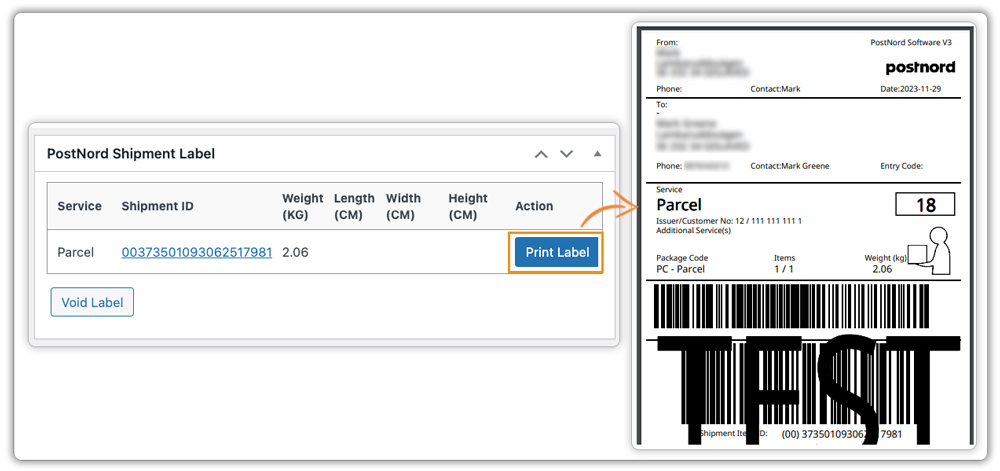
The plugin automatically updates tracking numbers in WooCommerce and shares them with customers, keeping them informed about their shipment status.

If PostNord is your primary shipping carrier, this plugin is the most reliable way to streamline your WooCommerce shipping operations while improving customer satisfaction.
Real-World Scenario
Let’s take an example of a WooCommerce store based in Copenhagen, Denmark, selling eco-friendly home products across Denmark and Sweden.
Before integrating PostNord, the merchant faced several issues:
- Every order required logging into the PostNord portal to create labels, which slowed down fulfillment.
- Tracking numbers had to be copied manually into WooCommerce, leading to delays and occasional errors.
- As order volumes grew, staff spent hours just managing shipments instead of focusing on sales and customer experience.
After integrating the PH PostNord Shipping Plugin for WooCommerce, the workflow completely changed:
- Labels are generated instantly from the WooCommerce order page, cutting fulfillment time by more than half.
- Tracking numbers update automatically and are shared with customers via email, reducing support queries.
- Customers now choose between home delivery and nearby parcel shops, improving satisfaction and repeat purchases.
- With automation in place, the store scaled its shipping process smoothly during peak holiday seasons without adding extra staff.
This shows how integrating PostNord directly into WooCommerce doesn’t just save time, it helps merchants deliver the fast, reliable experience that Danish and Swedish customers expect.
Conclusion
For WooCommerce merchants in Denmark and Sweden, PostNord offers reliable delivery, extensive local coverage, and flexible options that meet modern customer expectations. Proper integration with your store streamlines order fulfillment, automates tracking, and enhances the overall customer experience. By simplifying shipping processes, you save time and ensure customers receive their orders efficiently.
Need help setting up PostNord for your WooCommerce store? Contact our support team.
FAQs
- What PostNord shipping services can I offer in WooCommerce?
PostNord supports a variety of services, including home delivery, business delivery, and parcel shop pickup. Check out the guide on PostNord services in WooCommerce to learn more.
- Is PostNord suitable for cross-border shipping from Denmark and Sweden?
Absolutely. PostNord provides international delivery options, making it easier for WooCommerce merchants to sell across Nordic countries and beyond.
- Can I offer both home delivery and parcel shop pickup in WooCommerce?
Yes, PostNord allows you to provide multiple delivery options, giving customers the flexibility to choose what works best for them.
- How can I show accurate shipping rates at WooCommerce checkout if the PostNord API doesn’t support live rates?
Since PostNord’s API doesn’t provide real-time rates, you can set shipping costs manually based on weight, destination, or other criteria. Use plugins like WooCommerce Table Rate Shipping Pro to create flexible and accurate shipping options without offering blind flat rates.
