


When running a WooCommerce store that serves domestic or international customers, reliable shipping is non-negotiable. TNT, a well-established courier service under FedEx Express, offers fast and cost-effective delivery across more than 200 countries. Whether you’re shipping heavy items, time-sensitive parcels, or B2B goods, TNT’s strong logistics network can power up your store’s fulfillment strategy.
In this guide, we’ll explore the best ways to integrate TNT with WooCommerce, walk you through the setup process, highlight the key benefits, and share expert tips for optimizing your shipping workflow.
In This Guide
- Overview of TNT Shipping
- Services Offered by TNT
- Benefits of Integrating TNT in WooCommerce
- How to Integrate TNT Shipping on WooCommerce
- Real World Business Case
- Conclusion
- FAQs
Overview of TNT Shipping
TNT is a global express shipping service provider that specializes in time-definite and day-definite deliveries. Now operating as part of the FedEx Express network, TNT offers fast and reliable shipping solutions to over 200 countries and territories worldwide. The company provides a range of services designed to meet various delivery needs, whether it’s urgent next-day shipping or more economical options for less time-sensitive orders.
TNT also supports freight shipping, customs clearance, insurance, and comprehensive tracking, making it a suitable logistics partner for WooCommerce stores handling both domestic and international orders.
Services Offered by TNT
TNT offers a comprehensive range of shipping services tailored for both domestic and international deliveries. Their express solutions and economy services make TNT a flexible and reliable partner for WooCommerce sellers across the globe.
TNT Domestic Shipping Services
TNT offers a variety of domestic delivery options in countries where it still operates under its brand. These services are designed to cater to both urgent and budget-sensitive shipments:
- TNT 9:00 Express– Delivery by 9:00 AM the next business day
- TNT 10:00 Express– Delivery by 10:00 AM
- TNT 12:00 Express– Delivery by 12:00 PM
- TNT Express– Guaranteed delivery by the end of the next business day
- TNT Economy Express– A cost-effective option for non-urgent deliveries, typically within 2+ business days
TNT International Shipping Services
TNT’s international solutions are designed for speed, reliability, and global reach. Their express offerings ensure timely deliveries across major cities in over 65+ countries:
- TNT 9:00 Express: Delivery before 9:00 AM next day
- TNT 12:00 Express: Delivery before 12:00 PM next day
- TNT Express: Delivery by end of next business day
- TNT Economy Express: Day-definite delivery at a more economical rate
- TNT IDE (Integrated Direct Express): Consolidated international shipments destined for multiple addresses.
- Freight options are available to TNT customers by air or by sea.
TNT’s range of express and economy shipping options makes it an excellent fit for WooCommerce stores that need dependable logistics with global reach.
Benefits of Integrating TNT in WooCommerce
Yes, TNT shipping is all you need for your store, but you can automate the TNT shipping flow too. For that, you need to integrate a shipping tool that streamlines the entire process.
Without integration, you’ll end up handling everything manually, copying order info, generating TNT labels outside WooCommerce, and updating customers manually. It’s time-consuming, error-prone, and doesn’t scale as your business grows.
By integrating TNT directly into WooCommerce, you can solve all these issues in one place. The WooCommerce Shipping Services plugin is here to do exactly that. It helps you:
- Show accurate TNT shipping rates at checkout
- Generate and print TNT labels from WooCommerce
- Auto-assign TNT tracking numbers to orders
- Handle bulk or multi-package shipping with ease
- Generate required documents like commercial invoices
With everything managed from your WooCommerce dashboard, shipping becomes faster, simpler, and far more efficient.
How to Integrate TNT Shipping on WooCommerce
To integrate TNT shipping into your WooCommerce store, start by installing and activating the WooCommerce Shipping Services plugin.
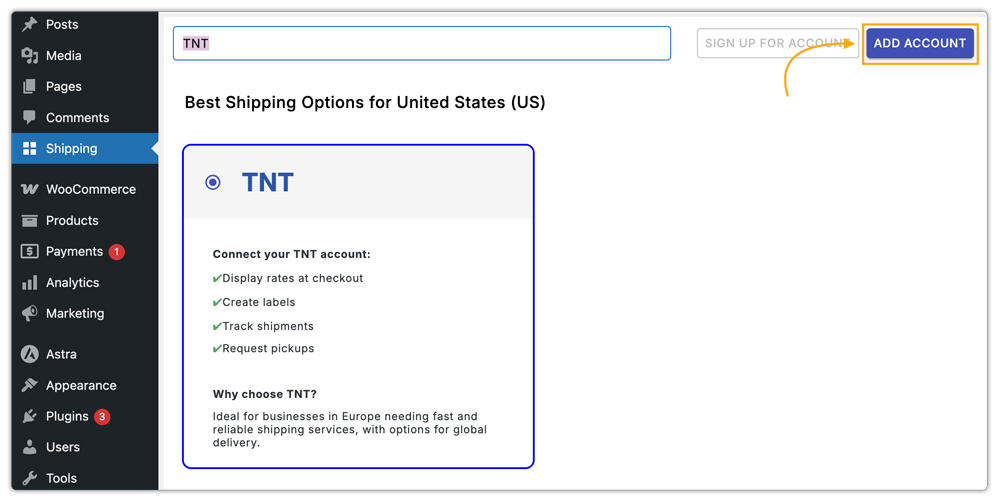
Once installed, go to the plugin settings and add TNT as a carrier, as shown in the image below.
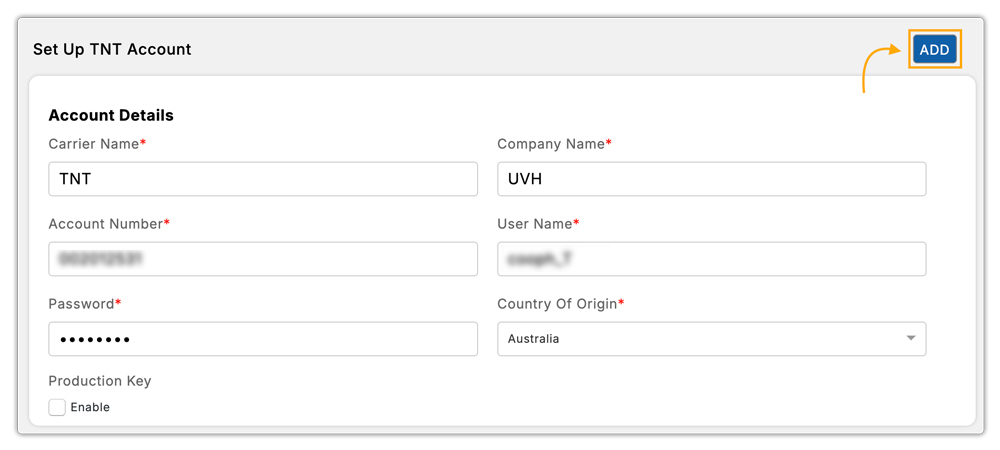
Simply enter the required TNT API credentials to connect your account with WooCommerce.
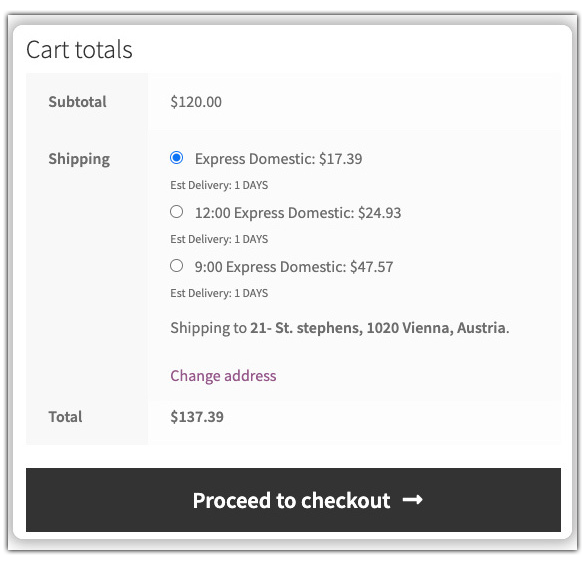
With TNT successfully integrated, your store can now display real-time TNT shipping rates at checkout based on order details and destination.
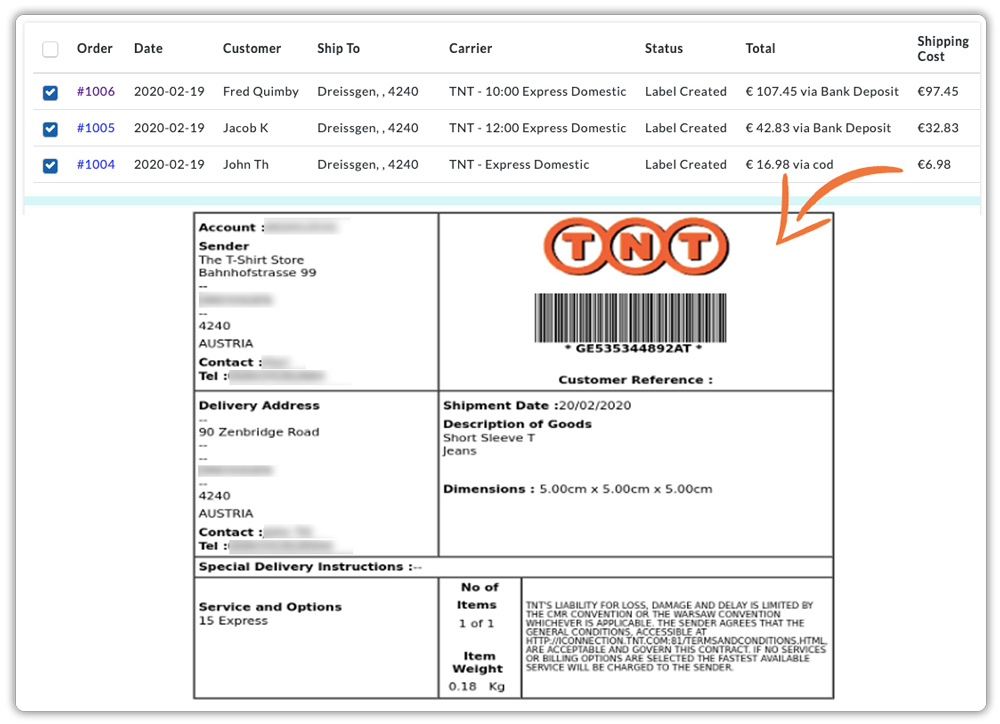
It also lets you print TNT shipping labels directly from WooCommerce orders.
With this plugin, you can schedule pickups and track shipments end-to-end right from your WooCommerce store. From order placement to final delivery, every step of the TNT shipping process becomes automated and hassle-free.
Let’s understand this better with a real case scenario.
Real World Business Case
An online store based in the UK specializing in custom automotive parts, shipping across Europe and internationally.
Challenges Faced
The business initially relied on manual shipping methods with TNT, copying order details, logging in to the TNT portal, creating labels, and emailing tracking info to customers. This led to:
- Frequent errors in shipment details
- Delayed order processing, especially during peak seasons
- No way to show accurate TNT shipping rates at checkout
- Customer dissatisfaction due to tracking delays
The Solution
By integrating the WooCommerce Shipping Services plugin, the business automated its entire TNT shipping workflow. Here’s how it helped:
- TNT rates were displayed instantly at checkout based on order weight and destination
- Orders were processed faster with one-click TNT label generation
- Tracking numbers were auto-assigned and emailed to customers
- Staff could schedule TNT pickups without leaving the WooCommerce dashboard
With TNT now fully automated in WooCommerce, the store significantly reduced errors, sped up fulfillment, and improved the overall shipping experience.
Conclusion
Integrating TNT shipping into your WooCommerce store streamlines the entire fulfillment process, from checkout to delivery. You can reduce manual work, minimize errors, and ensure a faster, more reliable shipping experience for your customers. Whether you’re managing domestic orders or global deliveries, automation makes it easier to scale and operate efficiently.
Need any help setting up TNT shipping on your store? Contact PluginHive support; we’re here to assist you.
FAQs
- Does the integration support bulk shipping?
Yes, you can handle bulk shipments, print labels in batches, and manage multi-package orders efficiently with the WooCommerce Shipping Services plugin.
- Does TNT support international shipping through WooCommerce?
Yes, TNT offers both domestic and international services. You can enable and configure both from your WooCommerce settings.
- Do I need a TNT business account to integrate it with WooCommerce?
Yes, you’ll need an active TNT business account to access API credentials, which are required to connect TNT services with your WooCommerce store.
- What happens if TNT services are not available in my region?
If TNT services are unavailable in your region, you can integrate alternative carriers like FedEx Express. Consider using the WooCommerce Shipping Plugin for FedEx, which automates the entire shipping process for all FedEx Express services.
