



Shipping internationally from Canada with Canada Post is straightforward until customs gets involved. Unexpected duties and taxes are one of the most common complaints in cross-border eCommerce. These surprise charges can discourage customers from buying again.
The Canada Post Shipping Plugin for WooCommerce with Print Label has a built-in Zonos integration that handles duty and tax calculation for Canada-to-US shipments directly from your WooCommerce store. This guide walks you through what Zonos is, why it matters, and exactly how to set it up.
On This Page
- Why Duties and Taxes Matter for WooCommerce International Shipping
- What Is Zonos and How Does It Work?
- How to Integrate Zonos with WooCommerce Canada Post
- Example Scenario
- Tips to Reduce Cross-Border Shipping Issues in WooCommerce
- Conclusion
- FAQs
Why Duties and Taxes Matter for WooCommerce International Shipping
When a package crosses a border, customs authorities in the destination country may charge import duties and taxes before releasing it for delivery. If your customers aren’t warned about this at checkout, the consequences are predictable and expensive.
- Refused deliveries: Customers hit with unexpected charges at the door often refuse the package entirely, leaving you with a lost sale and a return shipping bill.
- Damaged trust: A surprise customs charge after a smooth checkout feels like a bait-and-switch, even when it isn’t your fault.
- Higher return rates: Customers who accept the package may still dispute the charge or request a refund, adding unnecessary operational overhead.
The fix is collecting duties and taxes upfront at checkout, a model known as Delivered Duty Paid (DDP). Customers see exactly what they’re paying, and there are no surprises on delivery. This is where Zonos comes in.
What Is Zonos and How Does It Work?
Zonos is a cross-border eCommerce platform that specializes in landed cost calculation, the total cost of getting a product to an international customer, including duties, taxes, and fees.
When integrated with your WooCommerce store, Zonos calculates these costs in real time based on the product type, declared value, destination country, and applicable trade regulations. This allows you to:
- Include accurate duty and tax estimates in the total cost and display them to customers at checkout.
- Collect those charges upfront, avoiding post-delivery surprises
- Generate compliant customs documentation for Canada Post shipments to the US
- Reduce failed deliveries and returns caused by unexpected import charges
Zonos integrates using either a global Zonos Account Key for automated store-wide calculations or a unique Declaration ID for individual manual shipments. The Canada Post plugin uses these credentials to connect to Zonos and pass shipment data for duty calculation.
How to Integrate Zonos with WooCommerce Canada Post for Cross-Border Duties & Taxes
Before integrating Zonos with WooCommerce Canada Post, make sure you have installed and activated the Canada Post Shipping Plugin for WooCommerce with Print Label on your store.
Step 1: Get Your Zonos Credentials
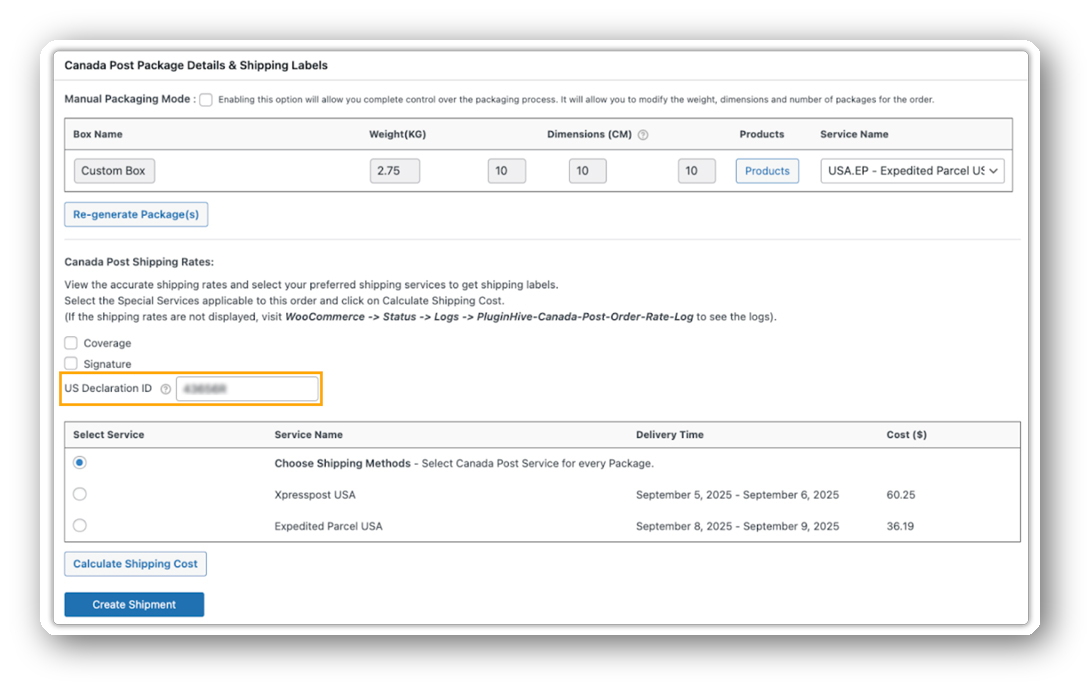
Log in to your Zonos account and retrieve your Zonos Account Key and Declaration ID. These are unique to your Zonos account and authorize the plugin to communicate with Zonos on your behalf. If you don’t have a Zonos account yet, sign up at zonos.com and complete their onboarding process first.
Step 2: Navigate to the Zonos Settings
In your WordPress dashboard, go to WooCommerce → Settings → Shipping → Canada Post. From within the plugin settings, look for the Zonos Integration section.
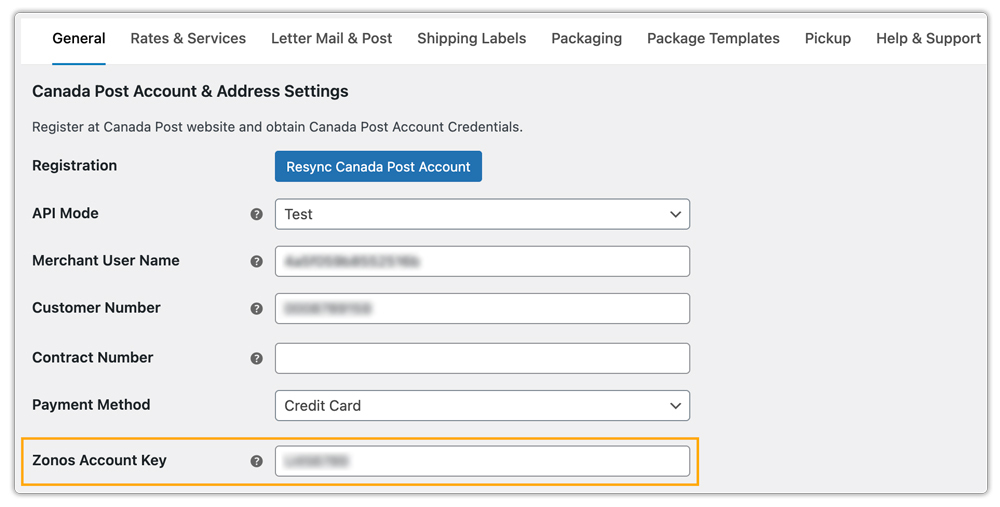
Step 3: Enter Your Zonos Account Key and Declaration ID
In the Zonos Integration section, enter your Zonos Account Key obtained from your Zonos dashboard and save. The plugin will use this key to automatically connect with Zonos and apply the required customs data.
Step 4: Configure Your International Shipping Services
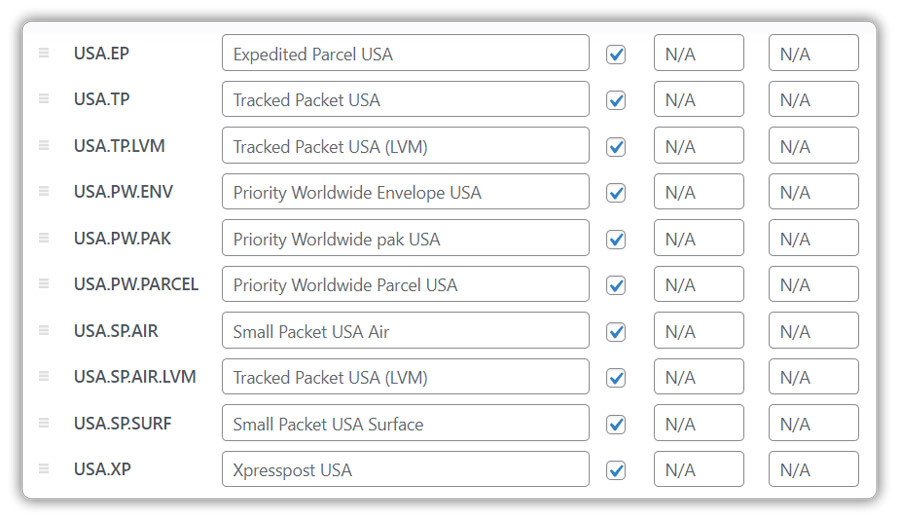
Make sure your international Canada Post shipping services are enabled in the plugin settings. The Zonos integration works alongside Canada Post’s US shipping services like Xpresspost USA, Expedited Parcel USA, and Tracked Packet USA
Also, ensure your products have the correct HS Tariff Codes set at the product level. The plugin supports this under each product’s shipping settings. Accurate HS codes allow Zonos to calculate duties correctly based on product classification.
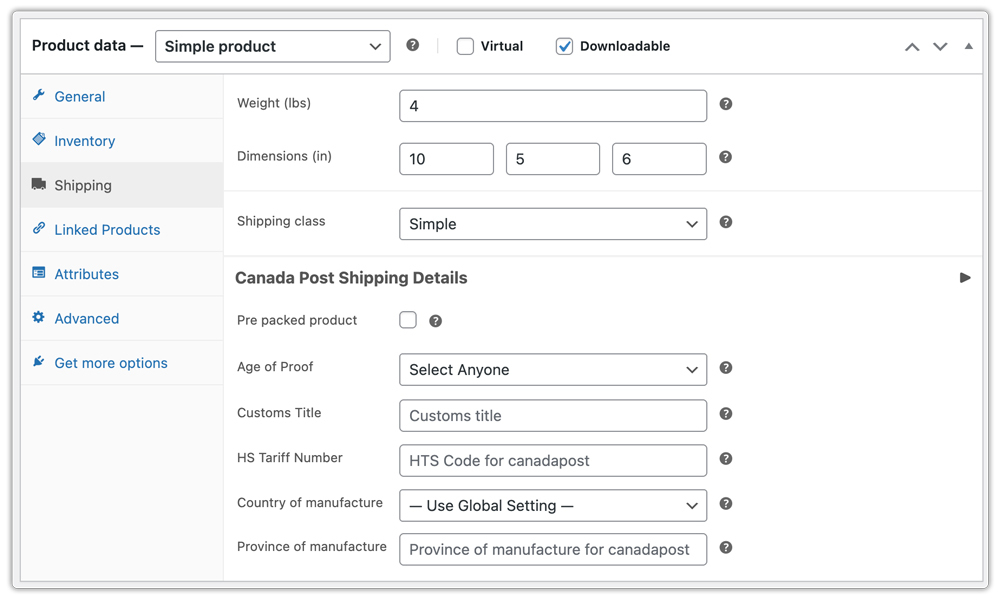
Test and Validate the Zonos Integration Before Going Live
Before going live, place a test order using an international destination address, ideally in the US, since it is a common use case for Zonos with Canada Post. Check whether the duty and tax amounts appear correctly at checkout.
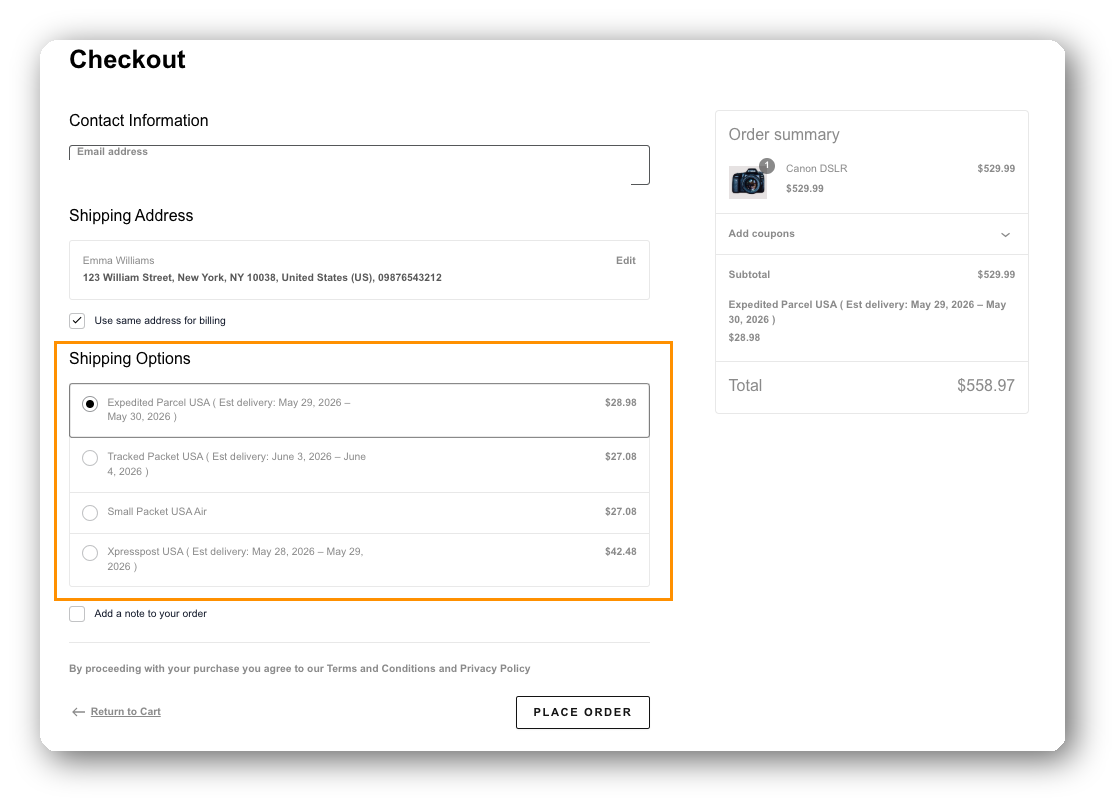
Also, verify that the order processes without errors and that the shipping label is generated successfully with accurate customs information.
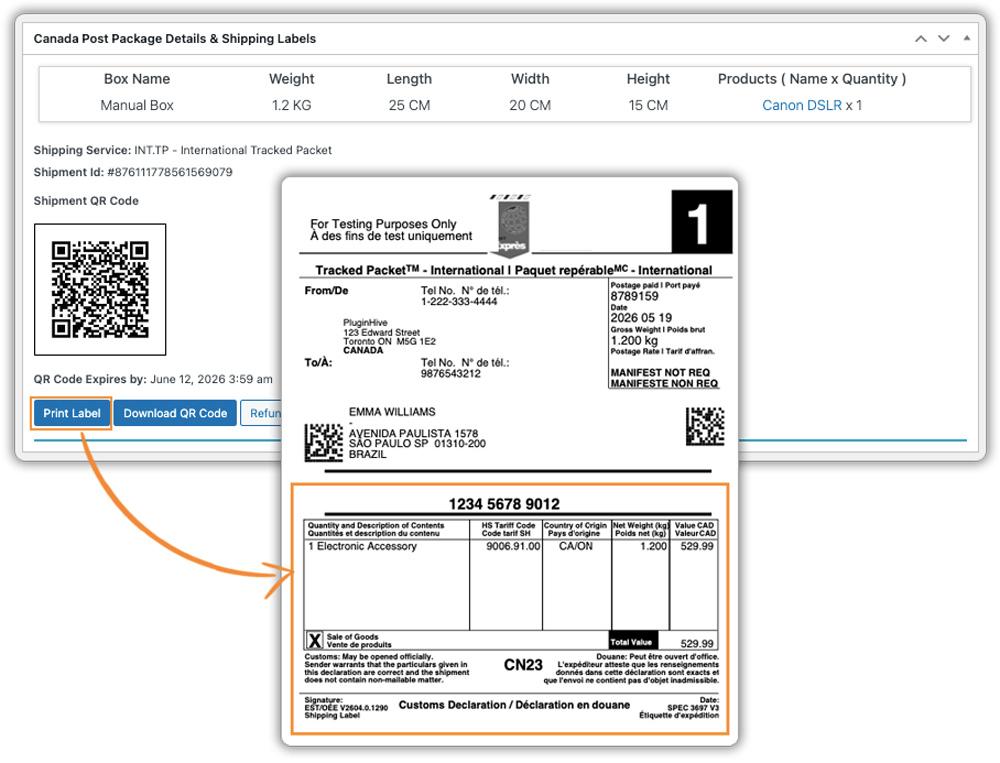
Once everything works as expected, your store is ready to handle compliant cross-border shipments.
Example Scenario: How Zonos and Canada Post Work Together for International Orders
Let’s say you run a Canadian apparel store and a customer in the United States places an order for a CAD $120 jacket.
Without Zonos, your Canada Post plugin calculates the shipping rate and generates a label, but US customs may hold the package and charge the customer import duties separately, often with no warning.
With Zonos integrated, here’s what happens instead:
- At checkout, Zonos calculates the applicable US import duty and any state taxes based on the jacket’s HS tariff code and declared value.
- The customer sees the total landed cost at checkout and pays up front.
- You generate the Canada Post shipping label directly from WooCommerce, and the customs documentation reflects the pre-paid duty status.
- US customs clears the package smoothly, and Canada Post delivers it without any extra charges for the customer.
The result is a better customer experience, fewer returns, and a cleaner customs process, all managed from within your WooCommerce dashboard.
Tips to Reduce Cross-Border Shipping Issues in WooCommerce
Even with Zonos in place, a few best practices will keep international shipments running smoothly.
- Always set HS Tariff Codes at the product level: The Canada Post Shipping Plugin for WooCommerce with Print Label lets you add HS codes per product, which Zonos uses to determine the correct duty rate. Missing or incorrect codes can lead to calculation errors.
- Use accurate declared values: Undervaluing shipments to reduce duties is against customs regulations and can result in seized shipments. Always declare the actual selling price.
- Enable commercial invoice generation: The Canada Post plugin generates commercial invoices (custom forms) for international shipments with one click, which are required for customs clearance on most international services.
- Set the Country and Province of Manufacture: The plugin lets you define these at the product level, which feeds directly into commercial invoices for more accurate customs documentation.
- Keep packaging weights and dimensions accurate: Canada Post U.S. shipments processing is based on the information you declare. If the actual package weight or dimensions don’t match what’s on the label, it can cause delays at customs or trigger additional charges on delivery.
Conclusion
Once Zonos is integrated, the difference shows up fast – fewer refused deliveries, fewer support emails asking about customs charges, and customers who actually complete their purchase knowing exactly what they paid for. The Canada Post Shipping Plugin for WooCommerce with Print Label handles the rest from within your WooCommerce store. For any help along the way, the PluginHive support team is available.
FAQs
Q: Do I need to set HS Tariff Codes for Zonos to work accurately?
Yes. Adding the correct HS Tariff Code at the product level allows Zonos to accurately classify products and calculate the right import duties for each destination country.
Q: What is Delivered Duty Paid (DDP) shipping?
DDP means duties and taxes are collected from the buyer at checkout before the package ships, so the recipient has nothing to pay on delivery. Zonos helps you offer DDP shipping on your WooCommerce store.
Q: Will Zonos work for Canada Post shipments to all countries?
While Zonos supports global shipping, this specific Canada Post integration is designed and required strictly for U.S.-bound shipments from Canada to comply with customs regulations.
