


Selling internationally allows WooCommerce stores to reach customers in different countries, but managing shipments across borders can be more complicated. International orders may pass through different carriers, customs, and delivery networks before reaching the customer. Without clear tracking information, customers may have questions about where their package is and when it will arrive.
Providing international order tracking gives customers a simple way to follow their shipments after an order is dispatched. It also helps merchants reduce order-status questions and keep shipment information organized in one place. In this guide, we’ll explain how WooCommerce order tracking can work for international shipments, how customers can track their orders, and how you can manage tracking information using Shipment Tracking Pro for WooCommerce.
Table of Contents
- What Is International Order Tracking in WooCommerce?
- Why Is International Order Tracking Important for WooCommerce?
- How to Add Tracking for WooCommerce International Orders
- Example Scenario: Tracking an International WooCommerce Order
- Best Practices for WooCommerce International Order Tracking
- Conclusion
- FAQs
What Is International Order Tracking in WooCommerce?
International order tracking is the process of letting customers follow their shipment’s journey across borders, from the moment it leaves your warehouse to the moment it clears customs and reaches their address. Unlike domestic tracking, an international shipment usually passes through more than one carrier or network, such as a local postal service handing the package to an international freight partner, which then hands it to a last-mile courier in the destination country.
For a WooCommerce store, this means your tracking setup needs to work with the carriers you actually use for cross-border shipping, whether that’s a global courier like DHL Express or FedEx, or a regional postal service like Canada Post or Australia Post. Since WooCommerce does not include this functionality out of the box, store owners rely on a dedicated plugin to connect tracking numbers to orders and carriers.
Why Is International Order Tracking Important for WooCommerce?
Cross-border orders naturally come with more anxiety for the buyer. Shipping takes longer, customs can cause delays, and the customer has no easy way to check in with your local support team the way they might with a domestic order. Order tracking closes that gap.
A few reasons this matters for WooCommerce store owners selling internationally:
- Fewer support tickets: When customers can check their tracking status themselves, they are less likely to email or message you asking, “Where is my order?”
- Lower cart abandonment on repeat purchases: Shoppers who had a smooth, transparent delivery experience are more likely to buy from your store again.
- Fewer disputes and chargebacks: Visible tracking history gives you proof of shipment and delivery status if a customer raises a dispute.
- Better brand trust: International buyers are often shopping with a store they’ve never used before. Clear tracking builds the same confidence a well-known local retailer would offer.
Without a tracking system built for international shipments, store owners are often left manually checking carrier websites and forwarding updates by email, which does not scale as order volume grows.
How to Add Tracking for WooCommerce International Orders
Shipment Tracking Pro for WooCommerce adds this functionality to your store without needing custom development. Refer to the setup guide for detailed steps. Here’s what the setup covers.
Add Carriers and Enable Live Tracking
- Add the carriers you use for international shipping. The plugin comes with 85+ carriers built in, including UPS, FedEx, USPS, DHL Express, Canada Post, and Australia Post. You can add more than one if you ship through different services for different regions, or add a custom carrier if yours isn’t on the list.

- Connect API credentials for live tracking. Many of these carriers support live status updates. Once you add the carrier’s API credentials in the plugin settings, it pulls real-time tracking updates as the shipment moves through customs and across borders, so you don’t have to check or update status manually.

Show Tracking Details to Customers
- Enable tracking details on the My Account page. Customers can check their shipment status by logging into their account and opening their order, without needing to visit the carrier’s website separately.

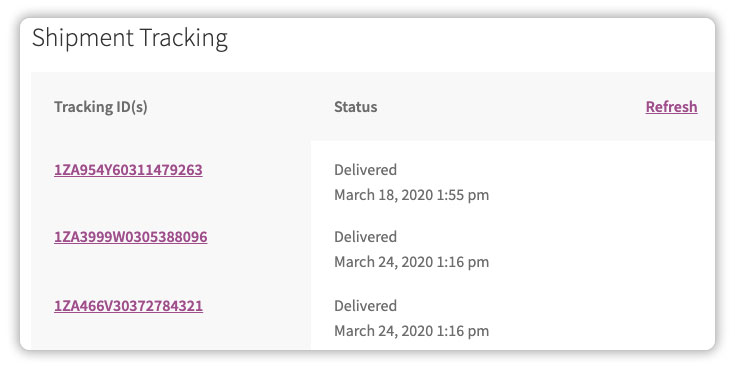
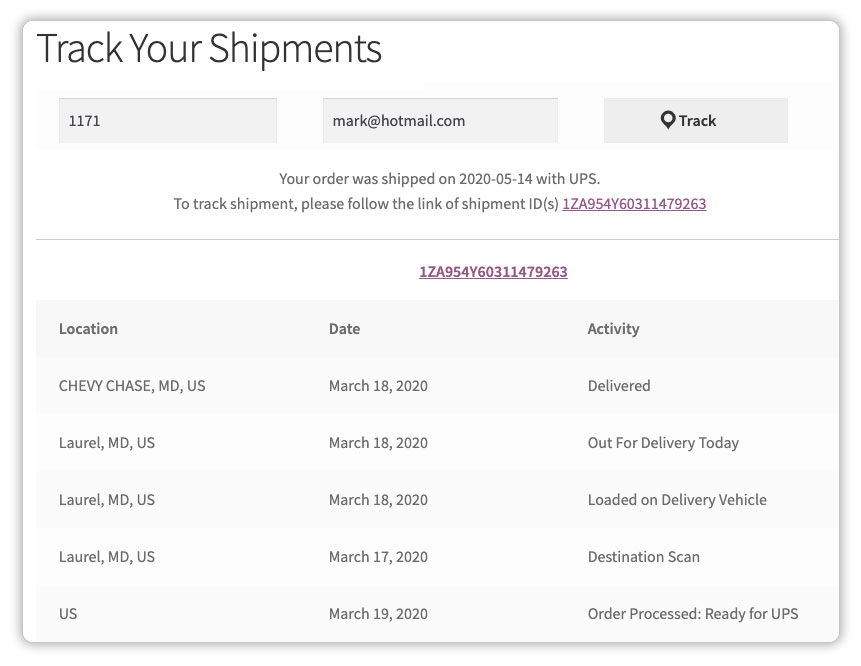
- Set up a tracking lookup page. Using the plugin’s shortcode, you can create a page on your own store where customers enter their order number and email to check status, so they don’t need to look it up on the carrier’s site separately.
- Turn on live tracking email alerts. For supported carriers, the plugin automatically emails customers whenever the carrier updates the shipment’s tracking status, keeping them informed without you having to follow up manually.

Automate Tracking for Bulk Orders
- Import tracking numbers in bulk. If you fulfil orders through a shipping partner or third-party software, you can import tracking details via CSV, FTP, or SFTP instead of adding them one by one.

- Automatically mark orders as complete. Once tracking details are added, the plugin can update the order status automatically, saving you from doing it manually for every cross-border shipment.
Once these settings are configured, tracking becomes part of your regular fulfilment process rather than a separate manual task for every order shipped abroad.
Example Scenario: Tracking an International WooCommerce Order
Say a customer in Germany orders a product from your WooCommerce store based in the United States. You ship the order using DHL Express and add the tracking details using Shipment Tracking Pro for WooCommerce.
The plugin fetches the live shipment status automatically as the package clears US customs, moves through the international carrier network, and reaches German customs before final delivery. Right after the order ships, the customer receives an order completion email with the tracking link and gets an automatic email update once the package is out for delivery. If they’d rather check manually, they can log in to their account or use your store’s tracking page at any point in the journey.
With this, handling the updates automatically, the customer never has to contact you to ask about the shipment’s location, and you don’t have to manually check DHL’s website and relay updates yourself.
Best Practices for WooCommerce International Order Tracking
Setting up tracking is only half the job. A few small adjustments make the experience noticeably smoother for customers shopping from another country.
- Match carriers to regions: Use carriers with strong last-mile networks in the countries you ship to most often, rather than relying on a single carrier for every destination.
- Enable live tracking wherever it’s supported: Real-time status updates reduce the number of “is my order still moving” questions from customers.
- Set realistic delivery expectations. International shipping timelines vary by destination, carrier, and customs. Communicate this clearly on your product and checkout pages using the Estimated Delivery Date Plugin for WooCommerce.
- Keep the tracking email simple: Include the essentials: tracking number, carrier name, and a direct link, so customers can act on it right away.
- Test the customer experience yourself: Place a test order and follow it through the My Account page, tracking page, and email notifications to make sure everything displays correctly before your customers see it.
Getting these details right means fewer surprises for the customer and fewer “where is my order” emails landing in your inbox.
Conclusion
International order tracking is one of the simplest ways to reduce customer anxiety and support requests for cross-border orders. With Shipment Tracking Pro for WooCommerce, you can connect your international carriers, show live tracking status on the My Account page and a dedicated tracking page, and keep customers updated automatically through email, all without manual follow-up on your end.
If you need help setting up Shipment Tracking Pro for WooCommerce for your store, feel free to reach out to our support team. We’re happy to help you get international order tracking running smoothly.
FAQs
Q: How to integrate shipping with WooCommerce?
WooCommerce supports shipping carriers through dedicated plugins that connect your store to the carrier’s API. This lets you generate labels, fetch live rates, and track shipments directly from the WooCommerce dashboard.
Q: How to ship orders internationally?
Choose carriers that operate well in your target countries, prepare the required customs documentation, and set clear delivery timelines for customers. A tracking plugin then keeps customers updated as the shipment crosses borders.
Q: How to add order tracking in WooCommerce?
Install a plugin like Shipment Tracking Pro for WooCommerce, add the carriers you ship with, and enter the tracking number for each order. The plugin then displays the status on the My Account page and sends it in the order completion email.
Q: What is the best order tracking plugin for WordPress?
For WooCommerce stores, Shipment Tracking Pro is a strong choice since it supports 85+ carriers, live tracking updates, and automatic email notifications, without needing any custom development.
