


Last-mile delivery is where shipping budgets take the hardest hit. For WooCommerce merchants, the cycle of missed home deliveries, redelivery attempts, and returned packages is both costly and avoidable. FedEx Hold at Location (HAL) offers a smarter alternative, eliminating the dependency on someone being home during a narrow delivery window. This article explains what FedEx Hold at Location is, how it reduces last-mile costs, and how to enable it in your WooCommerce store.
On This Page
- Why WooCommerce Last-Mile Delivery Costs Add Up
- How FedEx Hold at Location Reduces These Costs
- Types of FedEx Hold at Location Sites
- How FedEx Hold at Location Works in WooCommerce
- Real-World Use Case
- Conclusion
- FAQs
Why Last-Mile Delivery Costs Add Up in WooCommerce
For e-commerce stores, the stretch from a local FedEx facility to the customer’s door is the priciest part of the entire shipping journey. Several factors drive this up:
- Multiple delivery attempts: When a customer isn’t home, FedEx makes additional delivery attempts, each one adding to the per-shipment cost.
- Residential delivery surcharges: FedEx charges a residential delivery fee on top of base shipping rates for home deliveries, which can add $5–$6 or more per package, depending on the service.
- Return-to-sender costs: Packages that can’t be delivered after multiple attempts are returned, generating reverse logistics costs on top of the original shipping spend.
- Package theft: Parcels left unattended on doorsteps, sometimes called “porch piracy” lead to replacement shipments at the merchant’s expense.
- Customer service overhead: Failed deliveries generate support inquiries and complaints, adding indirect costs to every missed drop.
For stores shipping dozens or hundreds of orders per week, these costs compound significantly.
How FedEx Hold at Location Reduces These Costs
FedEx Hold at Location is a delivery option that routes a customer’s parcel to a designated FedEx pickup site, instead of the customer’s home address. When a shopper selects this option at checkout, FedEx delivers the package to the chosen location and notifies the customer.
Directing shipments to FedEx Hold at Location sites addresses each of the cost drivers practically:
- First-attempt delivery success: Every Hold at Location shipment reaches its destination on the first attempt. The package goes to a staffed retail location, not an empty doorstep. There are no second or third delivery attempts.
- Reduced residential surcharges: FedEx typically applies lower surcharges to shipments destined for commercial pickup locations compared to residential addresses.
- Fewer returns: With a 5-business-day pickup window at a secure location, customers have far more opportunity to collect their parcel than they do with a same-day home delivery attempt. This directly reduces return-to-sender rates.
- Elimination of porch theft losses: Packages held at staffed FedEx locations or secure lockers are not at risk of doorstep theft, removing a common cause of replacement shipments.
- Lower support volume: Customers who receive a pickup notification and collect on their own timeline generate far fewer “where is my order? (WISMO)” queries than those waiting on an uncertain home delivery window.
Types of FedEx Hold at Location Sites
FedEx’s pickup network covers a wide variety of location types, giving customers genuine flexibility:
- FedEx Office Print & Ship Centers: Full-service FedEx facilities with extended hours, staffed drop-off and pickup.
- FedEx Ship Centers: Dedicated FedEx shipping locations typically open six days a week.
- FedEx OnSite at Walgreens: Thousands of Walgreens locations across the U.S. serve as FedEx pickup and drop-off points, many open late and on weekends.
- FedEx OnSite at select grocery and retail partners: Neighborhood stores that hold packages as an added service.
- FedEx World Service Centers: Facilities handling international shipments with specialized support.
This breadth means that even in suburban or less dense areas, most customers can find a Hold at Location site within a short distance of their home or workplace.
How FedEx Hold at Location Works in WooCommerce
WooCommerce stores can offer FedEx Hold at Location at checkout using the FedEx Shipping Plugin for WooCommerce with Print Label. With this plugin, customers can choose a nearby FedEx pickup location instead of home delivery, helping reduce missed deliveries and last-mile shipping costs.
For full configuration instructions, visit the PluginHive WooCommerce FedEx Shipping Setup Guide .
Once configured, at checkout, shoppers can select from available FedEx pickup points near their entered address.
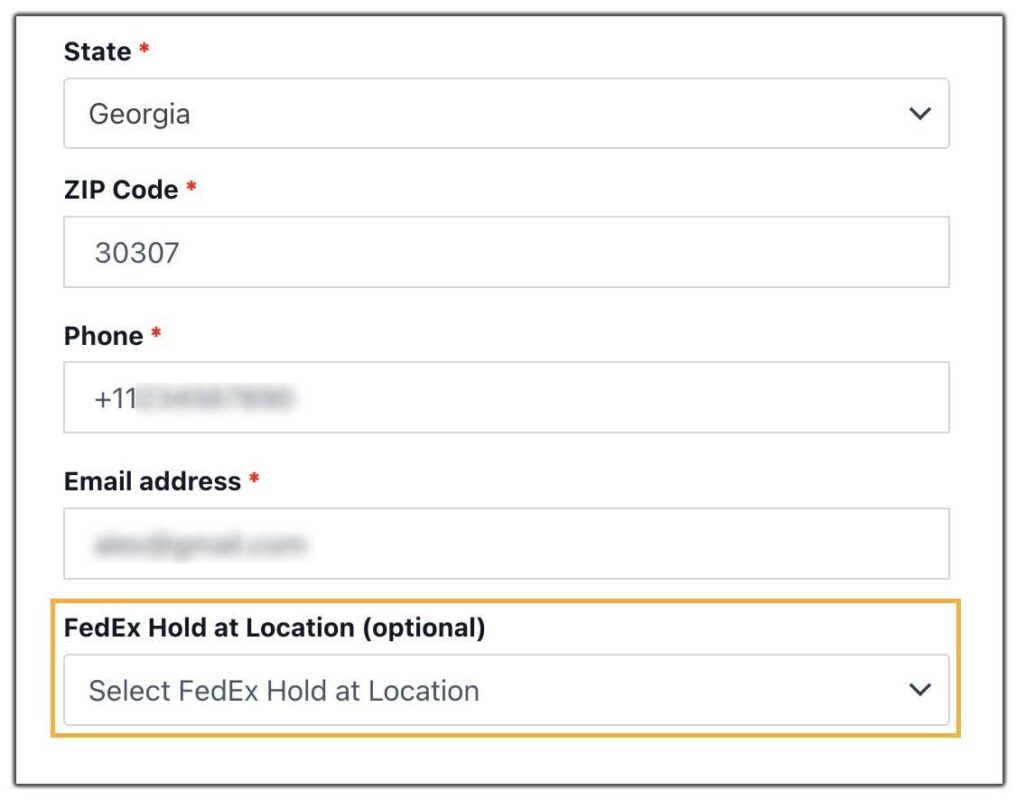
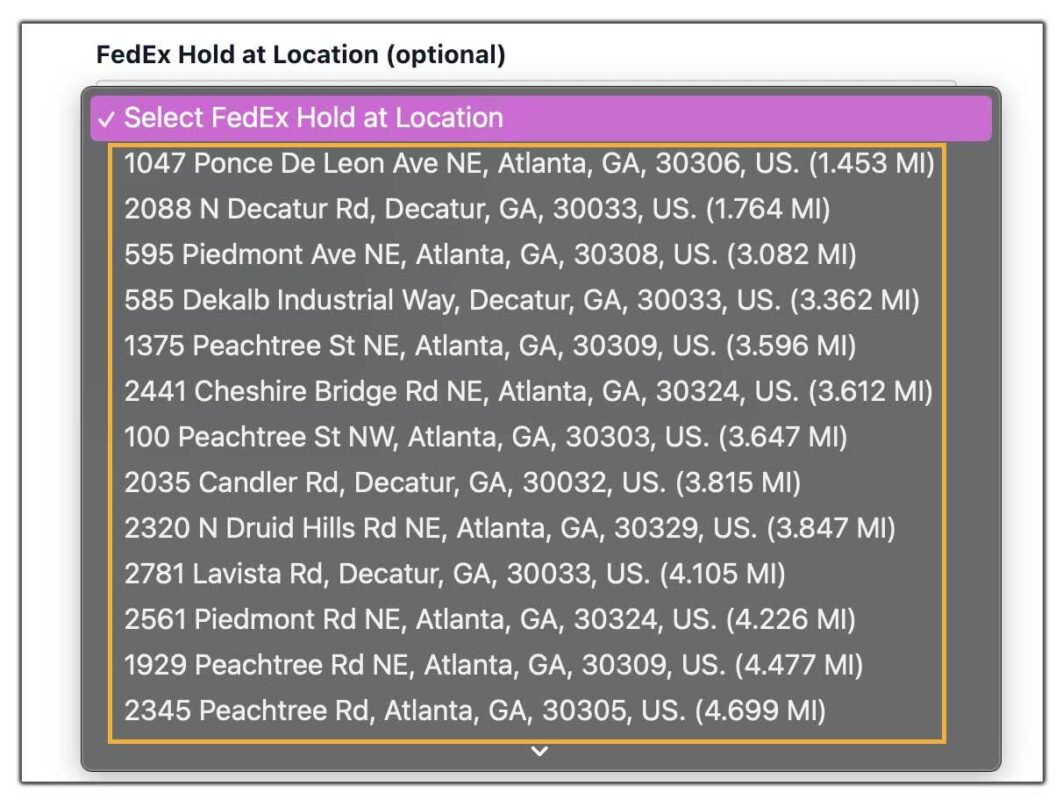
For complete setup instructions and configuration steps, check out the detailed guide: How to Enable FedEx Hold at Location in WooCommerce.
Real-World Use Case: WooCommerce Store Selling Health & Beauty Products
A WooCommerce store selling premium skincare and personal care products — serums, supplements, and grooming kits — was shipping primarily to residential addresses across major U.S. cities. With a customer base of busy professionals, first-attempt delivery success was consistently low.
The store was absorbing FedEx residential surcharges on every order, paying for redelivery attempts, and processing a growing volume of return-to-sender shipments from packages that were never collected. Customer complaints about missed deliveries were rising, and the support team was spending a disproportionate amount of time handling delivery-related queries.
The Solution
The store enabled FedEx Hold at Location through the FedEx Shipping Plugin for WooCommerce with Print Label. After configuration, customers at checkout could choose from several nearby FedEx pickup points within a few miles of their entered address.
Key changes after rollout:
- Customers in office-heavy zip codes selected Walgreens locations near their workplace for lunchtime pickup.
- First-attempt delivery success on Hold at Location orders reached nearly 100%.
- Residential surcharge spend dropped as a portion of volume shifted to commercial pickup locations.
- Return-to-sender shipments on Hold at Location orders effectively dropped to zero.
- Support tickets related to missed deliveries fell within the first 45 days.
The store’s per-shipment cost decreased on orders routed through Hold at Location. Customers who used the pickup option reported higher satisfaction by not having to wait at home for a delivery window.
Conclusion
FedEx Hold at Location gives WooCommerce merchants a direct tool to reduce the most expensive and unpredictable part of the shipping process. The FedEx Shipping Plugin for WooCommerce makes the integration seamless. For stores shipping to residential addresses in volume, it’s one of the most cost-effective changes available without changing carriers or renegotiating rates.
For help setting up FedEx Hold at Location in your WooCommerce store, reach out to PluginHive Support.
FAQs
Q. Does FedEx Hold at Location cost extra for customers?
No. Selecting a Hold at Location pickup site does not add a fee for the customer. In some configurations, it may reduce the shipping rate shown at checkout compared to residential delivery.
Q. How long does FedEx hold a package at a pickup location?
FedEx holds packages for up to 5 business days. If the parcel is not collected within this window, it is returned to the sender.
Q. Are all FedEx shipments eligible for Hold at Location?
Hold at Location is available for most FedEx Express and FedEx Ground shipments. Some restrictions may apply depending on package type and service.
Q. Do customers need identification to pick up their package?
Yes. Customers must present a valid photo ID and the FedEx tracking number at the selected location.
