


Shipping costs have a major impact on whether customers complete their orders. Showing live rates at WooCommerce checkout ensures they see accurate, real-time shipping costs based on their location. By integrating Canada Post live rates, your WooCommerce store can automatically display precise costs for both domestic and international shipments.
This guide explains how to easily enable live Canada Post rates in WooCommerce and tips to improve your shipping process.
On This Page:
- Importance of Live Rates in WooCommerce
- Canada Post Retail vs. Commercial Rates in WooCommerce
- How to Show Live Canada Post Rates in WooCommerce
- Real-World Example
- Tips to Optimize Your Rate Display in WooCommerce
- Conclusion
- FAQs
Importance of Live Shipping Rates in WooCommerce
Accurate shipping rates are essential for building trust and providing a seamless shopping experience. When customers see real-time shipping costs during checkout, they know exactly what they’ll pay, no surprises or hidden fees.
- Improves Transparency and Trust: Live shipping rates show up-to-date carrier pricing. This transparency helps customers feel more confident about completing their purchase.
- Prevents Pricing Errors: Manual or flat shipping rates can easily lead to undercharging or overcharging. With live rates, WooCommerce automatically fetches the correct cost from the carrier.
- Reduces Cart Abandonment: Unexpected shipping fees at checkout are a major reason customers abandon their carts. Displaying real-time rates upfront gives customers clarity and helps increase conversions.
- Saves Time for Store Owners: Instead of updating rates manually whenever carriers change their pricing, live rate integration keeps your store automatically in sync, reducing administrative work.
For Canadian store owners, integrating live Canada Post rates in WooCommerce offers these same benefits, providing real-time, reliable shipping costs directly from Canada Post.
Canada Post Retail vs. Commercial (Contract/ Negotiated) Rates in WooCommerce
When using Canada Post for your WooCommerce store, you’ll come across two types of shipping rates: Retail Rates and Commercial (Contract/ Negotiated) Rates. Understanding the difference is key to displaying accurate costs at checkout and optimizing your shipping expenses.
| Type of Rate | Who Can Access it | Where It’s Used | Pricing Level |
|---|---|---|---|
| Retail Rates | Anyone shipping without a business account | Walk-in customers or non-contract users | Standard published rates (higher) |
| Commercial (Contract) Rates | Businesses with a Canada Post commercial account or enrolled in the “Solutions for Small Business” program | For e-commerce and volume shippers | Discounted rates based on shipping volume |
For Canadian WooCommerce stores, enabling live Canada Post rates not only provides accurate, real-time shipping costs but also helps maintain transparency and competitiveness.
Use discounted (commercial) rates to reduce your shipping costs or pass those savings to your customers for higher conversions.
How to Show Live Canada Post Rates in WooCommerce
Setting up live Canada Post rates in WooCommerce is simple with the right solution. You can use the Canada Post Shipping Plugin for WooCommerce, which ensures your customers see accurate, real-time shipping costs directly at checkout.
To set up the plugin, follow this guide: How to Configure the WooCommerce Canada Post Shipping Plugin .
Once configured, you can:
Enable real-time rates in Plugin Settings, which allows WooCommerce to automatically fetch live shipping costs from Canada Post based on the customer’s destination, package weight, and dimensions.

If you have a Canada Post business or commercial account, enable the Commercial Rates option to display discounted rates available under your account.

Choose which Canada Post services you want to show at checkout. You can also hide certain services or reorder them for a smoother customer experience.

Once set up, customers will see live Canada Post rates displayed on both the cart and checkout pages.
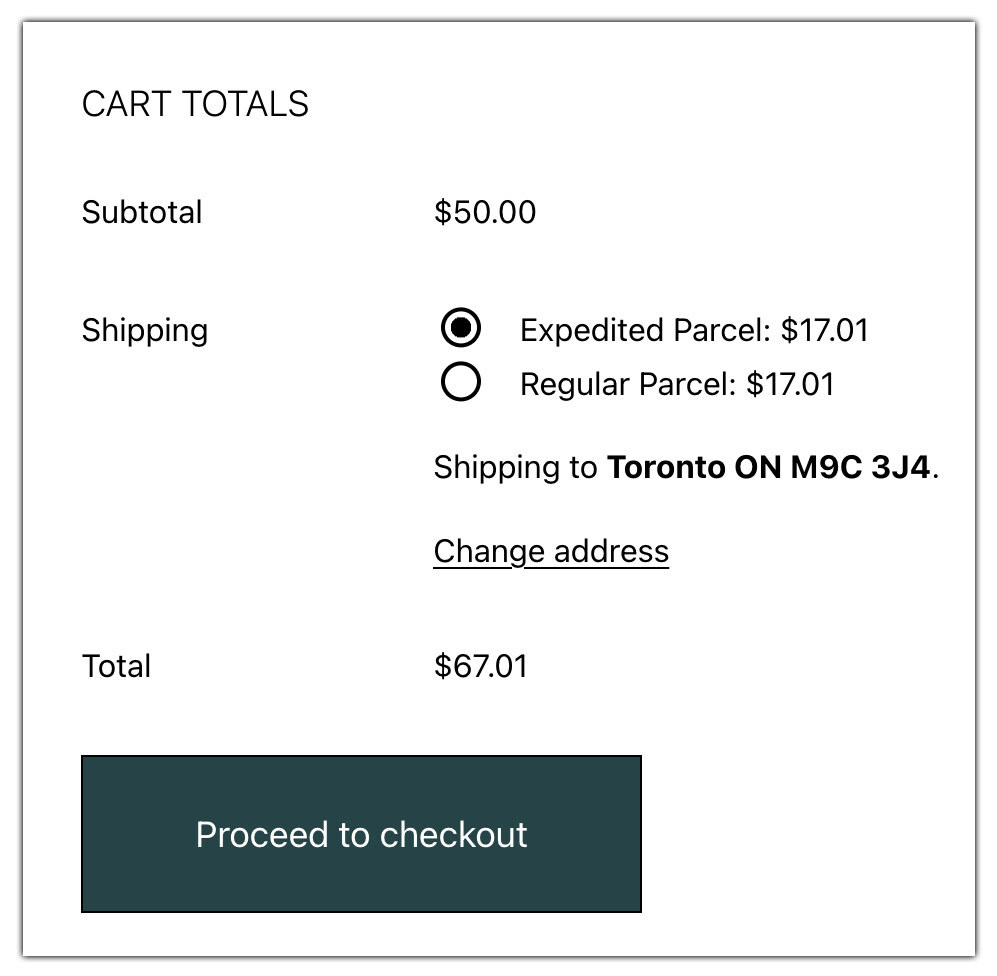
You can also generate a Canada Post shipping label and track shipments directly from WooCommerce; no need to log in separately to your Canada Post account.
To learn more about the WooCommerce Canada Post Plugin, watch this video.

Real-World Example: WooCommerce Store Using Live Canada Post Rates
A WooCommerce-based boutique selling handmade candles across Canada was struggling to manage its shipping costs and delivery times.
Challenges:
- Flat-rate shipping didn’t reflect the true cost; small orders were overcharged, and larger ones cut into profits.
- Customers in remote areas experienced inconsistent delivery timelines.
- Manual rate calculation and label creation slowed down order fulfillment.
Solution:
The store implemented live Canada Post rates using the Canada Post Shipping Plugin. This integration allowed them to:
- Display real-time Canada Post shipping rates at checkout, ensuring transparency for every customer.
- Access discounted Canada Post rates to maintain healthy profit margins.
- Offer multiple service options, including Expedited Parcel™ and Xpresspost™, giving customers the choice between speed and savings.
- Generate labels directly from WooCommerce, saving time on fulfillment.
- Automatically share tracking details with customers through email notifications.
After enabling live rates, the store cut shipping complaints by 40% and boosted conversions with accurate, transparent costs, achieving the ideal balance between cost, speed, and customer satisfaction.
Tips to Optimize Your Rate Display in WooCommerce
Optimizing how shipping rates appear at checkout can make a big difference in both user experience and conversion rates. Here are some simple yet effective ways to fine-tune your WooCommerce rate display:
- Avoid overwhelming customers with too many options. Display only the Canada Post services you actually use.
- Customize service names to make them more customer-friendly, for example, “Fast Delivery (Xpresspost™)” or “Economy Shipping (Expedited Parcel™)”. This helps shoppers quickly understand their choices.
- Arrange the available rates so that either the cheapest or fastest shipping option appears first.
- If you have a Canada Post business account, enable commercial (negotiated) rates to get discounted pricing.
- Use the Hide WooCommerce Shipping Methods & Rate Adjustment Plugin to remove unnecessary or higher-cost rates, keeping the checkout page clean and focused on the best options.
- Show estimated delivery dates at checkout for better clarity. You can use the Estimated Delivery Date Plugin for WooCommerce to display accurate delivery timelines.
Conclusion
Showing live Canada Post rates at checkout helps you provide accurate, transparent shipping costs and build trust with customers. For Canadian WooCommerce stores, integrating Canada Post live rates ensures a smoother checkout experience and better control over shipping costs, benefiting both you and your customers.
Need help setting it up? Contact PluginHive Support for assistance.
FAQs
1. Does the plugin support international shipping?
Yes, the Canada Post Shipping Plugin supports international shipping options to customers outside Canada. For more info, check out – Canada Post International Shipping Guide for WooCommerce.
2. Can I offer expedited shipping with Canada Post?
Yes. For parcels, you can use services like Expedited Parcel™, Xpresspost™, or Priority™ for faster delivery. Standard options such as Lettermail and Letter-Post don’t come with guaranteed speed or tracking.
3. Can I display other carriers’ live rates along with Canada Post rates?
Yes, you can. Use the WooCommerce Shipping Services Plugin to display live rates from multiple carriers, including Canada Post, FedEx, UPS, DHL, and more, all on the same checkout page.
4. Does the plugin support Lettermail and other lightweight parcel options?
Yes, the plugin allows you to configure and offer Lettermail and small parcel services for lightweight shipments. Read the full guide here – WooCommerce Canada Post Lettermail and Parcel Services
