


The holiday season drives significant spikes in online commerce, with recent data showing that U.S. holiday online sales are expected to reach around $253.4 billion, marking a year-on-year increase of about 5.3 % over the previous year. Events like Black Friday and Cyber Monday alone drive a sharp increase in consumer activity that extends across November and December. For booking-based WooCommerce businesses, this heightened demand often means more bookings and reservations, but also increased pressure on scheduling, availability, and customer communication.
Without a structured approach, high-volume bookings in WooCommerce can lead to double reservations, conflicts, missed messages, and unhappy customers just when expectations are highest. To handle this surge smoothly, store owners need clear availability rules, sensible booking limits, and fewer manual tasks. This article shares practical ways to manage high-volume bookings during the holiday rush, helping WooCommerce store owners stay in control, keep customers happy, and handle the busiest season with confidence.
Table of Contents
- Key Challenges WooCommerce Stores Face During Holiday Booking Surges
- How to Manage High-Volume Bookings in WooCommerce During the Holiday Rush
- Real-World Use Case
- Conclusion
- FAQs
Key Challenges WooCommerce Stores Face During Holiday Booking Surges
Once the booking surge hits, store owners encounter several acute operational problems that strain manual systems and basic setups. These specific challenges can quickly derail what should be a peak revenue period.
- Difficulty tracking real-time availability: Static calendars or manual updates often lead to double bookings and overselling.
- Staff and resource scheduling conflicts: Without clear visibility, some staff members or resources become overbooked, while others remain underutilised.
- Complicated booking experience: Slow or confusing booking flows cause customers to abandon bookings during the holidays.
- Overwhelming customer communication: Manual confirmations and reminders often result in missed messages and no-shows.
- Inflexible pricing: Flat pricing fails to reflect peak holiday demand or encourage bookings during slower periods.
These challenges tend to compound quickly during peak seasons, highlighting the limits of manual booking processes. Understanding these pain points sets the stage for exploring how WooCommerce store owners can manage high-volume bookings more effectively during the holiday rush.
How to Manage High-Volume Bookings in WooCommerce During the Holiday Rush
Managing holiday bookings doesn’t have to be complicated. Many WooCommerce stores use PluginHive’s WooCommerce Booking and Appointments plugin to handle bookings more comfortably as demand increases.
Here’s how the plugin helps WooCommerce stores manage bookings during the holiday season.
1. Eliminate Double Bookings During the Holiday Rush
When booking volume increases, teams must ensure that customers can only book valid time slots and that shared resources are never double-booked.
The WooCommerce Booking and Appointments plugin helps by:
- Allowing you to clearly define when bookings are allowed and when they are not.
- Automatically mark a time slot as unavailable once the maximum number of allowed bookings is reached.
- Applying booking rules consistently, even during high traffic.
Example: If you rent out a camera and allow only one booking per slot, the system marks the slot as unavailable as soon as a customer books it. Any other customer viewing the same dates sees the slot as unavailable, preventing double bookings.

If you’d like a deeper look at different ways to prevent overlapping bookings, you can refer to this guide on avoiding double bookings in WooCommerce
This approach keeps your booking calendar accurate and reliable throughout the holiday rush, without the need for constant manual checks.
2. Simplify the Booking Process for Faster Checkouts
During the holiday rush, customers should be able to understand the booking process quickly and complete their booking without unnecessary steps or confusion.
Using the Bookings plugin, WooCommerce stores can:
- Showing booking options directly on the product page, so customers don’t need to navigate multiple pages.
- Displaying available dates and time slots clearly before checkout
- Supporting different booking types such as single appointments, multi-day bookings, or fixed start and end date events
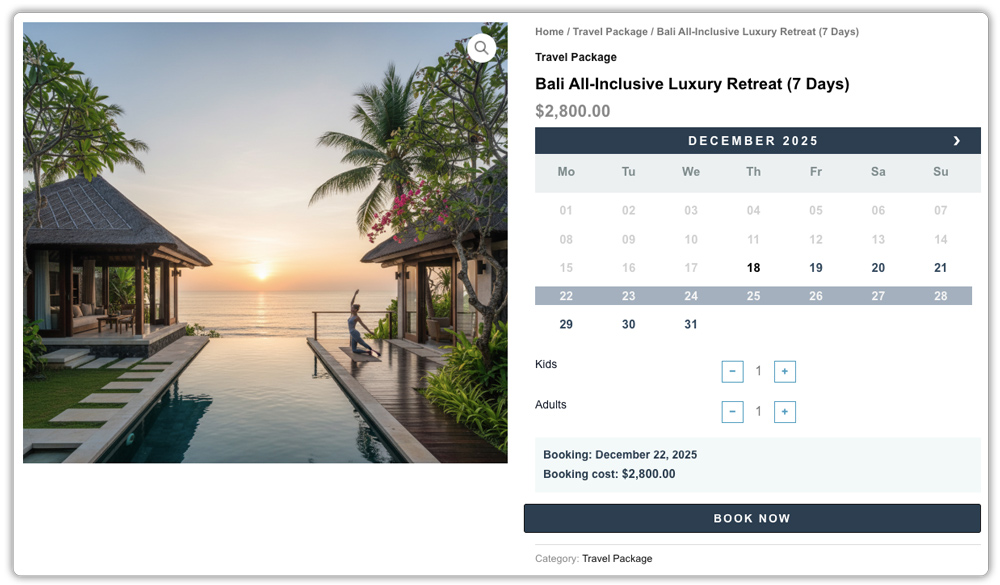
This makes it easier for customers to complete their bookings quickly, even when demand is high.
3. Adjust Pricing Easily for Holiday Demand
Holiday bookings rarely follow a flat pattern. Some dates fill up quickly, while others need a small push. Pricing should reflect this without requiring daily manual changes.
The WooCommerce Booking and Appointments plugin helps by:
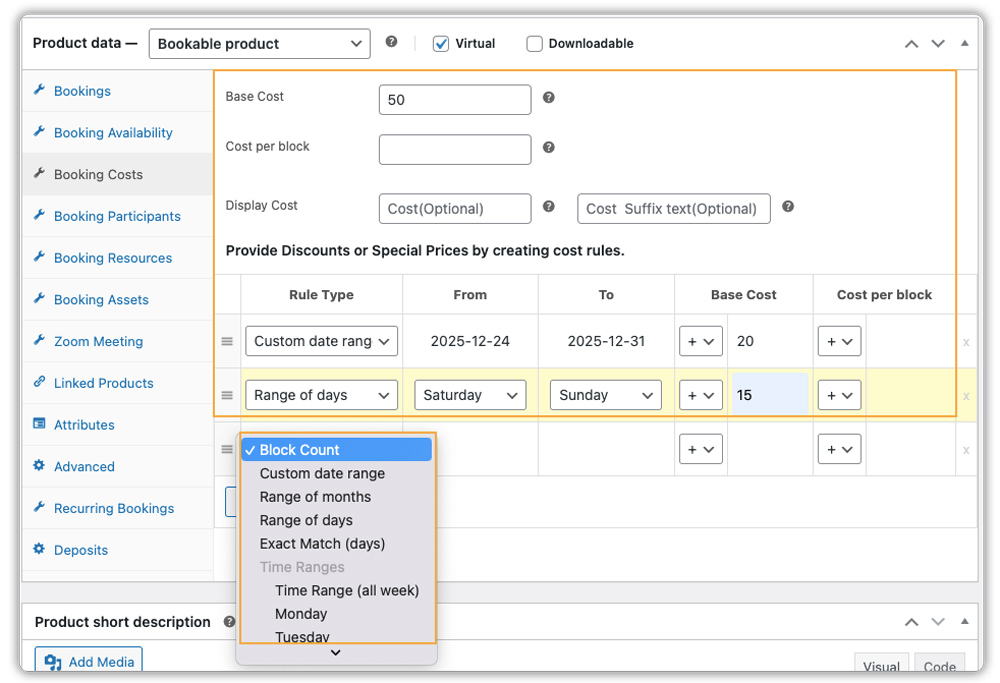
- Adjusting booking prices based on dates, days, or seasons
- Supporting higher pricing for peak dates such as Christmas week or New Year’s Eve
- Working alongside deposit or partial-payment solutions like the PH WooCommerce deposits plugin to secure bookings early
- Explore this guide to see how deposits work with WooCommerce bookings .
- For a step-by-step overview of setting booking cost rules, refer to this guide .
This makes it easier to manage holiday pricing while maintaining consistency and transparency for customers.
4. Automate Booking Communication and Keep Schedules in Sync
When booking volume increases during the holiday season, keeping customers and internal teams informed becomes just as important as managing the bookings themselves. Instead of manually sending confirmations or updating calendars, communication and scheduling should happen automatically and stay consistent across all touchpoints.
The WooCommerce Booking and Appointments plugin helps by:
- Sending automatic booking confirmation emails as soon as a reservation is placed
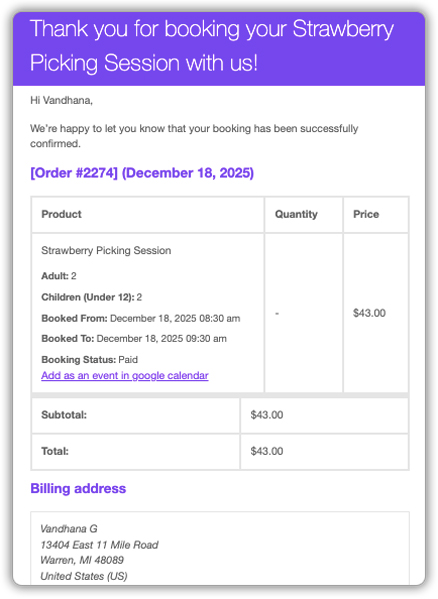
- Triggering reminder emails before the scheduled date to help reduce no-shows

- Syncing bookings with external calendars such as Google Calendar, Outlook, or iCal
- Updating calendar entries automatically when a booking is modified or cancelled
- Storing all booking details, customer information, and internal notes in one central dashboard

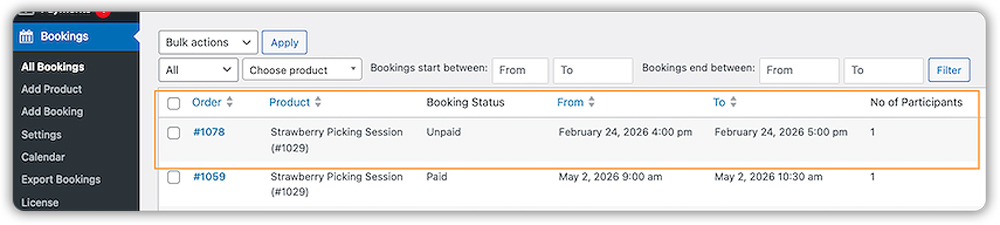
This keeps customers informed, staff aligned, and schedules accurate throughout the holiday rush without the need for manual follow-ups or calendar checks.
5. Manage Staff and Shared Resources During Peak Booking Periods
As holiday bookings increase, teams need clear visibility into who is handling each booking and which resources are being used. Without proper assignment and tracking, teams can become overloaded, and the same resource may be scheduled multiple times.
The WooCommerce Booking and Appointments plugin helps by:
- Allowing bookings to be assigned to specific staff members, service providers, or resources
- Allowing each staff member or shared resource (such as rooms, vehicles, or equipment) to have its own working hours and availability, so nothing is booked at the same time.
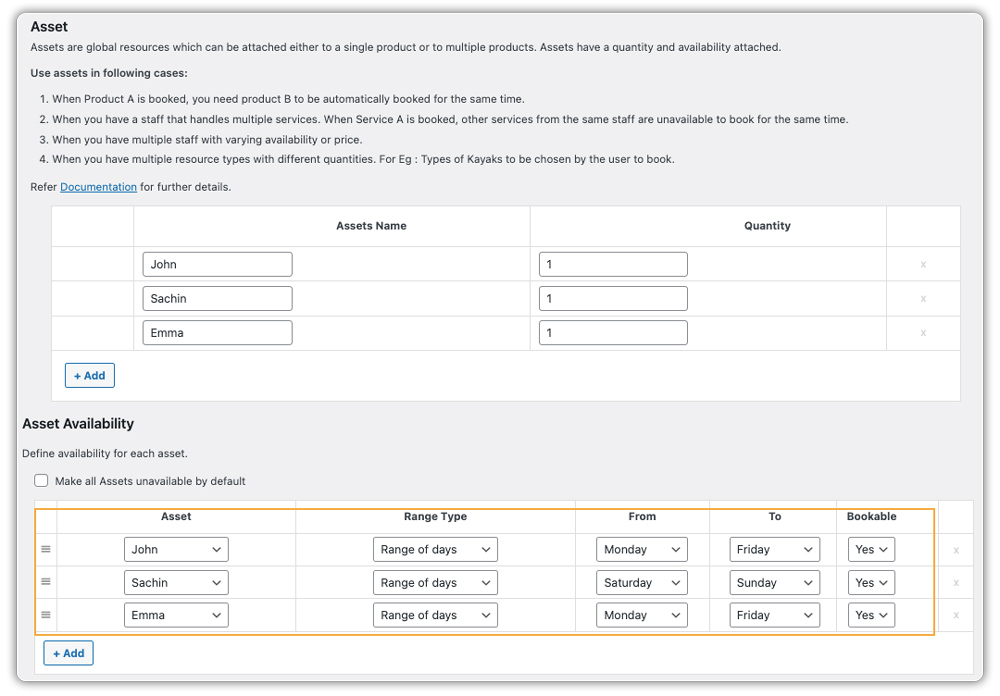
This makes it easier to distribute bookings evenly, avoid scheduling conflicts, and keep operations running smoothly during peak holiday demand.
Together, these features help WooCommerce stores manage holiday bookings in a more controlled and predictable way.
Real-World Use Case: Managing a Holiday Booking Rush in WooCommerce
Let’s say you run a salon that accepts appointment bookings through WooCommerce. As the holiday season approaches, bookings start coming in quickly, especially for popular dates and time slots before Christmas and the New Year.
The Challenges You Will Face
During this period, a few practical issues tend to appear:
- Peak-time slots get booked very fast
- There’s a risk of overlapping appointments
- Some stylists get overbooked, while others remain available
- Back-to-back appointments leave no time for preparation or cleanup
Handling these issues manually becomes difficult as the booking calendar fills up.
How This Can Be Solved
Using PluginHive’s WooCommerce Booking and Appointments plugin, this scenario is typically handled by:
- Assigning appointments to specific staff members
- Showing only available time slots based on staff availability
- Removing a time slot from availability as soon as it’s booked
- Adding buffer time between appointments to avoid overlaps
All booking details are managed in one place, reducing the need for constant manual adjustments.
The salon can handle higher booking volume during the holiday season without scheduling conflicts. Appointments stay evenly distributed, customers see accurate availability, and daily operations run more smoothly during the busiest time of the year.
Conclusion
You don’t have to treat the holiday rush like a crisis. By streamlining how you handle availability, pricing, and communication, you spend less time managing bookings and more time delivering a great experience to your customers. The WooCommerce Booking and Appointments plugin helps keep operations steady, even when demand peaks during the busiest season of the year.
If you need help fine-tuning the Booking plugin setup, the PluginHive support team is here to assist.
FAQs
1. What’s the best way to handle last-minute cancellations during the holidays in WooCommerce?
Set clear cancellation rules in advance. You can define a cutoff time, such as 24 or 48 hours before the booking starts, to prevent last-minute cancellations. Taking partial payments using a PH WooCommerce deposits plugin also helps secure bookings and reduces revenue loss when cancellations happen during busy periods.
2. How do I manage recurring holiday bookings in WooCommerce?
If you offer repeating services like weekly classes or seasonal appointments, recurring bookings can save time. You can set the schedule once and let WooCommerce automatically handle future bookings. Many store owners use the PH Recurring Booking Addon along with the WooCommerce bookings plugin by PluginHive to manage recurring holiday bookings more efficiently.
3. How can I manage group bookings in WooCommerce for holiday events?
The WooCommerce bookings plugin by PluginHive allows customers to book for multiple people in a single reservation. This is useful for holiday events, workshops, or family appointments. You can refer to this guide to understand group bookings in WooCommerce.
