



Peak season can quickly turn into chaos for WooCommerce store owners. Orders spike, customers expect fast delivery, and even small shipping delays lead to complaints or refunds. The stores that sail through it aren’t the ones with the most staff; they’re the ones with the most reliable systems in place.
The Canada Post Shipping Plugin for WooCommerce with Print Label by PluginHive connects your store directly to Canada Post, automates your shipping workflow, and helps you handle high order volumes without losing control. This guide walks you through how to make that happen well before the rush hits.
Table of Contents
- Why Peak Season Is a Real Challenge for WooCommerce Stores
- How to Manage WooCommerce Orders During Peak Season with Canada Post
- A Real-World Example: Handling High Order Volume with Canada Post
- Tips to Prepare Your WooCommerce Store Before Peak Season
- Conclusion
- FAQs
Why Peak Season Is a Real Challenge for WooCommerce Stores
Most WooCommerce stores handle 10–30 orders a day without any trouble. The moment volumes jump to 80 or 100 orders, every weak link in your process shows up fast. Here is what typically goes wrong:
- Manual shipping is too slow: Entering shipping details one by one is manageable at low volumes. At 100+ orders a day, it creates a bottleneck that delays your entire fulfillment process.
- Wrong rates at checkout: Showing flat or incorrect shipping costs means customers either overpay and get frustrated, or you absorb the difference. Neither works at scale.
- No tracking updates: Peak season customers are anxious. Without automatic tracking emails, your support inbox fills up fast with “Where is my order?” messages.
- Label printing one at a time: Switching between WooCommerce and the Canada Post website to download labels individually wastes hours during your busiest weeks.
- Packing errors under pressure: When teams rush, items land in the wrong box sizes, causing overcharges, delivery issues, and unhappy customers.
The good news is that the Canada Post Shipping Plugin for WooCommerce solves every one of these problems from inside your WooCommerce dashboard.
How to Manage WooCommerce Orders During Peak Season with Canada Post
Getting your WooCommerce store connected to Canada Post the right way changes how peak season feels entirely. Here is what the Canada Post Shipping Plugin for WooCommerce handles automatically, so your team does not have to.
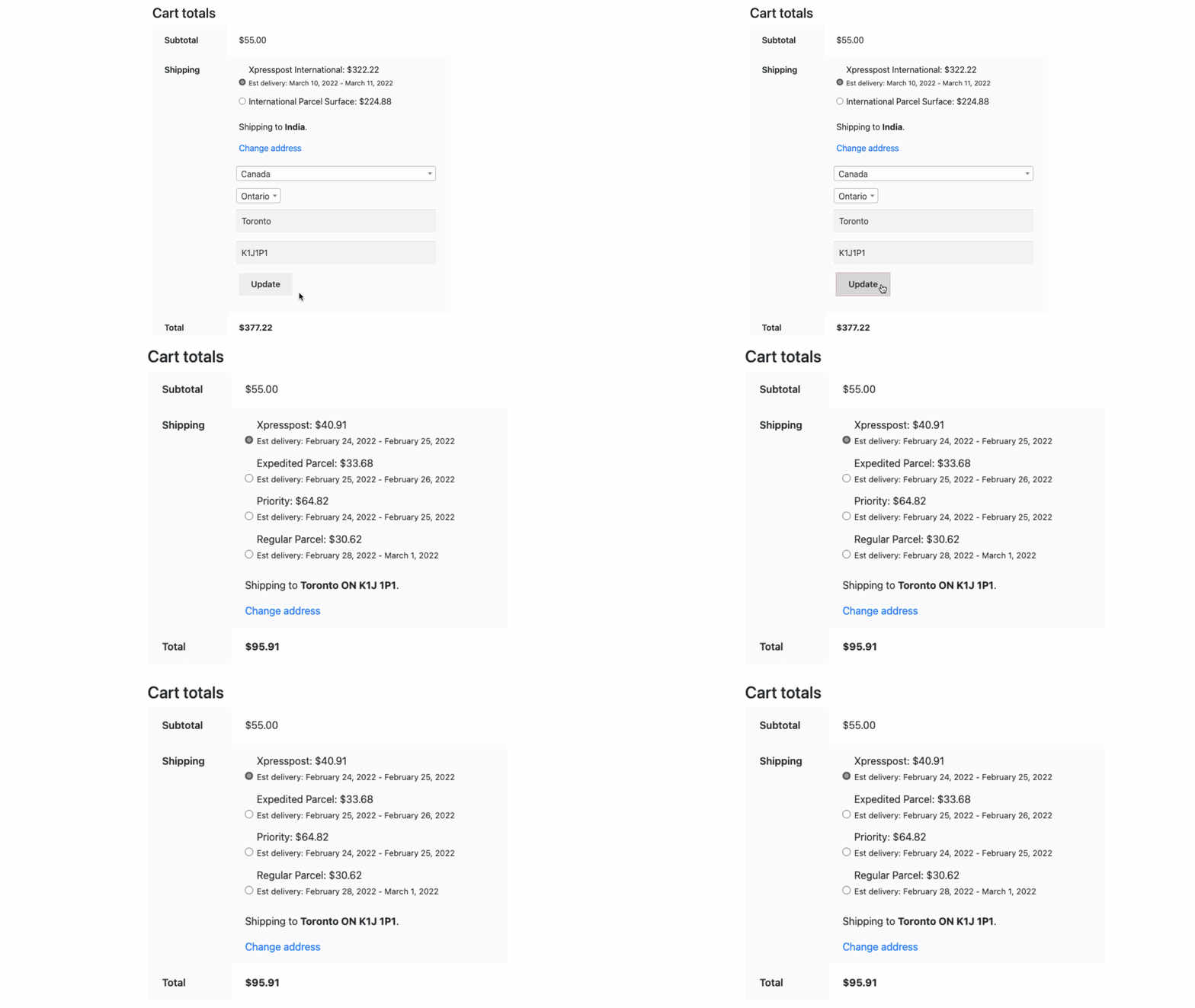
- Get Real-Time Canada Post Rates at Checkout: The plugin connects directly to Canada Post and shows live shipping rates based on the customer’s address, package weight, and dimensions. Every customer sees the exact rate for their order, domestic, USA, or international, without any manual lookup on your end.
- Print Hundreds of Labels in One Click: Instead of logging into Canada Post’s website for each order, you select all your pending WooCommerce orders and generate labels in bulk with a single click.

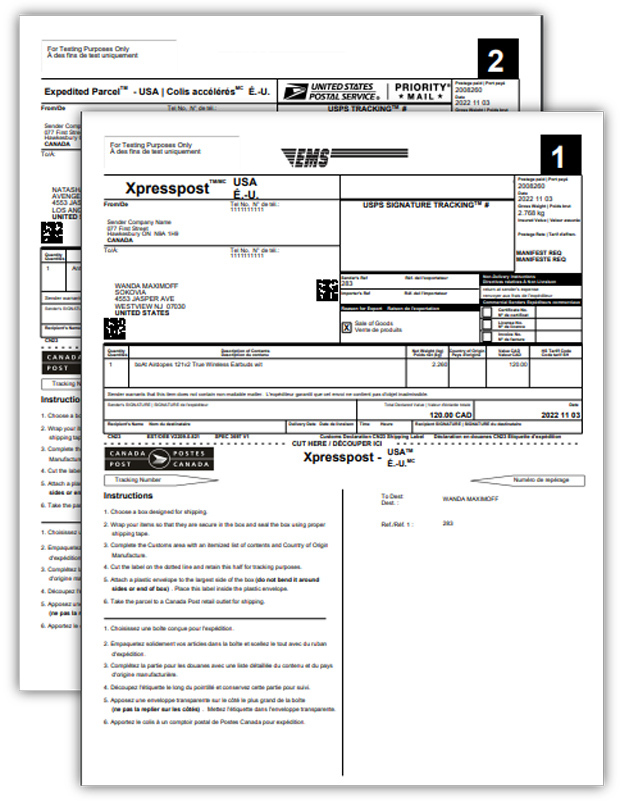
For a step-by-step walkthrough on how this works, see the guide on how to print Canada Post shipping labels in WooCommerce.
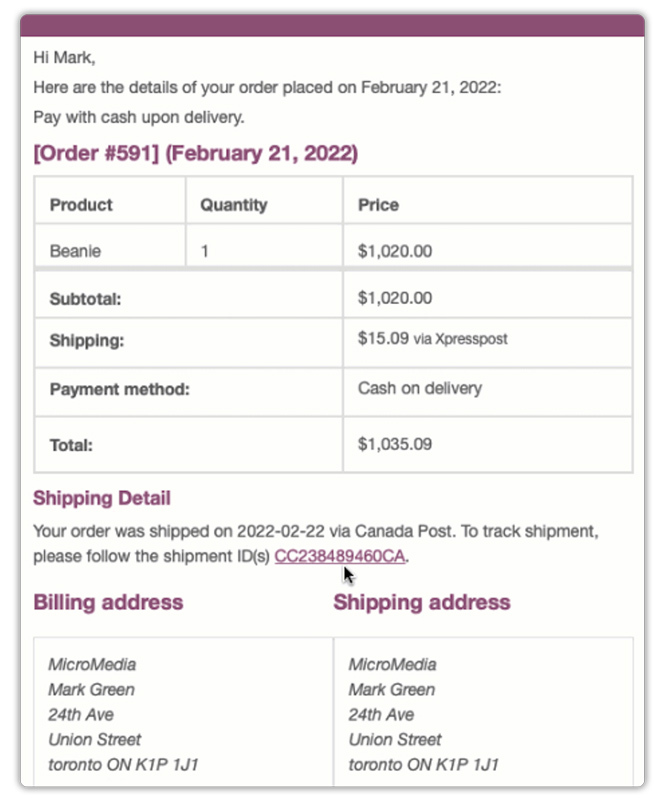
- Send Tracking Details to Customers Automatically: The moment a label is created, the plugin attaches a Canada Post tracking number to the order and sends the customer an email with their tracking number, shipment date, and a direct tracking link, all without you sending a single email manually. This alone cuts down support inquiries significantly during peak weeks.
- Show Estimated Delivery Dates at Checkout: Customers see exactly when their order is expected to arrive right on the cart and checkout page. This builds trust, reduces cart abandonment, and is especially powerful during the holidays when delivery timing drives purchase decisions.

For full setup instructions, refer to the Canada Post plugin configuration guide.
With all five of these features working together, your team spends less time on repetitive tasks and more time getting orders out the door, exactly what peak season demands.
A Real-World Example: Handling High Order Volume with Canada Post
Most WooCommerce stores in Canada ship 10–30 orders a day during regular months. When Black Friday, Christmas, or a big sale hits, that number can jump to 80, 100, or more in a single day. The question is not whether you can handle the orders. It is whether your shipping process can keep up.
Here is what that looks like in practice.
Without the Plugin:
- Log in to Canada Post’s website separately for every single order
- Enter the customer address, pick a service, and download labels one at a time
- Copy tracking numbers manually into WooCommerce and email customers by hand
- At 80+ orders a day, this process easily takes 5–7 hours, and the risk of typos, wrong services, and missed emails increases with every order
- The time that should go into running your business gets swallowed by repetitive shipping tasks
With the Canada Post Shipping Plugin for WooCommerce:
- Live Canada Post rates display at checkout automatically, no manual rate checking needed
- Select all new orders and generate every label in one click
- Tracking numbers are attached to each order automatically, the moment a label is created
- Customers receive their tracking email without you sending a single one manually
- What used to take most of your day now takes under an hour
The difference is not just speed; it is the mental load. When shipping runs in the background without your constant attention, you can focus on fulfilling orders, managing stock, and keeping customers happy. That is exactly what peak season demands of you.
Tips to Prepare Your WooCommerce Store Before Peak Season
Peak season rewards stores that prepare early. Waiting until the week of Black Friday or Christmas is too late. Here is what to set up now so your shipping runs smoothly when orders increase.
- Enable only the Canada Post services you actually use: The plugin supports many domestic and international services. Turn off the ones you do not offer. Fewer options at checkout mean faster decisions and fewer confused customers at the most critical moment.
- Turn on estimated delivery dates: During peak season, customers want to know if their order will arrive on time. The plugin supports delivery estimates. If you need more detailed control by product, category, or holiday schedule, you can use the Estimated Delivery Date Plugin for WooCommerce to show clear arrival dates on the product page, cart, and checkout.
- Set up a self-service tracking page: Peak season brings more tracking questions. Shipment Tracking Pro for WooCommerce by PluginHive allows customers to check their order status themselves. This reduces support emails and keeps your team focused on fulfillment.
- Enable Canada Post insurance for high-value items: Activate coverage for expensive products so you are protected if a shipment is delayed, lost, or damaged.
When these are in place before volumes spike, your shipping process runs without last-minute problems. Preparation is what separates a smooth peak season from a stressful one.
Conclusion
When your WooCommerce store hits peak season, having a smart shipping setup is not a luxury; it is a necessity. The Canada Post Shipping Plugin for WooCommerce with Print Label removes the time-consuming manual work from your shipping process, so you can focus on fulfilling orders faster and keeping customers happy. From real-time rate display at checkout to one-click bulk label printing and automatic tracking emails, the plugin handles the things that would otherwise slow you down the most.
The sooner you get this plugin set up and tested, the more ready you will be when the orders start rolling in. Whether you are a solo store owner or running a small team, this tool gives you the confidence to handle high volumes without the chaos. If you need help setting up this in your WooCommerce store, the PluginHive support team is ready to assist you with configuration and guidance.
FAQs
1. How many days a week does Canada Post deliver?
Canada Post usually delivers Monday to Friday. In some areas, weekend delivery may be added during the Christmas season. It is best to show clear delivery estimates in your WooCommerce checkout using the Estimated Delivery Date Plugin so customers always know what to expect before placing an order.
2. What is the fastest Canada Post service to offer in WooCommerce during the holidays?
Canada Post Priority™ is the fastest option, typically delivering in 1–2 business days. You can enable this service directly in the Canada Post plugin settings to help customers who need urgent holiday delivery.
3. Does the Canada Post shipping plugin for WooCommerce work for both Contract and Non-Contract accounts?
Yes. The plugin works for both Contract accounts and Solutions for Small Business (Non-Contract) accounts. You can connect your Canada Post account and show your negotiated or standard rates directly in WooCommerce.
4. What if Canada Post rates do not load during high traffic on my WooCommerce store?
The plugin lets you set a fallback shipping rate. If Canada Post rates do not load for a short time, customers still see a shipping cost at checkout and can complete their order without issues.
