


NZ Post prices each shipment by service, weight, and delivery address, and some services, like Pace same-day, only exist in certain cities. A flat rate at checkout can’t reflect any of that. Displaying live NZ Post rates means customers see what their order actually costs and which services are available at their address.
This guide explains what you need to display NZ Post shipping rates in WooCommerce, how those rates are calculated, and how to control what customers see using the PH NZ Post Shipping Plugin for WooCommerce with Print Label.
On This Page
- Why Displaying Live NZ Post Rates Matters for WooCommerce Stores
- How NZ Post Shipping Rates Are Calculated at Checkout
- NZ Post Services You Can Show at Checkout
- What You Need Before Displaying NZ Post Rates
- How to Display NZ Post Shipping Rates in WooCommerce
- Real-World WooCommerce Use Case
- Conclusion
- FAQs
Why Displaying Live NZ Post Rates Matters for WooCommerce Stores
Shipping costs vary depending on the package weight, delivery address, and service you choose. A domestic parcel travelling to a nearby destination may cost less to ship than an international order or a package requiring faster delivery.
A flat shipping rate cannot account for these differences. You may charge customers more than necessary for some orders and absorb additional shipping costs on others.
Live NZ Post rates help address this problem by fetching shipping prices from the connected NZ Post account. Customers can see the available shipping services and their corresponding rates at checkout instead of relying on a fixed amount.
How NZ Post Shipping Rates Are Calculated at Checkout
NZ Post calculates shipping rates based on shipment details, the delivery destination, and the services available for the route.
The main factors that affect shipping rates include:
- Origin and destination: The shipment’s starting point and delivery address determine the available services and applicable prices.
- Package weight: The weight of the shipment affects the shipping charges returned by the NZ Post Rates API.
- Packing method: The configured packing method determines how products are grouped for shipping rate calculations.
- Shipping service: CourierPost domestic, Pace same-day, and international services have different rates and eligibility requirements.
- Account pricing: The returned rates reflect the pricing available through your connected NZ Post account.
- Rate adjustments: Any configured handling fees or percentage adjustments affect the final amount displayed to customers.
The plugin retrieves live rates from the NZ Post Rates API and displays the applicable services at checkout. You can also display estimated delivery windows when the API provides them.
NZ Post Services You Can Show at Checkout
NZ Post offers several domestic, same-day, international, and packaging-based shipping options. The services available for an order depend on your configuration, account eligibility, and delivery destination.
| Service Group | Services | Description |
|---|---|---|
| CourierPost Domestic | Courier Parcel, Courier Parcel W/Island Contract, Courier Parcel Nationwide Contract, Express Tonight, Courier Perishable Parcel | Domestic shipping services priced according to shipment details and destination |
| Pace Same-Day | Pace – Express, Pace – Priority | Same-day delivery options available in supported areas of Wellington, Auckland, and Christchurch |
| International | Courier, Courier Thermal, Express, Economy Packet, Economy Plus, Economy Thermal, Economy Tracked | International shipping options for eligible destinations |
| Trackpaks and Envelopes | Predefined formats, including A4, A5, DLE, Foolscap, Lineflow, and Eco variants | Packaging formats used to request eligible rates for the corresponding shipment type |
What You Need Before Displaying NZ Post Rates
Before displaying live NZ Post shipping rates in WooCommerce, make sure you have the following:
- A WooCommerce store: Configure shipping zones for the countries and regions you serve.
- An NZ Post business account: Ensure your account has the required API access to retrieve shipping rates. Keep your Client ID, Client Secret, Account Number, and Site Code ready for configuration.
- An NZ Post shipping plugin: Install the PH NZ Post Shipping Plugin for WooCommerce with Print Label to connect your NZ Post account and display live rates at checkout.
- Product weights: Enter accurate weights for your shippable products. You can configure a minimum weight for products with incomplete shipping data.
- Package dimensions: Provide box dimensions if you choose Box Packing as your packing method.
Having these requirements ready makes it easier to connect your NZ Post account, configure shipping services, and display appropriate rates at checkout.
How to Display NZ Post Shipping Rates in WooCommerce
Install and activate the PH NZ Post Shipping Plugin for WooCommerce with Print Label. Then, follow the NZ Post Shipping Plugin setup guide to connect your account and configure the plugin.
Once the setup is complete, configure the following settings:
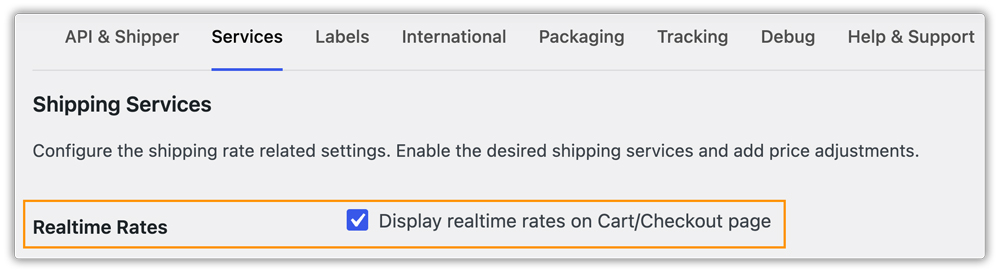
- Enable real-time rates: Enable the Realtime Rates option in the plugin settings to retrieve live NZ Post shipping rates.
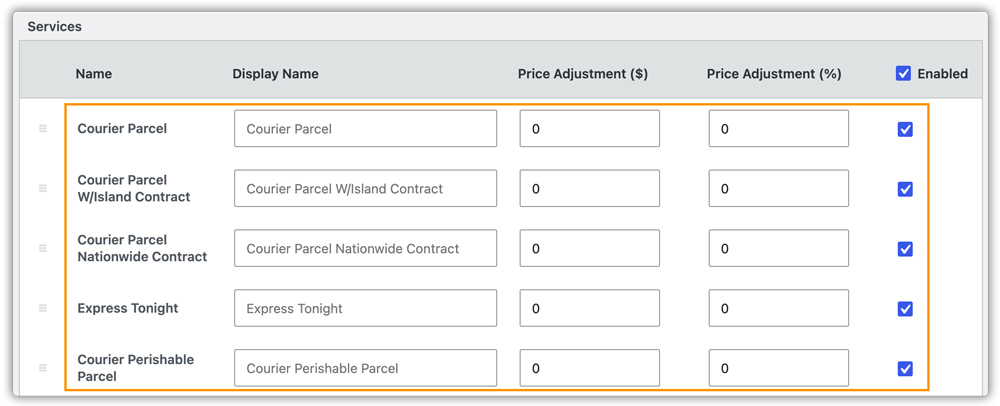
- Select shipping services: In the Services settings, enable the NZ Post services you want to offer. You can also customize their display names and control their order at checkout.
- Display rates at checkout: Once configured, the plugin retrieves live NZ Post rates for eligible shipments and displays them on the cart and checkout pages.
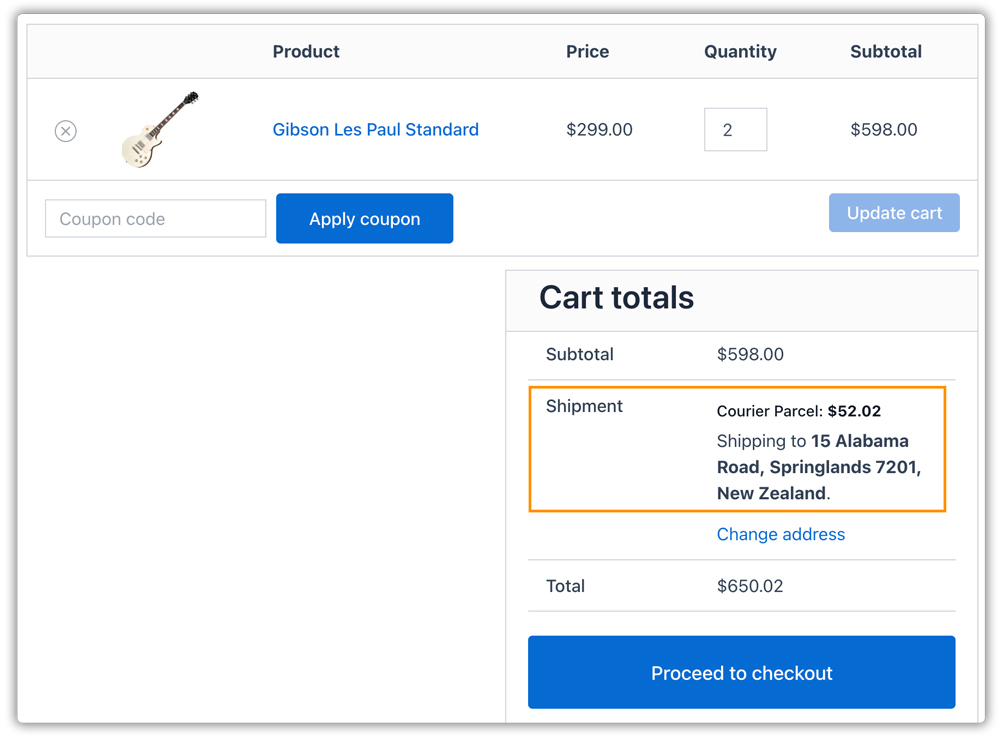
Review the Rates at Checkout
After saving your settings, test the shipping calculation using different shipping addresses and sample orders.
Check that:
- The correct NZ Post services appear for each destination.
- Shipping prices reflect different package details.
- Rate adjustments work as expected.
- The fallback rate works when configured.
- The displayed prices use the correct store currency.
Real-World WooCommerce Use Case
A New Zealand specialty food producer sold gift boxes to customers nationwide and shipped a smaller number of orders internationally. The store used a single flat shipping rate for every order. This approach overcharged customers shipping to some destinations and left the business covering additional costs on heavier or more expensive shipments. Customers in major cities also had no way to choose an eligible faster delivery option.
How the Plugin Helped
The store connected its NZ Post account using the NZ Post Shipping Plugin. The team enabled the appropriate CourierPost and international services, configured eligible Pace options, and added a small handling fee to account for packaging expenses.
The store also enabled estimated delivery windows and tested different package weights and delivery addresses to verify the rates displayed at checkout.
The Result
- Customers could see shipping rates based on their delivery addresses instead of one universal flat rate.
- Eligible customers in Wellington, Auckland, and Christchurch could choose available Pace same-day services.
- Estimated delivery windows helped customers compare delivery options.
- The store could adjust shipping charges to account for packaging expenses.
- The business reduced its reliance on manually maintained shipping prices.
Conclusion
Displaying live NZ Post shipping rates in WooCommerce helps you calculate shipping costs according to shipment details, delivery destinations, and available services. Instead of charging every customer the same flat rate, you can offer shipping options that better reflect the cost of each order. With the right setup, you can reduce manual rate management, account for different delivery requirements, and make the checkout experience clearer for your customers.
If you need help configuring shipping rates or troubleshooting an issue with your WooCommerce store, contact our support team for assistance.
FAQs
Q. Do customers outside Wellington, Auckland, and Christchurch see Pace options?
No. Pace rates are fetched live from NZ Post and appear at checkout only when the delivery address is within a supported city.
Q. What happens if NZ Post rates aren’t available at checkout?
You can configure a fallback flat rate that displays when live rates can’t be retrieved, so checkout is never blocked by an API timeout.
Q. Can I display NZ Post rates if my store uses a currency other than NZD?
Yes. The NZ Post Shipping Plugin supports a currency conversion rate, so NZ Post’s NZD rates are converted for stores that operate in another currency.
Q. Can I show NZ Post rates alongside free shipping or flat rate?
Yes. The plugin works with all native WooCommerce shipping methods and zones. For custom rules beyond NZ Post’s own rates, such as weight or price brackets, the PH Table Rate Shipping Pro Plugin for WooCommerce can run alongside it.
Q. Can I hide specific NZ Post services for certain products?
You can disable services per zone in the plugin. For conditional rules based on products, categories, or cart value, the PH Hide Shipping Methods & Rate Adjustment for WooCommerce plugin lets you hide methods conditionally.
Q. Can I show delivery estimates elsewhere in my store, not just at checkout?
The plugin shows NZ Post estimated delivery windows at checkout. To show estimates on product pages and the cart as well, the Estimated Delivery Date Plugin for WooCommerce extends that across your store.
