


Selling heavy or oversized products through WooCommerce isn’t the same as shipping small parcels. Items like furniture, machinery, or bulk inventory often exceed standard carrier limits, making parcel shipping unreliable and expensive. That’s where LTL freight shipping becomes essential. By integrating Old Dominion Freight Line (ODFL) with WooCommerce, store owners can automate shipment processing and avoid manual quoting.
In this guide, we’ll cover how freight shipping works for large products and how to set up ODFL to streamline your fulfillment process.
On This Page
- Understanding LTL Freight for Heavy and Oversized Products
- Why Choose ODFL for WooCommerce Freight Shipping
- How to Set Up & Automate ODFL Freight Shipping in WooCommerce
- Real-World Use Case
- Conclusion
- FAQs
Understanding LTL Freight for Heavy and Oversized Products in WooCommerce
Less-than-truckload (LTL) freight shipping is designed for products that are too large or heavy for standard parcel carriers but don’t require a full truck. Instead of booking an entire truck, your shipment shares space with other freight, making it a cost-effective solution for bulky WooCommerce orders.
In WooCommerce, LTL freight is typically used when products:
- Exceed common parcel weight limits (e.g., 150 lbs+)
- Require palletized shipping
- Have large dimensions that trigger oversize surcharges
- Need special handling like liftgate or residential delivery
Unlike regular shipping, LTL freight rates are calculated based on factors such as freight class, pallet dimensions, weight, delivery location, and accessorial services. This makes accurate product data (weight, size, freight class) essential for correct rate calculation at checkout.
For WooCommerce stores selling furniture, industrial equipment, appliances, or wholesale goods, LTL freight ensures safer handling, better cost control, and more reliable delivery for oversized shipments.
Why Choose ODFL for WooCommerce Freight Shipping
When you’re shipping heavy, oversized, or palletized products from your WooCommerce store, choosing the right freight carrier can make a big difference in reliability. ODFL is widely regarded as one of the most trusted less-than-truckload (LTL) freight carriers in North America for several reasons:
- Consistently Top-Rated LTL Carrier: ODFL has been named the #1 National LTL Carrier for quality by logistics professionals for more than a decade, reflecting strong performance, reliability, and customer trust year after year
- Reliable On-Time Delivery: ODFL emphasizes dependable transit times and delivery performance, backed by a large nationwide network of service centers that ensures shipments are delivered on schedule.
- Low Claims & Damage Rates: With a well-maintained fleet and an industry-leading claims ratio, ODFL’s freight services are designed to reduce damage and loss, helping protect your products and lower overall shipping costs.
- Wide Service Coverage: ODFL’s freight solutions cover standard and expedited LTL services across the continental United States, Canada, and Mexico, making it suitable for both domestic and cross-border heavy shipments.
- Technology & Customer Support: The carrier invests in technology and logistics tools that help streamline tracking, billing, and shipment management — giving WooCommerce store owners better control and visibility over their freight orders.
All of these factors make ODFL an excellent choice for WooCommerce merchants who need dependable, scalable freight shipping for heavy and oversized products.
How to Set Up & Automate ODFL Freight Shipping in WooCommerce
Setting up ODFL (Old Dominion Freight Line) freight shipping in your WooCommerce store is straightforward when you use the PH ODFL Freight Shipping Plugin for WooCommerce with Print Label.
To configure the plugin in your WooCommerce store, refer to the setup guide for the ODFL Freight Shipping Plugin.
Once installed, you can connect your ODFL account to WooCommerce and configure the shipping settings based on your business requirements. Here’s what you can do with the plugin:
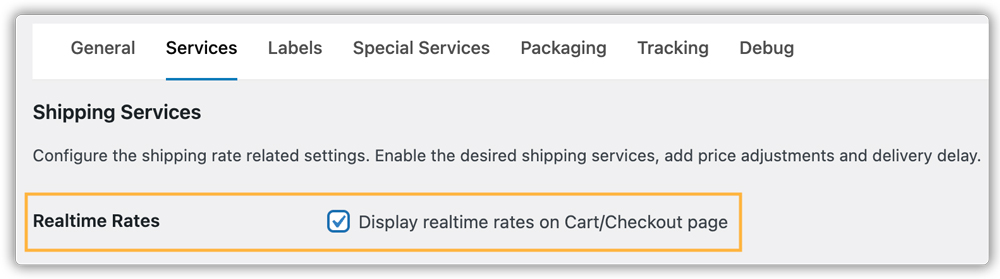
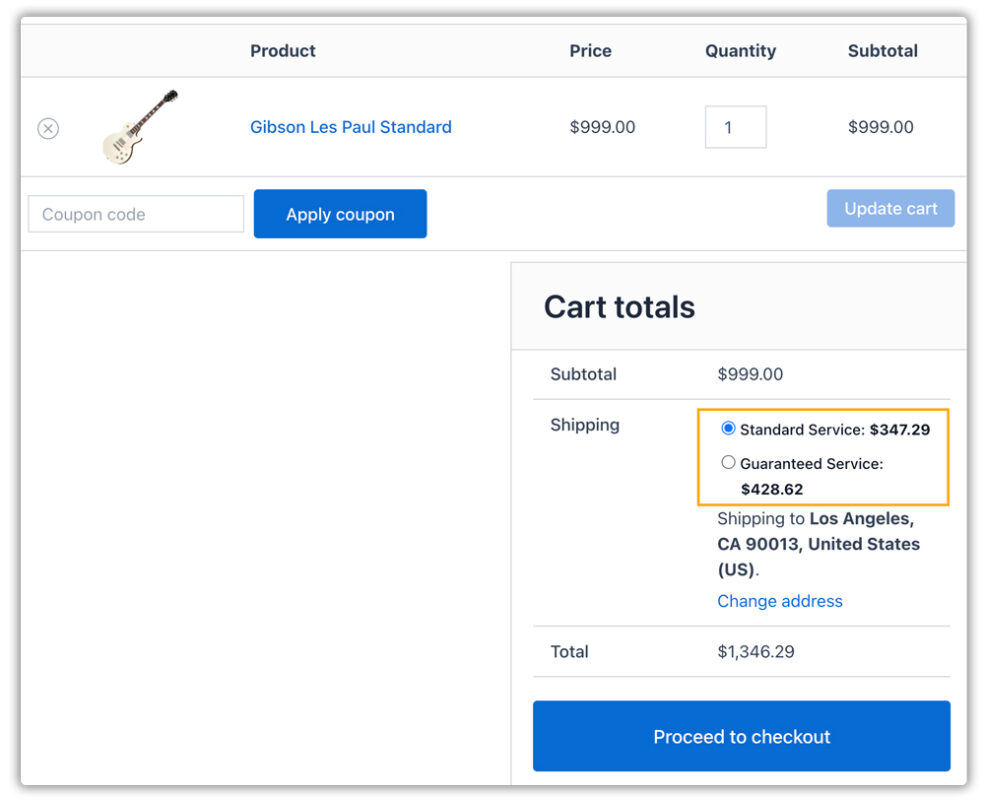
- Enable real-time ODFL freight rates so customers see accurate LTL shipping costs at checkout based on weight, dimensions, freight class, and destination.
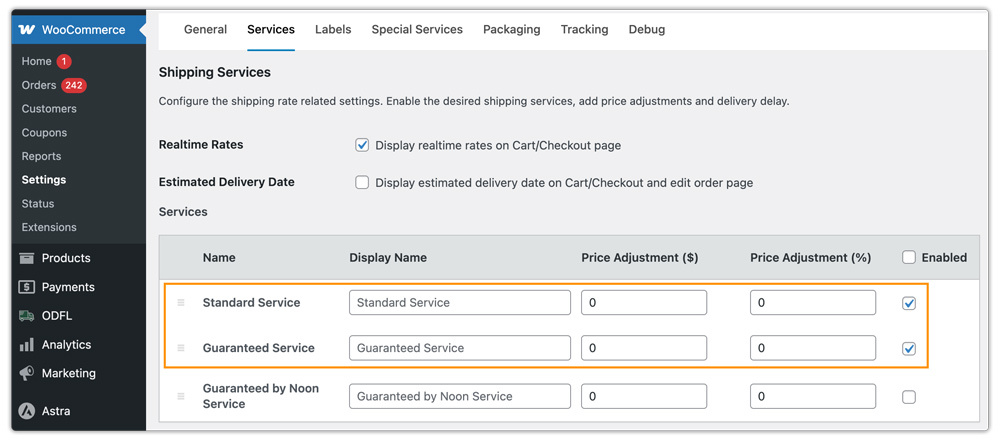
- Select the required ODFL services as per your business needs, such as standard LTL, residential delivery, liftgate service, or expedited shipping, and display rates accordingly.
- Generate and print the Bill of Lading (BOL), which is mandatory for LTL freight pickups and documentation.
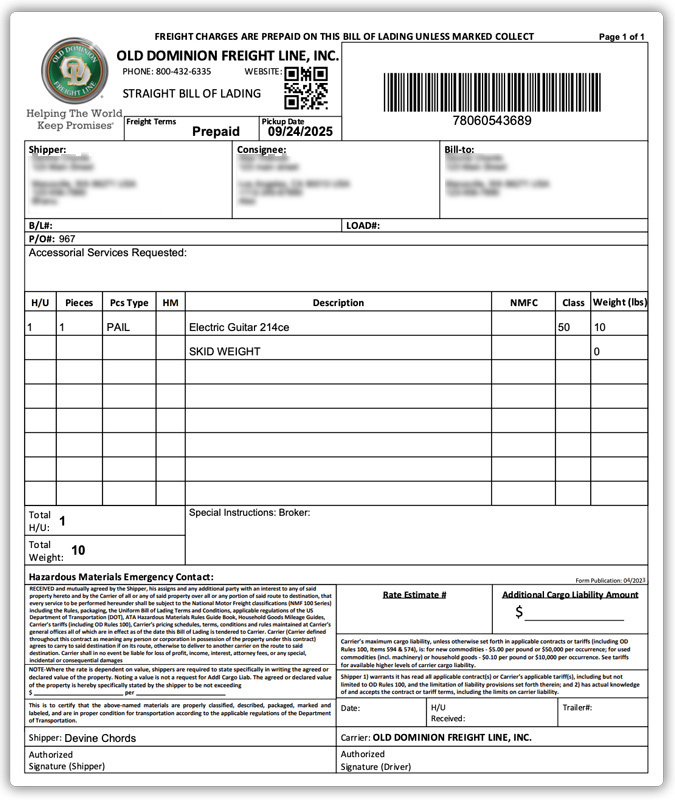
Manage everything from rate display to shipment creation and BOL printing within your WooCommerce dashboard, keeping the entire freight workflow centralized. Let’s understand the benefits of this plugin through a detailed real-world use case.
Real-World Use Case: How a US Store Selling Industrial Equipment Scaled with ODFL Freight
A US-based WooCommerce store selling industrial air compressors and heavy workshop equipment faced serious shipping challenges as order volume increased. Most products weighed between 180 and 600 lbs and required palletized freight shipping.
Initially, the store handled freight manually, requesting quotes from carriers, emailing customers updated shipping costs, and creating BOL (Bills of Lading) outside WooCommerce. This process caused:
- Delays of 24-48 hours just to confirm shipping charges
- Cart abandonment when customers didn’t see instant freight rates
- Errors in freight class selection leading to unexpected reclassification fees
- Operational bottlenecks during peak sales periods
As the business scaled to 40-60 freight orders per week, the manual workflow became unsustainable. After integrating ODFL freight shipping directly into WooCommerce via the PH ODFL Freight Shipping Plugin for WooCommerce with Print Label, the store transformed its operations:
- Real-time LTL rates were displayed at checkout, eliminating manual quote requests and reducing checkout friction.
- Accurate freight class and pallet configuration improved rate precision and reduced unexpected carrier adjustments.
- Bills of Lading (BOL) were generated instantly from the WooCommerce order page, cutting processing time significantly.
- Liftgate and residential delivery options were automatically included when required, preventing delivery failures.
Within three months, the store experienced measurable improvements:
- 28% faster order processing time
- 35% reduction in freight-related support inquiries
- Improved checkout conversion rate due to transparent freight pricing
- Better carrier performance with fewer damage claims
By automating ODFL freight shipping inside WooCommerce, the store was able to scale confidently and provide a smoother buying experience for customers ordering oversized equipment.
Conclusion
Freight shipping doesn’t have to slow down your WooCommerce growth. With the right carrier integration in place, even heavy and oversized products can be managed efficiently without adding operational complexity. As your business grows, having a reliable freight workflow ensures consistency, transparency, and a smoother post-purchase experience for customers.
If you need assistance with setup or configuration, feel free to reach out to our support team: PluginHive Support
FAQs
Q. Can I combine ODFL live freight rates with free shipping or flat rates in WooCommerce?
Yes. You can configure conditional shipping rules to offer free freight above a specific cart value or display flat-rate options alongside live ODFL freight rates using the WooCommerce Table Rate Shipping Pro Plugin.
Q. Can I show estimated delivery dates along with live ODFL freight rates?
Yes. Estimated transit times can be displayed along with the rates at checkout. For more advanced delivery date customization based on business rules, you can integrate an Estimated Delivery Date Plugin for WooCommerce.
Q. Can multi-vendor WooCommerce stores automate ODFL shipping?
Yes. With the WooCommerce Multi-Vendor Shipping Addon, in a multi-vendor setup, each vendor can configure their own warehouse address, freight class, pallet details, and shipment preferences.
Q. Can I provide tracking updates for ODFL freight shipments to customers?
Yes. Basic tracking is supported within the freight plugin. For automated tracking updates and better customer communication, you can integrate ODFL tracking with the WooCommerce Shipment Tracking Pro Plugin.
Q. What product data is required for accurate ODFL freight rates?
To ensure precise LTL rate calculation, you should configure accurate product weight, dimensions, freight class, and pallet information. Correct data helps prevent reclassification fees and billing adjustments from the carrier.
