


Every WooCommerce store starts out shipping parcels, small boxes, standard carriers, and straightforward rates. But the moment you start selling something heavy, bulky, or palletized, parcel shipping stops working and starts costing you. Knowing exactly when to switch to LTL freight and setting it up correctly in WooCommerce is what keeps shipping costs under control as your product range grows.
This guide explains why parcel shipping breaks down for heavier products, how it compares to ODFL freight, the signs that tell you it’s time to switch, and how to set it all up using the PH ODFL Freight Shipping Plugin for WooCommerce.
On This Page
- Why Parcel Shipping Breaks Down for Certain Products
- Parcel vs ODFL Freight: Key Differences
- Signs Your WooCommerce Store Needs ODFL Freight
- How to Set Up ODFL Freight in WooCommerce
- Real-World WooCommerce Use Case
- Conclusion
- FAQs
Why Parcel Shipping Breaks Down for Certain Products
Parcel carriers — USPS, UPS, and FedEx — are built for individually boxed packages. Most parcel services cap out around 150 lbs per package, and heavier or larger packages often trigger oversize surcharges even below that limit. Beyond that threshold, parcel carriers either reject the shipment outright or price it so high that it stops making commercial sense.
Old Dominion Freight Line (ODFL) is built for exactly what parcel carriers can’t handle: palletized freight ranging from 150 lbs up to 15,000 lbs. Rather than pricing by simple weight and box dimensions, LTL freight is priced using freight class, shipment density, and the NMFC (National Motor Freight Classification) code assigned to the product.
Parcel vs ODFL Freight: Key Differences
| Factor | Parcel Shipping | ODFL Freight (LTL) |
|---|---|---|
| Typical weight range | Up to ~150 lbs per package | 150 lbs to 15,000 lbs, palletized |
| Pricing basis | Weight and dimensional weight per package | Freight class, density, NMFC code, and pallet count |
| Packaging | Individually boxed parcels | Palletized freight, shrink-wrapped or crated |
| Delivery | Curbside or doorstep, no equipment needed | May require liftgate or dock access |
| Best for | Small, lightweight, boxable items | Bulky, heavy, or palletized shipments |
Signs Your WooCommerce Store Needs ODFL Freight
A few practical signals that it’s time to move a product — or your whole catalog — from parcel to ODFL freight:
- Products regularly weigh more than 150 lbs, or your parcel carrier is applying oversize or additional handling surcharges
- Products ship on a pallet rather than in an individually boxed parcel — furniture, machinery, industrial equipment, building materials
- Parcel carriers have rejected or returned a shipment due to size or weight
- You’re manually requesting freight quotes by phone or email for certain orders because your checkout can’t calculate them
- Customers are being shown a flat-rate freight estimate that doesn’t reflect actual weight or destination, leading to under- or overcharging
If any of these apply to part of your catalog, that’s usually the signal to configure ODFL freight for those specific products rather than switching your entire store over.
How to Set Up ODFL Freight in WooCommerce
The PH ODFL Freight Shipping Plugin for WooCommerce connects your WooCommerce store to ODFL’s API, showing live LTL rates at checkout for the products that need it.
To configure the plugin in your WooCommerce store, refer to the setup guide for the ODFL freight shipping plugin .
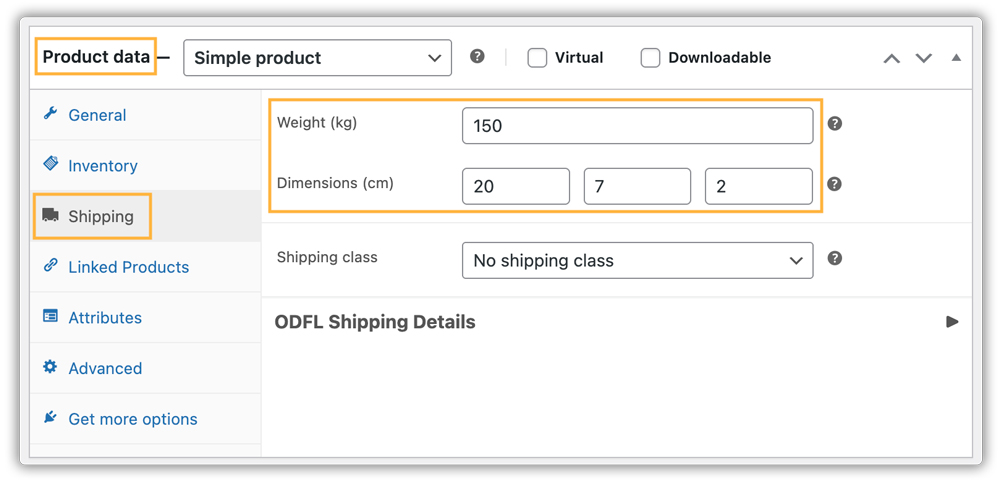
Configure Product Shipping Details
Make sure every freight-eligible product has accurate weight and dimensions entered. ODFL rates depend on this data being correct; missing or inaccurate weight and dimensions are the most common reason freight rates come back wrong or don’t appear at all.
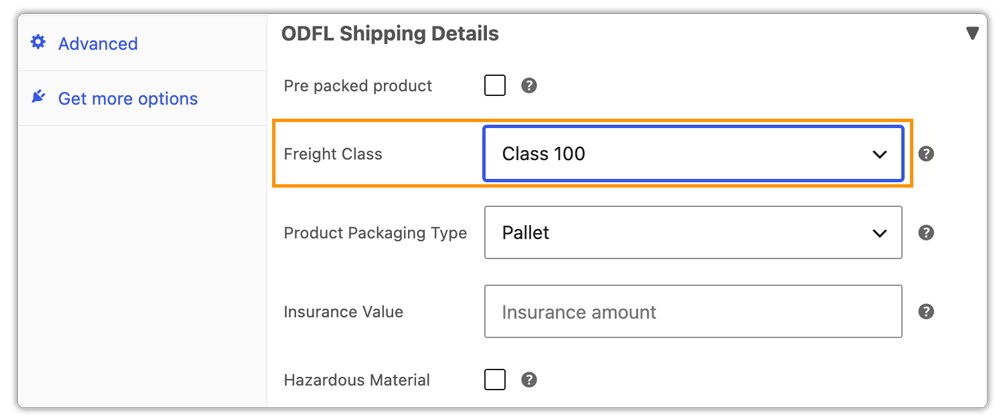
Assign Freight Class to Products That Ship via LTL
Products that will ship via ODFL need a freight class assigned — this is what determines how ODFL prices the shipment based on density and handling requirements.
Test Checkout With a Freight-Eligible Product
Add a product to the cart and go through the checkout. Confirm that ODFL LTL rates appear instead of any of your configured carrier parcel rates, and that the rate reflects the destination accurately.

Real-World WooCommerce Use Case
A WooCommerce store selling home gym equipment — power racks, weight plates, and benches — had been shipping everything through a single parcel carrier account. Power racks and loaded weight sets regularly exceeded 150 lbs, and the parcel carrier was applying steep oversize surcharges or rejecting the shipment outright. The store had been manually quoting freight for these orders by phone, which meant customers waited a day or more before they knew their final shipping cost, and several abandoned their orders during that wait.
How the Plugin Helped
The store installed the PH ODFL Freight Shipping Plugin for WooCommerce, assigned a freight class to their heavier equipment based on NMFC codes, and enabled real-time rates with BOL. Customers ordering power racks and heavyweight sets now saw an accurate freight rate immediately at checkout, no more waiting on a manual quote.
The Result
- Manual freight quoting was eliminated for heavy equipment orders
- Checkout abandonment on large equipment orders dropped, since customers saw their shipping cost immediately
- Freight pricing became accurate and consistent, removing the oversize surcharge guesswork the store had been absorbing
- The store was able to print BOL inside the WooCommerce dashboard itself
Conclusion
Parcel shipping works well until a product’s weight or shape makes it impractical, and pushing heavy items through a parcel carrier anyway just means paying surcharges or facing rejected shipments. The PH ODFL Freight Shipping Plugin for WooCommerce lets you run LTL freight from the WooCommerce store, showing customers the correct shipping method automatically based on weight, without you needing to manually decide or quote it order by order.
Need help setting up ODFL freight in WooCommerce? The PluginHive support team is here.
FAQs
Q. What is freight class and why does my product need one for ODFL?
Freight class is a standardised rating used by LTL carriers to price shipments based on density, handling difficulty, and value. ODFL uses the NMFC (National Motor Freight Classification) system to assign freight class — the plugin lets you set this per product so accurate rates are returned at checkout.
Q. Does ODFL freight cover international shipments?
ODFL LTL service covers the United States, Canada, and Mexico. For shipments outside this footprint, a different freight or international carrier would be needed.
Q. Can I hide ODFL freight for smaller orders that don’t need it?
Yes. Beyond the plugin’s built-in weight threshold, the PH Hide Shipping Methods & Rate Adjustment for WooCommerce gives you additional control to show or hide freight and parcel options based on cart value, product category, or destination.
Q. Can WooCommerce marketplaces offer ODFL freight per vendor?
Yes. The PH Multi-Vendor Shipping Plugin for WooCommerce calculates freight rates separately per vendor based on each vendor’s warehouse or origin address.
