


Selling one or two heavy items a week through a manual freight quote process is manageable. Selling twenty a day through the same process isn’t; it turns into a full-time job for someone on your team, and it caps how fast the heavy-goods side of your store can actually grow. Scaling that part of a WooCommerce business means moving freight out of email threads and phone calls and into the same automated checkout flow as everything else you sell.
This guide covers what actually breaks first as heavy-goods freight volume grows, and how to scale that part of a WooCommerce store using the PH ODFL Freight Shipping Plugin for WooCommerce.
On This Page
- What Breaks First as ODFL Freight Volume Grows in WooCommerce
- What Scaling Heavy-Goods Shipping Actually Requires
- How to Set Up ODFL Freight for Scale in WooCommerce
- Conclusion
- FAQs
What Breaks First as ODFL Freight Volume Grows in WooCommerce
Most WooCommerce stores that start selling heavy or palletized items begin with a manual process: a customer places an order, someone on the team calls or emails ODFL for a quote, the customer is contacted with a shipping cost, and the order is confirmed once they agree. That works at low volume. It falls apart predictably once volume increases:
- Manual quoting doesn’t scale linearly — doubling order volume roughly doubles the person-hours spent quoting freight by hand
- Customers abandon orders waiting on a manual quote, especially against competitors showing an instant freight rate at checkout
- Freight class gets applied inconsistently across a growing catalog when it’s assigned manually per order rather than stored against the product
- BOL and label generation through a separate freight portal adds a step per order that compounds as order count increases
None of this is a reflection of ODFL’s capacity — ODFL’s own network handles far more volume than any single WooCommerce store will generate. The bottleneck is almost always the manual process sitting between the store and the carrier, not the carrier itself.
What Scaling Heavy-Goods Shipping Actually Requires
Moving from a handful of manual freight orders a week to a high volume of automated ones comes down to three things working together rather than any single fix:
- Live Rates Instead of Manual Quotes: The single highest-leverage change is replacing manual quoting with live ODFL rates calculated automatically at checkout, based on actual weight, dimensions, freight class, and destination. This removes the person-hours bottleneck entirely rather than just making the manual process faster.
- Freight Class Stored at the Product Level: As a catalog grows, freight class needs to live on the product itself rather than being decided fresh for every order. This is what keeps pricing consistent across hundreds of orders instead of depending on whoever happens to be quoting that day.
- Label and BOL Generation Inside the Same Workflow: At low volume, logging into a separate ODFL portal to generate a Bill of Lading and print a label per order is a minor inconvenience. At high volume, it’s a second system every order has to pass through — which is exactly the kind of step that needs to collapse into the same place orders are already being managed.
How to Set Up ODFL Freight for Scale in WooCommerce
The PH ODFL Freight Shipping Plugin for WooCommerce connects your WooCommerce store directly to ODFL’s API. This connection lets you move from manual freight quotes to automated shipping rates.
To configure and install the plugin, follow the ODFL Freight Shipping for WooCommerce guide.
Start by connecting your ODFL account using the required credentials in the plugin settings. Enable live rates to fetch real-time ODFL freight rates at checkout.
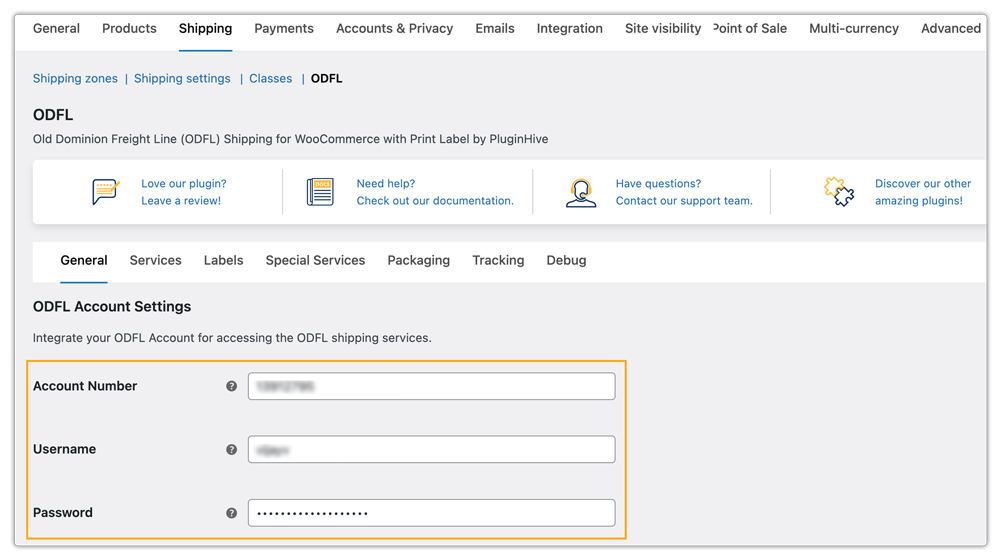
Make sure each freight product has an accurate freight class, weight, and dimensions. The plugin uses these details to calculate the applicable ODFL rates. Set the freight class for every heavy-goods item and treat it as a required part of adding new products.

With accurate product details and live rates enabled, the applicable ODFL shipping rates will be displayed for each product at the cart and checkout pages.

Once an order is placed, you can generate the Bill of Lading and freight label directly from the WooCommerce order page. You can manage these fulfillment tasks without logging into a separate ODFL portal.

At scale, this keeps the fulfillment process efficient as your order volume grows.
Conclusion
Scaling heavy-goods shipping in WooCommerce isn’t really about handling more volume; ODFL’s network can already do that. It’s about removing the manual steps that don’t scale: quoting by hand, assigning freight class inconsistently, and generating BOLs through a separate portal. The PH ODFL Freight Shipping Plugin for WooCommerce replaces all three with live rates, product-level freight class, and BOL generation inside WooCommerce, so freight volume can grow without a proportional increase in manual work.
Need help scaling your ODFL freight setup? The PluginHive support team is here.
FAQs
Q. At what order volume does manual ODFL quoting stop being practical in WooCommerce?
There’s no fixed number. It depends on your team’s capacity and order volume. However, manual freight quoting can become a bottleneck once orders increase from a few per week to daily volumes. Using live rates earlier can reduce manual work and rework as your store grows.
Q. Can a single WooCommerce store run parcel and ODFL freight at scale simultaneously?
Yes. The ODFL plugin can display live ODFL freight rates. You can also use the Multi-Carrier Shipping Plugin for WooCommerce to display live parcel rates from multiple carriers.
Q. Can I track high volumes of ODFL freight shipments from WooCommerce?
Yes. The ODFL plugin supports shipment tracking. For live tracking links in WooCommerce order emails and customers’ My Account pages across multiple carriers, you can use Shipment Tracking Pro for WooCommerce. This becomes especially useful as shipment volume grows and tracking enquiries increase.
Q. Can WooCommerce marketplaces scale ODFL freight across multiple vendors?
Yes. The PH Multi-Vendor Shipping Plugin for WooCommerce can calculate freight rates separately for each vendor based on their warehouse address. This allows marketplaces to manage vendor-specific freight rates as the number of vendors grows.
