


Managing event registrations through your WooCommerce store should be exciting, but let’s be honest, it can come with a few headaches. You list a great concert, workshop, or conference, only to see potential attendees hesitate when facing the full price at checkout. Or worse, you deal with last-minute cancellations that leave you with empty spots and lost revenue. If this sounds familiar, you’re not alone; these are common challenges for any event organiser.
This is where deposit payments can make a big difference. By letting your customers reserve their spot with a fraction of the full price, you make your events more accessible, encourage early bookings, and gain better financial predictability. In this article, we’ll explore how the PH Deposits for WooCommerce plugin can simplify event bookings and show you how to set it up in your store.
Table of Contents
- Common Problems WooCommerce Event Organisers Face
- How WooCommerce Deposits Solves These Challenges
- Implement WooCommerce Deposits for Event Bookings
- Real-World Examples & Use Cases
- Best Practices for Using Deposits for Event Bookings on WooCommerce
- Conclusion
- FAQs
Common Problems WooCommerce Event Organisers Face
Even with an amazing event, many WooCommerce store owners run into booking-related challenges:
- High Upfront Cost: A significant one-time payment can make customers hesitate, leading to abandoned bookings.
- Last-Minute Cancellations: Without a financial commitment, attendees may change plans, leaving empty spots.
- Unpredictable Cash Flow: Waiting for full payments makes it hard to pay vendors or plan marketing.
- Hard to Gauge Interest: Without a financial commitment, it’s difficult to know who will actually attend.
- Payment Tracking Headaches: Manually following up on payments and tracking balances is time-consuming.
These problems can make event bookings feel more reactive than strategic. However, there’s a straightforward approach that tackles all these issues at once, which we’ll explore next.
How WooCommerce Deposits Solves These Challenges
Using the PH deposits for WooCommerce plugin allows customers to secure their spot with a partial payment, which addresses many common problems.
- Lower Entry Barrier: Customers can reserve their spot by paying a fraction upfront, reducing checkout abandonment.
- More Committed Attendees: A small upfront payment encourages attendees to stick to their plans, lowering last-minute cancellations.
- Steady Cash Flow: Partial payments provide early funds to cover venue deposits, vendors, and marketing.
- Better Attendance Forecasting: Upfront deposits help identify serious attendees, making planning and logistics easier.
- Simplified Payment Management: Helps to keep track of balance payments, saving you time and reducing errors.
For WooCommerce stores, plugins like PH Deposits for WooCommerce make setting up these partial payments easy without complicating your checkout process. Let’s look at how this works in practice with some real-world event scenarios.
Implement WooCommerce Deposits for Event Bookings
Many assume deposit setups are difficult, but with the PH Deposits for WooCommerce plugin, it’s actually very easy. Essentially, you’re just configuring a new, flexible payment option for your events, much like enabling a new gateway.
Here’s a straightforward look at how to set it up:
Note: Before you get started, ensure the Deposits plugin for WooCommerce is installed, activated, and properly configured. You can refer to the setup guide for help.
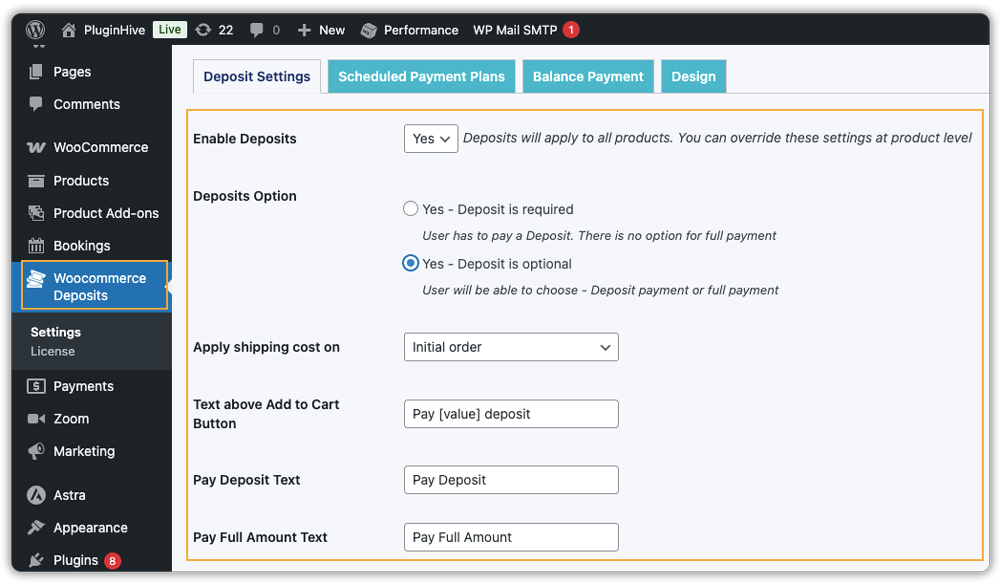
- Enable Deposits: Go to the plugin settings and turn on the deposit option for your event bookings. Choose whether deposits are optional or required.
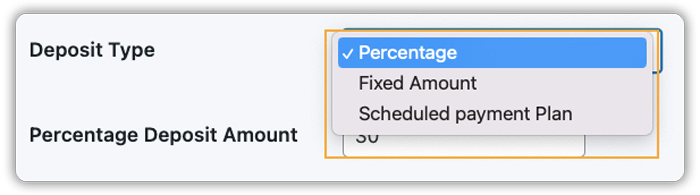
- Create Your Payment Plan: Decide how the deposit works. You can set a fixed amount (e.g., “$20 to book”) or a percentage of the event price (e.g., “30% today”), and set a default selection for customers.
- Apply It to Your Events: Choose which events will offer the deposit option. You can enable it for all bookings or just for specific high-value or long-term events.

Once set, the plugin manages checkout and displays deposit options for your customers automatically.

It also sends friendly reminders for the remaining balance, so you don’t have to track payments manually.

With the PH Deposits for WooCommerce plugin, booking events with partial payments becomes mostly automated, saving you time and giving customers a smooth, flexible checkout experience.
Real-World Examples & Use Cases
Deposit payments work effectively across a wide range of events. Here are some practical examples showing how deposits can help you manage bookings and improve the customer journey:
| Event Type | How Deposits Are Used | Benefits for Store Owners |
|---|---|---|
| Workshop | Customers pay 25% upfront to reserve a spot. | Reduces last-minute cancellations and ensures committed attendees. |
| Online Webinar | Participants pay a small deposit to secure access. | Encourages early sign-ups and helps forecast attendance. |
| Training Classes | Members pay a deposit for a multi-week course. | Helps manage cash flow and track who is genuinely enrolled, and makes planning supplies and instructor scheduling easier. |
| Guided Tour | Travellers pay a deposit when booking a tour package. | Ensures serious bookings and covers initial expenses for guides or logistics. |
These examples illustrate how a deposit system makes event management more predictable, improves attendee commitment, and simplifies the financial administration of different event types.
Best Practices for Using Deposits for Event Bookings on WooCommerce
To maximise the effectiveness of your deposit system, follow these best practices:
- Start with a Strategic Pilot: If you’re new to deposits, try it on one high-value or long-lead-time event (like a workshop or conference) first. Test the process, see how customers respond, and fine-tune things if needed.
- Have a Clear Policy for Missed Payments: Decide in advance what happens if a balance isn’t paid, cancel the booking and refund the deposit, or keep the deposit. Make sure this policy is clear in your terms.
- Promote the Flexibility: Highlight the deposit option as a benefit with phrases like “Secure Your Spot Today with a Small Deposit” or “Book Now, Pay Later” in your promotions.
- Integrate Booking Tools: Use the Booking and Appointments for WooCommerce plugin to manage registrations and schedules alongside deposits.
Note: To learn more about how to set it up and manage bookings smoothly, check out this guide: Event Booking Setup for WooCommerce
- Host Online Events Easily: For webinars or workshops using Zoom, pair deposits with Zoom for WooCommerce. Check this Zoom Integration Guide to learn more.
These tips help you offer deposits confidently, simplify payment management, and create a smooth booking experience for your attendees.
Conclusion
As we’ve seen, implementing a deposit system for your event bookings is a practical step toward more reliable registrations and smoother event management. The PH Deposits for WooCommerce plugin allows you to offer this flexibility easily, helping you convert more interest into committed bookings while gaining financial clarity much earlier in your planning cycle.
Ultimately, this approach creates a better experience for everyone involved. Your customers appreciate the lower upfront commitment, and you benefit from more predictable revenue and confirmed attendance. It’s a straightforward strategy to build a stronger, more resilient foundation for every event you host.
If you need help setting this up in your WooCommerce store, you can contact PluginHive support for guidance.
FAQs
Q: Can I accept deposits for some events but require full payment for others?
With the PH Deposits for WooCommerce plugin, you can let customers pay a partial amount (deposit) at checkout instead of the full price. The remaining balance can be paid later, giving attendees flexibility and reducing upfront cost pressure.
Q: Is a deposit system compatible with booking-type events (like workshops, classes, tours) under WooCommerce?
Yes. The Deposits plugin works with bookable products (if using the Booking and Appointments for WooCommerce plugin). This allows deposits for bookings, making it suitable for events, classes, or tours.
Q: If I use WooCommerce Deposits, will I have to manually track who pays the balance and who doesn’t?
No, the PH deposits for WooCommerce plugin make payment tracking easier. The plugin marks orders as “Partially Paid” and shows deposits, remaining balance, and schedules (if payment plans are used). You can issue balance invoices or let customers pay via a link.
Q: What if a customer never pays the remaining balance? Does the deposit stay or get refunded automatically?
That depends on your store policy. PH Deposits for WooCommerce plugin itself handles payments and balances, but how you treat missed payments is up to you. It’s best to set a clear policy (e.g. deposit forfeited or refunded) and communicate it to customers before purchase.
