


Attracting new customers to your WooCommerce store can be challenging, especially when selling services like fitness classes, coaching sessions, or consultations. One of the most effective ways to build trust and encourage first-time users to try your services is by offering free trial bookings. A free trial gives potential customers a risk-free opportunity to experience your service before committing, helping you turn curious visitors into loyal, paying clients.
With the Bookings and Appointments for WooCommerce plugin, you can easily create and manage free trial sessions directly from your store. The plugin automates scheduling, availability, and customer management, making it simple to offer free trials without manual coordination. In this article, we’ll explore how offering free trial bookings can help your WooCommerce business attract more customers and boost long-term sales.
On This Page
- Why Offer Free Trial Bookings on Your WooCommerce Store
- Scenarios Where Free Trials Can Benefit WooCommerce Stores
- How to Offer Free Trial Bookings in WooCommerce
- Tips to Convert Trial Users into Paying Customers with WooCommerce Bookings
- Conclusion
- FAQs
Why Offer Free Trial Bookings on Your WooCommerce Store
Free trial bookings let your customers schedule a session or appointment at no cost. This allows them to experience your service before committing, helping build confidence and interest in your offerings.
Key benefits for your WooCommerce store include:
- Builds trust with new customers: A free trial gives visitors confidence in your services before making a purchase.
- Increases conversion rates: Once customers experience your service, they’re more likely to book a paid session.
- Showcases your expertise: Free trials allow you to demonstrate the quality and value of your offering.
- Encourages repeat business: A smooth trial experience can turn first-time visitors into long-term clients.
- Reduces hesitation to buy: By removing upfront costs, customers are more willing to take that first step.
Free trial bookings are not just a marketing tactic; they’re a way to connect with potential customers and give them a reason to return
With the Bookings and Appointments for WooCommerce plugin, you can easily set up these free sessions, manage availability, and automate booking notifications all without manual follow-ups.
Scenarios Where Free Trials Can Benefit WooCommerce Stores
Free trials can be tailored to fit different types of services. The table below highlights specific scenarios and shows the immediate value these trials can bring to your WooCommerce store.
| Business Type / Category | Example Trial Offer | Conversion Benefit |
|---|---|---|
| Fitness & Yoga Classes | Offer a free 1-hour class | Builds trust and encourages booking of paid classes |
| Consulting | Free 15-minute consultation | Demonstrates expertise and increases paid session bookings |
| Salons & Spas | Complimentary skincare or hair consultation | Reduces hesitation and drives first paid appointments |
| Online Courses / Tutoring | Free trial lesson or module | Shows course value, increasing full enrollment rates |
| Wellness and Therapy Services | First session free | Helps clients experience benefits, boosting repeat bookings |
These are just a few scenarios. Your free trial setup can vary based on your business model, service type, and customer needs. By offering the right trial for your service, you can engage potential customers in a meaningful way and create a clear path toward paid bookings.
How to Offer Free Trial Bookings in WooCommerce
Free trial bookings in WooCommerce are an effective way to let new customers experience your services and build trust. With the right approach, you can manage bookings efficiently while ensuring each customer enjoys only one trial session.
Note: Before we begin, make sure the Bookings and Appointments for WooCommerce plugin is installed and activated on your store. This plugin helps manage your bookings, availability, and resources seamlessly.
Here’s how you can offer free trial bookings to attract and convert new customers:
1. Create a Dedicated Free Trial Booking Product
Start by creating a bookable product in your WooCommerce store using the Bookings and Appointments for WooCommerce plugin. This product should represent the free trial session, for example, “Pilates class Free Trial.”
Set the regular price for this product; do not set it to $0, as the free trial will be applied through a coupon to control one-time usage, which we’ll cover shortly. Next, configure the availability, time slots, and booking settings according to your business needs. This ensures your booking schedule remains organized, automated, and conflict-free.

For detailed instructions on setting up the plugin, you can refer to this setup guide.
2. Create a Coupon for Your Free Trial Booking
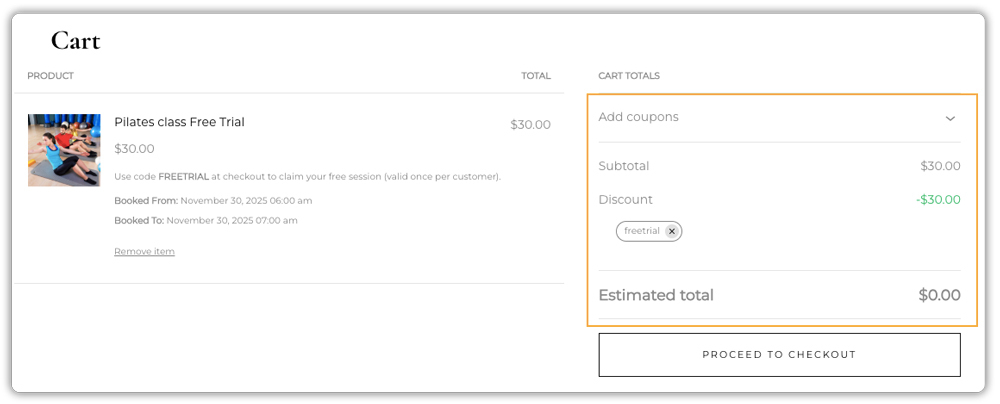
Once your product is ready, go to Marketing -> Coupons -> Add Coupon in WooCommerce. Create a coupon that makes the booking free, for example, use the code FREETRIAL and set the discount type to Fixed product discount with an amount equal to your booking price.

In the Usage Limits section, set Usage Limit per User = 1 to ensure that each customer can claim the free trial only once.

Assign the coupon to the specific free trial product and, if desired, set an expiry date to limit the campaign duration.

This ensures that the free trial is applied only when customers use the coupon, preventing multiple free bookings by the same user.
To get a better idea of how WooCommerce coupons work, you can refer to this WooCommerce Coupons guide.
3. Communicate the Free Trial to Customers
Make sure to clearly explain on your website or product page that the free trial requires a coupon. Provide simple instructions on how customers can apply the coupon at checkout. Highlight that the trial is limited to one per customer to maintain fairness.

This is how your booking interface will appear on the frontend, allowing customers to select their preferred slot and apply the coupon to claim their free trial. Clear instructions like this help ensure a seamless experience for your users and make the booking process straightforward.
4. Automate Scheduling and Notifications
With the Bookings plugin, all bookings are managed automatically. Sessions are confirmed instantly, reminders are sent to customers, and availability is tracked to prevent overbooking. This automation saves time and helps you manage your bookings efficiently.

Note: If you’re offering online sessions, you can use a Zoom integration to create and share meeting links with customers automatically. This is optional. The PluginHive plugin already manages your scheduling and reminders, while Zoom simply makes hosting virtual classes or webinars easier.
Free trial bookings are a proven way to turn visitors into paying customers. By using the Bookings and Appointments for WooCommerce plugin with WooCommerce coupons, you can control trial usage, streamline scheduling, and provide a smooth, hassle-free booking process.
Tips to Convert Trial Users into Paying Customers with WooCommerce Bookings
Free trials help attract new users, but the real success lies in turning them into paying customers. Here are a few simple ways to make that happen:
- Make the Trial Experience Count: Deliver a great first impression. Ensure your trial session runs smoothly, communication is clear, and the booking process is effortless using the Bookings and Appointments for WooCommerce plugin.
- Follow Up Quickly: Send a quick thank-you after the trial with a link to book a paid session. A prompt follow-up increases conversions.
- Offer a Special Deal: Encourage conversions with a limited-time discount or package offer for users who upgrade soon after their trial.
- Show the Value of Paid Sessions: Highlight what makes paid bookings worth it, such as exclusive features, longer sessions, or added benefits.
- Ask for Feedback: Collect quick feedback from trial users to understand what worked and what can be improved. This helps refine your offer and build trust.
By combining a smooth booking experience with smart follow-ups and clear communication, you can turn free trial users into loyal, paying customers.
Conclusion
Free trial bookings in WooCommerce are a powerful way to attract new customers and let them experience your services with confidence. By combining the flexibility of the Bookings and Appointments for WooCommerce plugin with simple coupon settings, you can manage trial sessions efficiently, automate scheduling, and maintain complete control over how customers access their free trials. This approach not only builds trust but also increases the chances of turning trial users into long-term customers.
Suppose you’d like to implement free trial bookings on your WooCommerce store or need help with advanced configurations, custom rules, or specific business workflows. In that case, the PluginHive team is always ready to assist. Reach out to the PluginHive Support team for expert guidance and personalized setup assistance.
FAQs
Q: Will offering free trial bookings via WooCommerce actually lead to paying customers?
Yes, when done right. Free trials reduce hesitation and build trust by letting visitors experience your service firsthand. With quick follow-ups and clear communication about the value of paid sessions, many trial users convert into paying customers.
Q: Can I offer a free trial booking in WooCommerce without using a booking plugin?
You can use basic WooCommerce products and coupons, but this setup lacks proper scheduling and availability control. A dedicated solution like the Bookings and Appointments for WooCommerce plugin helps you manage time slots, prevent double bookings, and handle trial sessions more efficiently.
Q: How do I ensure each customer gets only one free trial in WooCommerce?
Use WooCommerce Marketing to create a coupon ($0 value) with Usage Limit per User = 1. Then link it only to the free-trial product and ensure your booking product is managed via the WooCommerce booking plugin for availability control.
Q: Is a free trial for a WooCommerce bookable product the same as a free trial for a subscription?
No, they’re different. A bookable product trial lets customers schedule a one-time free session, like a class or consultation. A subscription trial offers temporary access to a recurring service.
