


Group bookings are becoming increasingly common across different types of online businesses, whether you’re offering workshops, tours, classes, equipment rentals, or services where more than one person or item can be booked at the same time. Instead of customers making separate reservations, group bookings allow them to reserve multiple spots or units in a single order, making the process quicker and easier.
WooCommerce doesn’t support group booking functionality on its own, but with the WooCommerce Bookings and Appointments plugin, you can easily manage group sizes, set limits, adjust pricing, and control availability, In this guide, you’ll learn exactly how group bookings work in WooCommerce and how to set them up effectively so you can run your bookings smoothly and avoid overbooking issues.
Table of Contents
- Benefits of Offering Group Bookings in WooCommerce
- Offer Group Bookings in Your WooCommerce Store
- Real World Examples
- Tips for Delivering Better Group Booking Experiences in WooCommerce
- Conclusion
- FAQs
Benefits of Offering Group Bookings in WooCommerce
Group bookings are more than just a convenience; they help your store run smoothly while improving the customer experience. Here are the main benefits of adding group booking functionality to your WooCommerce store:
- Better Capacity Management: The system automatically tracks available spots, seats, or units as customers select their group size, ensuring optimal utilisation. This prevents overbooking and keeps your schedule organised without manual checks.
- Increase Revenue per Booking: Customers can book for multiple participants or units in a single order, allowing for more efficient use of resources. This means each time slot or session generates more revenue.
- Reduce Manual Work: Handling bookings for individual participants manually can be time-consuming. Group bookings process everything in one order, saving time and reducing errors.
- Flexible Pricing Options: You can easily set per-person or per-unit costs, charge different rates for adults, children, or teams, and offer discounts for larger groups. This gives you full control over pricing.
- Better Customer Experience: Customers can select the number of participants, add optional extras, and see the updated total instantly. This smoothes out the booking process and removes confusion.
Now that you understand why group bookings are important, let’s explore how you can offer them effectively in your WooCommerce store.
Offer Group Bookings in Your WooCommerce Store
Setting up group bookings in WooCommerce is simple when using a booking plugin. Customers can select their group size, and the system updates availability and pricing automatically. Here’s how to get everything in place.
Note: Before we begin, ensure that the PH WooCommerce Bookings plugin is installed, activated, and the basic setup is completed. If needed, refer to this setup guide for assistance.
- Create a Bookable Product
First, think about what you want customers to book. It could be a class, a tour, a rental, or a service. In your WooCommerce store, create a product for this booking. This will be the item that customers select when they want to make a reservation.
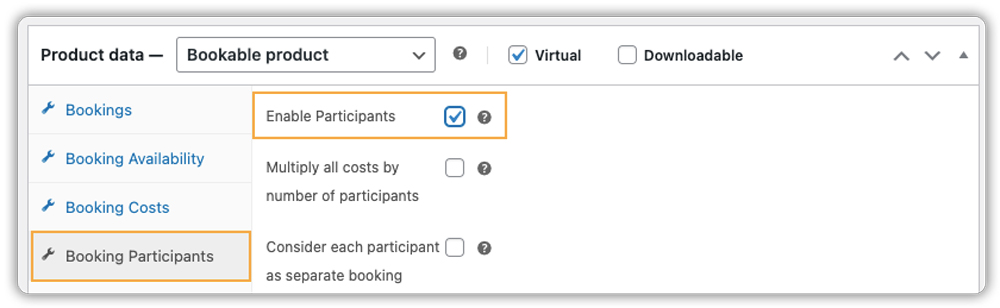
After creating the product, enable bookings for it and turn on the Participants option within the product settings.
- Manage Availability and Capacity
Decide how many people can book each time slot. When the maximum number of participants is reached, that slot automatically closes to prevent overbooking.

If you need help setting booking availability, refer to this guide.
- Allow Customers to Specify Group Size
Next, define how many people or items a customer can book at once. Set a minimum and maximum number.

For example, a yoga class might allow 1–10 people, while a kayak rental might allow 1–5 kayaks. Customers can simply select the quantity they need when booking.
- Set Up Pricing
Once the number of participants is set, you can define how much each person or item costs. You have a few options:
- One-time booking cost: A fixed amount for the booking itself
- Per person/item cost: Charges added for every participant or item
- Combination: A base booking cost plus a per-person or per-item cost

For instance, a party package might include a $50 base booking cost plus $0.75 for every extra chair selected, while a spa service could have a $50 booking fee plus $5 per person.
This ensures the total cost updates automatically depending on how many participants or items the customer chooses.
- Adjust Pricing for Special Situations
You can also handle special pricing scenarios, such as:
- Different prices for adults and children
- Discounts for larger groups

This ensures your bookings are flexible and fair, while still keeping things simple for your customers. They can choose how many people to book, see the updated price instantly, and check availability all in one simple view, as shown.

For a detailed step-by-step guide on setting up group bookings in WooCommerce, you can refer to the tutorial here.
Note: If you want to offer bookings in fixed-size groups instead of individual participants, PluginHive provides a Participant Groups Add-on. This add-on lets you define groups such as Family (4 members) or Team (12 members). The system then automatically adjusts pricing and reduces availability based on the group size, making it perfect for tours, team activities, or family packages.
You can learn more about the Participant Group add-on here or contact PluginHive to have group bookings tailored specifically to your store’s needs.
With PluginHive’s WooCommerce Bookings and Appointments, managing group bookings becomes easy. It automatically counts participants, calculates total costs, tracks availability, and handles extra services. This lets you focus on running your business while the system takes care of the bookings.
Real Examples of Group Bookings You Can Offer in WooCommerce
Group bookings can be applied to many types of businesses and services. The table below shows practical examples, what customers typically book, and how group booking settings can be applied to manage availability, pricing, and participants effectively.
| Business Type | What Customers Book | How Group Booking Settings Apply |
|---|---|---|
| Tours & Activities | Guided city tours, adventure trips, or sightseeing experiences | Set min/max group size, charge per person, and limit total capacity. |
| Fitness Classes & Workshops | Yoga, pilates, cooking classes, educational workshops | Allow multiple participants per session, set room limits, and adjust pricing based on group size. |
| Appointments for Services | Spa sessions, massage treatments, group coaching | Enable multiple participants to book a single time slot; manage total slots to match staff availability; adjust cost per person or per booking. |
| Equipment Rentals | Bikes, kayaks, cameras, party supplies | Let customers choose quantity; cost updates automatically based on units selected. |
| Events & Parties | Birthday parties, corporate events, kids’ workshops | Allow exact group size selection and add optional extras like chairs, materials, or decorations. |
These examples illustrate how flexible group bookings can be in WooCommerce. By adjusting participant limits, availability, and pricing, store owners can offer a smooth, organised booking experience that works for both small and large groups.
Tips for Delivering Better Group Booking Experiences in WooCommerce
Creating a smooth group booking experience isn’t just about letting customers select multiple participants; it’s about making the process seamless, building trust, and increasing conversions. Here are actionable tips that go beyond basic setup and truly enhance the customer experience.
- Clearly Display Group Sizes: Show customers how many participants they can book with clear labels like “Guests” or “Seats,” and display minimum and maximum limits to avoid confusion.
- Offer Group Discounts or Incentives: Encourage larger bookings by giving discounts or extra perks for bigger groups.
- Allow Partial Payments for Large Bookings: Let customers pay a deposit instead of the full amount for bigger bookings. This helps them commit and improves conversions. The PH WooCommerce Deposits plugin helps you set this up effortlessly.
- Offer Recurring Bookings: Let customers book recurring classes or appointments easily. Use the PH Recurring Bookings plugin to set up repeat sessions and keep your schedule organised.
These quick adjustments help build trust and make group bookings feel simple and stress-free.
Conclusion
Offering group bookings in your WooCommerce store makes it easier for customers to book spots for multiple participants while helping you stay organised with capacity, pricing, and availability. It works well for a wide range of businesses, letting you handle everything from classes to rentals without adding extra manual work. If you need help setting up group bookings in your WooCommerce store, PluginHive’s support team is available to guide you every step of the way.
FAQs
1. Can WooCommerce handle group bookings?
Not by default. You need a booking plugin, like PluginHive WooCommerce Bookings, to let customers book multiple participants and manage availability.
2. How can I prevent overbooking for large groups in WooCommerce?
Set limits for each time slot or resource using the WooCommerce booking plugin. Once the limit is reached, the system blocks extra bookings automatically.
3. Can I charge different prices for adults and children in WooCommerce?
Yes. You can set different prices for adults, kids, or other participant types using a booking plugin, and the total cost updates automatically.
4. Can customers book multiple units, like bikes or tents, in WooCommerce?
Yes. Each unit can be treated as a participant or resource, and the WooCommerce Bookings and Appointments plugin calculates availability and pricing based on what the customer selects.
5. Is it possible to offer group discounts in WooCommerce?Absolutely. WooCommerce bookings and Appointments plugins let you create pricing rules for group bookings. For example, you can offer 10% off for groups of 5 or more, or set tiered pricing based on the number of participants, encouraging larger bookings and improving conversions.
