


Customers who reach checkout are ready to buy, but uncertainty around shipping can quickly change their minds. Unexpected shipping charges, unclear delivery timelines, or limited shipping options often lead customers to abandon their carts before completing payment.
Optimizing the shipping experience at WooCommerce checkout isn’t just about displaying shipping methods; it’s about giving customers the confidence to complete their purchase. This guide covers practical ways to improve the shipping experience, from showing real-time carrier rates to displaying delivery estimates and building trust at checkout.
On This Page
- Why the Shipping Experience at WooCommerce Checkout Matters
- Best Practices to Improve the Shipping Experience at WooCommerce Checkout
- Tips to Optimize the WooCommerce Shipping Experience
- Conclusion
- FAQs
Why the Shipping Experience at WooCommerce Checkout Matters
Shipping is one of the last things customers evaluate before placing an order. Even after they’ve decided to buy, confusion about shipping costs, delivery speed, or available shipping methods can cause them to leave without completing the purchase.
According to the Baymard Institute, unexpected extra costs remain one of the biggest reasons shoppers abandon their carts. Providing transparent shipping information and clear delivery expectations helps reduce uncertainty and encourages customers to complete their orders.
Best Practices to Improve the Shipping Experience at WooCommerce Checkout
A positive shipping experience gives customers confidence that they’ll receive their order when expected and at a shipping cost they understand. Here are the most effective ways to improve shipping during the WooCommerce checkout process.
Show Real-Time Shipping Rates at WooCommerce Checkout
WooCommerce doesn’t display live carrier rates by default. Without a shipping plugin, stores either show a flat rate that feels arbitrary or nothing at all, both of which create doubt right before payment.
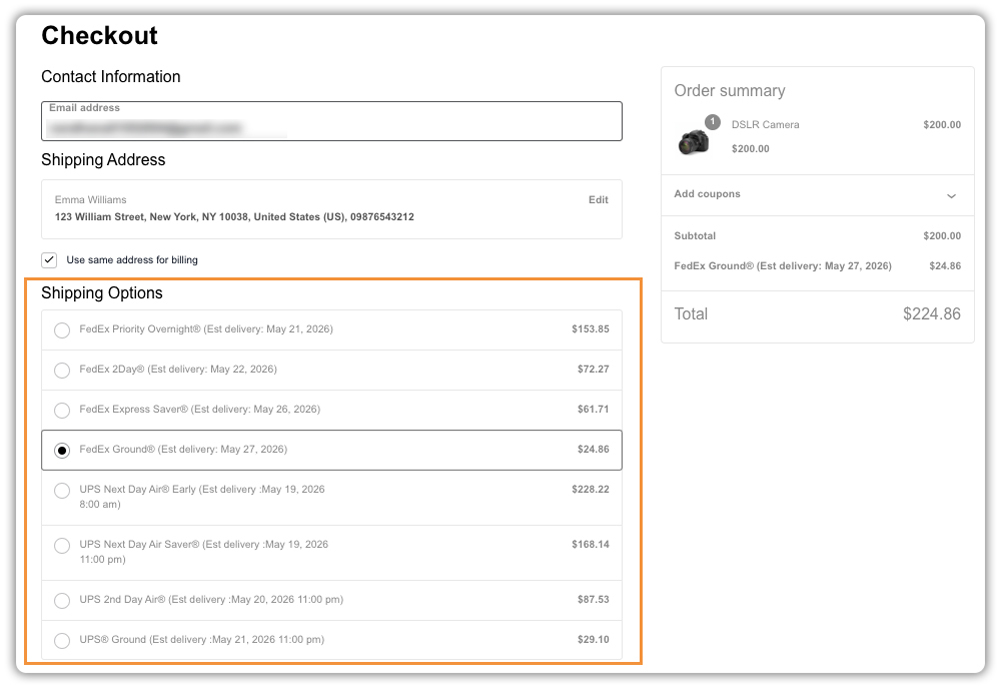
The Multi-Carrier Shipping Plugin for WooCommerce fetches live rates from FedEx, UPS, DHL Express, USPS, and Stamps.com and displays them at checkout based on the customer’s address and cart contents. Each option shows the carrier name, actual cost, and estimated delivery days so customers can make an informed choice rather than second-guessing a single number.
For stores with more structured pricing needs, the Table Rate Shipping Pro plugin lets you define shipping costs based on weight, order total, or destination zone a reliable option when rule-based pricing works better than live carrier rates.
Offer Flexible Payment Options in WooCommerce
Shipping isn’t always the only reason customers hesitate at checkout. For expensive products, bulky items, or custom orders with higher shipping costs, paying the full amount upfront can discourage customers from completing their purchase. Offering flexible payment options helps reduce that hesitation.
The PH Deposits for WooCommerce plugin lets customers choose between a deposit and full payment directly on the product page. Customers can choose to pay a fixed deposit, a percentage of the total, or follow a payment schedule. You control which products allow deposits and what each option looks like to the customer.

- Customisable payment buttons – clearly labelled “Pay Deposit” and “Full Payment” options so the choice is straightforward
- Automated balance reminders – sent with a secure payment link when the remaining amount is due, no manual follow-up needed
- Tax transparency – deposit and balance amounts clearly show whether tax is included or excluded
- Coupon compatibility – discounts apply correctly across both the deposit and final payment

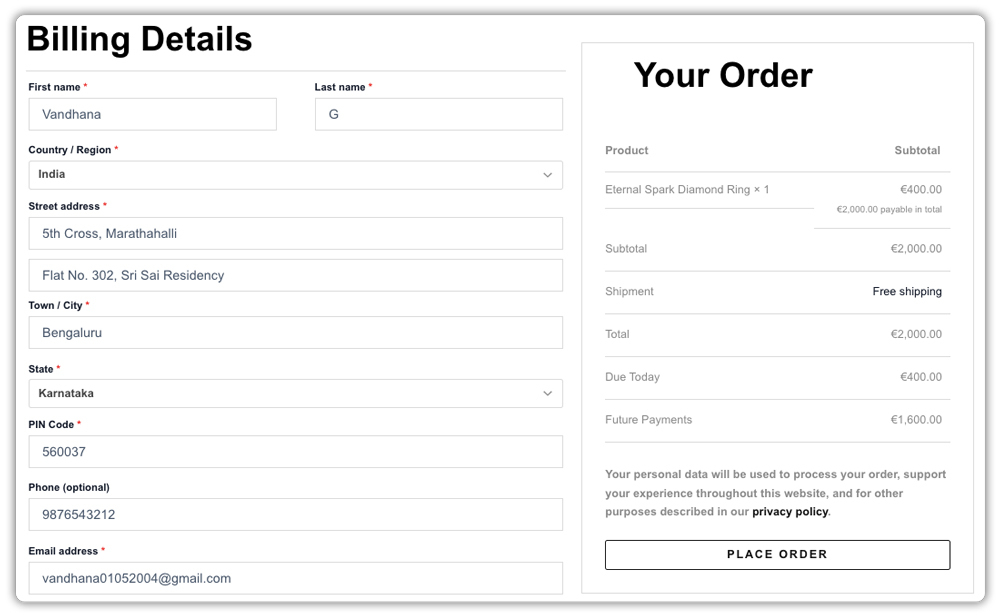
Giving customers control over how they pay reduces hesitation on higher-priced products and keeps more orders from being abandoned at the decision stage.
Show Estimated Delivery Dates at WooCommerce Checkout
Customers buying time-sensitive items, gifts, event supplies, or urgent replacements need to know when their order will arrive before they commit to paying. Without a delivery date visible at checkout, even a well-priced order with clear shipping options can lose a customer unwilling to guess.
The Estimated Delivery Date Plugin for WooCommerce shows delivery windows at the shop, product page, cart, and checkout, calculated based on working days, cut-off times, shipping zones, and custom holidays.
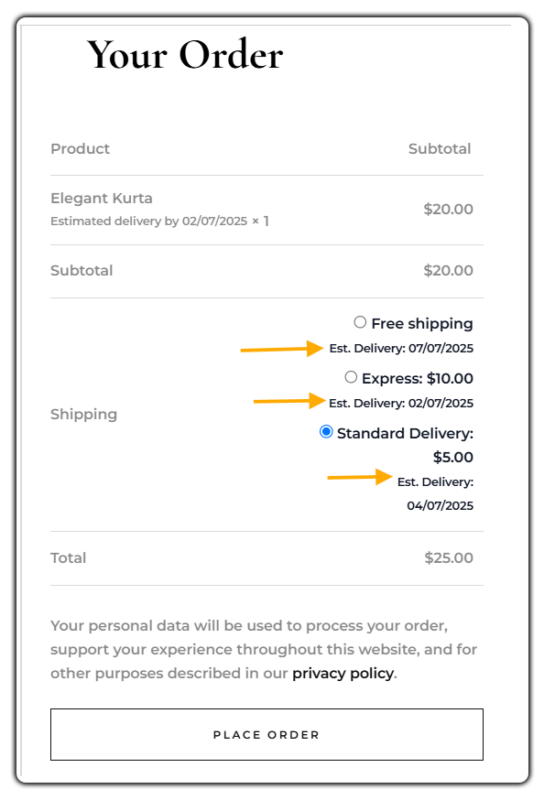
When a customer has multiple products with different timelines, each item shows its own estimated date, giving them complete clarity before they hit the pay button.
Build Trust at WooCommerce Checkout
Getting a customer to check out doesn’t guarantee they’ll complete the purchase. Small doubts about payment security, returns, or who they’re buying from can be enough to make them leave.
A few simple additions help here:
- Show secure payment badges – Place SSL certificates or trusted payment icons near the payment field. Customers look for these before entering card details.
- Display return & shipping policies – A one-line summary with a link to the full policy removes last-minute hesitation around commitment.
- Visible contact information – A support email or live chat link on the checkout page builds confidence, especially for first-time buyers.
- Transparent order summary – Show a clear cost breakdown before the pay button. Unexpected totals at the last step are a common reason customers abandon.
None of these needs a plugin – they are small, deliberate additions that make your checkout feel more credible to customers who are on the fence.
Tips to Optimize the WooCommerce Shipping Experience
Getting the shipping experience right at checkout comes down to a few setup choices that are easy to overlook.
- Offer multiple shipping options: Give customers a choice between standard, expedited, or express shipping whenever possible. Different customers have different priorities when it comes to cost and delivery speed.
- Set realistic cut-off times. If same-day or next-day shipping is offered, make sure the cut-off time reflects your actual dispatch process, not an optimistic estimate.
- Account for holidays and weekends in delivery estimates. A delivery date that ignores non-working days will consistently be wrong, which damages trust over time.
- Review your shipping zones periodically. Rates or delivery estimates set up once and left untouched often drift out of sync with actual carrier pricing or transit times.
- Keep deposit terms clear on the product page, not just at checkout, so customers know upfront that a partial payment option exists.
These small adjustments make the difference between a checkout that feels accurate and one that feels like a guess.
Conclusion
A smooth shipping experience plays a major role in whether customers complete their purchase. Accurate shipping rates, clear delivery estimates, flexible payment options, and transparent checkout information help eliminate uncertainty at the final step of the buying journey.
By improving how shipping information is presented at WooCommerce checkout, you can reduce cart abandonment and create a more reliable shopping experience for your customers. If you need help setting up any of the plugins covered in this article, the PluginHive support team is available to assist.
FAQs
Q: Why should I show real-time shipping rates instead of a flat rate at checkout?
Flat rates often don’t match what a carrier actually charges, leading to either lost margin or customer distrust when the number doesn’t add up. Live rates from a plugin like the Multi-Carrier Shipping Plugin ensure the price shown reflects the actual cost.
Q: How do I show estimated delivery dates in WooCommerce?
WooCommerce doesn’t include this by default. The Estimated Delivery Date Plugin calculates and displays delivery windows across the shop, product, cart, and checkout pages based on your shipping zones and working days.
Q: How do I customize checkout in WooCommerce?
WooCommerce has built-in settings to remove or reorder checkout fields. For more advanced changes like adding payment options, showing delivery dates, or controlling which shipping methods appear, you can use dedicated plugins without touching any code.
