


Shipping sea food through WooCommerce presents unique challenges. Whether you’re shipping fresh fillets, frozen shrimp, or gourmet shellfish, maintaining product quality while also meeting customer expectations is essential. To achieve this, store owners must manage strict temperature controls, choose the right carriers, and use proper packaging. In other words, every detail in seafood logistics plays a critical role. In this article, we’ll explore how WooCommerce store owners can successfully ship sea food in WooCommerce by adopting smart shipping strategies, automation tools, and proven best practices to ensure products are delivered fresh, efficiently, and in full compliance with food safety regulations.
On This Page
- Challenges of Shipping Seafood with WooCommerce
- Requirements for Fresh and Frozen Seafood Shipments
- Choosing the Right Shipping Carriers for WooCommerce
- Automating Seafood Shipping in WooCommerce
- Conclusion
- FAQs
Challenges of Shipping Seafood with WooCommerce
Shipping seafood in WooCommerce presents different hurdles due to the perishable nature of the products. Store owners must address several critical challenges, such as:
- Temperature Sensitivity
Sea food requires strict temperature control, utilizing insulated packaging and cooling agents such as dry ice or gel packs. Failure to maintain the cold chain results in spoilage.
- Time-Critical Deliveries
Sea food must reach customers quickly, often within 1–2 days. This demands integration with carriers that support express delivery options.
- Specialized Packaging
Leak-proof and food-safe packaging is essential to preserve freshness and comply with health regulations during transit.
- Limited Carrier Choices
Not all carriers accept perishable goods. WooCommerce stores must work with carriers that allow cold shipments.
- High Shipping Costs
Expedited services and insulated packaging significantly raise shipping costs. Merchants must manage this without affecting product pricing or profit margins.
- Regulatory Compliance
Sea food shipping must meet food safety standards, especially for cross-border deliveries. Proper labeling and documentation are required.
Tackling these challenges is key to delivering seafood safely, maintaining customer trust, and running a successful WooCommerce store.
Requirements for Fresh and Frozen Seafood Shipping
Proper packaging is essential to ship sea food in WooCommerce, as it helps preserve product quality. Whether it’s fresh or frozen, each requires specific packaging to ensure safe delivery.
1. Fresh Seafood Packaging
- Insulated Containers: Use rigid polystyrene foam (EPS), polyurethane, or foil-lined containers to keep products cold.
- Gel Packs/Ice Packs: Preferred over dry ice for fresh seafood. These maintain temperature without freezing the product.
- Leak-Proof Liners: Include sealed, watertight liners or absorbent pads to prevent leakage during transit.
- Durable Outer Box: Use a strong, corrugated cardboard box around the insulated container to withstand shipping stress.
- Ventilation: Avoid fully sealing fresh seafood in airtight bags to allow air circulation and avoid spoilage.
2. Frozen Seafood Packaging
- Dry Ice: Commonly used for frozen seafood. Ensure the packaging allows ventilation to release CO₂ gas safely.
- Vacuum Sealing: Minimizes freezer burn and extends shelf life. Products should be vacuum-sealed individually.
- Insulated Shippers: Use thick-walled foam containers rated at -20°C or below.
- Secondary Containment: Outer cardboard or plastic shipping boxes are required for stability and labeling.
- Labeling: Clearly label the package with “Perishable,” “Keep Frozen,” or “Dry Ice” as applicable.
Note:To learn more about frozen items shipments, check out these detailed guides:
3. Regulatory Compliance
- Dry Ice Limit: Carriers like UPS and FedEx limit dry ice to 5.5 lbs per package (for air shipments).
- Hazmat Labeling: Dry ice is considered a Class 9 hazardous material and requires specific labeling under IATA/DOT regulations.
- FDA & Local Laws: Ensure packaging materials are food-safe and compliant with FDA standards for food transport.
Using the right combination of insulation, cold packs, and labeling ensures your seafood arrives safely and legally at your customer’s door.
Choosing the Right Shipping Carriers for WooCommerce
Sea food demands fast, cold‑chain delivery. Among the big four carriers, only UPS, FedEx, and (to a limited extent) USPS accept temperature‑controlled packages with dry ice. DHL does not handle perishable food shipments within the U.S. Let’s dive more into the table below:
| Carrier | Seafood Accepted | Dry Ice Limit | Approx. Dry Ice Fee* | Recommended Services | Key Restrictions |
|---|---|---|---|---|---|
| UPS | Fresh & Frozen | Up to 5.5 lb (Air) | $7.05 per package | Next/2nd Day Air; Ground for B2B | Ground is not advised for perishables; no live seafood |
| FedEx | Fresh & Frozen | ≤200 kg (~441 lb) | ~$8 per package | Priority Overnight, First Overnight | Class 9 labels, packaging rules apply |
| USPS | Frozen only | 5 lb (Air); Unlimited (Surface) | No extra fee | Priority Mail Express | No liability for spoilage; limited tracking accuracy |
| DHL | Not accepted (U.S.) | N/A | N/A | N/A | The prohibited goods list includes dry ice |
Choosing the right carrier is just the first step. To successfully ship frozen food from your WooCommerce store, your fulfillment strategy matters just as much.
Check out to learn more about shipping frozen food with different carriers: How to Ship Frozen Food with WooCommerce: USPS vs. UPS vs. FedEx.
Let’s see how to get it right, UPS and FedEx, in the next section.
Automating Seafood Shipping in WooCommerce
Let’s say you run a WooCommerce store selling premium frozen seafood, like lobster tails, crab legs, or ready-to-eat shrimp. Timely delivery and temperature control are critical, but handling shipping manually can lead to delays, errors, or spoilage..
Seafood shipping doesn’t have to be complicated when you automate the process using tools like:
If you’re new to the plugin, start with these setup guides for a quick integration:
FedEx Plugin Setup for WooCommerce
UPS Plugin Setup for WooCommerce
Here’s how you can automate seafood shipping with UPS and FedEx using PluginHive:
Make sure to configure the dry ice option in the FedEx plugin and the perishable and refrigeration options in the UPS plugin to activate these options at the product level.
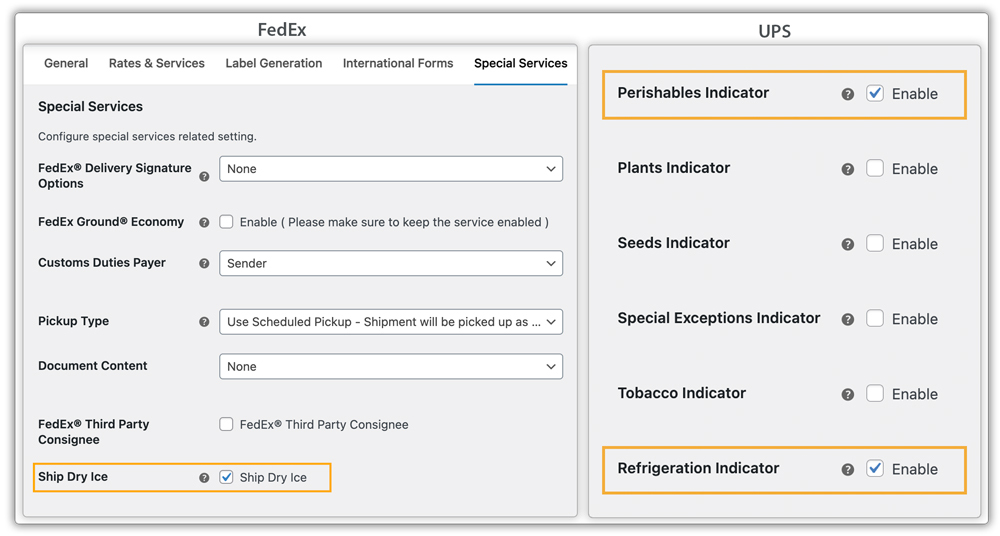
In the product settings, specify dry ice usage with weight for FedEx and mark seafood items as perishable and refrigerated for UPS.

Choose expedited services like FedEx Overnight services or UPS Next Day Air within the plugin. These services are suitable for time-sensitive seafood shipments.
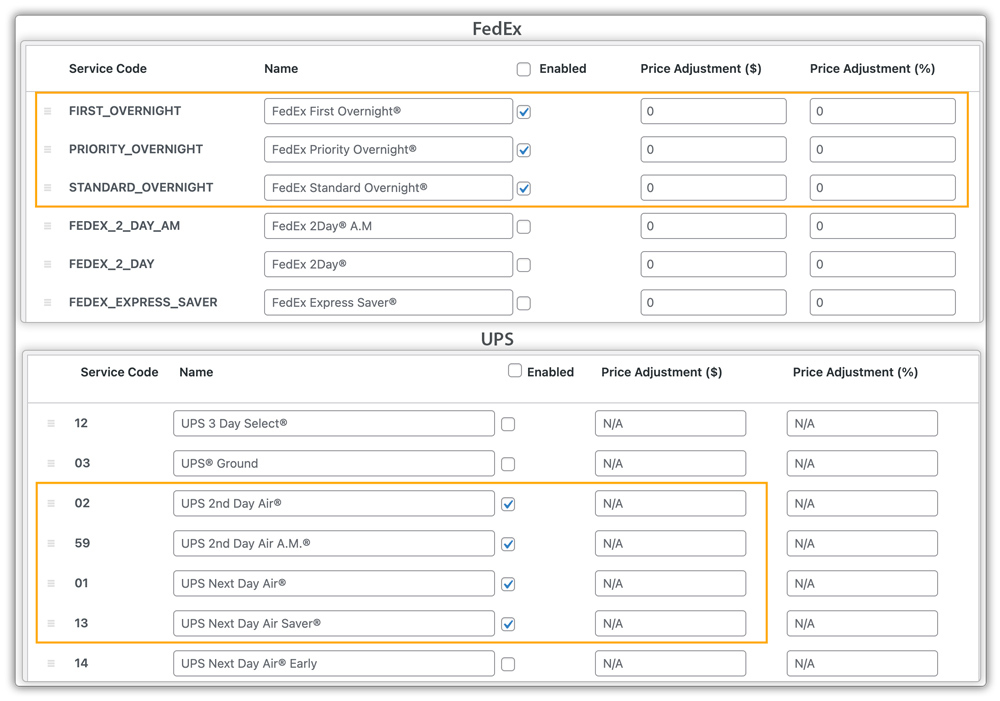
With the setup done, customers will see accurate FedEx and UPS shipping rates at checkout, including dry ice surcharge.

As soon as an order is placed, the plugin generates a label showing all required indicators. For example, UPS labels display perishable and refrigeration indicators, while FedEx labels mention the dry ice quantity.

Once the label is generated, tracking is shared with the customer, and you can schedule UPS or FedEx pickups right from WooCommerce. For details, refer to the WooCommerce FedEx Shipment Tracking & Pickup Guide and Track UPS Orders in WooCommerce
This end-to-end automation ensures your sea food products ship safely and quickly, with minimal manual intervention.
USPS doesn’t offer refrigeration services. You can ship seafood with USPS using insulated packaging and ice packs or dry ice (domestic only), but it’s at your own risk as spoilage isn’t covered under insurance.
Conclusion
In brief, shipping sea food in WooCommerce becomes manageable when you combine proper packaging, fast carrier services, and automation tools. With the right setup, using the UPS Shipping Plugin and the FedEx Shipping Plugin, you can not only display accurate rates but also generate dry ice-compliant labels and automate tracking—all directly from your WooCommerce store.
Need help setting this up? Contact PluginHive Support for personalized assistance.
FAQs
- Is dry ice mandatory for shipping frozen seafood?
Dry ice is highly recommended for frozen seafood, especially for shipments longer than 24 hours. It helps maintain sub-zero temperatures throughout transit.
- Are international seafood shipments supported?
Yes, UPS and FedEx support international sea food shipping with dry ice, if regulations are followed. USPS does not allow dry ice for international shipments and isn’t recommended for perishables.
- Are there legal restrictions when shipping seafood across state lines or internationally?
Yes. You must comply with FDA regulations for food transport and also meet any local or international food import/export laws.
- How do I calculate how much dry ice to include per shipment?
The required amount of dry ice depends on several factors: the product type, insulation quality, transit time, and external temperatures. As a general rule, you should use 5–10 lbs of dry ice for 24–48 hours of cold retention.
