


In today’s competitive e-commerce world, providing reliable shipment tracking is key to building trust and improving the customer experience. For WooCommerce stores in Denmark and Sweden, PostNord is a leading courier recognized for its efficient delivery across the region. Integrating PostNord tracking into your WooCommerce orders keeps customers informed throughout, reducing inquiries and increasing satisfaction.
This guide covers PostNord tracking features, why tracking matters, and how to easily set it up in WooCommerce.
On This Page
- PostNord Tracking Services for Denmark & Sweden
- Why Add PostNord Tracking in WooCommerce?
- How to Add PostNord Tracking to WooCommerce Orders
- Real-World Example
- Conclusion
- FAQs
PostNord Tracking Services for Denmark & Sweden
PostNord is the leading logistics provider in the Nordic region, offering comprehensive tracking services for shipments within Denmark and Sweden. Customers receive real-time updates on their parcels’ status, from pickup to final delivery, ensuring transparency throughout the shipping journey.
Key features include:
- Detailed tracking events showing package location and progress
- Estimated delivery dates to keep customers informed
- Delivery notifications via email or SMS
- Access to tracking information through PostNord’s website or mobile app
PostNord’s tracking system supports both domestic and international shipments, making it a reliable choice for WooCommerce merchants shipping within Denmark, Sweden, and beyond.
To learn about Post Nord shipping services, check out this guide: PostNord Services for WooCommerce Businesses
Why Add PostNord Tracking in WooCommerce?
Integrating PostNord tracking into your WooCommerce store offers multiple benefits for both merchants and customers:
- Enhances Customer Experience: Real-time tracking updates keep customers informed about their order status, reducing anxiety and building trust.
- Reduces Support Inquiries: When customers can track shipments themselves, you get fewer “Where is my order? (WISMO)” questions, saving time for your support team.
- Boosts Transparency: Providing clear shipment information improves your store’s credibility and professionalism.
- Improves Order Management: Automatic tracking integration helps you monitor deliveries and quickly address any shipping issues.
- Increases Repeat Business: Satisfied customers who can easily track orders are more likely to return and recommend your store.
By adding PostNord tracking, you create a smoother, more reliable shopping experience tailored to the expectations of customers in Denmark and Sweden.
How to Add PostNord Tracking to WooCommerce Orders
To start automating PostNord shipping through your WooCommerce store, you’ll need to install and activate the PostNord Shipping Plugin for WooCommerce with Print Label.
Be sure to generate the shipping label and fulfill the order after it’s placed. This triggers the tracking process. To learn how, check out – Print PostNord Shipping Label in WooCommerce.
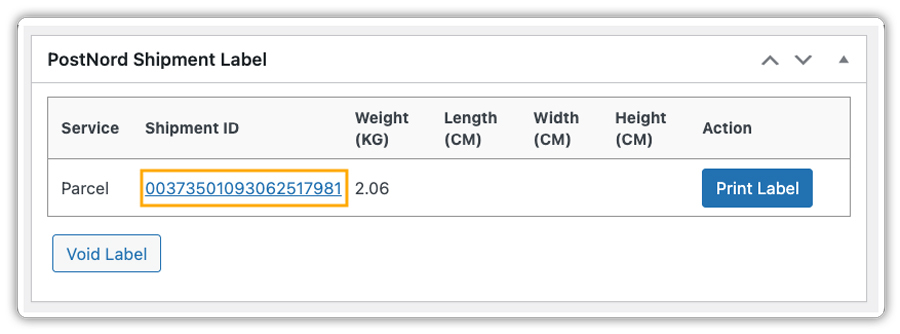
Once the shipping label is generated, the plugin creates a tracking ID along with the PostNord tracking URL for each order.
You can also enable the Tracking Details in Email option. The plugin allows you to customize the section title and tracking message, as shown below.
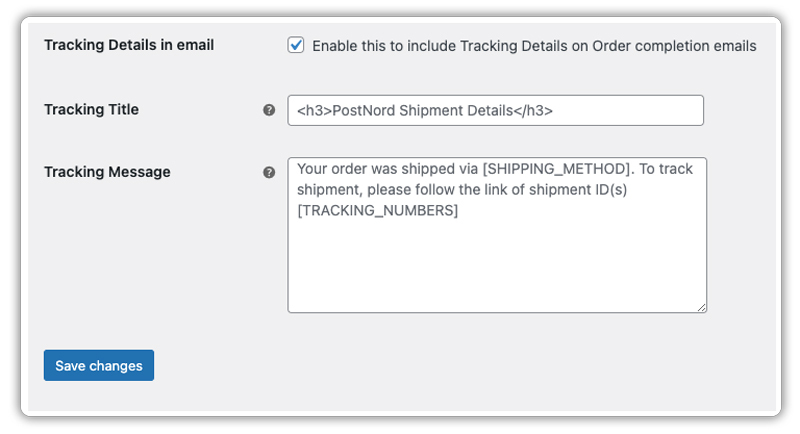
When enabled, customers automatically receive their PostNord tracking details in the WooCommerce order completion email.

This way, the plugin simplifies the process and keeps your customers updated at every step. Let’s understand this better with a real case study.
Real-World Use Case: Tracking Luxury Fashion Shipments with PostNord
Let’s say you run a WooCommerce store based in Denmark that sells luxury fashion items such as designer handbags, watches, and accessories. These high-value, delicate products require secure and timely delivery, along with transparent tracking for customers across Denmark and Sweden.
The Challenges You Will Face
- Luxury fashion products are valuable and often delicate, requiring reliable, trackable shipping to avoid loss or damage.
- Customers expect up-to-date tracking information to feel confident about their purchases.
- Without automated tracking, support teams face many “Where is my order? (WISMO)” inquiries, especially during peak seasons.
- Manual tracking is inefficient and increases the risk of errors, potentially affecting customer satisfaction.
How It Can Be Solved
Using the PostNord Shipping Plugin for WooCommerce, you can:
- Automatically generate a tracking ID along with the shipping label in your WooCommerce store.
- Keep your customers informed by automatically including tracking details in WooCommerce order completion emails.
- Reduce “Where is my order?” support queries, minimizing customer frustration and improving service.
- Increase customer trust and loyalty through improved visibility and seamless automation when shipping luxury fashion products across Denmark and Sweden.
This level of visibility and automation builds customer trust and reduces support workload.
Conclusion
Integrating PostNord tracking into your WooCommerce store enhances the customer experience by providing shipment updates and improving transparency. Automated tracking helps you manage orders more efficiently, especially when shipping valuable or time-sensitive products across Denmark and Sweden. By leveraging the PostNord Shipping Plugin for WooCommerce, you can create a seamless, trustworthy shipping process that builds customer confidence and encourages repeat business.
For assistance with setup or any questions, feel free to contact PluginHive Support.
FAQs
- Do I need a PostNord account to use the plugin?
Yes, you must have a registered PostNord business account to access shipping labels, live tracking, and other features via the WooCommerce plugin. Check out this guide to learn how to register for a PostNord account.
- Does PostNord support returns?
Yes. PostNord offers services like Return Drop-Off and Rek Retur to handle both domestic and international returns securely.
- Is PostNord tracking available for international shipments?
Yes, PostNord tracking supports both domestic and international shipments, so you can provide tracking details to customers shipping beyond Denmark and Sweden. For a detailed guide, read this – Domestic and international shipping with Post Nord
- Can I offer multiple PostNord shipping services in WooCommerce?
Yes, the plugin lets you enable and display various PostNord shipping options so customers can choose the service that best fits their needs.
