


For WooCommerce stores shipping within Australia, Australia Post is a popular and reliable carrier. However, manually generating shipping labels through the Australia Post portal can slow down fulfillment and lead to errors. Integrating MyPost Business with WooCommerce simplifies this process.
This guide explains how to print Australia Post labels for WooCommerce using MyPost Business for smoother fulfillment.
On This Page
- Why Print Australia Post Shipping Labels from WooCommerce?
- How to Print Australia Post MyPost Business Labels in WooCommerce
- Real-World Use Case
- Conclusion
- FAQs
Why Print Australia Post Shipping Labels from WooCommerce?
Printing Australia Post MyPost Business labels directly from WooCommerce simplifies shipping and improves overall fulfillment efficiency. Here’s how it makes a difference:
- Faster order fulfillment: Generate Australia Post shipping labels instantly from WooCommerce orders, reducing manual steps and speeding up dispatch.
- Reduced errors: Automatic transfer of order details minimizes mistakes in addresses, parcel weights, and service selection.
- Centralized shipping management: Manage label printing, shipments, and order statuses directly within WooCommerce without switching to the MyPost Business portal.
- Improved tracking experience: Tracking numbers are automatically added to WooCommerce orders, keeping customers informed about delivery progress.
- Scalable for growing stores: Ideal for stores handling higher order volumes, making daily shipping operations more efficient and reliable.
Overall, printing Australia Post labels from WooCommerce helps save time and deliver a smoother post-purchase experience.
How to Print Australia Post MyPost Business Labels in WooCommerce
Printing Australia Post MyPost Business labels in your WooCommerce store is simple with the PH Australia Post MyPost Business Shipping Plugin for WooCommerce. This plugin connects your store directly with Australia Post and automates the fulfillment process, so you can generate labels, tracking numbers, and shipments without leaving WooCommerce.
To configure the plugin in your WooCommerce store, refer to the guide: Setting Up Australia Post Shipping Plugin for WooCommerce.
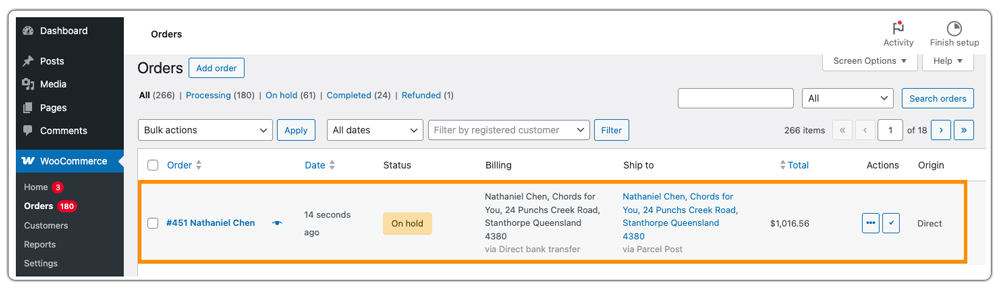
Once an order is placed in your WooCommerce store, open the specific order from your WooCommerce Orders page.
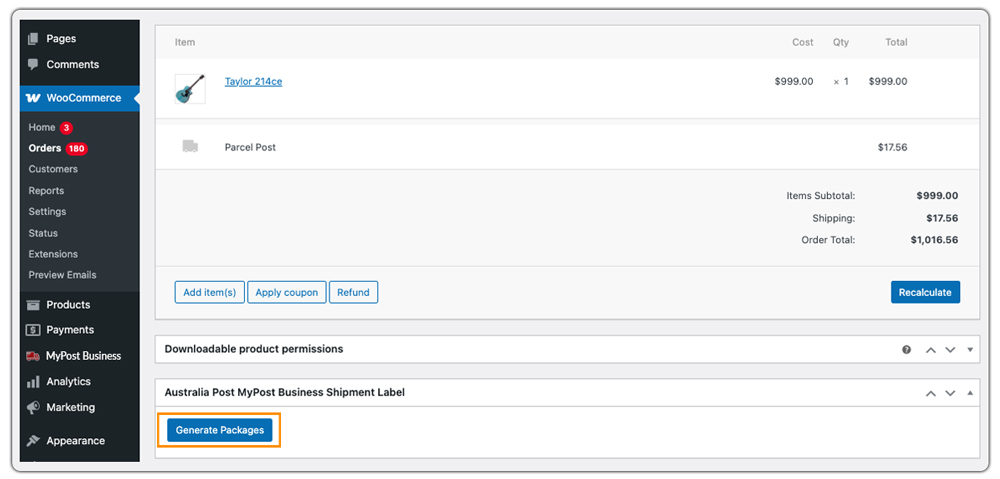
Click Generate Packages. The plugin creates packages automatically using the parcel packing method configured in the plugin settings, ensuring accurate weight and dimensions.
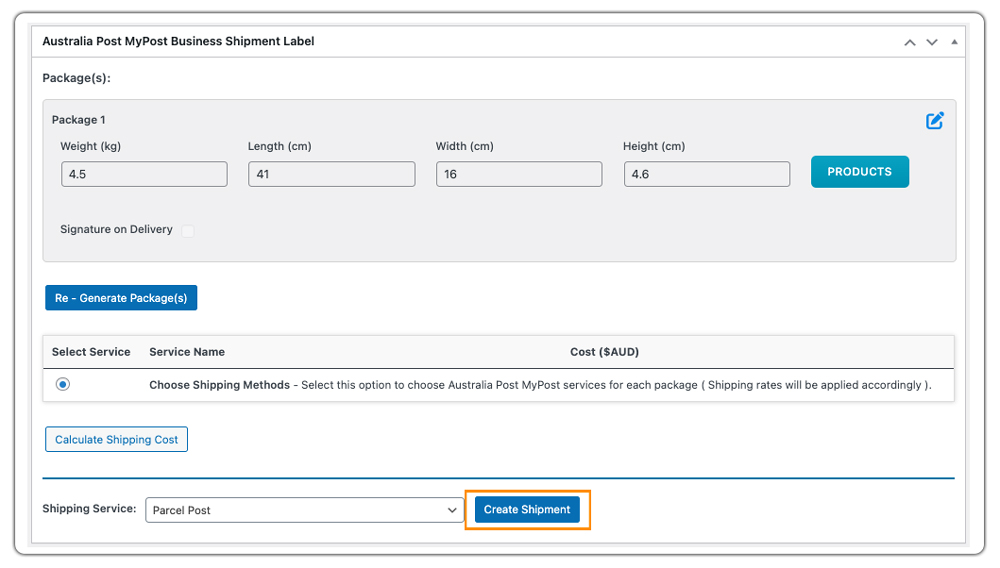
After the packages are generated, Create Shipment. This action generates the Australia Post MyPost Business shipment and creates the shipping label for the order.
Once the shipment is created, the tracking ID is automatically added to the order, and the Print Label option becomes available. You can download and print the label directly from the order page.
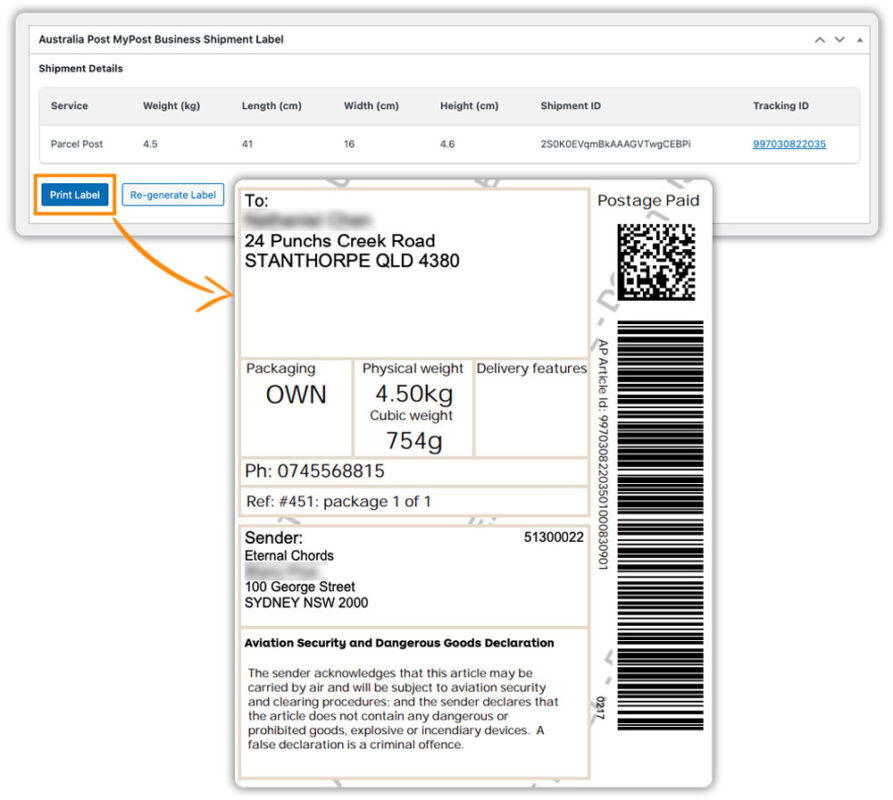
Using this setup, WooCommerce store owners can handle Australia Post shipping labels efficiently and maintain a smooth fulfillment workflow.
Real-World Use Case: Australian WooCommerce Store Struggling with Multiple Dashboards
An Australian WooCommerce store selling lifestyle and home products processed 40-60 orders per day, with volumes increasing by nearly 35% during seasonal sales. Even though the store preferred Australia Post MyPost Business as its carrier, it followed a fragmented and inefficient fulfillment workflow.
As order volume grew, operational challenges became more visible:
- Staff had to switch between the WooCommerce admin panel and the Australia Post MyPost Business dashboard for every order. This context switching added unnecessary time to each shipment.
- Store owners created shipping labels in the MyPost Business portal and manually copied tracking numbers into WooCommerce orders, making the process error-prone.
- On busy days, fulfillment time per order increased by 20-25%, leading to delayed dispatches and customer follow-ups.
- Reprinting labels or reviewing past shipments required logging into multiple systems, slowing down customer support responses.
Solution Implemented
To centralize shipping operations, the store integrated Australia Post MyPost Business with WooCommerce using the PH Australia Post MyPost Business Shipping Plugin for WooCommerce. Once configured, the plugin connected the store directly to Australia Post from within WooCommerce.
The impact was immediate and measurable:
- Shipping labels were generated directly from WooCommerce orders, eliminating manual data entry.
- Tracking numbers were added automatically, reducing fulfillment errors.
- Order processing time dropped by 30%, even during high-volume sales periods.
- All shipping labels were stored in WooCommerce, making reprints and audits effortless.
- The team managed daily fulfillment from a single dashboard, improving productivity and accuracy.
By moving Australia Post MyPost Business shipping entirely into WooCommerce, the store reduced operational overhead and scaled shipping operations without adding staff or complexity.
Conclusion
Printing Australia Post MyPost Business shipping labels directly from WooCommerce helps save valuable time as order volumes grow. By centralizing label generation, tracking, and shipment management in one dashboard, store owners can maintain a faster and more reliable shipping workflow.
If you need help setting up or optimizing Australia Post shipping in WooCommerce, reach out to PluginHive Support for assistance.
FAQs
Q. Can I display Australia Post MyPost Business real-time shipping rates in WooCommerce?
Yes. The Australia Post MyPost Business Shipping Plugin for WooCommerce supports live MyPost Business rates at cart and checkout. For setup details, refer to this guide: Australia Post MyPost Business Shipping Rates in WooCommerce.
Q. Can I combine Australia Post MyPost Business live rates with free shipping or flat rates?
Yes. You can create flexible shipping rules to offer free shipping above a certain cart value or show flat-rate options using the WooCommerce Table Rate Shipping Pro Plugin, while still displaying MyPost Business live rates when required.
Q. Can I show estimated delivery dates along with Australia Post shipping rates?
Yes. Using the Estimated Delivery Date Plugin for WooCommerce, you can display accurate delivery estimates alongside Australia Post MyPost Business rates at checkout, helping customers know when their orders are likely to arrive.
Q. Can multi-vendor WooCommerce stores use this plugin?
Yes. With theWooCommerce Multi-Vendor Shipping Addon, each vendor can display real-time Australia Post rates and print the label.
Q. Can I provide complete shipment tracking for Australia Post MyPost Business orders?
Yes. Basic tracking is automatically added when labels are generated. For advanced features and better customer communication, you can integrate the WooCommerce Shipment Tracking Pro Plugin.
Q. Can I reprint Australia Post shipping labels from WooCommerce if needed?
Yes. The plugin stores all generated MyPost Business shipping labels directly in your WooCommerce dashboard, so you can download and reprint labels anytime without logging into the Australia Post portal.
