


If you run a Shopify store and ship internationally, chances are you’ve considered DHL Express. It’s fast. It’s reliable. And when it comes to global delivery, it’s one of the most trusted carriers in the world.
But choosing the right carrier is only half the job. The real magic happens when your shipping process is smooth, especially when printing labels. The faster and more accurately you generate DHL Express shipping labels, the quicker your orders go out, and the happier your customers are.
In this guide, we’ll walk through exactly how to print DHL Express shipping labels directly in Shopify so that you can streamline your fulfillment.
In This Article:
- What You Need Before Printing DHL Express Labels in Shopify
- DHL Express Account Options in Shopify
- When Shopify Supports DHL Express and When It Doesn’t
- Printing DHL Express Labels Using Shopify Shipping
- Printing DHL Express Labels Using PluginHive
- DHL Express Pickups Inside Shopify
- Conclusion
- FAQ’s
What You Need Before Printing DHL Express Labels in Shopify
Before you start generating DHL labels, make sure a few basics are in place:
- Your store address is correct in Shopify
- Product weights and dimensions are accurate
- Your shipping zones are properly configured
- You’ve decided whether you’re using Shopify Shipping, i.e., using the services with Shopify’s account with DHL or your own DHL account
Getting these details right prevents delays, incorrect rates, and customs issues later on.
DHL Express Account Options in Shopify
There are generally two ways Shopify merchants ship with DHL Express:
Shopify Shipping
- Shopify gives merchants access to discounted DHL Express rates through Shopify Shipping. You don’t need your own DHL account; Shopify handles that part.
- This is ideal for small to mid-sized stores that want something quick and simple.
Your Own DHL Express Contract Account
- If you ship frequently or in high volumes, you may have negotiated rates directly with DHL Express.
- In that case, you’ll want to connect your DHL account to Shopify using a shipping app like PH Multi-Carrier and Shipping Label app.
- This gives you more control, better rates, and advanced features.
When Shopify Supports DHL Express and When It Doesn’t
Shopify’s built-in DHL Express support applies only when:
- You ship from the continental U.S. region
- You ship to international addresses
- You use Shopify’s negotiated DHL rates, i.e., the rates Shopify has negotiated with DHL.
You’ll need a shipping app like PH Multi-Carrier Shipping Label if:
- You want to use your own DHL Express contract rates
- You need bulk label printing
- You want automatic label generation
- You require multi-carrier shipping from one dashboard
Printing DHL Express Labels Using Shopify Shipping
Shopify Shipping makes it easy for eligible U.S. merchants to print DHL Express labels directly from the order page.
Supported Features
With Shopify Shipping, you can access:
- DHL Express Worldwide (1–3 business days delivery)
- Coverage to 200+ countries and territories
- Free DHL shipment pickups
- Support for DDP (Delivered Duty Paid) and DDU (Delivered Duty Unpaid) labels
- Automatic tracking number updates
Package Requirements
DHL Express international shipments must follow these limits:
- Maximum weight: 154 lb (70 kg)
- Maximum length: 47.2 inches
- Maximum width: 31.5 inches
- Maximum height: 31.5 inches
Accurate package details help prevent shipping adjustments or delays.
Step-by-Step Guide
Here’s how to print a DHL Express shipping label using Shopify’s native workflow:
- Open the order you want to ship in your Shopify dashboard.
- Click Create shipping label.
- Select DHL Express Worldwide.
- Review the shipping rate.
- Click Buy shipping label, and Shopify will generate it instantly.
- Download and print the label.
Once purchased, the tracking number is automatically added to the order and sent to the customer.
Limitations
Shopify Shipping is convenient, but it has several restrictions:
- Only available for international shipments from the continental U.S.
- No domestic DHL shipping
Limited automation and bulk processing, only one label can be printed at once.
Printing DHL Express Labels Using PluginHive
For growing stores, shipping apps provide far more flexibility. The PH Multi-Carrier Shipping Label app is a strong option because it offers full support for DHL Express, including contract accounts.
Features available with the PH Multi-Carrier and Shipping Label app.
A shipping app unlocks features that Shopify doesn’t provide, including:
- Support for own DHL Express accounts

- Real-time negotiated DHL rates at checkout
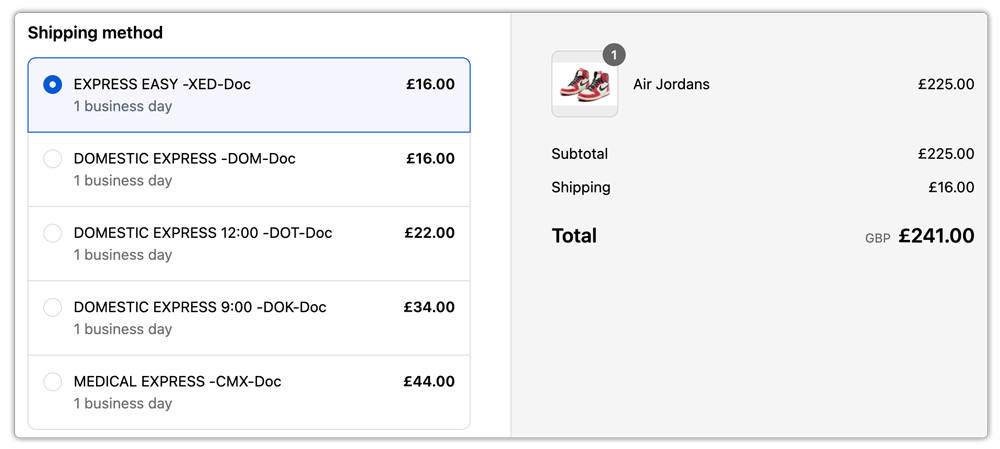
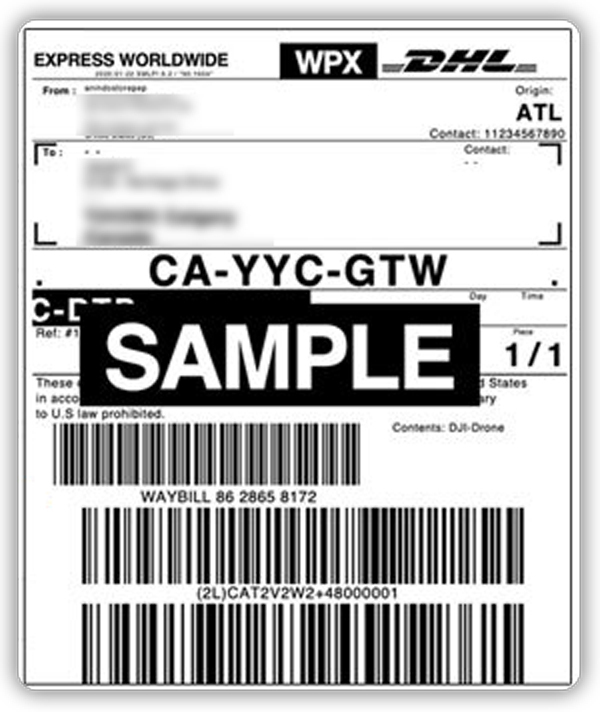
- Automatic label generation after order payment and Bulk label printing for high-volume fulfillment
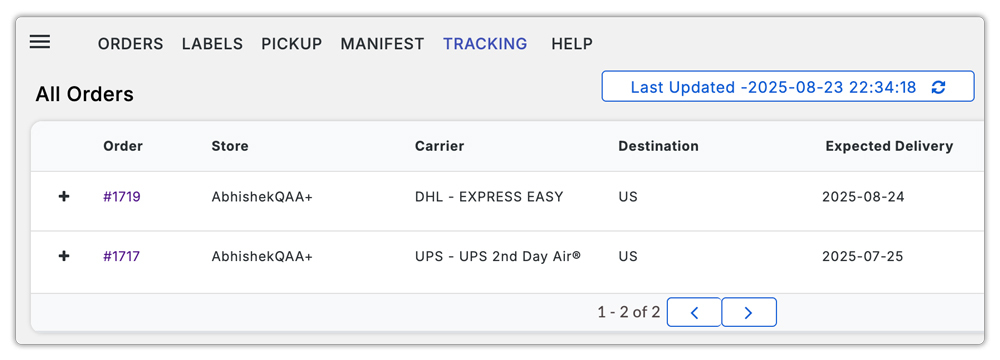
- Centralized shipment tracking for multiple carriers, including DHL, can be tracked in one dashboard
These tools help merchants save time and reduce manual shipping work.
DHL Express Pickups Inside Shopify
DHL Pickups Through Shopify Shipping:
One major benefit of DHL Express through Shopify is free shipment pickups.
You can:
- Schedule a pickup immediately after purchasing a label
- Schedule a pickup from a fulfilled order
- Book pickups up to 7 days in advance
You’ll need to provide:
- Contact name and phone number
- Pickup date and estimated time
- Package location (front desk, reception, door, etc.)
- Any special instructions
DHL Pickups Through PluginHive:
If you’re using the PH Multi-Carrier Shipping Label App by PluginHive, scheduling DHL pickups becomes much easier and more automated.
Instead of logging into your DHL account separately every time, you can schedule your pickup directly inside the app.
All you need to do is click “Request Pickup” once within the app. After that, the pickup is scheduled automatically with DHL no need to repeat the process for every label you generate.
The PluginHive app gives you access to advanced pickup features that are not always easily accessible elsewhere, including:
- Holiday pickups
- Saturday pickups
- The ability to choose a specific pickup time

This means you can schedule pickups at a time that works best for your warehouse or fulfillment team, ensuring DHL arrives when you’re ready.
For high-volume Shopify stores, this saves time, reduces manual errors, and makes the entire shipping workflow smoother.
Conclusion
Printing DHL Express shipping labels inside Shopify can be simple or advanced, depending on your business needs.
If you’re a U.S.-based merchant shipping internationally, Shopify Shipping provides a quick, built-in way to purchase DHL Express Worldwide labels, schedule free pickups, and manage tracking without extra tools.
However, if you rely on contract rates, bulk processing, or advanced automation, a more powerful setup becomes essential. That’s where the PH Multi-Carrier Shipping Label app fills the gaps, giving you full DHL Express flexibility and time-saving features that Shopify doesn’t provide on its own.
Regardless of the method you choose, a smooth label-printing process leads to faster fulfillment, fewer errors, and a better customer experience. The right setup will keep your international shipping efficient today and scalable as your Shopify store continues to grow.
FAQ’s
Q. Does Shopify integrate with DHL Express?
Yes. Shopify integrates with DHL Express through Shopify Shipping for international shipments originating in the continental United States and supports shipping to all locations with your own account through the PH Multi-Carrier and Shipping Label app
Q. Can I ship domestically in the U.S. using DHL Express through Shopify Shipping?
No. DHL Express through Shopify Shipping supports international shipments only.
Q. Are DHL Express pickups free?
Yes. Free shipment pickups are included when you purchase DHL Express labels through Shopify Shipping.
