



Printing shipping labels efficiently is essential for WooCommerce stores shipping across the UK and internationally. Parcelforce Worldwide, a trusted Royal Mail courier, offers reliable domestic and global delivery services. However, creating shipping labels outside WooCommerce can slow down fulfillment and lead to errors. Printing Parcelforce shipping labels directly from WooCommerce minimizes the manual work.
This guide explains how to print Parcelforce shipping labels in WooCommerce and outlines the benefits of using a real-world UK store example.
On The Page
- Overview of Parcelforce Shipping
- Why Print Parcelforce Shipping Labels from WooCommerce
- How to Print Parcelforce Shipping Labels in WooCommerce
- Real-World Example: UK WooCommerce Store Using Parcelforce
- Conclusion
- FAQs
Overview of Parcelforce Shipping
Parcelforce Worldwide is a leading UK-based courier service and a part of the Royal Mail Group. It is widely used by UK businesses for domestic and international parcel deliveries, making it a reliable shipping option for WooCommerce stores.
Parcelforce Shipping Services & Coverage
Parcelforce offers a range of delivery services, including express next-day delivery, standard UK services, and international shipping to destinations worldwide. Its network covers all UK postcodes and connects to global delivery partners, enabling WooCommerce stores to ship orders reliably across borders. Most services include parcel tracking and delivery confirmation, which helps both store owners and customers stay informed throughout the shipping process.
Parcelforce Network, Tracking & Business Features
Parcelforce operates through automated hubs and depots across the UK, supported by Royal Mail’s extensive logistics infrastructure. Shipments typically come with end-to-end tracking, collection options, and compensation cover depending on the service selected. These capabilities make Parcelforce suitable for WooCommerce stores handling regular order volumes, time-sensitive deliveries, and international shipments.
Why Print Parcelforce Shipping Labels from WooCommerce
Printing Parcelforce shipping labels directly from WooCommerce offers several advantages for store owners, including:
- Faster Order Fulfillment: Shipping labels can be generated in just a few clicks from the WooCommerce dashboard, allowing orders to be packed and dispatched more quickly.
- Reduced Manual Errors: Order details such as customer address, parcel weight, and service type are automatically pulled from WooCommerce, minimizing address and data entry mistakes.
- Integrated Tracking Updates: Once a label is created, tracking numbers are automatically linked to the order, making it easy to monitor shipments and keep customers informed.
- Consistent Shipping Workflow: Managing labels, tracking, and shipment status from one system creates a smoother, more reliable fulfillment process.
- Scalable for Growing Stores: Whether processing a few orders a day or handling higher volumes, printing Parcelforce labels from WooCommerce supports scalable and repeatable shipping operations.
By printing Parcelforce shipping labels directly from WooCommerce, store owners can streamline fulfillment and deliver a better post-purchase experience for customers.
How to Print Parcelforce Shipping Labels in WooCommerce
Printing Parcelforce shipping labels directly inside your WooCommerce store is easy and efficient with the WooCommerce Shipping Services plugin.
For a detailed, step-by-step installation and setup process, refer to the Setup Guide for the WooCommerce Shipping Services Plugin.
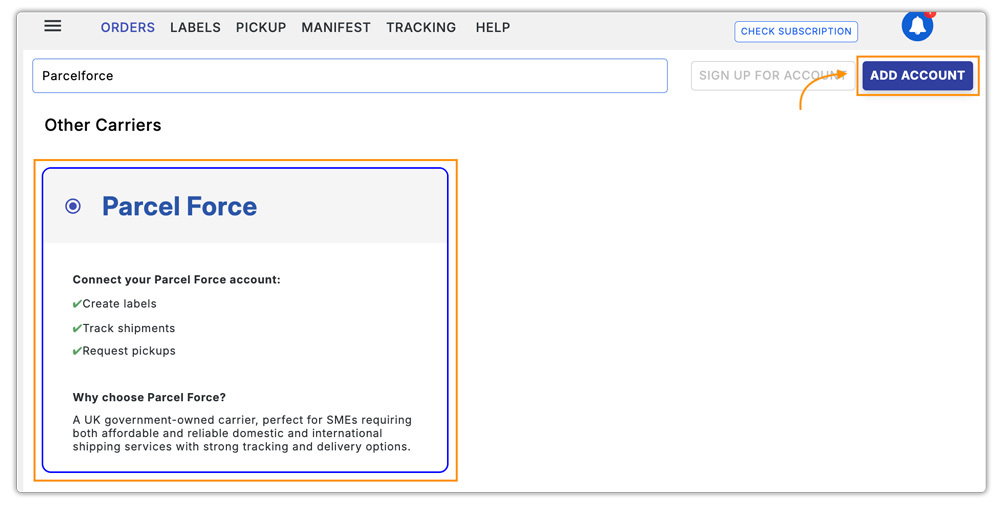
Once the plugin is installed, navigate to the plugin settings and add Parcelforce as a carrier, as shown in the image below.
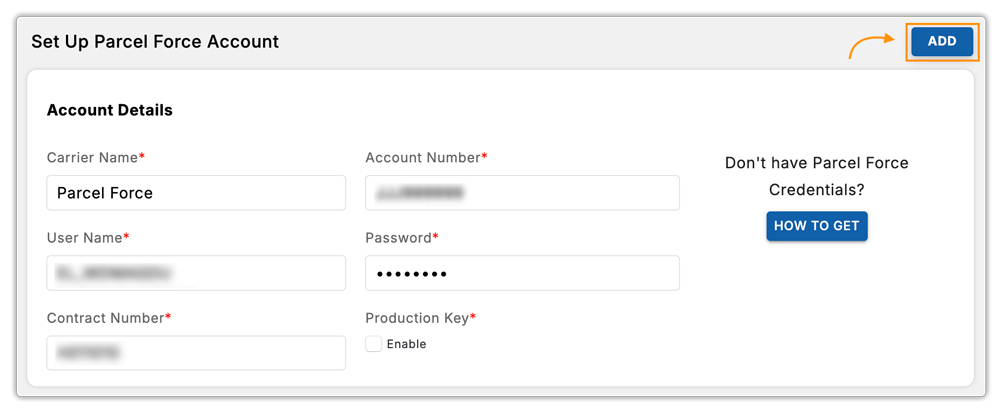
Next, enter your Parcelforce account credentials to connect your Parcelforce account with WooCommerce.
Since the Parcelforce API currently doesn’t support real-time shipping rates in WooCommerce, you can use WooCommerce Flat Rate Shipping or a flexible rate plugin like the WooCommerce Table Rate Shipping Pro to set up accurate custom rates.
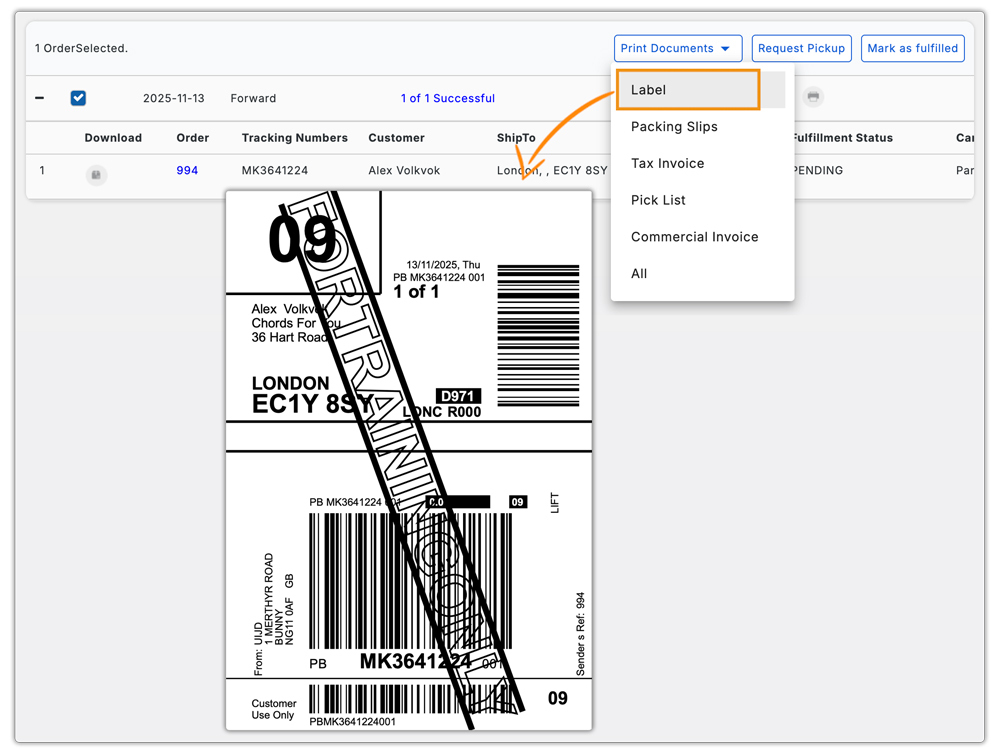
Once the account is connected, your store can generate Parcelforce shipping labels directly from WooCommerce orders.
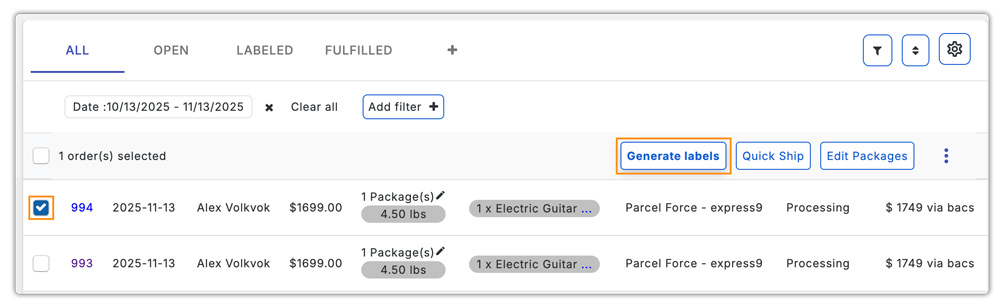
After generating, you can print the labels immediately and attach them to the packages for dispatch, making fulfillment faster and more accurate.
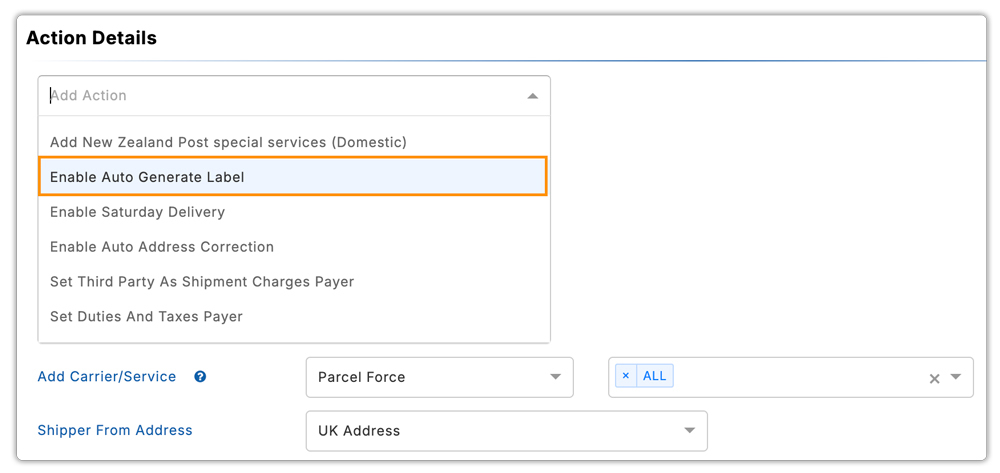
You can also Enable Auto Generate Label in the plugin settings, which lets you generate a label automatically.
Let’s take a closer look at how this process benefits real-world WooCommerce stores.
Real-World Example: UK WooCommerce Store Using Parcelforce
A UK-based WooCommerce store selling handmade home accessories ships hundreds of orders weekly across the country. Initially, the store managed shipments manually, which caused several issues:
Challenges Faced
- Shipping labels were created manually, slowing down fulfillment.
- Inconsistent shipping charges led to customer complaints.
- Staff spent extra hours calculating and coordinating Parcelforce shipments.
- Errors in address or service selection caused delays and returns.
Solution Implemented
The store integrated Parcelforce shipping with WooCommerce using the WooCommerce Shipping Services plugin. The store added Parcelforce as a carrier and connected the account credentials to the plugin. It then generated shipping labels directly from WooCommerce orders and set up flat or custom rates using WooCommerce Table Rate Shipping Pro to display accurate charges at checkout.
Results
- Shipping labels are generated instantly from the WooCommerce dashboard.
- Faster order fulfillment and reduced manual errors.
- Reliable deliveries across the UK, including remote regions.
- Improved customer satisfaction and fewer support queries.
By printing Parcelforce shipping labels directly from WooCommerce, the store streamlined its fulfillment process, saved time, and scaled operations efficiently without relying on manual intervention.
Conclusion
Integrating Parcelforce with WooCommerce and printing Parcelforce shipping labels directly from your store makes managing orders simpler and more seamless. With the plugin set up, store owners can keep fulfillment organized. This approach ensures smoother operations for both domestic and international orders while supporting scalable growth.
For setup assistance or further support, reach out to PluginHive Support.
FAQs
Q. Can I use Parcelforce shipping labels in a multi-vendor WooCommerce marketplace?
Yes. With the WooCommerce Multi-Vendor Shipping Addon, each vendor can generate their own Parcelforce labels, fulfill orders, and manage tracking independently, all under one marketplace.
Q. Can I provide end-to-end tracking for Parcelforce shipments?
Yes. When you generate shipping labels, WooCommerce automatically links the tracking numbers to orders. Customers can monitor delivery status in real time from their order page. For more flexibility, you can use the WooCommerce Shipment Tracking Pro Plugin.
Q. Can I print Parcelforce labels in bulk for multiple orders?
Yes. The WooCommerce Shipping Services plugin allows bulk label generation, making it easier to handle high order volumes efficiently.
Q. Can I automatically attach tracking numbers to customer emails?
Yes. Once you generate a Parcelforce label, WooCommerce automatically includes the tracking number in order emails, keeping customers informed.
Q. Is Parcelforce suitable for large or oversized parcels?
Yes. Parcelforce offers services like express48 Large, specifically for oversized or heavy parcels beyond standard size limits.
