FAQs
- Do I need WooCommerce installed to use this plugin?
Yes, the plugin requires WooCommerce to be installed and active on your WordPress site. It integrates directly with the WooCommerce orders screen, the product edit page, and the order completion email system.
- Do I need a GLS carrier account to use this plugin?
Yes. You need an active GLS account and an active PluginHive license. During setup, you enter your GLS Contact ID, Account Number, API Key, and API Secret to connect the plugin to GLS via the PluginHive proxy. Account registration is handled from the GLS Europe → Account Connection screen within the plugin.
- Do my products need weight for GLS shipments?
Yes. GLS requires a weight for each shipment unit. Products without a defined weight will be assigned the minimum weight configured in the plugin’s Packaging settings. For accurate GLS labels, it is recommended to add a weight to every shippable product in your WooCommerce catalog.
- Can I use this plugin alongside free shipping or flat-rate methods?
Yes. The plugin is compatible with all WooCommerce shipping methods. Label printing is available for any WooCommerce order regardless of the shipping method used at checkout — you can select the GLS service directly from the order detail page and generate the label from there.
- Does this plugin display GLS shipping rates at checkout?
No. GLS does not provide a public rates API, so the plugin does not display GLS shipping rates at checkout. It is designed for order fulfillment: connecting to GLS to create labels, print them, and track shipments from your WooCommerce dashboard.
- Does the plugin support both domestic and international GLS shipments?
Yes. Both GLS Parcel and GLS Express can be used for shipments within Europe and to destinations outside Europe. For shipments that cross commercial zones — such as EU-origin parcels to non-EU destinations — the plugin automatically includes the appropriate Incoterm code in the GLS request. Incoterm is not applied to EU-to-EU shipments.
- What label formats does the plugin support?
The plugin supports three label formats: PDF, PNG, and ZEBRA/ZPL for thermal printers. You configure your preferred format in the Labels settings tab, and all labels — including bulk-printed and return labels — use that format.
- Is the plugin compatible with WooCommerce shipping zones?
Yes. The plugin works with WooCommerce’s built-in shipping zones. You can configure services and display names per zone.
- Can I print GLS labels directly from my WooCommerce dashboard?
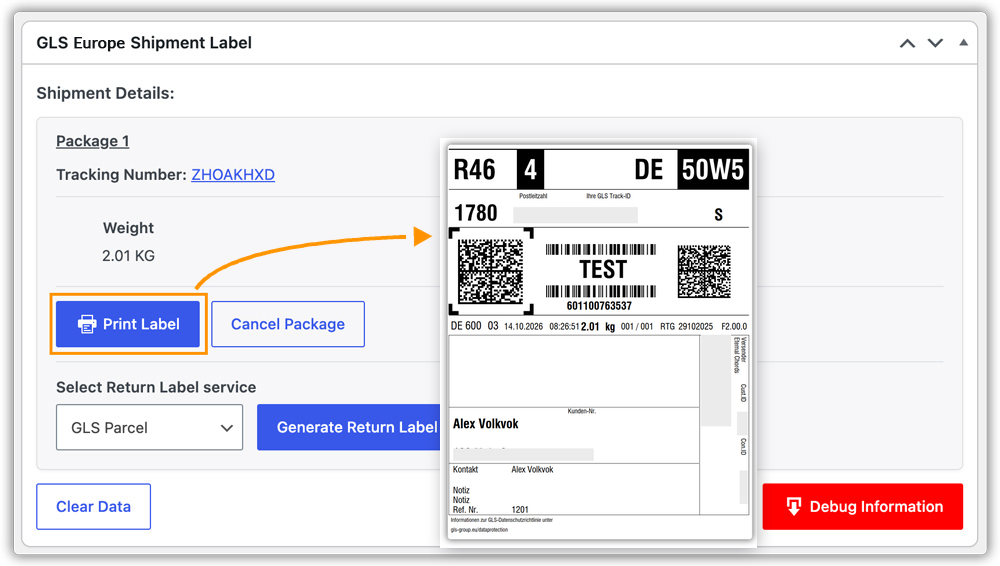
Yes. The plugin adds a label printing button to each WooCommerce order. Clicking it creates the shipment with GLS and downloads the label as a file in your chosen format — all from the order detail page, without logging into the GLS portal.
- Can I generate GLS labels for orders placed with free or flat-rate shipping?
Yes. Label printing is available for all WooCommerce orders regardless of how the shipping method was selected. You choose the GLS service on the order detail page and generate the label from there.
- How are GLS Europe tracking updates sent to my customers?
When a label is generated, the GLS tracking number is stored on the WooCommerce order. It is included in the order completion email sent to the customer, and it also appears on the customer’s My Account order detail page. You can customise the tracking message title and body text from the Tracking settings tab, and optionally disable tracking notifications or My Account tracking independently.
- Can I generate GLS labels for multiple orders at once?
Yes. The plugin adds “Create GLS Europe Label” and “Print GLS Europe Label (PDF)” to the bulk actions menu on the WooCommerce orders list. Selecting multiple orders and running either action processes all of them in one pass. The Print action downloads all generated labels as a single merged PDF.
- Can I generate return labels using this plugin?
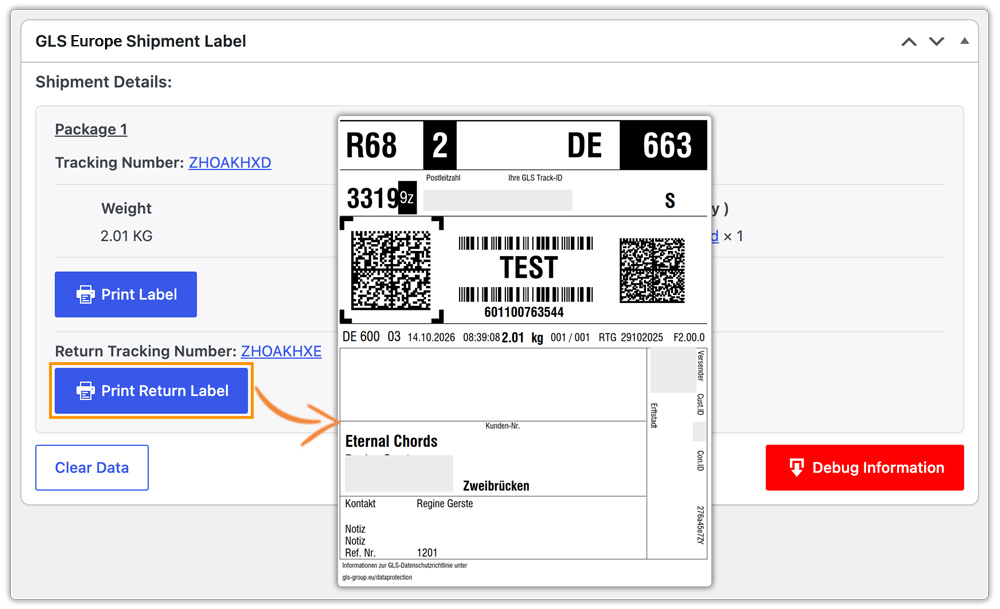
Yes. A Return Label section is available on each order’s detail page after the outbound label has been created. You select the return service, click Generate Return Label, and the label is created and ready to print immediately. The return tracking number is stored on the order alongside the outbound tracking number.
- Does the plugin support WooCommerce High-Performance Order Storage (HPOS)?
Yes. The plugin is fully compatible with WooCommerce High-Performance Order Storage (HPOS). Both the HPOS-based orders interface and the legacy orders screen are supported, so the plugin works regardless of which order storage mode your store uses.
- What GLS services are available in this plugin?
The plugin supports two GLS services: GLS Parcel for packages up to 40 kg, and GLS Express for packages up to 50 kg. Both services are available for domestic and international shipments. You can enable or disable each service, assign a custom checkout display name, and set a default service that pre-fills the create-label dropdown on every order.
- Which countries are supported for GLS account registration through this plugin?
The plugin supports account registration for merchants based in the following countries: Austria, Belgium, Denmark, France, Germany, Ireland, Luxembourg, and Switzerland. You select your Country of Origin during the account connection step, and the plugin uses this to determine when Incoterm codes apply.
- Can I try the plugin before committing to a subscription?
The plugin comes with a 30-day money-back guarantee. If the plugin does not meet your requirements within the first 30 days of purchase, you can request a full refund.
- Can I use this plugin on more than one WooCommerce store?
Each license covers a single site activation. If you need to use the plugin on multiple WooCommerce stores, a separate license is required for each site.
Change Log
Version 1.0.0 – Released: 29th October, 2026
[New Feature]
* Added GLS Europe account connection with Terms and Conditions consent step, supporting registration from Austria, Belgium, Denmark, France, Germany, Ireland, Luxembourg, and Switzerland.
* Added GLS Europe shipping label creation for GLS Parcel and GLS Express services from the WooCommerce order detail page.
* Added label printing in PDF, PNG, and ZEBRA/ZPL formats, configurable from the Labels settings tab.
* Added return label generation and printing from the WooCommerce order detail page.
* Added package cancellation from the order detail page.
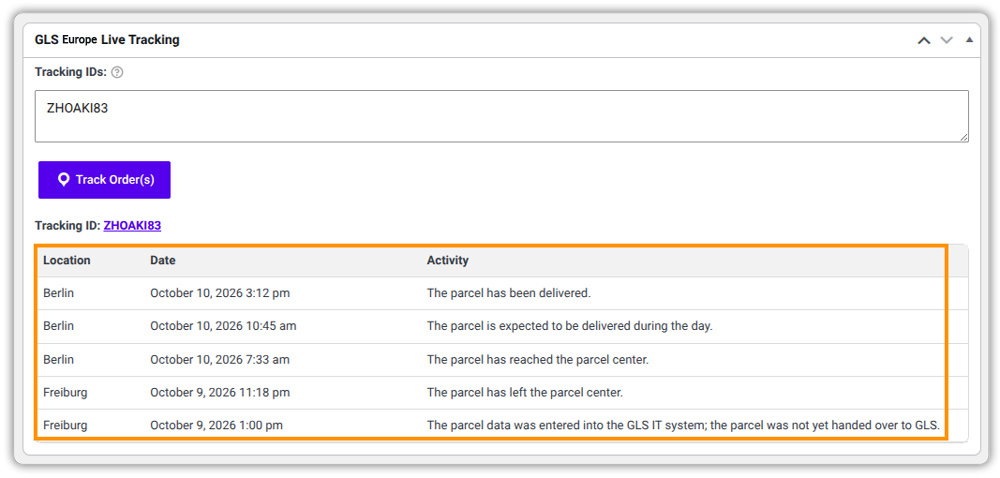
* Added shipment tracking with automatic tracking number storage on each order and inclusion in the WooCommerce order completion email.
* Added tracking information display on the customer’s My Account order page, with options to disable email notifications and My Account tracking independently.
* Added customisable tracking message title and body text.
* Added Live Tracking metabox on the order detail page for real-time GLS shipment status, with optional live tracking updates on the customer’s My Account page.
* Added “Create GLS Europe Label” and “Print GLS Europe Label (PDF)” bulk actions to the WooCommerce orders list, with merged PDF output for multi-order print runs.
* Added a print-label action icon per order row on the orders list.
* Added per-item and weight-based parcel packing methods, with configurable maximum package weight, maximum package quantity, and packing order (heavier or lighter items first).
* Added per-product pre-packed flag, available on both simple and variable products, to treat individual items as independent packages.
* Added automatic Incoterm code inclusion for shipments crossing commercial zones (EU-origin to non-EU destinations), with a configurable default Incoterm (DAP/20).
* Added shipper address and contact details settings, printed on every GLS label.
* Added per-service enable/disable toggles, custom display names, and drag-and-drop display order for GLS Parcel and GLS Express.
* Added default service selection for pre-filling the create-label dropdown on all orders.
* Added Debug Mode for API request and response logging and debug information download from the order page.
* Confirmed compatibility with WooCommerce High-Performance Order Storage (HPOS).
* Confirmed compatibility with WooCommerce Blocks-based cart and checkout.


















Reviews
There are no reviews yet.