


Canada Post packaging costs can quietly eat into your margins if your WooCommerce store isn’t configured correctly. Many store owners focus on product pricing and marketing, yet overlook how box sizes, dimensional weight, and packing logic influence what Canada Post charges. As a result, you may end up paying more than necessary on every shipment.
This article explains how you can reduce packaging costs using structured box configuration, smarter packing methods, and accurate rate calculation inside WooCommerce. We’ll walk through practical strategies and show how a structured Canada Post integration helps you align checkout rates with actual carrier charges, without overcomplicating your workflow.
Table of Contents
- Why Packaging Costs Matter for Canadian WooCommerce Stores
- How Canada Post Calculates Packaging Costs
- Optimizing Canada Post Shipping for Lower Packaging Costs in WooCommerce
- Real-World Example: How WooCommerce Stores Reduce Canada Post Packaging Costs
- Conclusion
- FAQs
Why Packaging Costs Matter for Canadian WooCommerce Stores
Packaging directly affects your profit. In WooCommerce, even small mistakes in box size or weight can increase Canada Post charges on every order. Over time, those small costs add up.
Here’s why it matters:
- Margin protection: Shipping is often your largest expense after product cost. Even a 5% reduction in packaging volume can save thousands each year.
- Customer retention: High shipping rates cause cart abandonment. Accurate, optimized rates help customers complete their purchases.
- Dimensional weight reality: Canada Post charges based on box size. If you ship a small item in a large box, you pay to ship air.
- Sustainability expectations: Customers prefer right-sized packaging. Smaller boxes reduce waste and improve brand perception.
Packaging is not just a shipping detail. It is a controllable cost. When you manage it carefully, you protect margins, improve conversions, and strengthen your brand.
How Canada Post Calculates Packaging Costs
Before you reduce packaging costs, you need to understand how Canada Post sets its rates. The pricing is not random. It follows clear rules based on size, weight, and destination.
Canada Post calculates shipping charges using these main factors:
- Actual weight: The physical weight of your parcel. Heavier shipments cost more.
- Shipping zone: The distance between your origin and the customer’s postal code affects the final rate.
- Service type: Options like Regular Parcel, Expedited Parcel, or Xpresspost have different pricing structures.
Dimensional (volumetric) weight: Canada Post also considers parcel size. If your box is large relative to its weight, you are charged based on volume, not actual weight.
| Parcel Size | Actual Weight | Billed Weight | Result |
|---|---|---|---|
| Compact box | 1 kg | 1 kg | Standard rate |
| Oversized box | 1 kg | 3 kg | Higher rate |
Consequently, a two-inch increase in box height can push you into a higher billing tier. Many Canadian WooCommerce stores overlook this detail.
Canada Post pricing is formula-driven. When your WooCommerce store reflects precise weights and dimensions, you avoid cost increases and maintain predictable shipping expenses.
Optimizing Canada Post Shipping for Lower Packaging Costs in WooCommerce
Understanding how Canada Post calculates rates is only the first step. To reduce packaging costs, you must configure your shipping setup correctly inside WooCommerce.
This is where the Canada Post Shipping Plugin for WooCommerce with Print Label plays an important role. It connects your store directly with Canada Post, fetches real-time rates, applies your defined box dimensions, and generates shipping labels within the WooCommerce dashboard.
Note: For step-by-step configuration, refer to the setup guide
When configured accurately, the rate shown at checkout reflects the actual dimensions and weight you define. This alignment prevents undercharging, eliminates pricing guesswork, and protects your margins.
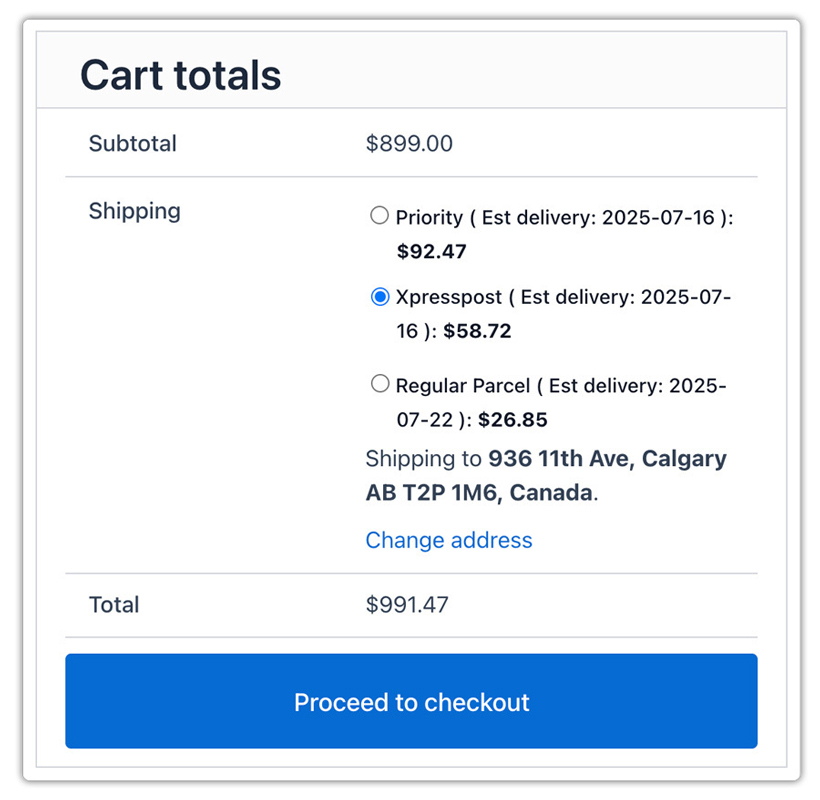
a. Choosing the Right Packing Method in WooCommerce
Your packing method determines how the plugin calculates package dimensions before requesting Canada Post rates. Three primary approaches exist, each suited to different business models.
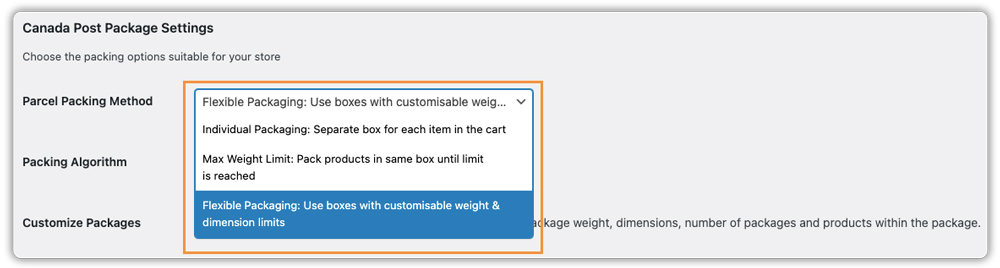
Available Packing Methods:
| Method | Best For | How It Works | Cost Impact |
|---|---|---|---|
| Pack Items Individually | Single-item orders, fragile products | Each product ships in its own package | Higher costs for multi-item orders; optimal for fragile items requiring separation |
| Pack into Boxes with Weight and Dimensions | Diverse product catalogs, mixed item sizes | The algorithm selects the smallest box that fits all items based on dimensions | 15-30% savings vs. individual packing; requires an accurate box library |
| Weight-Based Packing | Uniform product sizes, subscription boxes | Uses total order weight without dimensional calculation | Risky if dimensional weight exceeds actual weight; suitable only for consistently dense products |
For most Canadian WooCommerce stores, box-based packing gives you the best balance of accuracy and cost control. It prevents you from overcharging customers while protecting you from unexpected shipping losses.
b. Configuring Box Dimensions and Packing Logic
Once you’ve selected your packing method, accurate configuration becomes critical. Box-based packing only works when your data reflects reality.
Essential Configuration Steps:
- Enter accurate product dimensions: Configure precise measurements for every product.
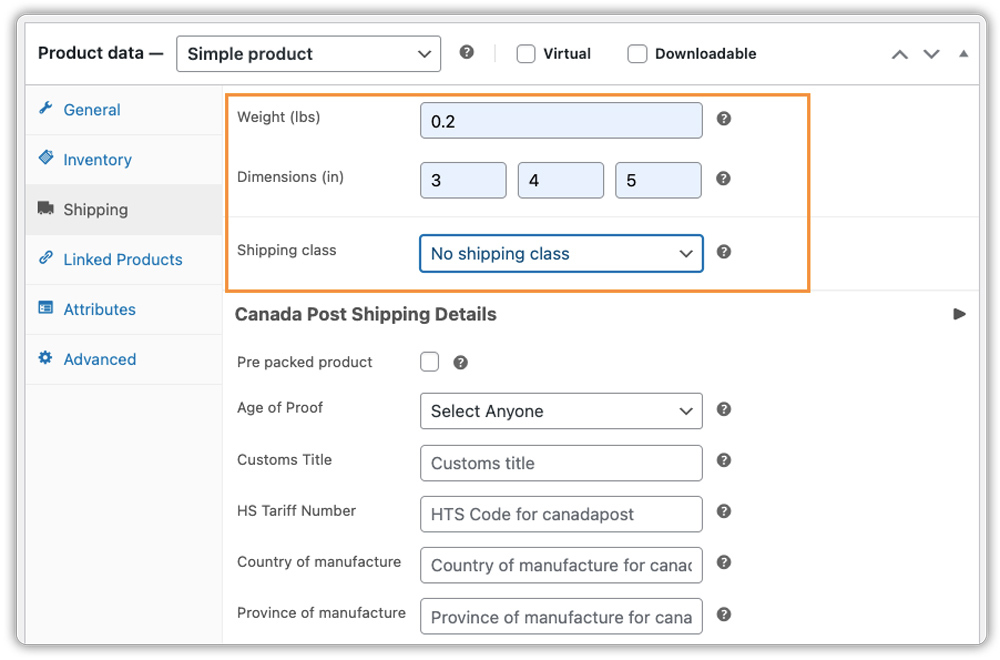
- Define your box library first: Add all box sizes you use for shipping by recording internal and external dimensions (length × width × height). Include the weight of empty boxes plus packaging materials like tape and padding (typically 0.1-0.3kg), and set maximum weight capacity for each box size.
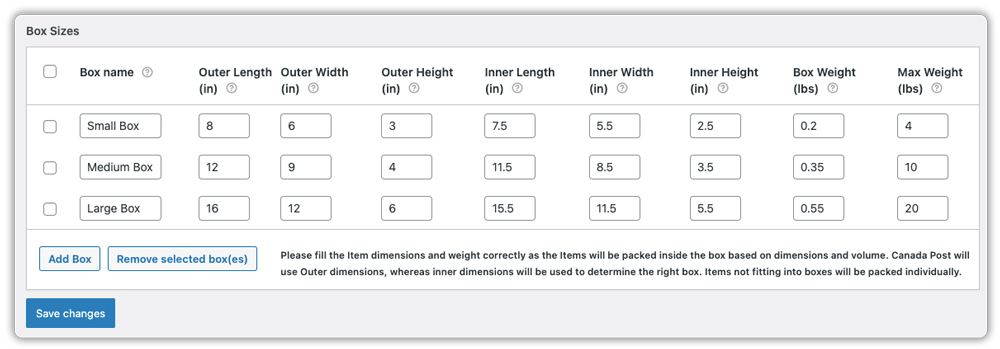
Once everything is set up, place a few test orders yourself. Check that the system chooses the right box size for each order.
Remember: Canada Post calculates rates using the dimensions you provide. Inflated box measurements translate directly into higher shipping costs. Accuracy here determines whether your optimization efforts succeed or fail.
Real-World Example: How WooCommerce Stores Reduce Canada Post Packaging Costs
Consider a typical Canadian WooCommerce store that ships products nationwide using Canada Post. Before optimizing its packaging setup, the store often experiences avoidable cost inefficiencies.
Before Optimizing Packaging
Many stores in this situation typically face:
- One default box is used for most orders
- Small products are shipped in larger-than-needed cartons
- Frequent dimensional weight charges
- Shipping invoices that don’t always match checkout estimates
- Rising packaging costs without a clear explanation
- Support teams handling shipping cost complaints
These issues don’t look dramatic individually. However, over hundreds of monthly shipments, they steadily reduce profit margins.
After Optimizing Packaging Configuration
After implementing structured box definitions and real-time rate calculation through the Canada Post Shipping Plugin for WooCommerce, stores generally see improvements such as:
- Clearly defined box sizes based on actual product dimensions
- Orders are packed into more appropriate box sizes
- Fewer dimensional weight adjustments
- More accurate checkout shipping rates
- Greater consistency in monthly shipping expenses
- Reduced customer confusion about shipping charges
This example reflects what happens when packaging decisions become data-driven. When box sizes, product dimensions, and rate calculations align, WooCommerce stores reduce unnecessary Canada Post packaging costs without changing their product pricing.
Conclusion
Canada Post packaging costs are not fixed. They depend on how accurately you define your boxes, weights, and packing logic inside WooCommerce. When your setup reflects real product dimensions, you avoid unnecessary dimensional charges and gain predictable shipping expenses.
By configuring your store properly and using the Canada Post Shipping Plugin for WooCommerce with Print Label to calculate live rates and apply structured packing, you turn shipping from a hidden expense into a controlled cost. If you need help optimizing your packaging configuration in WooCommerce, the PluginHive support team is ready to assist you with setup and guidance.
FAQs
Q: Does Canada Post provide packaging for WooCommerce shipments?
A: Yes. Canada Post offers prepaid flat-rate boxes and envelopes. However, many WooCommerce stores use their own custom boxes to better control packaging costs and dimensional weight.
Q: Do I need a plugin to reduce Canada Post packaging costs in WooCommerce?
A: Yes. The Canada Post Shipping Plugin for WooCommerce with Print Label helps you apply proper box packing and calculate dimensional weight automatically. You can manage it manually, but it becomes difficult and error-prone as your store grows.
Q: How do I pack a package for Canada Post in WooCommerce?
A: Use a box that fits the product closely. Avoid oversized cartons. Enter accurate product dimensions in WooCommerce so shipping rates are calculated correctly before you print the label.
Q: How often should I update my box dimensions in WooCommerce?
A: Update dimensions immediately when you add new products, change suppliers, or start using different box sizes. Also, review your settings quarterly to ensure your most frequently shipped items are still using the right boxes.
