


Every time an order returns to your warehouse undelivered, you lose time, effort, and money. You pay once to ship the package to the customer and again when it comes back, a situation known as RTO (Return to Origin). For many WooCommerce store owners, this is not an occasional issue but a recurring operational challenge that affects logistics costs and delivery efficiency.
Reducing return to origin is less about managing returns and more about preventing delivery failures in the first place. This requires better shipping accuracy, clear delivery timelines, and consistent communication with customers after dispatch. PluginHive’s WooCommerce shipping plugins support this by automating key shipping tasks and improving shipment visibility from checkout to final delivery. In this article, you will learn practical ways to reduce RTO and improve delivery success in your WooCommerce store.
Table of Contents
- What is RTO (Return to Origin) and Why Does It Happen?
- How Does RTO Affect Your WooCommerce Business?
- How PluginHive’s Shipping Solutions Help Reduce RTO and Improve Delivery Success
- Best Practices to Reduce and Monitor RTO in WooCommerce
- Conclusion
- FAQs
What is RTO (Return to Origin) and Why Does It Happen?
RTO in eCommerce occurs when a shipment cannot be delivered and is sent back to the seller’s warehouse. Understanding the root causes is the first step to fixing the problem.
- Customer unavailable at delivery time: Failed delivery attempts often lead to parcels being returned.
- Incorrect or incomplete shipping address: Missing house numbers, wrong Pin/Zip codes, or unclear landmarks delay delivery.
- Customer refusal at the doorstep: This happens due to delayed delivery, unexpected shipping charges, or a change of mind.
- Long delivery timelines: When delivery takes too long, customers may cancel or refuse the order.
- Wrong item dispatched: Incorrect packing or labelling can lead to the wrong product reaching the customer, resulting in immediate refusal.
Each of these issues increases the chances of Return to Origin and adds avoidable costs to your operations.
How Does RTO Affect Your WooCommerce Business?
RTO doesn’t just create a shipping cost; it creates a chain of losses that hits your business from multiple directions.
- Double shipping cost: You pay for forward shipping and return shipping on every failed delivery
- Blocked inventory: Products stuck in return transit cannot be sold again until they are physically back and restocked
- Lost revenue on COD orders: Payment was never collected, but shipping was already paid
- Repackaging and inspection costs: Returned items need to be checked, repackaged, and re-entered into inventory before going out again
- Customer loss: A failed delivery is often the last interaction a customer has with your store
RTO % = (Undelivered + Returned Orders ÷ Total Orders) × 100
Even a small RTO rate adds up fast at scale. Fixing it isn’t just about cutting costs; it’s about building a delivery experience customers can rely on.
How PluginHive’s Shipping Plugins Reduce RTO in WooCommerce
Most RTOs don’t happen by chance; they happen because of specific gaps in the shipping process. Here is how PluginHive’s WooCommerce plugins address each of those gaps directly.
| RTO Cause | How It’s Fixed | PluginHive Plugin |
|---|---|---|
| Customer is unaware of the delivery timeline | Display estimated delivery dates before purchase | Estimated Delivery Date Plugin for WooCommerce |
| Customer loses track of the order after dispatch | Send tracking updates at every carrier status change | Shipment Tracking Pro for WooCommerce |
| Errors due to manual label creation | Generate shipping labels directly from WooCommerce orders | FedEx, UPS, DHL, and Blue Dart plugins |
| Customer unavailable at delivery | Offer alternate pickup or delivery options at checkout | FedEx and UPS plugins |
Showing Estimated Delivery Dates Before Purchase
Most customers don’t refuse a delivery out of spite; they refuse it because the package arrived when they least expected it. Setting a clear delivery expectation before the order is placed removes that problem entirely.
The Estimated Delivery Date Plugin for WooCommerce displays the expected delivery date automatically across different WooCommerce pages in your store :
1. Shop Page: Delivery estimates appear below each product on the shop page, offering instant clarity before customers even click on the product.

3. Product Page: The plugin displays the delivery date clearly on the product page.

4. Cart: The delivery date stays visible in the cart, so customers are reminded of when to expect the order before they proceed to checkout.

5. Checkout: At checkout, the delivery date is shown one final time right before the customer places the order.

6. Order Confirmation page: The estimated delivery date is included in the confirmation message, setting clear expectations and reinforcing trust.

How the Plugin Calculates Estimated Delivery Dates :
- It considers daily order cut-off times to show accurate dispatch-based delivery dates.
- The plugin calculates delivery timelines based on the selected shipping class of the product.
- Delivery estimates can also be adjusted based on the customer’s shipping location or zone.
- Public holidays can be configured and excluded to ensure realistic delivery promises.
- The plugin works smoothly with multiple shipping methods.
You can follow the setup guide for the Estimated Delivery Date Plugin to configure it for your store.
When customers know exactly when to expect their order, they plan around it, and that directly reduces missed-delivery RTOs.
Real-Time Tracking Notifications to Improve Delivery Success
No updates after dispatch is one of the fastest ways to lose a delivery. Customers assume something went wrong, lose interest, and refuse the package when it finally arrives.
The Shipment Tracking Pro for WooCommerce keeps customers informed from dispatch to doorstep.
- Sends live tracking notifications via email at every carrier status update
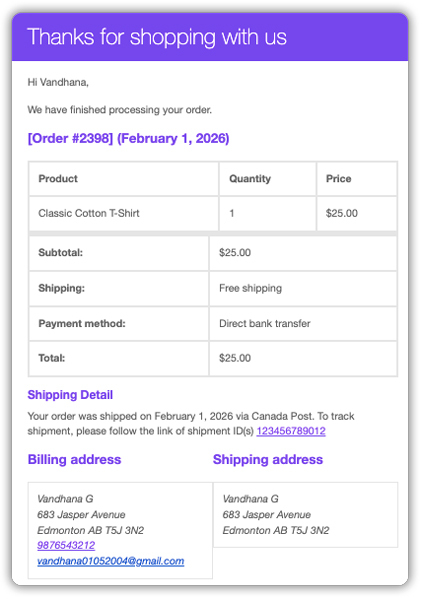
- Adds a real-time tracking lookup page to your store, so customers can check status without contacting support

- Supports 80+ carriers, including FedEx, UPS, DHL, and USPS
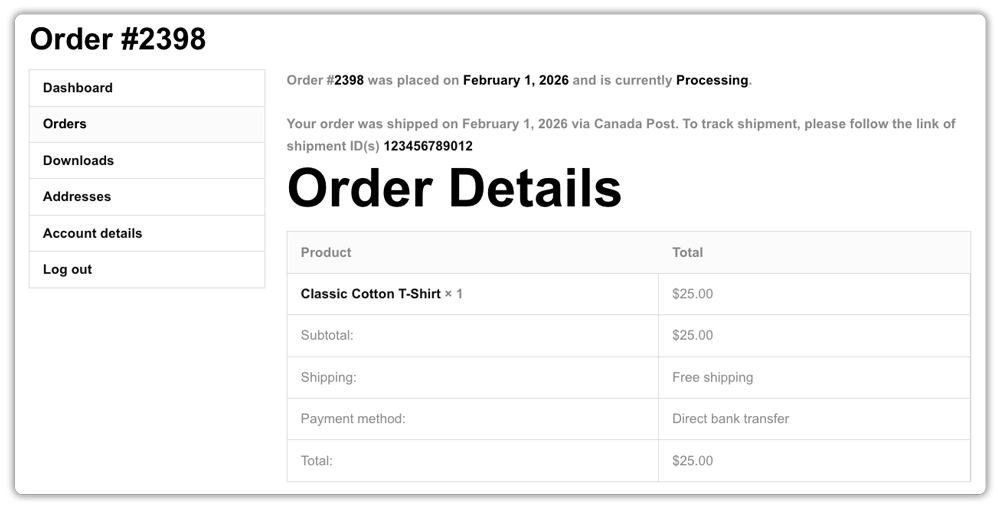
- Adds tracking details directly to the customer’s My Account page
Refer to the Shipment Tracking Pro setup guide to get it running in your store.
A customer who knows their order is out for delivery is far more likely to be home. That is really all it takes.
Accurate Shipping Label Automation to Prevent Dispatch Errors
Many RTOs start at your end: a wrong address, an incorrect service, or a manual entry error on the label. By the time the courier realises it, the package is already on its way to the wrong place.
PluginHive’s carrier plugins, FedEx, UPS, DHL, Blue Dart, and others, automate fulfilment directly inside WooCommerce
- Order details such as address, weight, and dimensions are automatically pulled from the WooCommerce order, and real-time carrier shipping rates are displayed instantly.
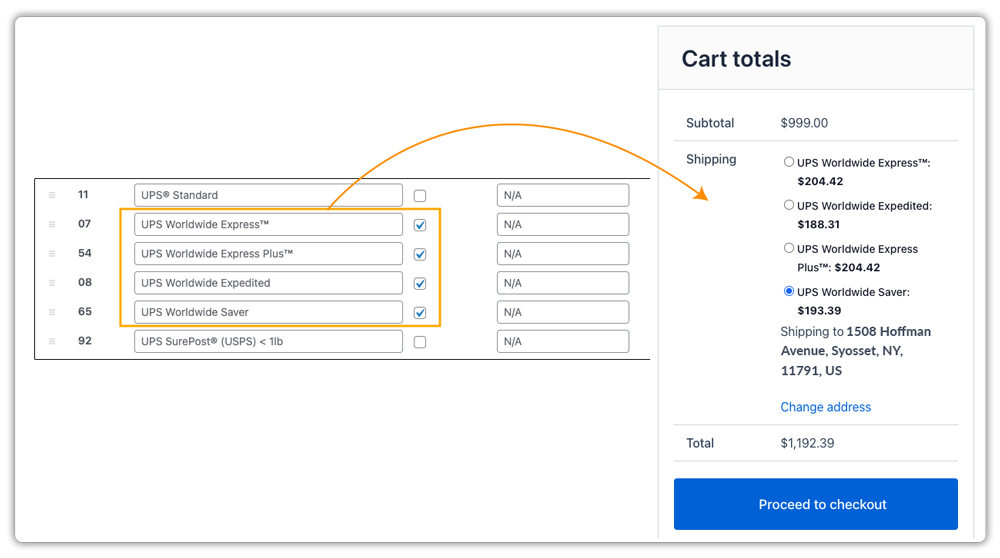
- Labels are printed directly from the dashboard, no manual copying, no switching between tools
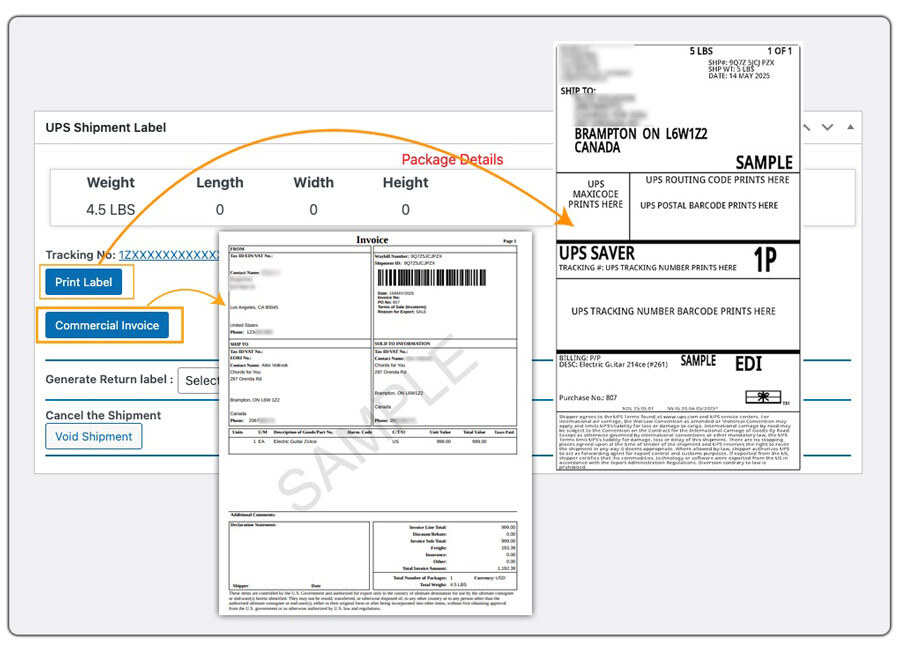
- Supports bulk label generation for high-volume stores
Automating labels removes the most common source of dispatch errors, and a correctly labelled package has a far better chance of reaching the customer on the first attempt.
Alternate Delivery & Pickup Options to Avoid Missed-Delivery RTO
Even when everything goes right on your end, the customer may still not be home. Without an alternative, that package comes back. Major carriers like FedEx and UPS address this by using alternate pickup locations, where the shipment is held nearby, and the customer collects it when convenient, rather than triggering an RTO.
PluginHive’s shipping plugins bring these options into WooCommerce directly.
- The FedEx plugin supports FedEx Hold at Location shipments, which are held at a nearby FedEx facility instead of being returned
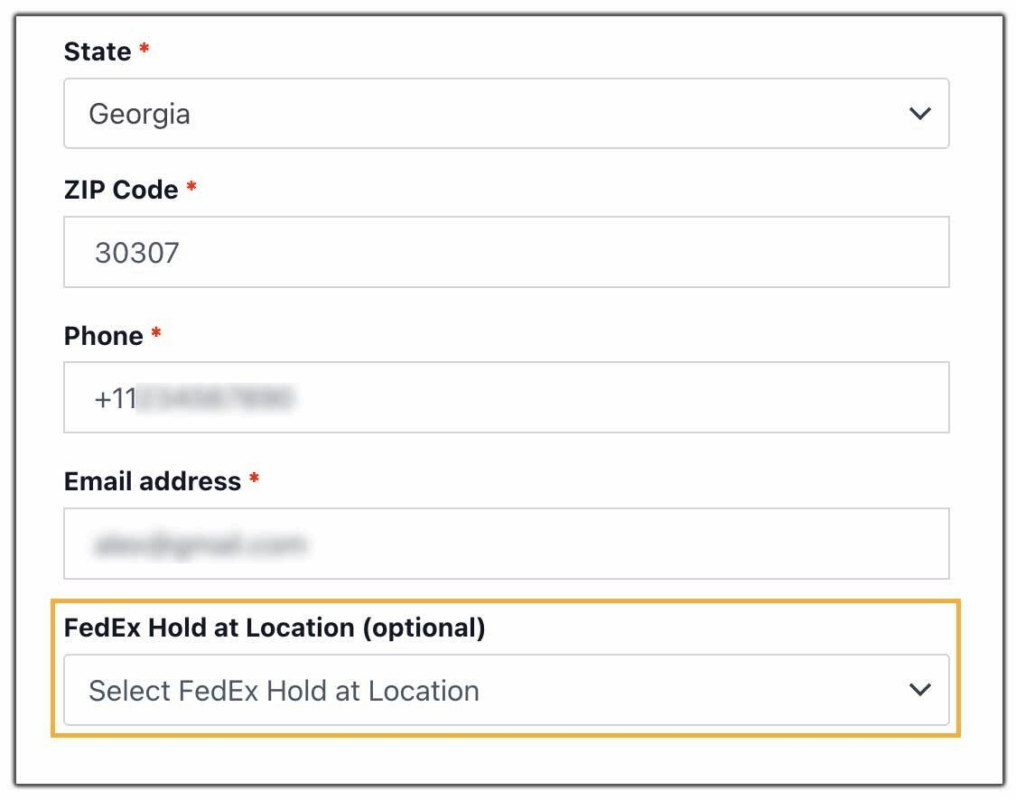
- The UPS plugin supports UPS Access Point customers who select a nearby pickup location at checkout, so the package waits for them rather than returning to you

When a missed delivery doesn’t have to become a returned package, your RTO rate drops, and the customer still gets their order.
Best Practices to Reduce and Monitor RTO in WooCommerce
Beyond using the right plugins, simple operational habits can help you reduce your RTO percentage even further.
- Restrict COD for high-risk pin codes: Identify locations with repeated delivery failures and limit Cash on Delivery, or allow only prepaid orders in those areas.
- Offer small prepaid incentives: Discounts on prepaid orders can encourage customers to avoid COD, which is a major cause of RTO in e-commerce.
- Validate addresses at checkout: Use pin code validation or address auto-fill tools to reduce incorrect or incomplete shipping details.
- Write clear and accurate product descriptions: When customers receive exactly what they expect, they are less likely to refuse delivery.
- Review RTO data regularly: Analyse returns by shipping zone, carrier, or order type to identify patterns and improve your delivery strategy.
Small process improvements, when followed consistently, can lead to a noticeable increase in successful deliveries and lower return to origin rates over time.
Conclusion
A high RTO rate is a sign that something in the delivery process needs attention, and in most cases, it is something fixable. Clear delivery dates, automated labels, live tracking, and flexible pickup options each remove a specific reason for a package to come back. Together, they make successful delivery the norm rather than the exception.
PluginHive’s WooCommerce shipping plugins give you the tools to make that happen right from within your store, without the complexity. And if you need help setting up any of these plugins in your WooCommerce store, the PluginHive support team is available to help you with configuration and guidance.
FAQs
- What is rto return to origin?
In WooCommerce, RTO (Return to Origin) happens when a shipped order cannot be delivered and is sent back to your warehouse. This usually occurs due to incorrect addresses, customer unavailability, or refusal of Cash on Delivery (COD) orders. High RTO in eCommerce can increase shipping costs and affect delivery efficiency. - What does reducing RTO mean?
Reducing RTO means lowering the percentage of orders that fail to deliver and return to your store. For WooCommerce businesses, a lower return to origin rate leads to better profit margins, reduced logistics expenses, and faster inventory turnover. - How does showing estimated delivery dates reduce RTO?
When customers see a clear delivery date before ordering, they plan around it and are far more likely to be available when the package arrives. The Estimated Delivery Date Plugin for WooCommerce by PluginHive displays this automatically across the product page, cart, and checkout. - What is the difference between RTO and RVP?
RTO (Return to Origin) occurs when a shipment is not delivered and is automatically returned by the courier. RVP (Reverse Pickup) happens after successful delivery, when a customer requests a return and the product is collected from their location. In WooCommerce logistics workflows, RTO is related to delivery failure, while RVP is linked to post-delivery returns.
