



Shipping costs can quickly turn into a hidden drain on profits for WooCommerce stores operating in Canada. Beyond postage itself, expenses like packaging, handling time, and manual order processing often add up faster than expected. For many store owners, shipping isn’t just a fulfillment step; it directly impacts margins, pricing decisions, and overall business sustainability.
Fortunately, Canada Post provides business-focused shipping services that can help keep costs under control when used effectively. Combined with a well-configured WooCommerce setup, makes it possible to lower shipping expenses while still delivering orders reliably and on time. This guide focuses on practical, proven strategies that help Canadian WooCommerce stores manage shipping more efficiently without sacrificing customer experience.
Table of Contents
- Common Shipping Cost Mistakes WooCommerce Store Owners Make
- Smart Ways to Reduce WooCommerce Shipping Costs Using Canada Post
- Real-World Use Case
- Conclusion
- FAQs
Common Shipping Cost Mistakes WooCommerce Store Owners Make
Most shipping cost problems don’t come from one big mistake. They come from small habits that feel fine at first but cost you money on every order. Here are the most common ones that quietly eat into your margins.
- Guessing Shipping Rates: You pick a number that feels reasonable and stick with it. The problem is that shipping costs change based on weight, size, and destination. A rate that works for one order can lose money on the next.
- Paying Counter Prices for Postage: Paying for postage at the post office is almost always more expensive. Canada Post offers business rates that are cheaper per shipment, even if you’re not shipping huge volumes. Many stores overpay simply because they don’t use them.
- Using Fast Shipping for Every Order: Sending everything with a faster service sounds professional, but most customers don’t need it. When you use higher-cost shipping for low-priority orders, you pay more without adding real value.
- Ignoring Box Size: This is an easy mistake to miss. Canada Post charges based on package size, not just weight. Shipping a light item in a large box can cost the same as shipping something much heavier. If this isn’t fixed, you end up paying more on every oversized shipment.
- Processing Orders Manually: Entering addresses, creating labels, and marking orders as shipped one by one takes time. As order volume grows, this slows you down and increases the chance of mistakes.
These mistakes are fixable, and most of them don’t require complicated solutions. The next section shows you exactly what to do instead.
Smart Ways to Reduce WooCommerce Shipping Costs Using Canada Post
Now that you know what’s costing you money, let’s talk about what actually works. These aren’t complicated tricks or hacks; they’re straightforward changes that start saving you money from day one. Using the WooCommerce Canada Post Shipping Plugin with Print Label by PluginHive, you can apply all of these improvements directly inside WooCommerce.
- Display Real-Time Shipping Rates at Checkout: The plugin displays live Canada Post rates based on product weight, dimensions, and the customer’s postal code. This prevents overcharging customers or underestimating shipping costs.
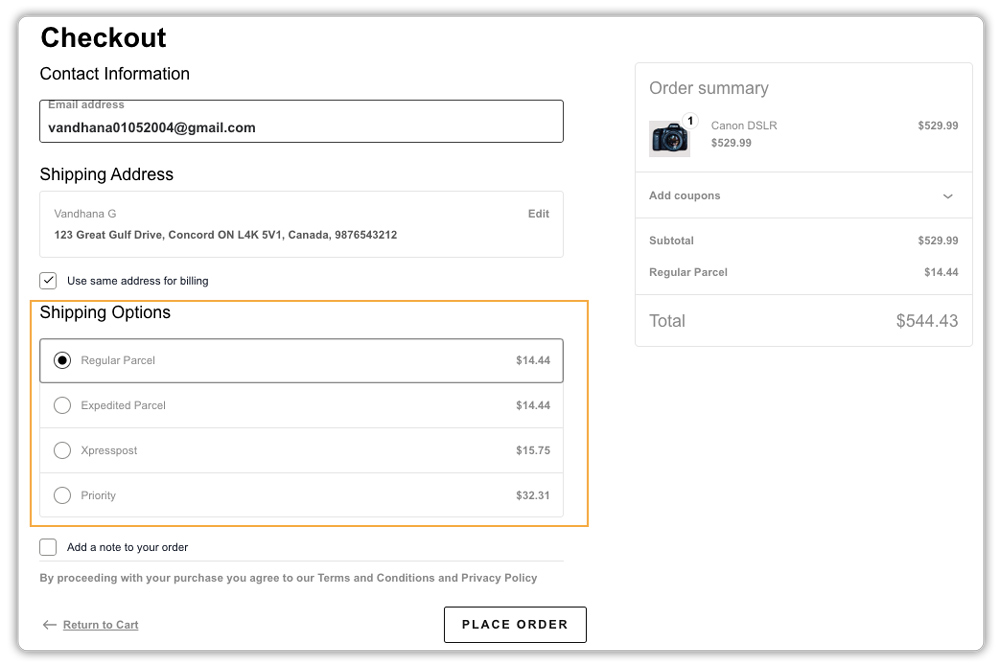
- Let Customers Choose (and Save) with Flexible Services: Instead of forcing one expensive service, you can show options like Regular Parcel, Expedited, and Xpresspost. Customers often choose slower, cheaper delivery for non-urgent orders, which improves conversions and lowers costs.
- Unlock Hidden Business Discounts Automatically: Connecting Canada Post through the plugin automatically applies commercial rates, which are lower than retail prices and reduce the cost of every shipment.

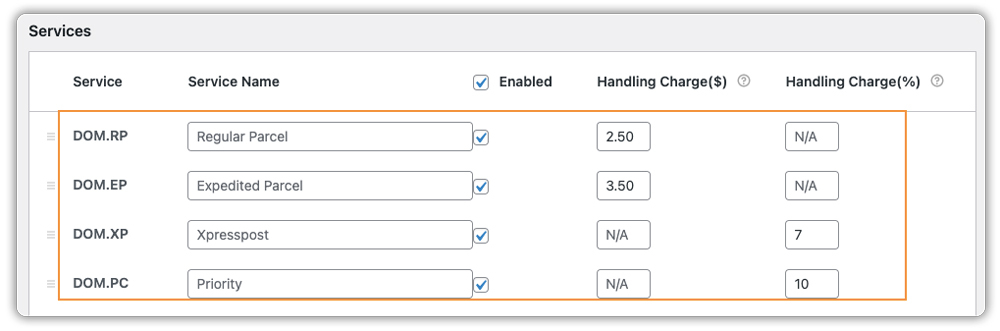
- Add Handling Fees to Cover Extra Costs: You can add a fixed or percentage-based handling fee to cover packaging and labor without increasing product prices.
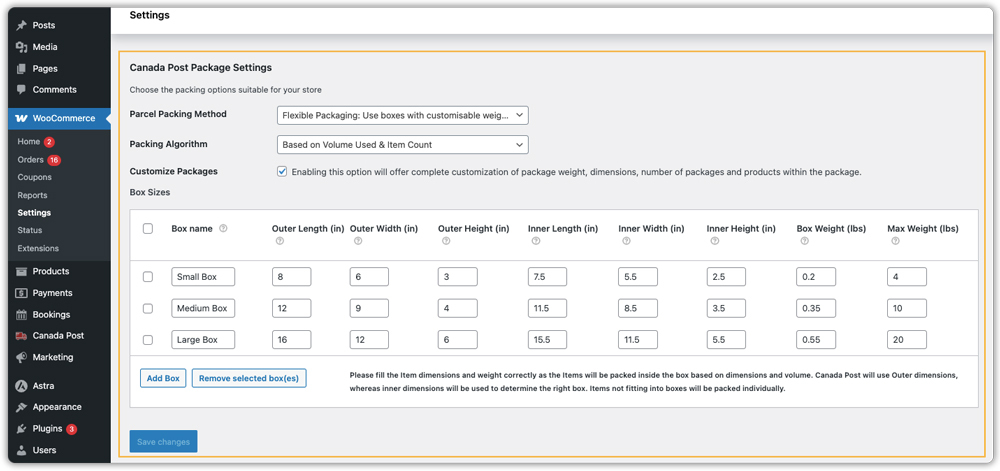
- Optimize Every Package with Smart Packing Logic: The plugin automatically calculates the most cost-effective way to pack items, combining products into one box or splitting them when needed so you don’t overpay due to inefficient packing.
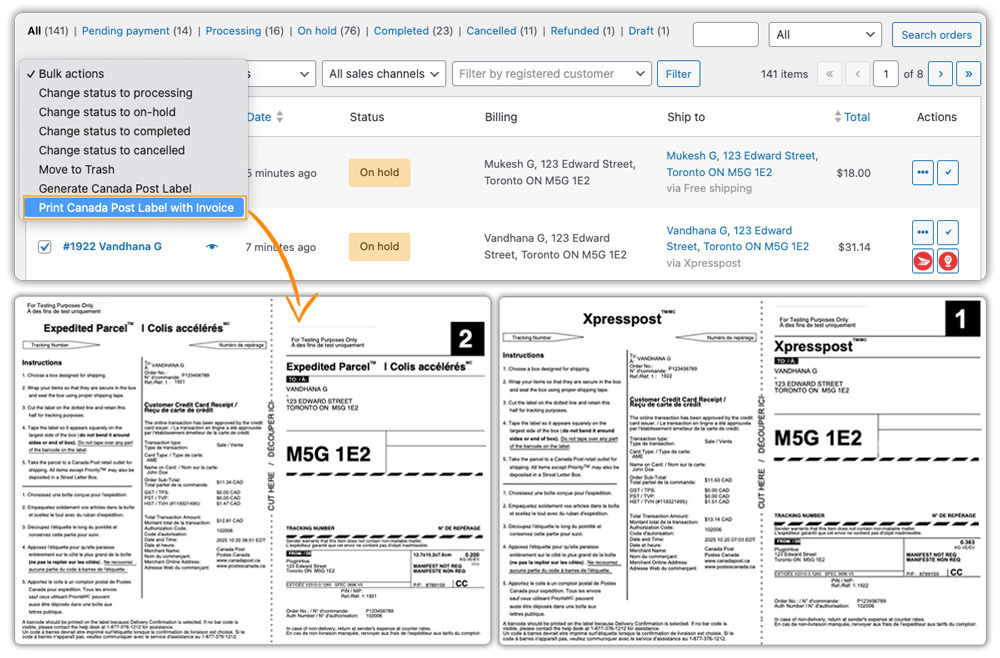
- Eliminate Manual Work with Bulk Label Printing: Bulk label printing lets you generate multiple Canada Post labels directly from WooCommerce, reducing manual work and errors.
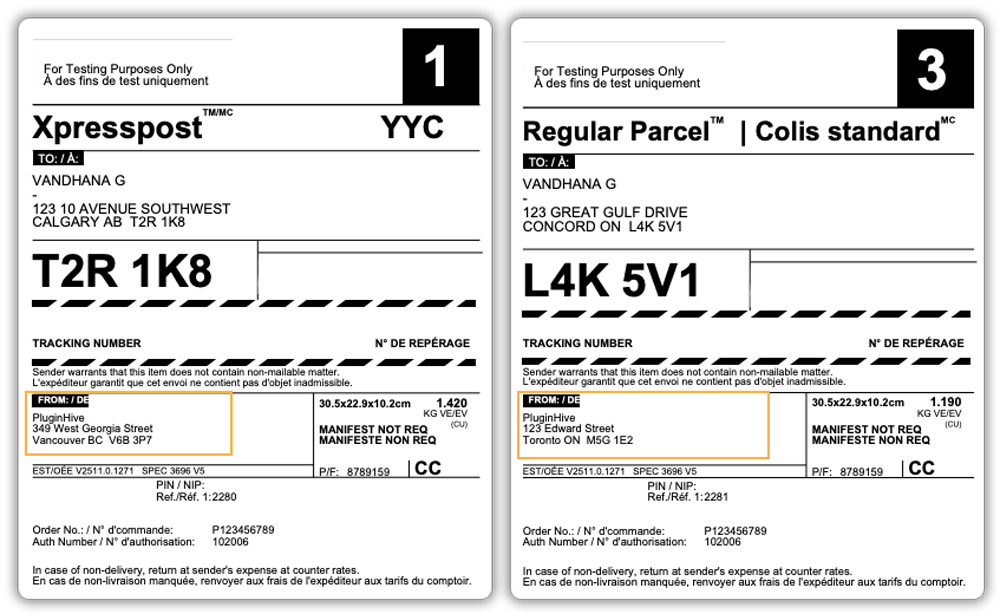
- Ship from the Closest Warehouse When Possible: If you store inventory in multiple locations, using PluginHive’s Multi-Warehouse add-on helps ship orders from the nearest location, reducing distance-based shipping charges.
Lower shipping costs come from accuracy and automation, not guesswork. With the WooCommerce Canada Post Shipping Plugin with Print Label by PluginHive, these strategies work together inside WooCommerce to make shipping more predictable, efficient, and cost-effective.
Real-World Use Case: How a WooCommerce Store Can Reduce Shipping Costs with Canada Post
A Canada-based WooCommerce store sells physical products and ships orders across different provinces. The store processes around 20–30 orders per day, and shipping costs have a direct impact on profit margins.
As the business grows, shipping becomes harder to manage and more expensive than expected.
The Challenges:
- Flat shipping rates work for nearby orders but cause losses on long-distance shipments
- The store relies on retail Canada Post rates instead of lower business rates.
- Staff create shipping labels manually outside WooCommerce.
- Package sizes and weights are not always accurate
- The team processes orders one by one, which slows down fulfillment.
- Customers frequently ask for tracking updates
The Solution:
The store connects WooCommerce to Canada Post using the WooCommerce Canada Post Shipping Plugin with Print Label.
- The store shows real-time Canada Post rates at checkout.
- Customers choose between cheaper or faster shipping options.
- The team prints shipping labels directly from WooCommerce.
- The plugin automatically applies business shipping rates.
- Staff process orders faster with bulk label printing.
- Customers receive tracking numbers automatically.
The Results:
Shipping costs become more predictable, fulfillment takes less time, and fewer mistakes are made. Customers see accurate shipping prices at checkout and receive tracking updates without delays, leading to fewer support requests and a smoother shipping workflow overall.
Conclusion
Mastering shipping costs is about replacing guesswork and manual processes with smart automation. By using the right tools, such as the PluginHive Canada Post plugin, you can unlock commercial rates, eliminate time-consuming tasks, and ensure every shipping quote is accurate, transforming a major expense into a streamlined, predictable part of your profitable WooCommerce business. Ready to begin? The PluginHive support team is ready to help you set it up.
FAQs
Q. How to offer free shipping in WooCommerce?
WooCommerce allows you to offer free shipping based on order value, shipping zones, or coupons. When using Canada Post, combining free shipping with real-time rates helps you set a threshold that covers your actual shipping costs without hurting margins. Learn more: How to offer free shipping with Canada Post in WooCommerce
Q. Is it cheaper to use Canada Post or UPS for WooCommerce shipping?
It depends on the shipment. Canada Post is usually more affordable for domestic and lightweight orders, while UPS may be better for certain international shipments, depending on speed and destination. Learn more: Canada Post vs UPS for WooCommerce international shipping
Q. How can I get cheaper Canada Post rates on my WooCommerce store?
The most effective way is to use a Canada Post Solutions for Small Business account and connect it to your WooCommerce store using the WooCommerce Canada Post Shipping Plugin with Print Label by PluginHive. This allows you to display discounted business rates instead of standard retail prices.
Q. Does WooCommerce automatically calculate Canada Post shipping costs?
By default, WooCommerce relies on manual shipping zones and flat rates. To calculate Canada Post shipping costs automatically, you need a Canada Post plugin that connects to the Canada Post API and shows real-time rates based on package weight, dimensions, and destination.
