



Shipping costs are one of the most significant recurring expenses for any WooCommerce store and one of the hardest to control when you’re locked into a single carrier. Every order that goes through a carrier that isn’t the most cost-effective option for that route, weight, or destination is money that quietly leaves your margins.
The solution isn’t to manually compare rates before every shipment. It’s to build a smarter shipping setup, one that automatically pulls live rates from multiple carriers and routes each order to the best option. That’s exactly what multi-carrier shipping WooCommerce does. In this article, you’ll learn how it works, why it helps you reduce shipping costs, and how to set it up using the Multi-Carrier Shipping Plugin for WooCommerce by PluginHive.
On This Page
- The Impact of High Shipping Costs on WooCommerce Stores
- Understanding Multi-Carrier Shipping in WooCommerce
- How Multi-Carrier Shipping Helps WooCommerce Stores Save on Shipping Costs
- How to Reduce Shipping Costs Using WooCommerce Multi-Carrier Automation
- Example Scenario
- Conclusion
- FAQs
The Impact of High Shipping Costs on WooCommerce Stores
High WooCommerce shipping costs don’t just hurt your margins; they hurt your conversions too. When customers see an inflated shipping charge at checkout, cart abandonment is the most common response. And when you’re using flat rates set too low to cover actual carrier costs, you end up absorbing the difference on every order.
The problem often comes down to relying on a single carrier for all shipments. A carrier that’s competitive on heavy domestic packages may be expensive for small parcels. A carrier great for US delivery may be a poor choice for international shipments. There’s no one-size-fits-all solution in shipping, and treating it like there is one is one of the most common ways WooCommerce stores quietly overpay.
Understanding Multi-Carrier Shipping in WooCommerce
Multi-carrier shipping means integrating your WooCommerce store with more than one shipping carrier and displaying live rates from all of them at checkout. Instead of a fixed flat rate, customers see real-time pricing pulled directly from each carrier’s API based on the actual package weight, dimensions, and destination.
The Multi-Carrier Shipping Plugin for WooCommerce by PluginHive connects your store with five major carriers: FedEx, UPS, USPS, DHL Express, or Stamps.com. Beyond fetching rates, it also includes a rule-based system that lets you define exactly when each carrier appears by product category, shipping class, order weight, item quantity, total price, or destination area.
This combination of real-time rates and conditional rules is what makes multi-carrier shipping practical for stores with diverse product catalogues or customer bases. You set it up once, and the plugin handles carrier selection automatically on every order.
How Multi-Carrier Shipping Helps WooCommerce Stores Save on Shipping Costs
Here’s where the cost reduction happens in practice:
- Always use the cheapest appropriate carrier: USPS for lightweight domestic parcels, UPS or FedEx for heavier shipments, DHL for international routes- the plugin assigns the right carrier automatically based on the rules configured.
- Eliminate flat-rate losses. Real-time rates replace guesswork – customers pay exactly what the carrier charges, so there’s no overcharging and no subsidizing shipments out of your own margin.
- Avoid paying for services that aren’t needed: Showing multiple carrier options lets customers self-select the speed and price that works for them – no quietly absorbing the cost of a premium service on every order.
- Get regional carrier efficiency: Assign carriers by country, state, city, or postal code so domestic customers see USPS and UPS while international customers see FedEx and DHL – each matched to where they’re most cost-competitive.
How to Reduce Shipping Costs Using WooCommerce Multi-Carrier Automation
The Multi-Carrier Shipping Plugin for WooCommerce makes this straightforward. Here’s how to get it working:
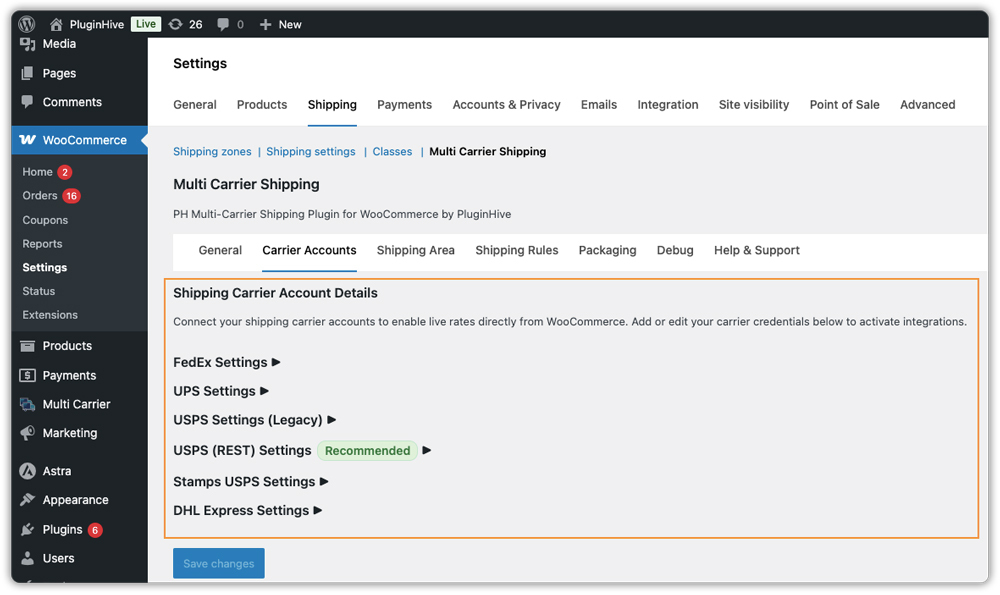
1. Connect your carrier accounts: Add your credentials for FedEx, UPS, USPS, DHL Express, or Stamps.com, whichever carriers you use. Each connected account becomes a live rate source.
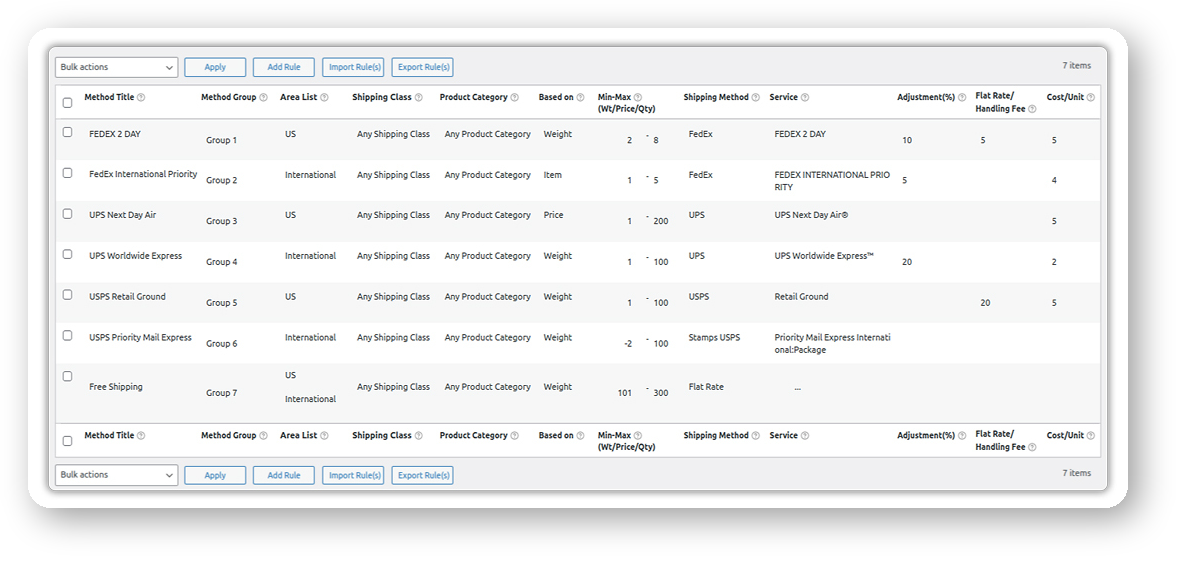
2. Set up carrier rules based on weight, destination, or product type: This is where the cost control happens. Assign USPS for lightweight domestic orders, UPS or FedEx for heavier shipments, and DHL for international destinations. The plugin picks the right carrier automatically on every order – no manual decisions needed.
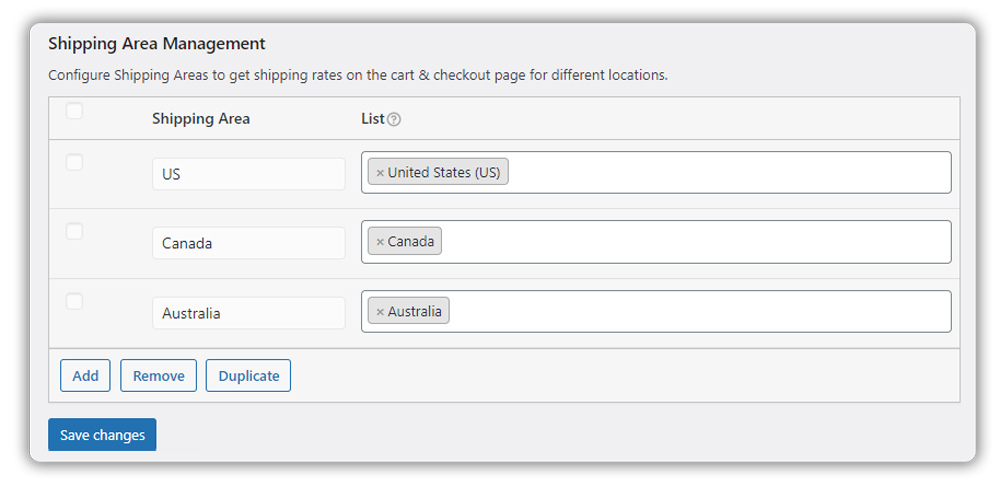
3. Define shipping areas: Create geographic zones by country, state, or postal code and assign the most cost-competitive carrier to each. This ensures domestic parcels never get routed through a carrier better suited for international shipping. Refer to the shipping area management guide for configuration details.
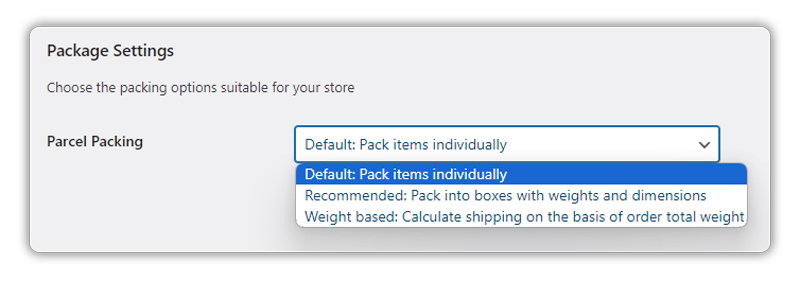
4. Set accurate parcel dimensions and packing method: Accurate weight and dimensions mean the carrier API returns rates that reflect the actual shipment – no inflated estimates, no unexpected charges after the fact.
5. Layer in free or flat rate shipping where it makes sense. Offer free shipping on orders above a certain cart value and let carrier rates handle everything else. You only absorb free shipping on orders where the margin supports it.
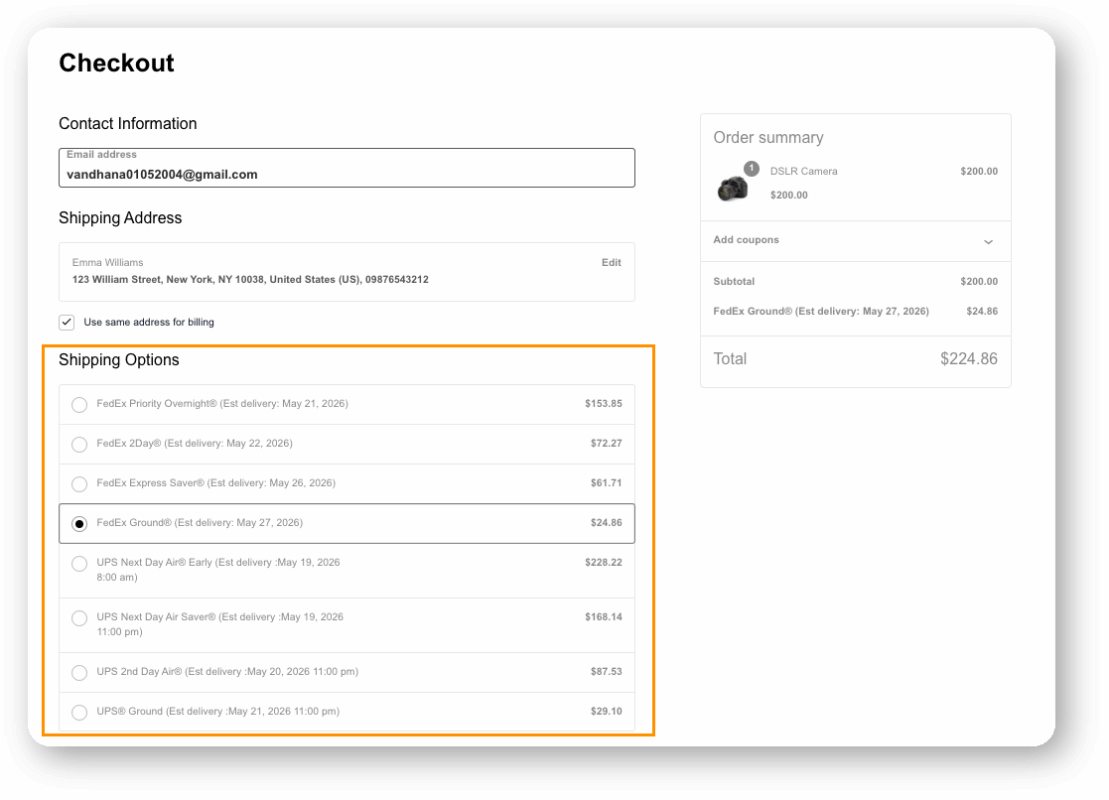
Once everything is configured, customers see accurate, real-time shipping rates from the most cost-effective carriers directly at checkout – giving them the choice, and giving you control over what you spend per shipment.
Example Scenario: WooCommerce Store Shipping Mixed Product Weights Domestically and Internationally
Let’s say you run a WooCommerce store that sells both small accessories and larger equipment, and you’re currently using a flat rate for all orders. Here’s what you’re likely dealing with.
Challenges You’re Probably Facing
- Small, lightweight orders are being charged the same flat rate as heavy ones – some customers are overpaying, others are underpaying
- You have no easy way to offer faster shipping options without setting up separate methods manually
- International customers see the same carrier options as domestic customers, even though coverage and pricing differ significantly
- You can’t easily offer a local pickup option for nearby customers without restructuring your entire shipping setup
- Cart abandonment is happening because customers don’t trust that the shipping charge is accurate
How the Multi-Carrier Shipping Plugin for WooCommerce Solves This
Using the plugin’s rule-based configuration, you set up carrier rules like:
- Rule 1: If total weight ≤ 5 lbs and shipping area = USA → Show USPS services
- Rule 2: If total weight > 5 lbs and shipping area = USA → Show UPS services
- Rule 3: If shipping area = International → Show DHL Express and FedEx services
- Rule 4: If shipping area = nearby states → Show Local Pickup (Flat Rate $0) alongside FedEx options
Results
- Lightweight domestic orders route to USPS, the most cost-competitive option for that range
- Heavier orders get UPS rates, better suited to larger packages
- International customers see DHL and FedEx, carriers that actually service their regions competitively
- Nearby customers can select local pickup at no cost, saving you carrier fees entirely on those orders
- Customers see multiple speed and price options at checkout, reducing friction and abandonment
Once the rules are configured, carrier selection is no longer something you manage order by order – it becomes an automatic part of how your WooCommerce store operates.
Conclusion
Reducing WooCommerce shipping costs comes down to matching each shipment to the right carrier, automatically. A multi-carrier shipping plugin for WooCommerce removes the guesswork by pulling real-time rates, applying your rules, and presenting customers with accurate options all at checkout. The Multi-Carrier Shipping Plugin for WooCommerce by PluginHive gives you that control without requiring you to manage it manually on every order. If you need help setting up your rules or connecting your carrier accounts, the PluginHive support team is available to assist.
FAQs
Q: What is a multi-carrier shipping plugin for WooCommerce?
It’s a plugin that connects your WooCommerce store to multiple shipping carriers such as FedEx, UPS, USPS, DHL, and Stamps.com and displays live rates from all of them at checkout. It replaces fixed flat rates with accurate, carrier-calculated pricing based on the actual package weight, dimensions, and destination.
Q: How does multi-carrier shipping reduce WooCommerce shipping costs?
By routing each shipment to the most cost-effective carrier for that specific weight, destination, and product type. Instead of using one carrier for everything, you assign the cheapest appropriate carrier to each scenario using rules – automatically, on every order.
Q: Can I mix real-time carrier rates with flat rate or free shipping in WooCommerce?
Yes. The Multi-Carrier Shipping Plugin for WooCommerce supports combinations of real-time carrier rates, flat rates, and free shipping within the same rule set. You can offer free shipping above a certain order value while showing carrier rates for smaller orders.
