


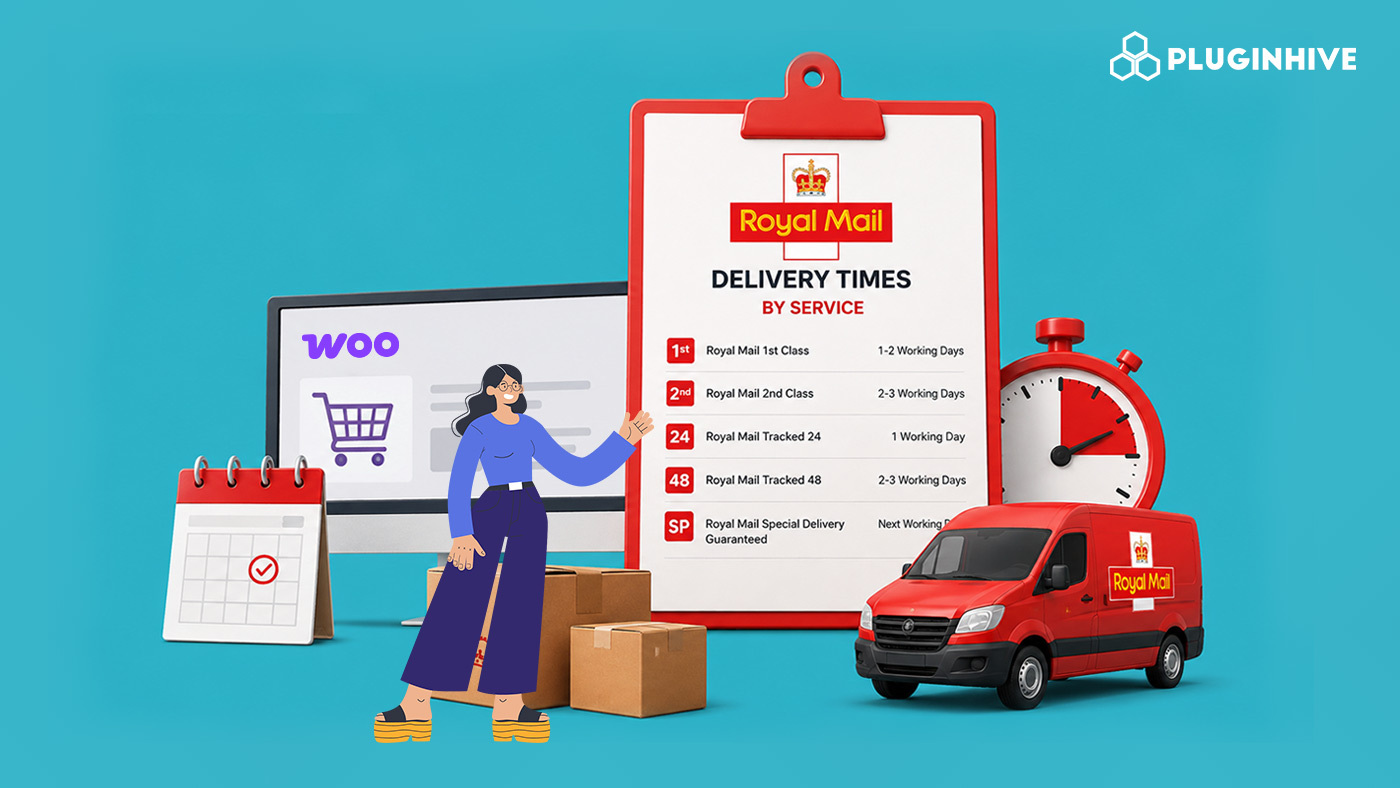
Royal Mail offers a range of delivery services for WooCommerce stores, from affordable standard options to tracked and guaranteed services. Understanding Royal Mail delivery times for each service is important, so you can choose the right option based on how quickly customers need their orders and whether they require tracking or a signature.
In this guide, we’ll look at Royal Mail delivery timeframes by service, covering both domestic and international options. We’ll also explain how you can offer these Royal Mail services at your WooCommerce checkout using the PH Royal Mail Shipping with Tracking for WooCommerce plugin.
On This Page
- Benefits of Royal Mail Delivery for WooCommerce Merchants
- Royal Mail Domestic Delivery Services
- Royal Mail International Delivery Services
- Which Royal Mail Service Is Right for Your WooCommerce Store?
- How to Offer Royal Mail Shipping in WooCommerce
- Best Practices for Showing Royal Mail Delivery Options at Checkout
- Conclusion
- FAQs
Benefits of Royal Mail Delivery for WooCommerce Merchants
Your choice of delivery partner shows up directly in customer reviews and repeat orders, not just your shipping budget. For UK-based WooCommerce merchants, Royal Mail offers a reliable, flexible option that fits most product types and order volumes.
- Reliable service: Consistent delivery across the UK and abroad means fewer late or missed orders.
- Wide reach: Covers every UK address, plus tracked, signed, and economy options for shipping internationally.
- Added security: Signature confirmation, insurance, and tracking reduce disputes on high-value or fragile orders.
- Cost flexibility: Budget options for price-sensitive customers, tracked services for orders that need them.
With this range of services, the key is matching Royal Mail delivery times to what each order actually needs – which is what the rest of this guide will help you do.
Royal Mail Domestic Delivery Services
Royal Mail’s UK domestic services fall into three broad categories: standard, tracked, and guaranteed. Here’s how the delivery windows compare.
1st Class vs 2nd Class
| Service | Estimated Delivery | Tracking | Best For |
|---|---|---|---|
| 1st Class | Next working day | No | Faster delivery at a moderate cost |
| 2nd Class | 2–3 working days | No | Affordable delivery for non-urgent orders |
Tracked 24 & Tracked 48
| Service | Estimated Delivery | Tracking | Best For |
|---|---|---|---|
| Tracked 24 | 1 working day | Yes | Time-sensitive orders |
| Tracked 48 | 2 working days | Yes | Reliable delivery at a lower cost than Tracked 24 |
Both services include full tracking with delivery notifications. If you’re deciding between the two, this Tracked 24 vs Tracked 48 comparison breaks down the differences in more detail.
Special Delivery Guaranteed
| Service | Guaranteed Delivery | Insurance | Tracking |
|---|---|---|---|
| By 9 AM | Next working day by 9 AM | Up to £2,500 | Yes |
| By 1 PM | Next working day by 1 PM | Up to £2,500 | Yes |
Royal Mail International Delivery Services
Royal Mail also handles a range of international services, with delivery times that vary by destination and speed.
| Service | Europe | Rest of World | Tracking |
|---|---|---|---|
| International Economy | 3–5 working days | 6–7 working days | No |
| International Standard | 3–5 working days | 6–7 working days | No |
| International Tracked | 3–5 working days | 5–7 working days | Yes |
| International Tracked & Signed | 3–5 working days | 5–7 working days | Yes (with signature) |
If you ship regularly outside the UK, check out this guide to know more about Royal Mail’s international shipping options.
Which Royal Mail Service Is Right for Your WooCommerce Store?
The right Royal Mail service depends on your products, delivery requirements, and how much you want to spend on shipping. You can choose services based on the following needs:
- Affordable standard delivery: Royal Mail 2nd Class is suitable for non-urgent orders where keeping shipping costs lower is more important than speed.
- Faster standard delivery: Royal Mail 1st Class is a good option when you want to provide a quicker delivery service without using a premium tracked or guaranteed option.
- Shipment visibility: Royal Mail Tracked 24 or Tracked 48 can be offered when tracking matters to your customers. Tracked 24 is the faster option, while Tracked 48 provides a more economical tracked service.
- Urgent deliveries: Special Delivery Guaranteed is better suited for time-sensitive orders where a guaranteed next-working-day delivery service is required, subject to Royal Mail’s terms and conditions.
- International orders: International Standard works for lower-cost shipments, while International Tracked or International Tracked & Signed are better choices when tracking or delivery confirmation is important.
For most WooCommerce stores, you don’t need to offer every Royal Mail service. Select a few options that cover your customers’ main delivery needs and make the difference between them clear at checkout.
How to Offer Royal Mail Shipping in WooCommerce
Setting up Royal Mail on your store doesn’t require manual rate entry or spreadsheets. The PH Royal Mail Shipping with Tracking for WooCommerce plugin displays Royal Mail and Parcelforce rates based on Royal Mail’s published rate sheets, and handles rates, packaging, and tracking from one settings page.
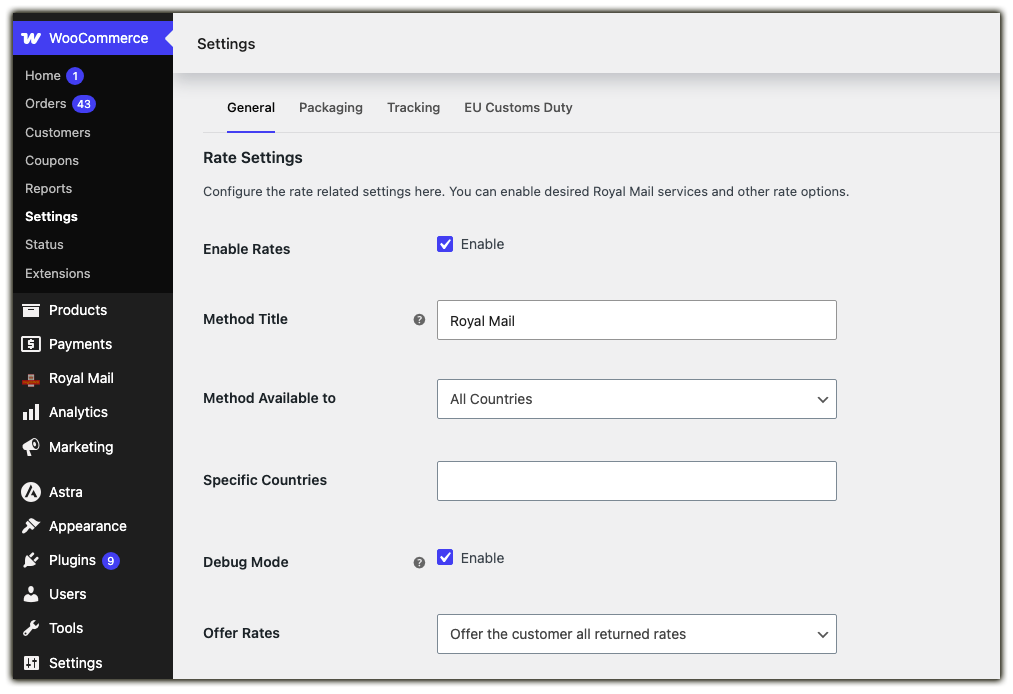
- Enable rates: Turn on the Enable Rates option in the plugin’s General settings to start showing Royal Mail rates on the cart and checkout page.
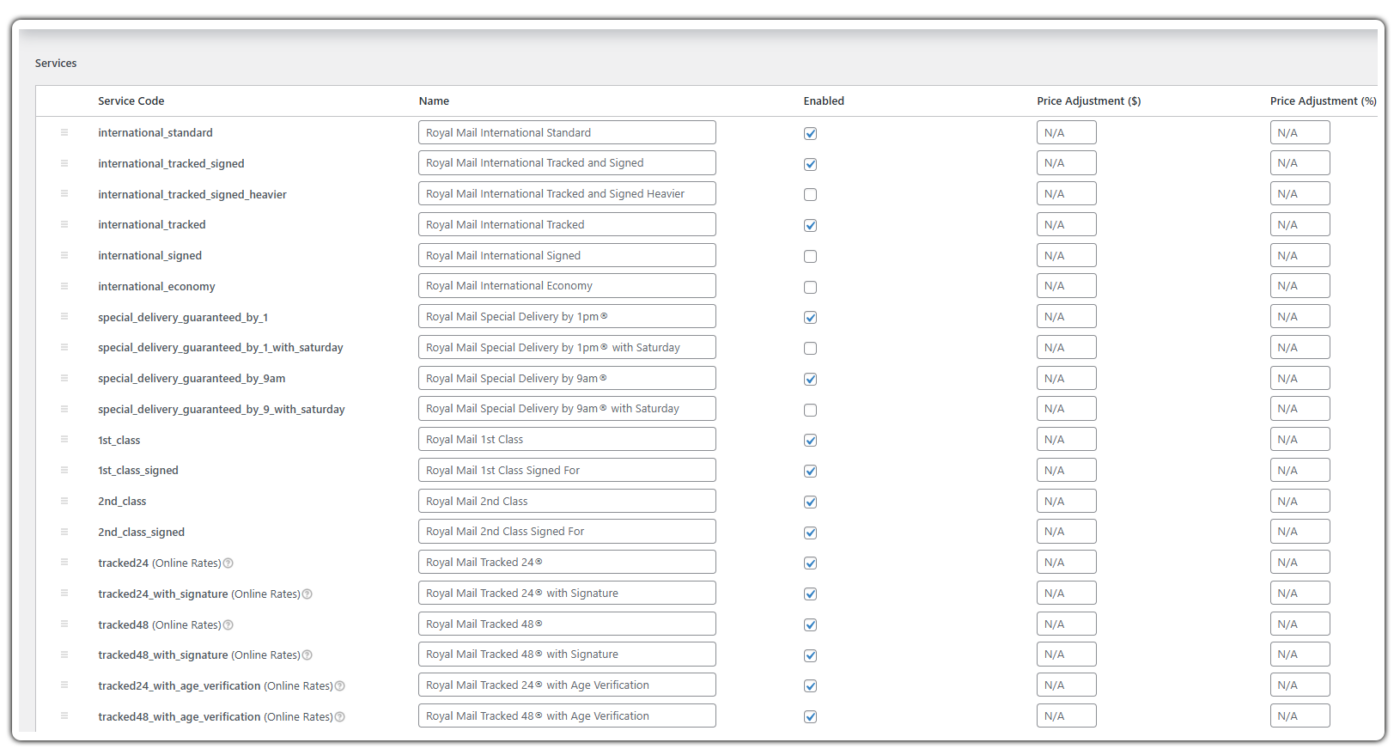
- Select your services: Choose which Royal Mail and Parcelforce services to offer – UK Tracked, UK Standard & Signed, Special Delivery, or International and adjust pricing for each with a fixed or percentage markup.
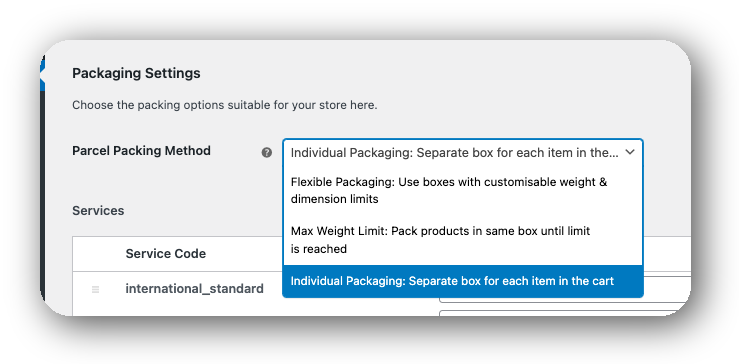
- Set your packaging method: Pack items individually, into predefined boxes, or based on total weight, depending on how your products actually ship.
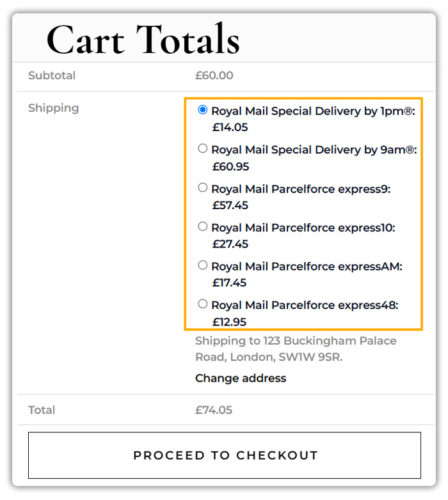
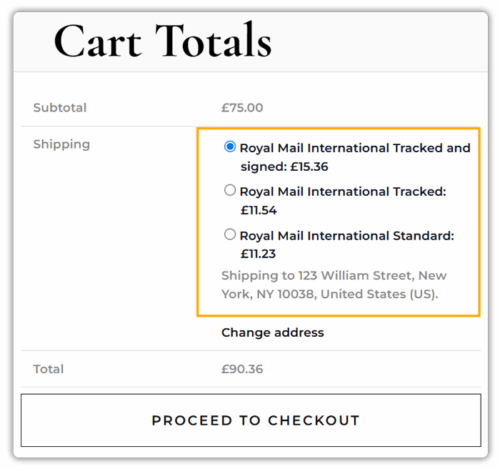
Once these are set up, Royal Mail rates appear automatically on the cart and checkout page, based on the customer’s address and cart weight.
- Add shipment tracking: Once an order ships, add the Royal Mail tracking number to the order, and the plugin automatically includes it in the WooCommerce order completion email.
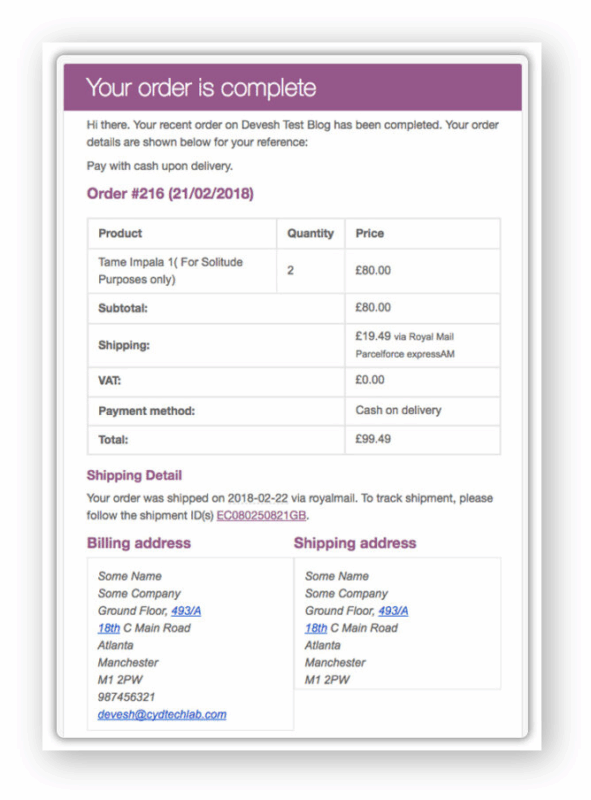
Rates are based on Royal Mail’s official rate sheets, which the plugin updates periodically as Royal Mail revises its pricing. For a full field-by-field walkthrough, refer to the setup guide for PH Royal Mail Shipping with Tracking for WooCommerce.
Best Practices for Showing Royal Mail Delivery Options at Checkout
Getting delivery estimates right comes down to a few setup choices that are easy to overlook.
- Rename services with clear timelines: Instead of “Royal Mail 1st Class,” rename it to “Royal Mail 1st Class (Next Working Day)” so the delivery expectation is obvious at a glance.
- Pair with the Estimated Delivery Date plugin: The Estimated Delivery Date Plugin for WooCommerce shows customers an actual delivery date range on the product page and at checkout, alongside the Royal Mail service name.
- Account for weekends and holidays: Royal Mail delivery windows are based on working days, so make sure your estimated delivery settings exclude weekends and UK bank holidays to avoid setting the wrong expectation.
- Enable Debug Mode when testing: If rates aren’t showing correctly, turning on Debug Mode in the plugin settings logs details right on the cart page, making it much easier to spot the issue.
- Watch for EU customs duty on eligible orders: If you ship to the EU, review the plugin’s EU Customs Duty settings so any applicable surcharge is calculated and shown correctly at checkout.
These small adjustments can make a noticeable difference in how smoothly your store handles delivery expectations.
Conclusion
Understanding Royal Mail delivery times by service helps WooCommerce store owners manage shipping costs, delivery expectations, and different order requirements. Whether you need an affordable standard option, a tracked service, or faster delivery for urgent orders, Royal Mail offers several services to suit different shipping needs.
With the PH Royal Mail Shipping with Tracking for WooCommerce, you can configure the Royal Mail services you want to offer and display their rates at checkout. You can also add tracking information to WooCommerce orders, making it easier to manage Royal Mail shipments from your store. If you run into any setup questions along the way, PluginHive’s support team is available to help.
FAQs
Q1: How long does it take for Royal Mail to deliver from the UK to India?
Royal Mail shipments to India typically fall under the Rest of World zone, taking around 6-7 working days for International Standard or Economy, and 5–7 working days for International Tracked.
Q2: Which countries does Royal Mail deliver to?
Royal Mail delivers to over 230 countries worldwide through its International Standard, Economy, Tracked, and Tracked & Signed services, alongside full UK domestic coverage.
Q3: What’s the longest Royal Mail can take?
Delivery times vary by service and destination, with international shipments to the Rest of World zone taking up to 6–7 working days under normal circumstances. Delays can occur due to customs checks or local disruptions at the destination.
Q4: Does Royal Mail do live tracking?
Royal Mail offers tracking for services such as Tracked 24, Tracked 48, International Tracked, and Special Delivery Guaranteed. Customers can use the tracking number to check the shipment’s progress, although tracking updates are not necessarily live or continuous.
