



For every Shopify store owner, providing customers with timely tracking updates is a crucial part of delivering a professional and trustworthy shopping experience. When you’re shipping orders through Royal Mail, sending tracking numbers automatically helps reduce customer support requests, improve transparency, and increase repeat purchases.
The challenge many business owners face is choosing between manual entry of tracking numbers, which is slow and error-prone, or finding a reliable way to automate the process.
This guide will show you exactly how to automate the sending of Royal Mail tracking numbers in Shopify, so your customers stay informed at every stage of the delivery journey, without extra work on your end.
In This Article:
- Why Send Royal Mail Tracking Notifications?
- Royal Mail Tracking Using PluginHive
- Best Practices For Tracking Notifications
- Conclusion
- FAQ’s
Why Send Royal Mail Tracking Notifications?
Automatically sending Royal Mail tracking numbers through Shopify isn’t just a nice-to-have; it’s essential for a smooth customer experience. Here’s why every Shopify store owner should prioritize tracking notifications:
- Improve Customer Satisfaction
Today’s customers expect to track their orders in real time. By sending Royal Mail tracking links automatically, you give them peace of mind and reduce the anxiety around online deliveries.
- Reduce WISMO Inquiries (“Where Is My Order?”)
Tracking notifications significantly reduce the number of support emails asking about order status. This saves time for your support team and improves customer response times.
- Enhance Post-Purchase Communication
Shipping notifications are a key part of your post-purchase flow. They keep the conversation going after checkout, building anticipation and engagement.
- Save Time with Automation
Manual entry of tracking numbers can be tedious and error-prone, especially as your store scales. Automating this process eliminates repetitive tasks and streamlines your fulfillment workflow.
- Boost Professionalism and Brand Trust
A seamless shipping experience, complete with branded tracking updates, shows customers that you run a reliable and trustworthy operation. It sets your store apart from less organized competitors.
Royal Mail Tracking Using PluginHive
Suppose you’re looking for a fast, reliable way to send Royal Mail tracking notifications to your Shopify customers automatically. In that case, the PH Multi-Carrier Shipping Label App by PluginHive is one of the best solutions available.
1. Seamless Royal Mail Integration
The app supports direct integration with Royal Mail accounts, allowing you to generate shipping labels and access real-time rates from within Shopify. Once connected, you can easily manage domestic and international Royal Mail shipments without leaving your store dashboard.
2. Automatic Tracking Updates
One of the app’s most valuable features is tracking.
- As soon as the label is generated and the order is marked as fulfilled. The order is now displayed in the Tracking tab of the app, with the status of the order displayed.
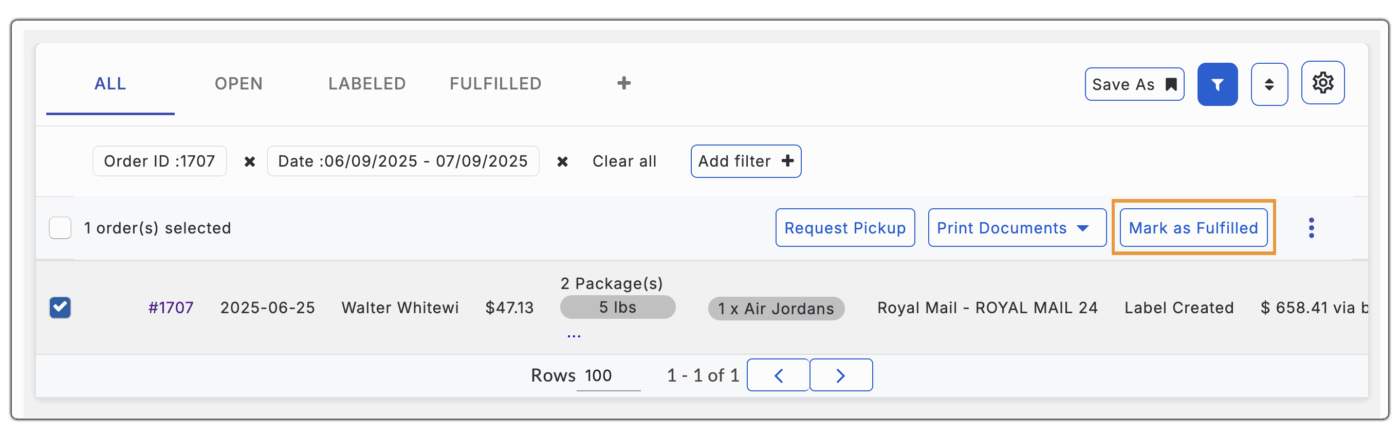

- Along with this, the tracking status is also available in the tab, which shows the status of the shipment at every stage.

- Along with these, one of the best advantages of using the PH Multi-Carrier Shipping Label app is that it allows you to send branded tracking emails, making your brand appear more professional and reliable in the eyes of your customers.
- Apart from this, if you want to display tracking information directly on your storefront, you can use the Shipment Tracking & Notify app by PluginHive.

- This ensures that customers checking their order status keep returning to your storefront, giving you the perfect opportunity to showcase new collections and increase sales.
Best Practices for Tracking Notifications
Sending tracking notifications is more than just confirming shipment; it’s a key touchpoint that shapes your customer’s post-purchase experience. To make your Royal Mail tracking emails more effective and brand-aligned, here are a few best practices:
Use Friendly, Reassuring Language
Keep the tone approachable and customer-focused. For example:
“Your order has been shipped via Royal Mail and is on its way. You can track it using the link below.”
Include Clear, Clickable Tracking Links
Make sure your email includes a visible and clickable tracking link. This saves customers from having to search through their order history or reach out for updates.
Add Royal Mail-Specific Information
- Mention Royal Mail by name and include the type of service used, like Tracked 48 or Special Delivery, so customers know what to expect in terms of delivery speed and handling.
- You can optimize your shipping notification emails using PluginHive. The PH Multi-Carrier Shipping Label app allows you to send branded tracking emails with Royal Mail details included, helping you deliver a more consistent and professional post-purchase experience.
- Optimizing your tracking emails helps build trust, reduces support tickets, and keeps customers engaged even after checkout.
Conclusion
Providing timely and accurate tracking updates is no longer optional; it’s a key part of building trust and delivering a top-tier shopping experience. By automating Royal Mail tracking notifications in Shopify, you reduce support inquiries, improve customer satisfaction, and streamline your fulfillment process.
For the smoothest and most reliable setup, we recommend using the PH Multi-Carrier Shipping Label app. It offers direct Royal Mail integration, automatic tracking updates, branded emails, and a built-in tracking dashboard, all designed to save you time and elevate your customer experience.
If you’re serious about improving your store’s post-purchase flow, start with better tracking notifications. A small investment in automation today can lead to stronger customer relationships and more repeat sales tomorrow.
FAQ’s
- Why should I send Royal Mail tracking numbers to customers?
Sending tracking numbers builds trust, keeps customers informed, and reduces support inquiries. It’s a key part of delivering a smooth post-purchase experience. - Can I send branded tracking emails to customers?
Yes. The PH Multi-Carrier Shipping Label app allows you to send branded tracking emails, which helps build trust and gives your Shopify store a more professional image. - How can I show tracking info on my Shopify store?
You can install Shipment Tracking & Notify by PluginHive, which displays tracking updates directly on your storefront. This encourages customers to return to your site, increasing chances for additional purchases. - What does “Fulfilled” order mean in Shopify?
When you mark an order as fulfilled in Shopify, it means the item has been shipped. Using PluginHive MCSL, this action also triggers automatic emails that include tracking details for the customer.
