


Managing payments in a WooCommerce store can be challenging, especially when you deal with rentals, custom orders, or high-value products. Asking customers to pay the full amount upfront can reduce conversions, while skipping a security deposit can expose you to risks like damages, cancellations, or no-shows. Many store owners struggle to balance protecting their business and offering a smooth checkout experience.
This is where adding a security deposit in WooCommerce helps. By collecting a small amount upfront, you secure the order while keeping payments flexible for your customers. In this guide, you’ll understand what a security deposit is, why it matters, and how to use it effectively in your WooCommerce store.
Table of Contents
- What is a Security Deposit in WooCommerce?
- Why You Should Accept Security Deposits in WooCommerce
- Ways to Accept Security Deposits in WooCommerce
- Real-World Example of Security Deposit in WooCommerce Stores
- Best Practices for Using Security Deposits in WooCommerce Stores
- Conclusion
- FAQs
What Is a Security Deposit in WooCommerce?
A WooCommerce security deposit is an amount collected from the customer upfront, separate from the product price that you hold during the order or rental period and refund once everything is completed without issues. It acts as a financial safeguard for your store.
It’s worth understanding how this differs from other WooCommerce payment options:
| Type | Purpose | Refundable? |
|---|---|---|
| Security Deposit | Protect against damage or cancellation | Yes, typically |
| Partial Deposit | Secure the order; balance paid later | No – applied to the total |
| WooCommerce Installment Payment | Split the total across multiple payments | No – it’s the full price |
WooCommerce doesn’t include security deposit functionality by default. A plugin is required to collect and manage deposits in your store.
Why You Should Accept Security Deposits in WooCommerce
If you’re on the fence about adding a security deposit to your WooCommerce store, here’s why it’s worth doing:
- Protects your revenue: if a customer damages a product or cancels late, you’re not left covering the full cost yourself.
- Filters out uncommitted buyers: customers who are serious about their purchase won’t hesitate to pay a refundable deposit.
- Reduces cancellations: people are less likely to cancel when they have money on the line. Learn how deposits help boost bookings and reduce no-shows.
- Builds professionalism: a clear deposit policy signals to customers that you run a structured, trustworthy business.
- Gives you flexibility: you can do a full refund, a partial refund, or withhold the deposit depending on the outcome. The choice stays with you.
A refundable security deposit doesn’t push customers away when it’s clearly communicated; it actually increases trust.
Ways to Accept Security Deposits in WooCommerce
There are two practical ways to collect a security deposit in WooCommerce using PluginHive plugins. Both are effective; the right one depends on how your store is set up.
Method 1: Using PH Product Add-Ons for WooCommerce
The PH Product Add-Ons for WooCommerce plugin lets you attach a security deposit directly to the WooCommerce product page as a standalone field, completely separate from the product price. Customers pay it at checkout, and you refund it once the order or rental is completed without any issues.
Here’s how to set it up (full steps in the setup guide):
- Install and activate the PH Product Add-Ons for WooCommerce plugin.
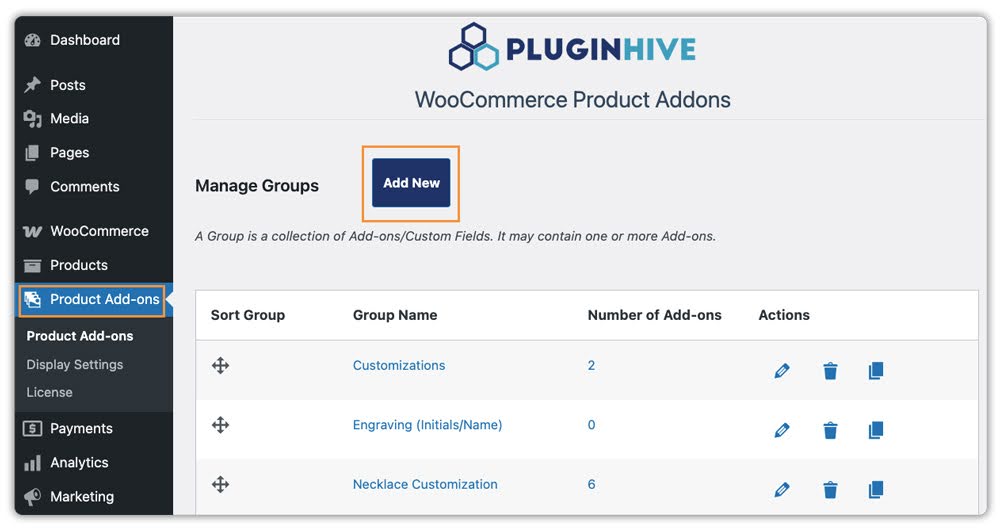
- Go to PH Product Add-Ons → Add New to create an addon group.
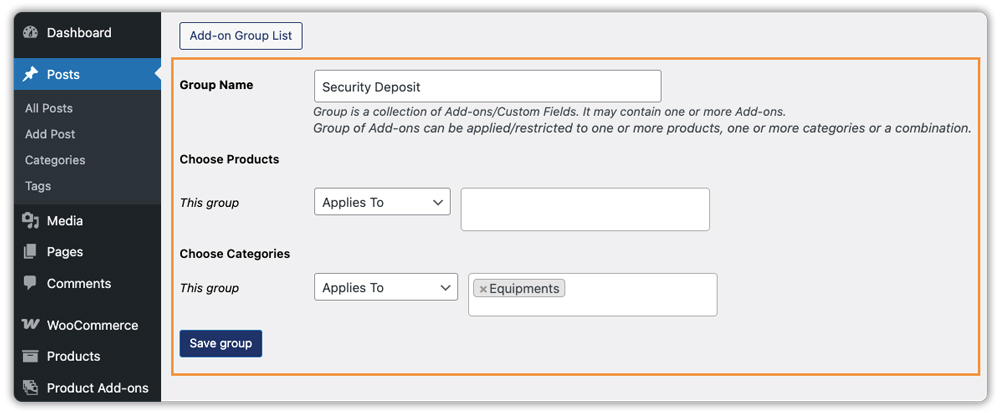
- Give your addon group a name (e.g., “Security Deposit”) and under Applies To, assign it to the specific product or category that needs a deposit.
- Add a new field inside the group and configure it:
- Field Type: Checkbox or Radio Button
- Label: e.g., “Security Deposit – $50”
- Price: Set the flat deposit amount
- Required: Toggle on if the deposit is non-negotiable

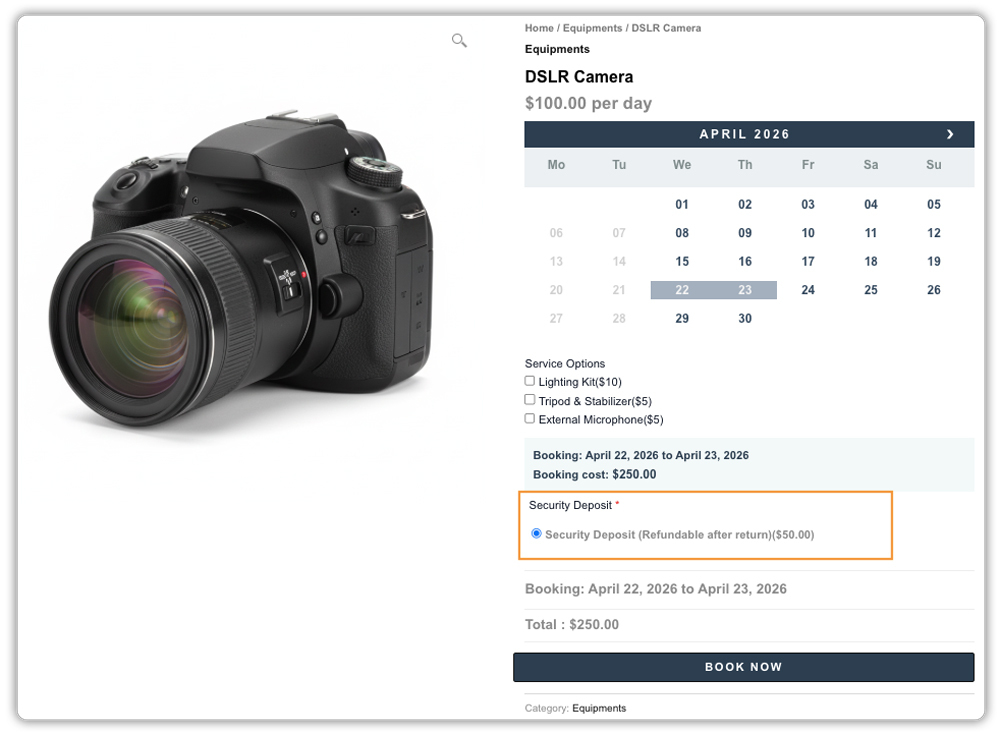
Once configured, the deposit appears as a checkbox or radio button on the product page, pre-selected if marked required, and carries through as its own line item in the cart and at checkout.
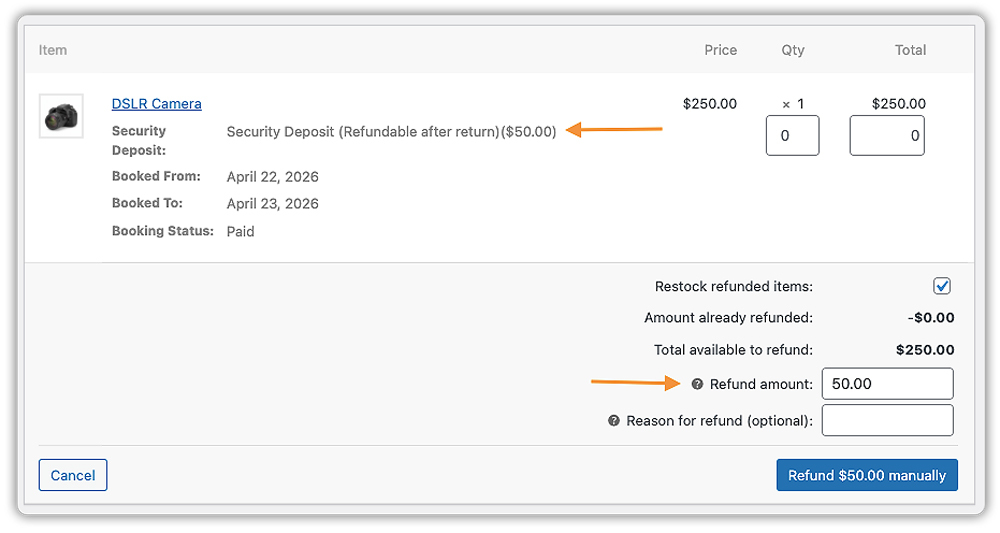
To refund, go to WooCommerce Orders, open the order, and click Refund. Enter the amount against just the deposit line without affecting the rest of the order. If your payment gateway supports automatic refunds, the amount is returned to the customer’s original payment method.
Method 2: Using PH Deposits for WooCommerce
The PH Deposits for WooCommerce plugin works well for stores where customers pay in parts – a deposit upfront to confirm the order, and the remaining balance collected later. This suits custom orders, pre-orders, or rental businesses where you want to secure the booking first and collect the full payment closer to the delivery or rental date.
Here’s how to set it up (full steps in the setup guide):
- Install and activate the PH Deposits for WooCommerce plugin.
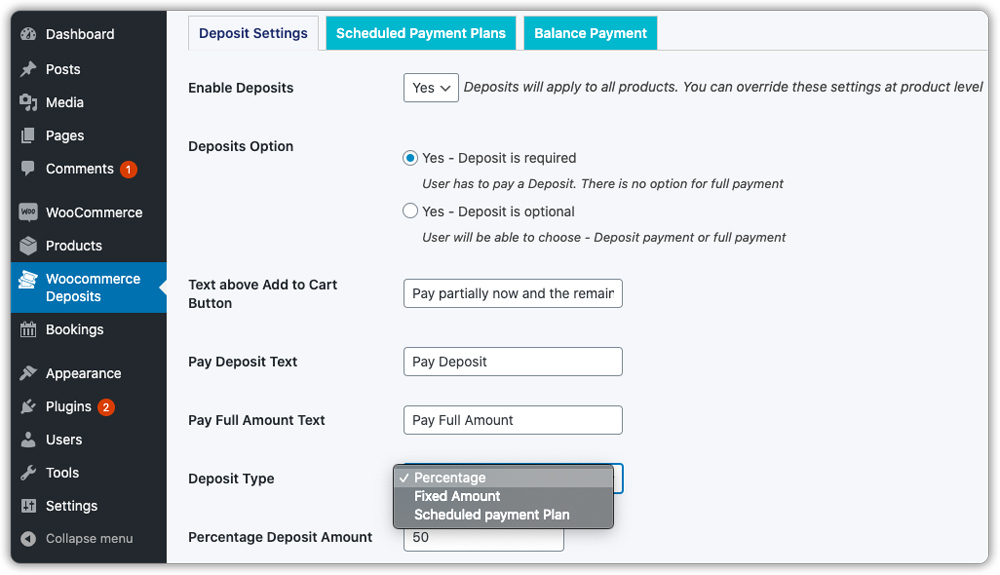
- Go to WooCommerce Deposits → Deposits Settings and set Enable Deposits to Yes.
- Under Deposit Option, choose Deposit is required to make it mandatory, or Deposit is optional to let customers choose.
- Under Deposit Type, set a Fixed Amount (e.g., $50) or a Percentage of the product price (e.g., 20%).
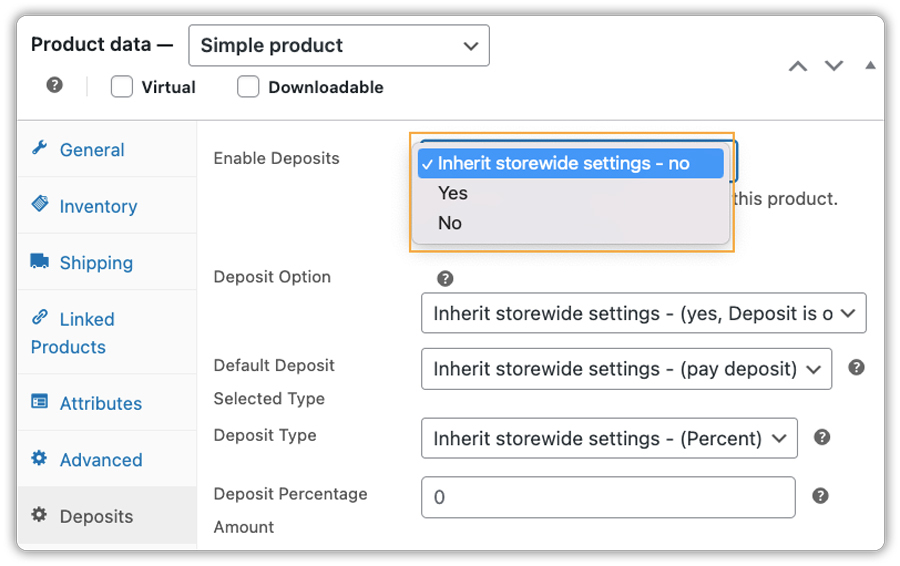
- To apply deposits only to certain products, go to the product edit page → Deposits tab and configure it at the product level.
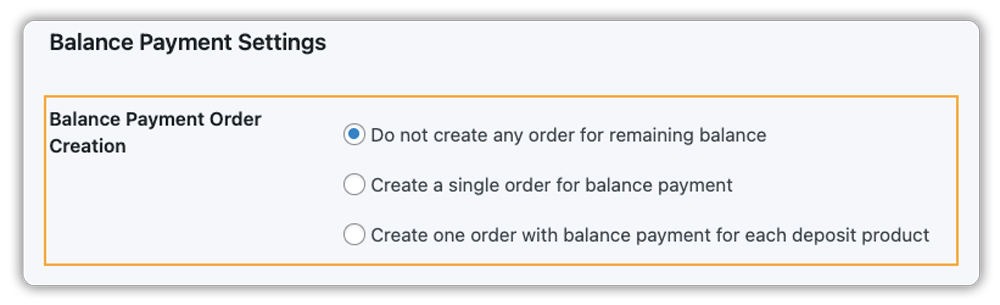
- Under the Balance Payment tab, set how the remaining amount is collected automatically via a new order or manually from your orders page.
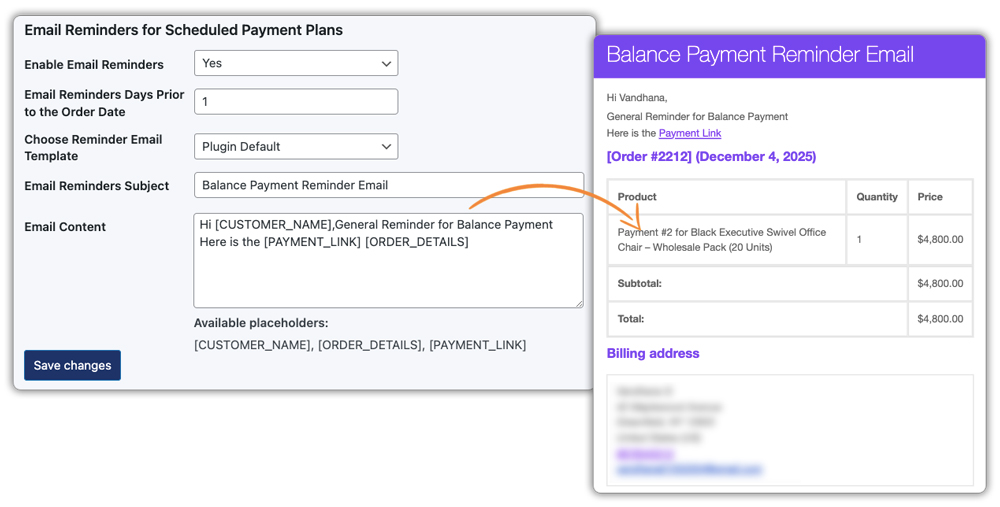
- Enable email reminders so customers are notified before their next payment is due.
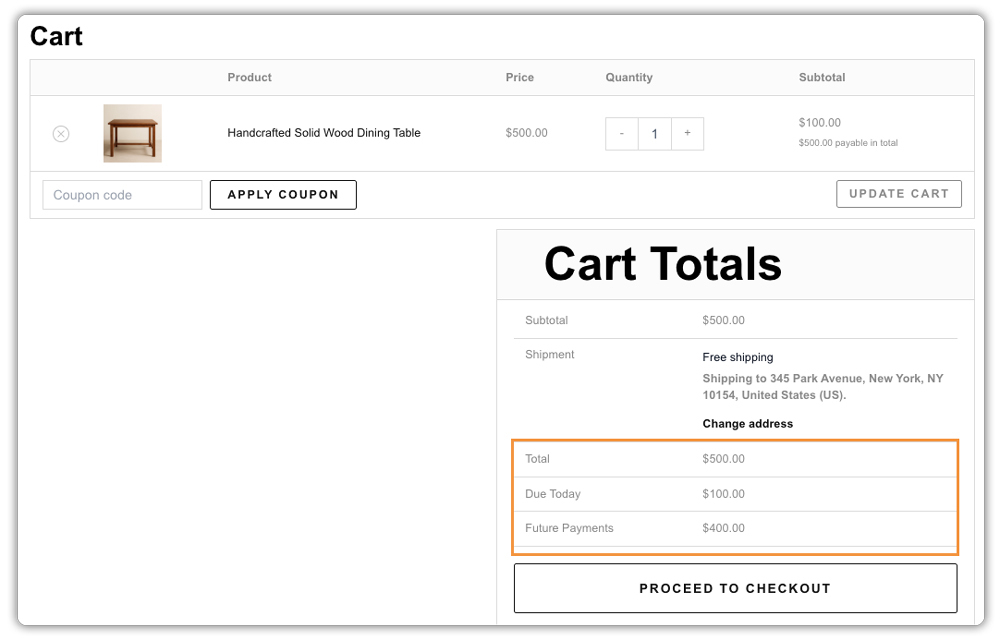
Once configured, customers will see the full product price, the amount Due Today (the deposit), and the Future Payments (remaining balance) clearly broken out in the WooCommerce cart before they proceed to checkout.
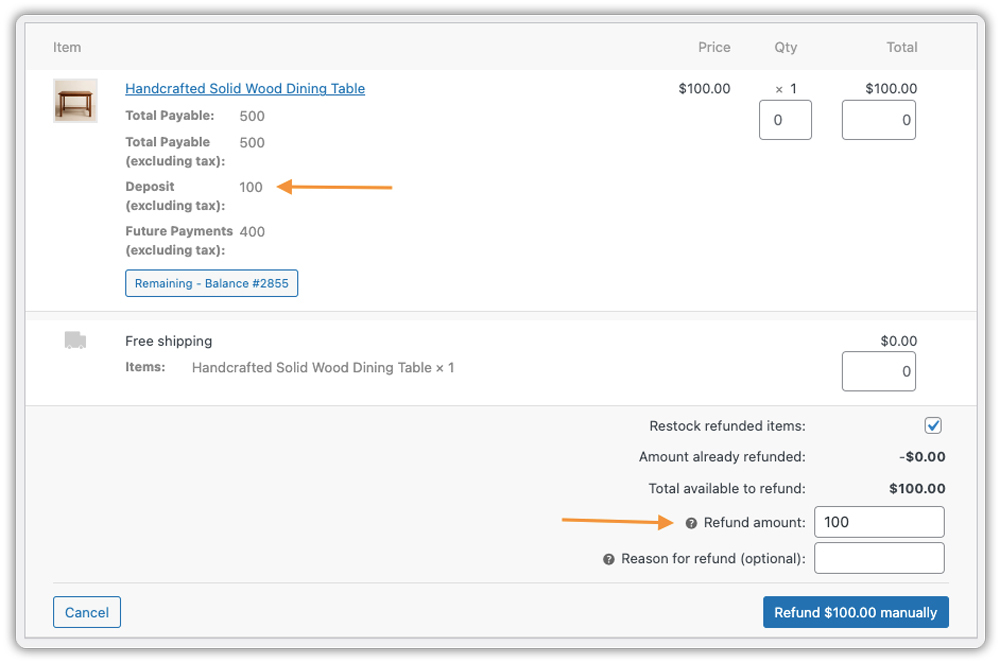
To refund security deposits, go to WooCommerce Orders, open the order, click Refund, and enter the amount against just the deposit line without touching the rest of the order.
Real-World Examples of Security Deposits in WooCommerce Stores
Security deposits fit naturally into many types of WooCommerce stores. Here are a few common examples:
- Equipment rental store: A WooCommerce rental store renting cameras or power tools charges a $100 fixed deposit per booking. The deposit is refunded once the equipment is returned in good condition.
- Vacation property listing: A cabin rental charges 20% of the total booking value as a security deposit. If the stay goes smoothly, the deposit is returned within 5 days of checkout.
- Event space booking: A studio or event venue WooCommerce deposits to collect a flat deposit to confirm the reservation. If the customer cancels within 48 hours, the deposit is withheld as a cancellation fee.
- Custom product store: A store that makes personalised gifts or made-to-order items collects a deposit before starting production, protecting against customers who change their mind mid-process.
In each case, the deposit is clearly communicated, tied to a specific product, and refunded through the WooCommerce orders screen once the conditions are met.
Best Practices for Using Security Deposits in WooCommerce Stores
A well-set-up deposit is only as effective as the policy behind it. Keep these points in mind:
- Pair with WooCommerce Bookings & Appointments for rental stores: WooCommerce rental store handles date-based rentals or reservations, both PH Deposits and PH Product Add-Ons are compatible with the Bookings & Appointments for WooCommerce plugin. Customers pick their dates, see the cost calculated automatically, and the security deposit appears as part of the same product page, with no separate steps needed.
- Be transparent: state clearly on the product page whether the deposit is refundable, how long the refund takes, and under what conditions it may be withheld.
- Set a realistic deposit amount: too low and it won’t protect you, too high and it may put customers off. A range of 10–30% of the product price works well for most rental stores.
- Add order notes when refunding: this keeps your records clean and gives you a clear paper trail for accounting.
- Factor in gateway fees: payment gateways like Stripe may charge a fee even on refunds, so your net deposit could be slightly less than the original amount collected.
Conclusion
Accepting a security deposit in WooCommerce is one of the simplest ways to protect your store against cancellations, damage, and non-payment. Whether you use PH Deposits for WooCommerce or PH Product Add-Ons for WooCommerce, both are easy to set up and manage from your orders screen. If you need help setting up this in your WooCommerce store, the PluginHive support team is ready to assist you with configuration and guidance.
FAQs
- What is the meaning of a security deposit?
A security deposit is an amount collected from the customer upfront, separate from the product price, that is held and refunded once the order or rental is completed without any issues. - What is the use of a security deposit for rent?
For rental businesses, it protects the store owner against losses from damaged items, late returns, or last-minute cancellations. It also ensures the customer is committed before the item or space is reserved. - What is the best security deposit plugin for WooCommerce?
PH Deposits for WooCommerce and PH Product Add-Ons for WooCommerce are two solid options. Both are compatible with the Bookings & Appointments for WooCommerce plugin, making them a great fit for stores that deal with date-based availability like rentals, property listings, or service bookings. - Is the security deposit refundable in WooCommerce?
Yes, since the deposit is added as a separate line item in the order, you can refund just that amount from the WooCommerce orders screen without affecting the rest of the order total.
