


Shopify merchants deal with dozens or sometimes hundreds of shipments every day. Manually picking the right FedEx service for each order quickly becomes a time-consuming task, and it’s easy to make mistakes that lead to higher costs or slower delivery times. That’s why so many merchants turn to automation.
Instead of comparing FedEx Ground, FedEx Express, FedEx 2Day, and other services one by one, a shipping automation tool can do the work instantly. Shopify apps, like the PH Multi-Carrier Shipping Label app, offer built-in rules that automatically look at all available FedEx rates and select the cheapest option for you.
In this article, we’ll break down how this “cheapest FedEx service” automation actually works, why it saves you money, and how you can set it up inside your Shopify store without adding complexity to your fulfillment process.
In This Article
- The Importance of Selecting the Cheapest FedEx Service:
- Prerequisites for Automating FedEx Service Selection in Shopify:
- How PH MCSL Determines the Cheapest FedEx Option in Shopify
- Setting Up Automatic Cheapest Service Selection in Shopify
- When to Use This Method of Selecting the Cheapest FedEx Service
- Conclusion
- FAQ’s
The Importance of Selecting the Cheapest FedEx Service
Automatically selecting the cheapest FedEx service can make a big difference in how efficiently your Shopify store operates.
Why It Matters
- Lower operational costs
When the system always chooses the lowest FedEx rate available, you avoid overspending on domestic and international shipping. Even saving a couple of dollars per order adds up quickly for busy stores. - No more human error
Manually comparing FedEx Ground, Express Saver, and 2Day on every order is repetitive, and mistakes happen. Automation removes the guesswork and ensures the correct service is chosen every time. - Consistent fulfillment process
Whether you have a team of two or twenty, everyone follows the same shipping logic. This keeps your workflow smooth and predictable. - Perfect for high-volume merchants
If you’re shipping dozens or hundreds of packages daily, automation eliminates a huge amount of manual decision-making. The more you ship, the more value you get from letting the system choose the cheapest FedEx option automatically.
Prerequisites for Automating FedEx Service Selection in Shopify:
Before you can automate the process of choosing the cheapest FedEx service, there are a few essentials you need to set up. These make sure your Shopify store can pull real-time FedEx rates and apply the cheapest service automatically.
Requirements
- The PH Multi-Carrier Shipping Label app
This app integrates your FedEx account, pulls all available FedEx services, and provides automation rules to automatically choose the cheapest FedEx option at label generation. Since Shopify’s native settings cannot perform this type of automated service selection, the PH Multi-Carrier Shipping Label app is required to make it possible.
- A Shopify plan with Carrier Calculated Shipping (CCS) enabled
CCS is required for using the PH Multi-Carrier Shipping Label app. It comes with Shopify Advanced and Plus, or can be added to other plans upon annual billing. - A FedEx account with API credentials
These credentials allow your shipping app to fetch real-time FedEx rates and compare them automatically.
How PH MCSL Determines the Cheapest FedEx Option in Shopify
The PH Multi-Carrier Shipping Label app makes the entire process of finding the most affordable FedEx service completely automatic. Instead of manually checking rates each time you fulfill an order, the app handles the comparison for you in real time. Here’s how it works:
1. Fetches Real-Time FedEx Rates
As soon as you go to generate a label, the app pulls live FedEx rates directly using your API credentials. These rates are calculated using key details like package weight, dimensions, origin, and destination, so everything stays accurate.
2. Compares All Available FedEx Services
The app looks at every FedEx service you’ve enabled. This could include options like:
- FedEx Ground
- FedEx Home Delivery
- FedEx Express Saver
- FedEx 2Day
- FedEx International Economy
Every available service is evaluated based on real-time pricing.
3. Automatically Selects the Lowest-Cost Service
Once the app has all the rates, it simply chooses the cheapest one. You don’t have to click or decide anything; the most cost-effective shipping option is picked automatically.
And importantly, this happens during fulfillment, right at the moment you generate the shipping label. That means every order is shipped most economically without adding extra steps to your work.
Setting Up Automatic Cheapest Service Selection in Shopify
With the PH Multi-Carrier Shipping Label app, setting up automatic cheapest-rate selection is straightforward. Once your FedEx account is connected, you can create a rule that tells the app to always choose the lowest-cost FedEx service when generating labels.
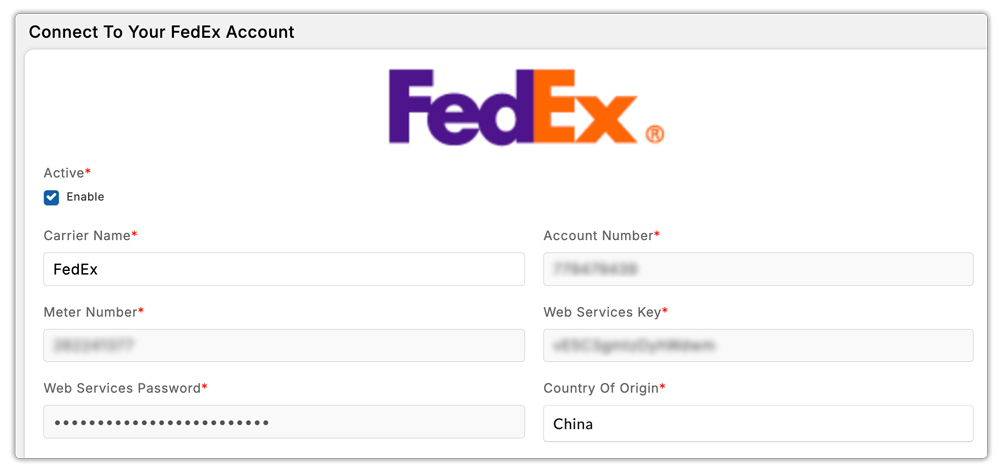
Enable Your FedEx Services
Start by connecting your FedEx account in the PH Multi-Carrier Shipping Label app using your API keys.
Once connected:
- Turn on all the FedEx services you want the app to compare. This ensures the app only evaluates the options you actually plan to use.
Configure the Shipping Automation Rules
Next, go to Automation → Setup inside the app.
When you added your FedEx account, the system automatically created a default FedEx automation rule. Click into that rule.
Here’s what to do:
- Click Add Action.
- Choose Carrier / Service.
- Select all FedEx services you want included in the comparison pool.
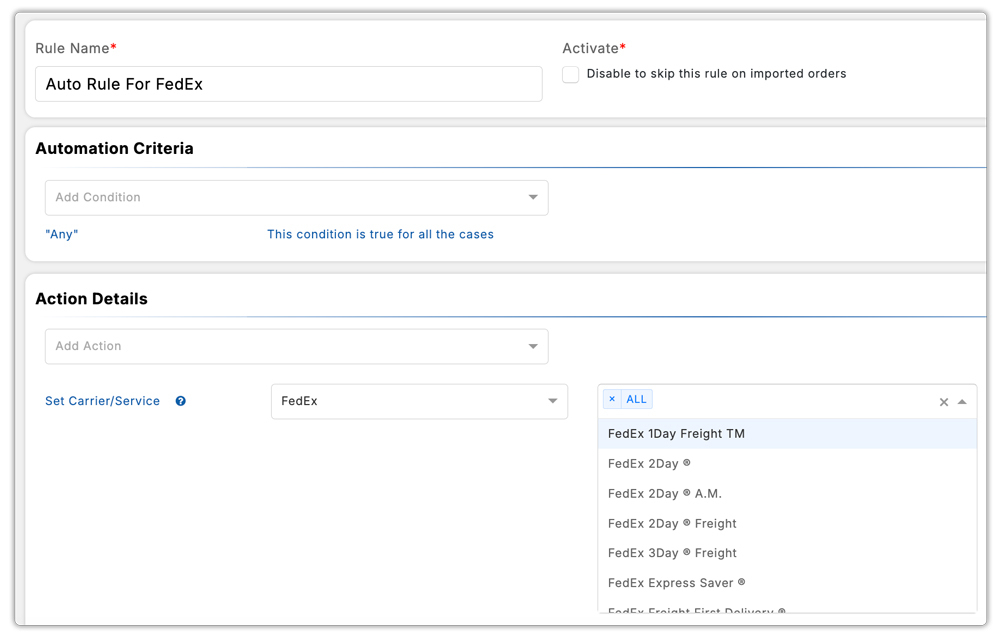
These selected services are the ones the app will evaluate to find the cheapest option.
Save and Activate the Rule
Once your settings are in place, simply save the rule.
From now on:
- No matter which shipping method the customer selects at checkout,
- The PH Multi-Carrier Shipping Label app will always generate the label using the cheapest available FedEx service from the services you enabled.

This keeps your fulfillment fast, consistent, and as cost-effective as possible without any manual decision-making.
When to Use This Method of Selecting the Cheapest FedEx Service
Automatically choosing the cheapest FedEx service is useful for almost any merchant, but it becomes especially powerful in certain situations. Here’s when this method really shines:
1. High-volume Shopify stores
If you’re processing a large number of orders every day, manually choosing shipping services becomes time-consuming and inconsistent. Automation saves hours and keeps costs predictable.
2. Stores that offer simple checkout shipping options
If your checkout only shows things like “Standard Shipping” or “Economy Shipping,” you still need a way to decide which FedEx service to use behind the scenes. Automation handles that for you by sending every order through the cheapest eligible FedEx service.
3. Teams that want to remove manual decision-making
Whether you have multiple fulfillment staff or handle everything yourself, automation ensures every label follows the same rule: choose the cheapest FedEx option. This reduces errors and keeps your workflow efficient.
Conclusion
Automatically selecting the cheapest FedEx shipping service in Shopify is one of the simplest ways to reduce costs, streamline fulfillment, and eliminate guesswork from your workflow. Instead of manually comparing FedEx rates for every order, the PH Multi-Carrier Shipping Label app does the heavy lifting, pulling real-time rates, comparing every eligible service, and choosing the most affordable option automatically.
For merchants who ship at high volumes, rely heavily on FedEx, or prefer a simple checkout experience for customers, this automation can save hours of work and significantly cut shipping expenses over time. Once the rules are set, your team can focus on fulfillment without worrying about which service to choose.
By letting automation handle the decision-making, you ensure every shipment is processed efficiently, consistently, and at the lowest possible cost, exactly what a growing Shopify business needs.
FAQ’s
- What is the cheapest FedEx shipping option?
The cheapest FedEx service for most domestic U.S. shipments is FedEx Ground, which typically costs around $16 with a delivery time of about 5 business days. It’s the most affordable and reliable option for standard, non-urgent packages.
- What is cheaper than FedEx?
For lightweight packages, especially those around 5 lbs or less, USPS is usually cheaper than FedEx. Services like USPS Priority Mail or First-Class Package often offer lower rates while still providing fast delivery.
- Does FedEx charge by weight or size?
FedEx calculates shipping costs based on both weight and size, along with factors like package contents, origin, destination, and the selected service. The final rate is determined once all these details are entered into the system.
