


Custom portraits and framed artwork have become a strong category in online selling. Customers are no longer satisfied with generic wall art. They want pieces that reflect their relationships, memories, and personal style. This shift has opened new opportunities for WooCommerce store owners who want to sell more meaningful, higher-value products.
Selling custom portraits, however, requires more than listing a product and setting a price. Customers need ways to upload images, choose sizes, select frames, and personalise their orders without confusion. This article explains how WooCommerce store owners can confidently offer custom portrait and framing products, and how the right personalisation tools make this process practical and scalable.
Table of Contents
- Why Custom Portraits and Framing Products Are in High Demand
- Where Default WooCommerce Falls Short for Product Personalisation
- How WooCommerce Product Add-Ons Make Custom Portraits Easy to Sell
- Popular Use Cases for Custom Portrait and Framing Products
- Best Practices to Effectively Sell Personalised Products in WooCommerce
- Conclusion
- FAQs
Why Custom Portraits and Framing Products Are in High Demand
Custom portraits and framed artwork are gaining traction as consumers increasingly seek personalised and meaningful products. The global personalised gifts market was valued at around USD 28.27 billion in 2024 and is projected to grow to USD 59.24 billion by 2032.
- Rising personalised gifting demand: The personalised gifts market is expected to grow at a CAGR of 9.69% through 2032, reflecting strong consumer interest in bespoke products.
- Home decor personalisation growth: Personalised home decor, including photo frames and wall art, is among the fastest-growing segments within the broader customised products category.
- U.S. market expansion: The U.S. personalised gifts sector is forecast to grow from USD 9.69 billion in 2024 to USD 14.56 billion by 2030, indicating sustained demand for custom items.
- E-commerce adoption: Online retail continues to dominate personalised gift sales as consumers increasingly prefer ordering customised products digitally.
For WooCommerce store owners, this growing demand signals a profitable opportunity: offering custom portraits and framing products can tap into a rapidly expanding market where personalisation drives both sales and customer engagement.
Where Default WooCommerce Falls Short for Product Personalisation
WooCommerce works well for standard products, but it shows clear limitations when you try to sell personalised items like custom portraits and framed artwork. These gaps often become more noticeable as order volume and customisation needs increase.
- WooCommerce does not include built-in fields for collecting reference photos or detailed instructions required for custom artwork.
- Product variations become difficult to manage when offering multiple sizes, frame styles, and finishes.
- There is no easy way to show or hide options based on customer selections.
- Adding extra charges for premium frames, sizes, or services requires manual work.
- Custom orders often rely on follow-up emails, increasing errors and processing time.
Together, these limitations make it challenging to offer a smooth buying experience and scale custom portrait and framing products efficiently in WooCommerce.
How WooCommerce Product Add-Ons Make Custom Portraits Easy to Sell
Selling custom portraits requires collecting several details from customers, such as photos, sizes, frame choices, and special instructions. The PH WooCommerce Product Add-Ons plugin simplifies this by allowing you to collect all customisation details directly on the product page in a structured way.
Note: Before getting started, make sure the PH WooCommerce Product Add-Ons plugin is installed, activated, and properly configured. You can follow the detailed setup guide here: Set up WooCommerce Product Add-Ons.
1. Use Add-On Groups to Organise Customisation Options
You can sell a custom portrait as one product instead of creating multiple versions. All customisation options, like photo upload, size, and frame selection, are added directly to the product.
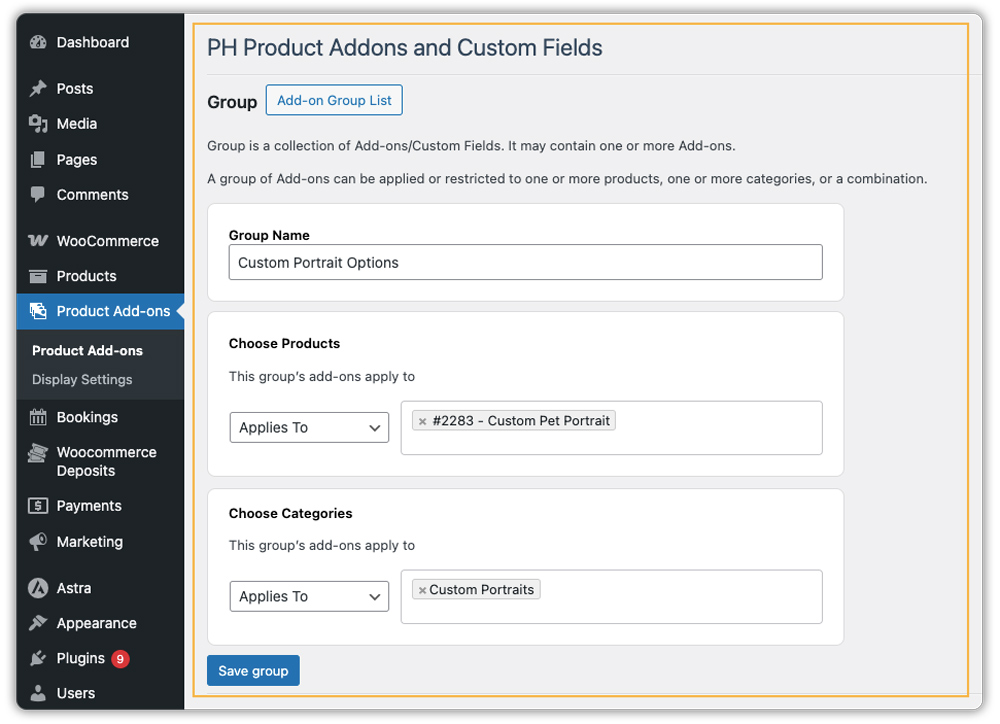
These options are organised using add-on groups, which can be applied to one product, multiple products, or a whole category. This makes it easy to reuse the same setup and keep your store organised.
2. Add Customer-Friendly Customisation Fields
You can then add the options customers need to personalise their artwork, such as:
- A photo upload field for submitting images
- Size selections for different print dimensions
- Frame style choices like classic, modern, or premium
- Text fields for special instructions or notes

Each option appears clearly on the product page, helping customers understand what they need to provide before placing an order.
3. Set Clear Pricing for Each Choice
Custom portraits often include upgrades, and unclear pricing can slow decisions. Product Add-Ons allow pricing to be attached directly to specific choices, such as premium frames or larger sizes, so customers see how their selections affect the final cost before adding the product to the cart.

4. A Simple Real-World Example
A customer selects a custom portrait, uploads a photo, chooses a size, selects a frame, and adds a short message. Each choice is made on the same product page, the price updates automatically, and the order is placed without any follow-up communication.

This approach reduces confusion for customers and manual work for store owners. By using the PH Product Add-Ons for WooCommerce, personalisation becomes structured, transparent, and scalable, helping stores sell custom portraits and framing products with greater confidence and consistency.
Popular Use Cases for Custom Portrait and Framing Products
Knowing your customer helps you tailor your offerings. Here are the most common reasons people order custom portraits:
- Pet Portraits: A hugely popular and emotional purchase for pet lovers
- Family & Couple Art: For anniversaries, weddings, or as unique home decor.
- Meaningful Gifts: For birthdays, holidays, or housewarmings – personalised art is a guaranteed standout gift.
- Memorial & Tribute Art: To honour and remember a loved one or a cherished pet.
- Home Decor: Customers wanting art that perfectly matches their room’s colour scheme and style.
- Professional Branding: Stylised portraits for offices, studios, or personal branding.
Across these use cases, the PH WooCommerce Product Add-Ons plugin makes it easy for customers to personalise portraits with photos, size choices, frames, and premium upgrades, helping you offer flexible options without complicating the buying experience.
Best Practices to Effectively Sell Personalised Products in WooCommerce
To succeed in the custom art market, you need to balance creativity with operational efficiency. Here are the best practices to ensure your WooCommerce store remains profitable and your customers remain satisfied.
- Be clear about production and delivery timelines: Custom portraits take time, so clearly mention how long it takes to create the artwork and when customers can expect delivery. Showing estimated delivery dates on the product page helps manage expectations and reduces support questions. Plugins like PluginHive’s Estimated Delivery Date for WooCommerce make this easy.
- Share shipment tracking automatically: Once an order is shipped, customers want updates. Automatically sharing tracking details using WooCommerce Shipment Tracking Pro keeps customers informed and reduces “Where is my order?” emails.
- Use the right shipping carriers and show live rates: Shipping framed artwork varies based on size and location. Showing live carrier rates at checkout helps customers see accurate pricing and prevents surprises. PluginHive WooCommerce Shipping Plugins help you manage rates, labels, and carriers from one place.
- Make critical customisation fields required: Ensure customers cannot complete checkout without uploading their photo or selecting a size. Setting required fields prevents incomplete orders and saves time on manual follow-ups.
- Keep the customisation flow simple: Group related options together and show only what’s relevant. A clean and guided customisation experience helps customers place orders confidently and reduces errors.
By following these simple steps, you can turn custom orders into a smooth and reliable part of your business.
Conclusion
Personalised e-commerce is no longer optional. Customers want products that feel meaningful, and custom portraits and framed artwork offer exactly that. For WooCommerce store owners, this is an opportunity to move beyond selling standard items and create experiences that build stronger customer connections and long-term value.
Scaling custom products becomes much easier when the right tools remove technical friction. With solutions like the PH WooCommerce Product Add-Ons plugin, customers can customise their orders smoothly while you focus on the creative side of your business. Ready to set up your own custom portrait store? You can contact PluginHive for expert guidance.
FAQs
Q. Can I sell custom portraits in WooCommerce?
Yes, WooCommerce can be used to sell custom portraits and framed artwork. While it works well for basic products, you’ll need the PH WooCommerce Product Add-Ons plugin to handle photo uploads, size selection, framing options, and other personalisation details smoothly.
Q. How do customers upload photos for custom portraits in WooCommerce?
By default, WooCommerce does not support file uploads on product pages. You can add photo upload fields using plugins like the PH WooCommerce Product Add-Ons plugin, allowing customers to upload images directly while placing an order.
Q. How do I charge extra for frames or larger portrait sizes in WooCommerce?
You can attach additional pricing to specific customisation options such as premium frames, larger print sizes, or express processing. This way, the product price updates automatically as customers make their selections.
Q. How do customers leave special instructions for the artist?
You can add a text area field on the product page labelled something like “Notes for the Artist.” Customers can use this to request changes such as background removal or specific styling preferences.
