


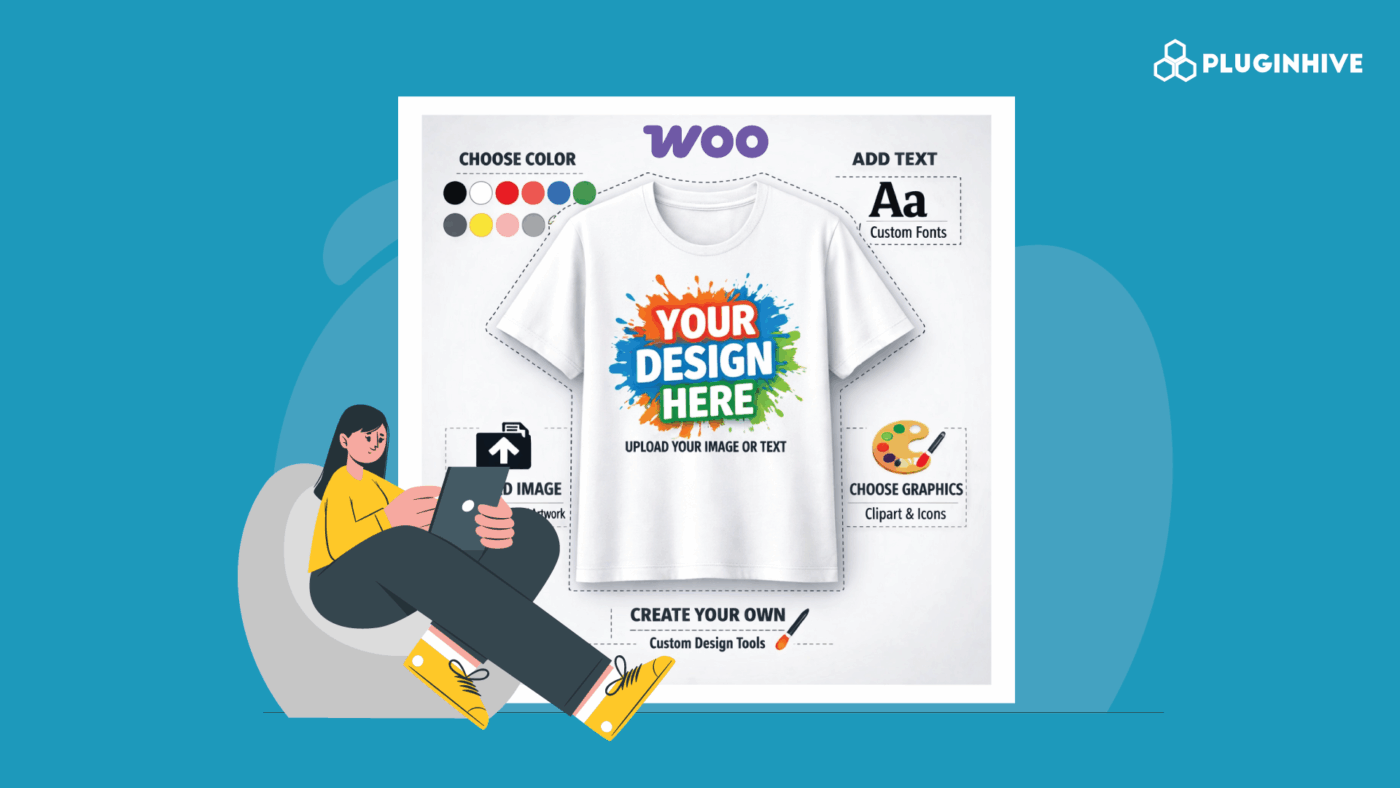
Selling WooCommerce made-to-order products can help you stand out in a crowded market. Instead of competing only on price, you offer something unique and personalized. For example, whether you sell custom furniture, engraved jewelry, tailored clothing, or personalized cakes, made-to-order products give your customers exactly what they want. At the same time, you avoid holding unnecessary inventory and reduce financial risk.
However, selling made-to-order products online isn’t always simple. You need accurate measurements, personalization details, and clear pricing before production begins. If customers miss something, you end up chasing information or correcting mistakes. That’s why you need a clear way to collect customization details directly on your product page. In this guide, you’ll learn how to simplify custom orders and manage your made-to-order products in WooCommerce with confidence.
Table of Contents
- WooCommerce Made-to-Order Products and Required Custom Fields
- Challenges of Selling Made-to-Order Products in WooCommerce
- How WooCommerce Product Add-ons Solve These Challenges
- How to Add Custom Options to WooCommerce Made-to-Order Products
- Best Practices for Selling Made-to-Order Products in WooCommerce
- Conclusion
- FAQs
WooCommerce Made-to-Order Products and Required Custom Fields
When you sell made-to-order products in WooCommerce, customization becomes part of the buying process. Therefore, you must clearly define what information you need from customers before production starts.
Here are common examples of WooCommerce made-to-order products and the type of information you typically need to collect.
| Product Type | Details You Need to Collect |
|---|---|
| Custom Furniture | Length and width, wood type, finish style, additional features (drawers or storage), special instructions |
| Personalized Jewelry | Engraving text, font style, metal type, ring size |
| Bespoke Clothing | Chest, waist, and sleeve measurements, fabric choice, fit preference, reference image upload |
| Custom Cakes | Cake size, flavor, occasion type, custom message, delivery date |
| Handmade Crafts & Gifts | Color options, material type, personalized name, gift wrapping selection |
As you can see, every product requires specific inputs from the customer. The more customized the item, the more structured your information collection needs to be.
Challenges of Selling Made-to-Order Products in WooCommerce
By default, WooCommerce works well for standard products. However, once you start selling customized items, things don’t always run smoothly. Here are some common problems store owners run into:
- Customers miss important details: Without clear prompts, they skip measurements or personalization. You contact them later to collect missing information.
- Order notes become messy: Many store owners use the “order notes” field. This gets disorganized quickly as orders increase.
- Too many product variations: Some try handling customization through product variations. However, options multiply quickly, making the product page confusing and harder to maintain.
- Manual pricing adjustments: Custom options change final prices. Without automation, you manually adjust orders or send updated invoices.
- Too much back-and-forth communication: Unclear details create long email threads. Production slows down, and mistakes increase.
These challenges don’t mean WooCommerce can’t handle custom products. You just need the right structure. The next section shows how Product Add-ons solve these issues.
How WooCommerce Product Add-ons Solve These Challenges
To manage made-to-order products efficiently, you need a structured way to collect and organize customer input. This is where PH Product Add-ons for WooCommerce becomes useful. Instead of relying on variations or order notes, you can add custom fields directly to your product pages. As a result, customers can enter measurements, choose materials, add personalization text, or upload files before completing their purchase.
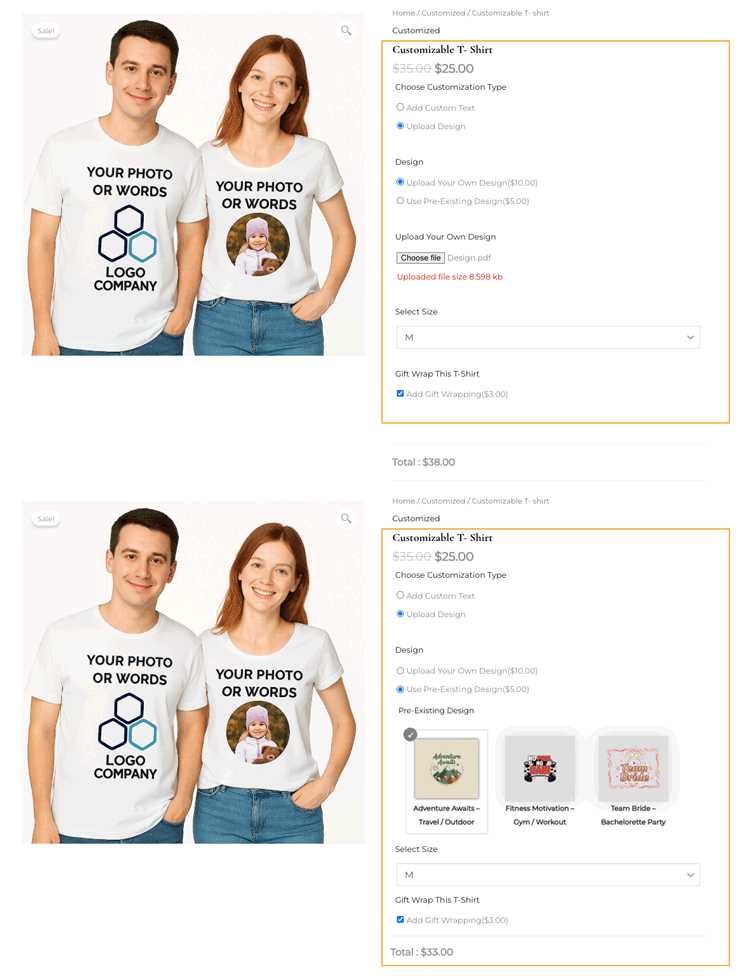
In addition, you can make important fields required, so orders don’t go through with missing information. Pricing updates automatically when customers select additional options, therefore removing the need for manual adjustments. Moreover, all customization details are saved clearly within the order, making it easier for you or your team to begin production without confusion.
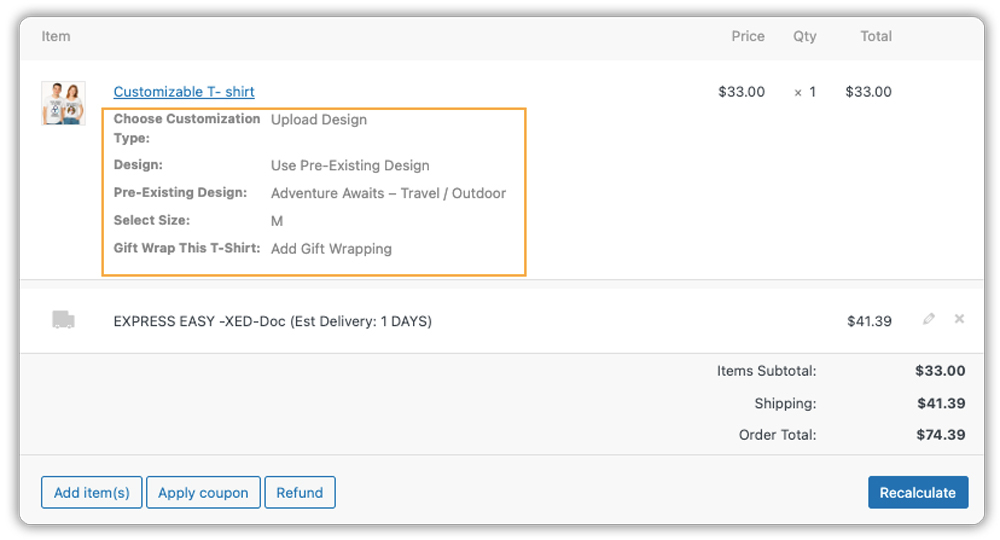
With the right plugin in place, selling made-to-order products becomes smoother, more accurate, and easier to scale.
How to Add Custom Options to WooCommerce Made-to-Order Products
Let’s set up custom options using PH Product Add-ons for WooCommerce. This plugin allows you to collect customization details directly on your product pages without creating dozens of variations.
Before you begin, ensure that the plugin is installed, activated, and properly configured. You can follow the detailed setup guide here: Set up Product Add-Ons for WooCommerce .
Create an Add-on Group
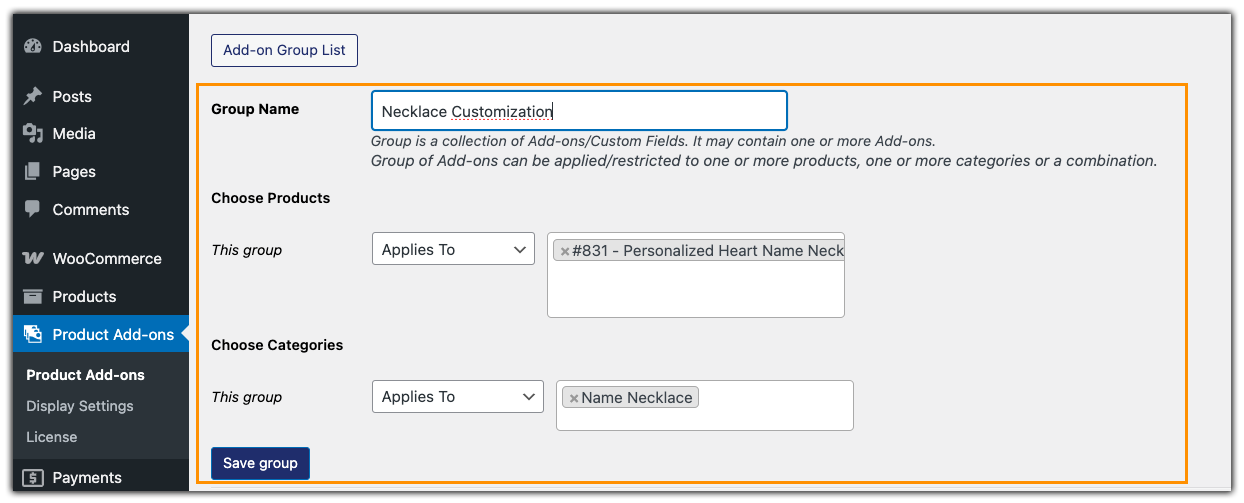
Product Add-ons works using add-on groups. Think of an add-on group as a collection of custom fields that you attach to a product or even a full product category.
For example, if you sell personalized necklaces, you can create a group called “Necklace Customization.” You can then assign this group to one necklace product or reuse it across similar jewelry items, which saves time and keeps things organized.
Add Custom Jewelry Options
Once your add-on group is ready, you can turn your regular jewelry products into customizable items by adding the right input fields.
- Text Fields: Let customers enter engraving text, initials, or short messages.
- Dropdowns or Radio Buttons or Color options: Offer choices like metal type, gemstone, or chain length.
- Multi-Select Boxes: Allow customers to choose multiple charms or decorative elements.
- Checkboxes: Add optional features like gift wrapping or premium packaging.
- File Uploads: Let customers upload custom designs or reference images.
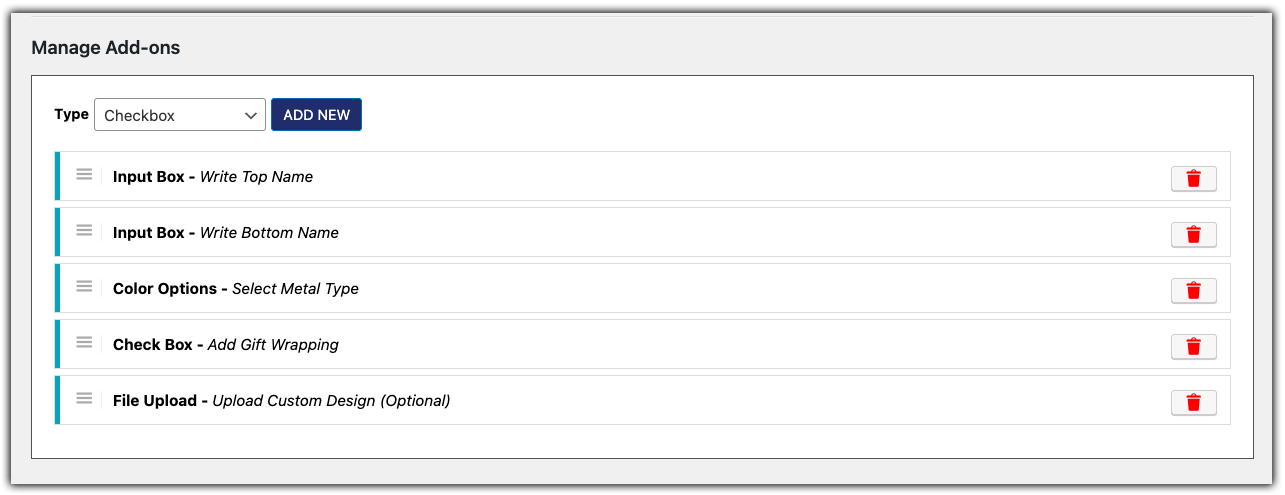
The fields above are just examples for personalized jewelry. You can use many other field types based on your made-to-order product. Choose the options that fit your business and the type of customization you offer.
Set Up Pricing Rules
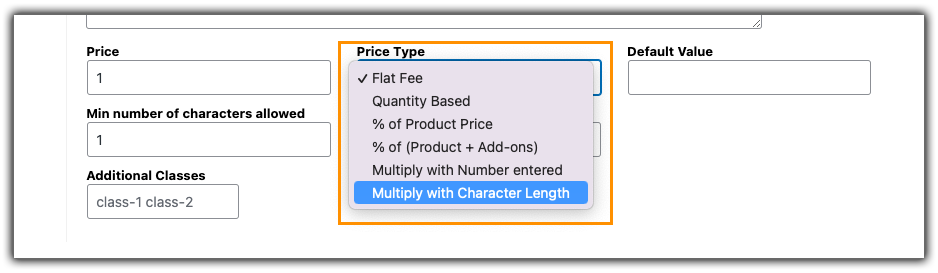
One of the most useful features is automated pricing. For instance, you can charge extra for premium materials or calculate engraving costs based on character count. As customers select options, prices update instantly, which keeps pricing transparent.
Use Conditional Logic to Keep It Simple
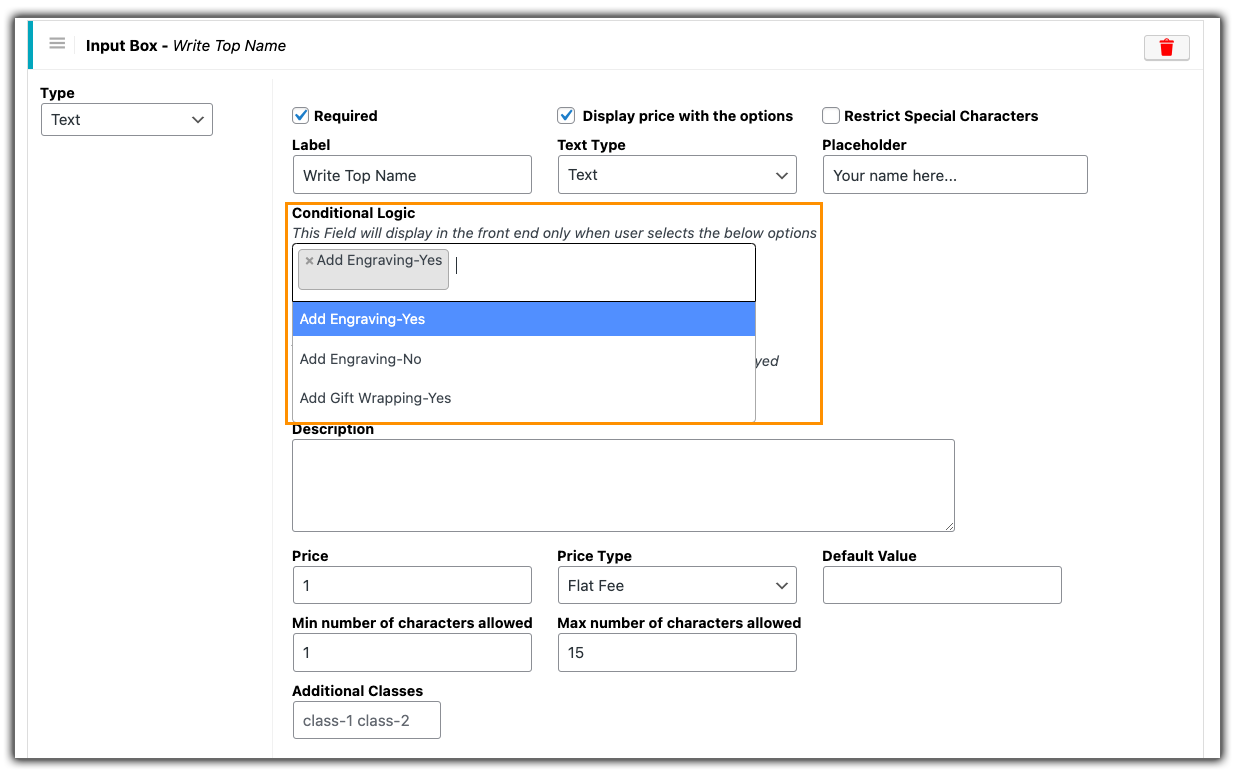
Conditional logic keeps your product page clean. For example, if a customer selects “Yes” for engraving, the engraving field appears. Otherwise, it stays hidden. This makes the buying experience less overwhelming.
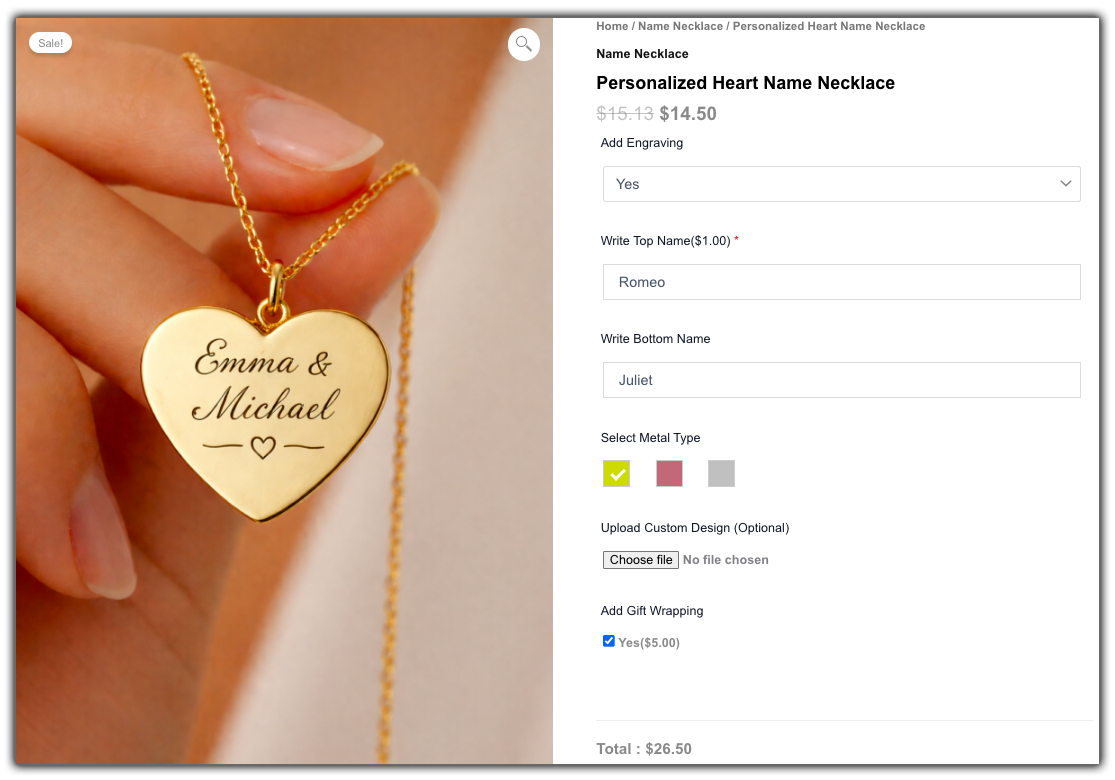
Once configured, your product page clearly displays all customization choices, and customer selections are saved accurately with the order.
Best Practices for Selling Made-to-Order Products in WooCommerce
Setting up custom options is only part of the process. To successfully sell made-to-order products in WooCommerce, you need clarity, structure, and consistency. The following best practices will help you reduce errors, improve customer experience, and scale your store confidently.
- Keep Customization Simple: Only ask for information you truly need. Too many fields can overwhelm customers and reduce conversions.
- Use Clear Field Labels and Instructions: Avoid vague terms like “Notes.” Instead, write specific instructions such as “Enter Engraving Text (Max 20 Characters).” Clear guidance reduces mistakes.
- Make Important Fields Required: If production depends on certain details, mark those fields as required. This prevents incomplete orders.
- Set Realistic Delivery Expectations: Clearly communicate production timelines. If your items take 5–7 days to create, make that visible on the product page using the Estimated Delivery Date Plugin for WooCommerce.
- Review and Improve Over Time: Pay attention to customer questions and common mistakes. Adjust your fields and instructions based on real buying behaviour.
Selling made-to-order products can be highly profitable when managed correctly. With the right structure and clear communication, you can reduce confusion, improve accuracy, and create a smooth customization experience for your customers.
Conclusion
Made-to-order products allow you to build a brand around customization and craftsmanship rather than mass production. When your ordering process feels clear and guided, customers feel more confident placing personalized orders. A well-structured product page not only improves accuracy but also makes your store look more professional and reliable.
If you’re planning to streamline customization in your store, PH Product Add-ons for WooCommerce can help you implement it in a practical way. And if you ever need assistance setting it up or adapting it to your specific products, PluginHive’s support team is available to guide you. With the right structure in place, you can focus less on fixing orders and more on growing your made-to-order business.
FAQs
1. What does “WooCommerce made to order” mean?
WooCommerce made-to-order means the product is created only after a customer places an order. Customers choose customization details like size, color, or engraving, and you produce the item based on their selections.
2. How do you create a custom order in WooCommerce?
To create a custom order in WooCommerce, you need to collect customer-specific details on the product page. Use the PH Product Add-ons for WooCommerce plugin to add custom fields, set pricing rules, and require important information before checkout.
3. Does adding custom product options affect my WooCommerce store’s performance?
No, if you use a PH Product Add-ons for WooCommerce plugin and keep your setup organized. Structured product options are more efficient than using long variation lists or manual order notes.
4. How do you handle shipping for made-to-order products in WooCommerce?
Once production is complete, you can use a WooCommerce shipping plugin to connect with major carriers. This lets you generate shipping labels, calculate rates, and share tracking details directly from your store.
