


Want to sell personalized pet products in WooCommerce? Pet owners love products that feel made for their pet, like an engraved tag with their pet’s name, a collar in their favourite colour, or a bowl with a funny nickname. In WooCommerce, though, a standard product page has no place for a pet’s name, size, or photo. Customers end up sending details by email or typing them in the order notes, and that is how engraving mistakes and delayed orders happen.
Adding custom fields to the product page fixes this. In this guide, we’ll show you how to sell personalized pet products in WooCommerce using PH Product Add-ons for WooCommerce.
On This Page
- Why Sell Personalized Pet Products in WooCommerce?
- Popular Personalized Pet Products You Can Sell
- What Does WooCommerce Need to Sell Personalized Pet Products?
- How to Sell Personalized Pet Products in WooCommerce
- Tips for Running a Pet Store in WooCommerce
- Conclusion
- FAQs
Why Sell Personalized Pet Products in WooCommerce?
Most pet owners see their pet as part of the family, and they are happy to pay more for something made just for them. Here’s why personalization works well for pet stores:
- It makes your products stand out: A tag with the pet’s name is more memorable than a generic one from a big retailer.
- You can charge for the extra effort: Engraving, custom colours, and printed designs can all carry their own price, which increases the value of each order.
- Customers give the right details upfront: Names, sizes, and contact numbers are entered on the product page, so you don’t have to chase customers for missing information.
- You don’t need a listing for every option: One product page can handle every pet name, colour, and size.
In short, personalization lets you earn more from the same product while giving pet owners something they truly want.
Popular Personalized Pet Products You Can Sell
Almost any pet product can be personalized. These are some of the most popular ones:
- Engraved pet tags: The pet’s name and the owner’s phone number engraved on a tag.
- Collars and leashes: Custom colours, sizes, and names or contact details added to the collar.
- Pet bowls: The pet’s name or a short message printed or engraved on the bowl.
- Beds and blankets: A name or a short phrase added to a cushion, bed, or blanket.
- Bandanas and pet clothing: Custom text, colours, and sizes.
- Pet portraits and photo gifts: Customers upload a photo, and you turn it into a canvas, mug, or cushion. For more ideas like these, see how to sell personalized gifts in WooCommerce.
Whatever you sell, the customer needs a simple way to tell you what to personalize.
What Does WooCommerce Need to Sell Personalized Pet Products?
WooCommerce has no built-in way to collect a pet’s name or photo. Product variations work well for fixed choices like size or colour, but they can’t accept free text such as a name. To sell personalized pet products, your product page needs:
- Text fields for the pet’s name, contact number, or a short message.
- Option fields such as dropdowns, colour options, or image options for sizes and styles.
- A file upload field so customers can share a pet photo or their own design.
- Flexible pricing to charge extra for engraving or custom designs.
- Show/hide logic so customers only see the fields that apply to them.
- Clear order details so you can see exactly what to engrave or print.
The PH Product Add-ons for WooCommerce plugin covers all of these, and the selected options appear on the product page, cart, and checkout.
How to Sell Personalized Pet Products in WooCommerce
Let’s set up a custom pet collar as an example. Customers pick a size, a colour, and a buckle finish, and they can add their pet’s name. The same steps work for leashes, harnesses, and other pet products.
Create a New Add-on Group: Go to WordPress Dashboard → PH Product Add-ons for WooCommerce → Settings and click Add New. Name it “Custom Collar Options”.
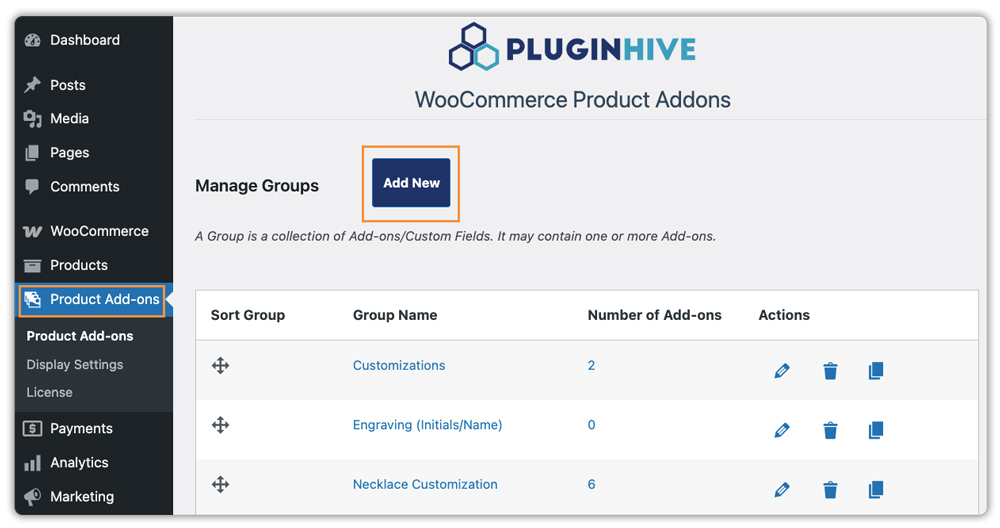
Choose the Products: Under Applies To, select your pet collar. To reuse the options on leashes or harnesses, add their category too.

Add the Size Options: Add a Dropdown labelled “Collar Size” with options like Small, Medium, and Large. Enable Required so customers always pick a size.

Add Colour and Buckle Finish: Add Color Options labelled “Collar Colour”. Then add a Radio Button labelled “Buckle Finish” with options like Silver, Gold, and Black.


Add the Pet’s Name: Add a Checkbox labelled “Add My Pet’s Name” and set a Flat Fee.

Next, add a Text add-on labelled “Pet’s Name”, set a character limit, and restrict special characters. Finally, use Conditional Logic so this field appears only when the checkbox is ticked.

Save and Preview: Save your changes and open the product page. The options appear there and carry through to the cart, checkout, and order details.

Every detail is now collected upfront, so you never have to follow up after the order.
Selling custom pet portraits? Refer to our guide on how to create and sell custom portraits and frames in WooCommerce for the steps.
Tips for Running a Pet Store in WooCommerce
Selling personalized products is only one part of a successful pet store. These tips will help you run the whole store more smoothly:
- Show real product photos. Pet owners like to see what they’re buying, so add clear images, including sample names or prints on personalized items.
- Mention production time. Personalized items take longer to prepare, so say so on the product page and consider showing estimated delivery dates at checkout.
- Explain your returns policy. Engraved or custom-printed items usually can’t be resold, so state clearly whether you accept returns on them.
- Check details before production. Review the order details before you start engraving or printing, so any mistakes are caught early.
- Offer pet services alongside your products. If you also run grooming, boarding, or training sessions, you can take those bookings in the same store. See how to manage pet service bookings with WooCommerce Bookings.
- Ship pet products safely. Items like supplements, shampoos, and sprays need careful packaging and the right carrier settings. Our guide on shipping pet care products and supplements in WooCommerce explains how.
These small steps help you deliver personalized pet products without errors or delays.
Conclusion
Selling personalized pet products in WooCommerce is a simple way to turn everyday items into something pet owners love. With the PH Product Add-ons for WooCommerce plugin, you can collect pet names, sizes, colours, and photos on the product page and charge extra for personalization. If you need help setting this up in your store, the PluginHive Support team is ready to help.
FAQs
Q: Is selling pet products profitable?
Yes, it can be. Pet owners buy regularly and often spend more on products made for their pet. Personalized items can also carry higher prices, which helps your margins.
Q: How to start a pet business?
Start by choosing what you want to sell, such as collars, bowls, or supplements. Then set up your WooCommerce store, add your products, and use a plugin like PH Product Add-ons to offer personalization.
Q: Which pet business is most profitable?
It depends on your niche and costs. Personalized products, pet supplements, and services like grooming or training often work well, since customers pay more for them and come back often.
Q: Which print-on-demand is profitable?
Products that customers like to personalize usually do best, such as pet bandanas, bowls, blankets, and photo gifts. You only pay to produce an item after it’s ordered, so your upfront costs stay low. See how to use product add-ons for print-on-demand to collect names and designs.
