



Sendle has long been used by WooCommerce stores as a convenient shipping option for handling domestic deliveries. When a widely used carrier becomes unavailable, it can directly affect order fulfillment, customer communication, and overall store operations. This article focuses on what WooCommerce sellers need to do now, how to manage shipping without interruptions, and which alternative carriers can help keep deliveries moving.
On This Page
- The Sudden Shutdown of Sendle
- Who Is Affected by the Sendle Service Disruption in WooCommerce?
- What Happens to WooCommerce Orders Already in Transit?
- Immediate Steps WooCommerce Stores Should Take
- Best Sendle Alternatives for WooCommerce Shipping
- Final Thoughts
The Sudden Shutdown of Sendle
Sendle’s shipping platform became unavailable in January 2026, when its delivery services stopped functioning for both new and existing bookings. The shutdown led to an immediate suspension of all shipping activity across the platform.
From the time operations stopped:
- New shipment bookings were no longer accepted: Users could not create or process any new Sendle shipments.
- Scheduled pickups were cancelled: Pickups scheduled from January 12, 2026, onward were not carried out.
- In-transit parcels followed limited delivery handling: Parcels already collected were handled based on the assigned delivery partner’s ability to complete the delivery.
- No pickup changes or rescheduling were supported: The platform no longer allowed delivery changes, new requests, or rescheduling of pickups.
- All services were affected: The shutdown applied to both domestic and international shipping, meaning no part of Sendle’s network remained operational.
The platform offered no alternative booking methods or temporary services, confirming a complete stoppage rather than a partial or temporary disruption.
Who Is Affected by the Sendle Service Disruption in WooCommerce?
The Sendle shutdown directly impacts WooCommerce stores, depending on how they configured Sendle in their shipping setup. Any store that depended on Sendle for checkout visibility, order processing, or fulfillment automation will experience operational gaps. The most impacted WooCommerce sellers include:
- Stores offering Sendle shipping at checkout: WooCommerce stores that displayed Sendle shipping options will see those options become unavailable.
- Stores with open Sendle shipments: WooCommerce cannot process orders that are not fully picked up or delivered.
- Stores using Sendle-driven automation: WooCommerce workflows built around Sendle, such as auto-label creation, shipment syncing, or fulfillment triggers, will no longer execute, forcing manual handling or migration to an alternative shipping solution.
What Happens to WooCommerce Orders Already in Transit?
WooCommerce Parcels That Are Already in Transit
- Assigned delivery partners (such as CouriersPlease, Aramex, and others) now handle all WooCommerce parcels picked up before Sendle stopped operations. Each carrier completes the delivery according to their process.”
- For updates on delivery status or tracking, store owners need to contact the delivery partner directly using the tracking number associated with the parcel.
- If you use a direct Sendle account, you can identify the delivery partner responsible for your shipment by downloading the Sendle shipping label, which shows the carrier’s logo.
- WooCommerce stores using Sendle through third-party integrations or APIs should contact their respective platform or API support team, as they can assist in coordinating with the carrier on your behalf.
Scheduled Sendle Pickups
Sendle cancelled all pickups scheduled for January 12, 2026, or later and did not carry them out. These pickups were automatically treated as cancelled once operations stopped.
WooCommerce Shipments Not Yet Picked Up
Sendle cancels all shipments that were created but not yet collected. Stores cannot use these labels, and the shipments will not be processed.
To complete delivery, WooCommerce store owners must:
- Void the unused Sendle labels
- Recreate the shipment using an alternative shipping carrier
But don’t worry, there are steps WooCommerce stores can take immediately to manage these orders and continue fulfilling shipments without disruption.
Immediate Steps WooCommerce Stores Should Take
With Sendle no longer operational, WooCommerce store owners need to act quickly to prevent fulfillment delays, checkout issues, and customer confusion.
- Disable Sendle from WooCommerce shipping settings: Remove Sendle as an active shipping method to prevent broken rate calculations, failed label generation, or checkout errors.
- Review pending and affected orders: Identify Sendle orders and confirm whether they require re-shipment, carrier reassignment, or customer communication.
- Void unused Sendle shipping labels: If you have created any labels but have not used them, you should void it avoid accounting mismatches or fulfillment confusion.
- Update checkout shipping options: Ensure customers can still complete purchases by enabling alternative shipping methods or temporary flat-rate options until you have configured a replacement carrier.
- Notify customers about possible delivery changes: Proactively inform affected customers about shipping adjustments to maintain transparency and reduce support requests.
- Prepare your store for a new shipping setup: Prepare your store for a new shipping setup: Review your fulfillment workflow and restore the automation features you used previously with a WooCommerce-compatible shipping solution.
Let’s look at the best Sendle alternatives for WooCommerce shipping that can replace Sendle’s functionality and restore automation.
Best Sendle Alternatives for WooCommerce Shipping
With Sendle no longer available, WooCommerce stores need new shipping carriers and automation tools that can handle rates, label printing, tracking, and fulfillment. Below are the top alternatives you can use to replace Sendle’s services.
Alternate Carrier Options for WooCommerce Stores
If your WooCommerce store ships domestically or internationally, you can consider these reliable carriers:
- Australia Post: Widely used in Australia for affordable domestic and international shipping.
- Aramex: Global carrier with a strong presence in the Asia-Pacific and the Middle East.
- UPS: Major global carrier with express and ground services.
- FedEx: Trusted for international express delivery and tracking.
- DHL Express: Good choice for fast international shipping.
- USPS / Canada Post / Royal Mail: Country-specific carriers for the US, Canada, and the UK, respectively, offering both local and international shipping services.
You can integrate these carriers into your WooCommerce checkout so customers see accurate shipping rates and delivery times.
WooCommerce Shipping Solutions for Automation
Carriers are essential, but to replace Sendle effectively, your store also needs automation features. The following WooCommerce plugins can help you do just that:
A. Multi-Carrier and Complete Shipping Suites
These solutions connect multiple carriers and automate shipping operations without manual effort:
- WooCommerce Shipping Services: A comprehensive shipping automation plugin that supports major carriers (UPS, FedEx, DHL, Aramex, Australia Post, Canada Post, and more).
It enables:
- Live carrier rates at checkout
- Label printing directly from orders
- Tracking number generation
- Shipping cost management
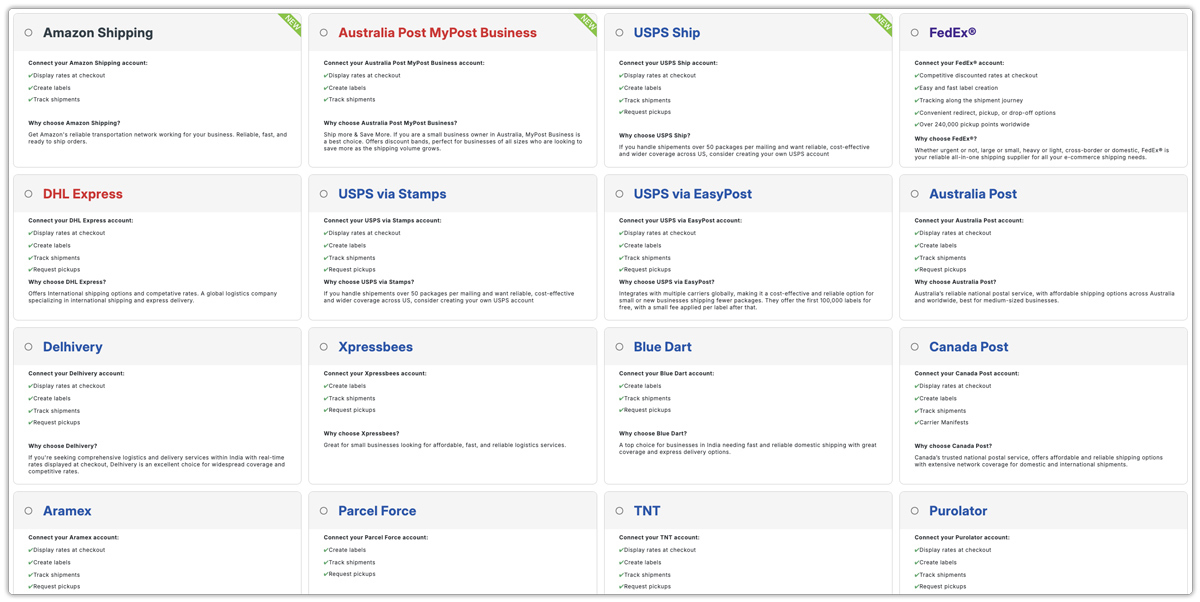
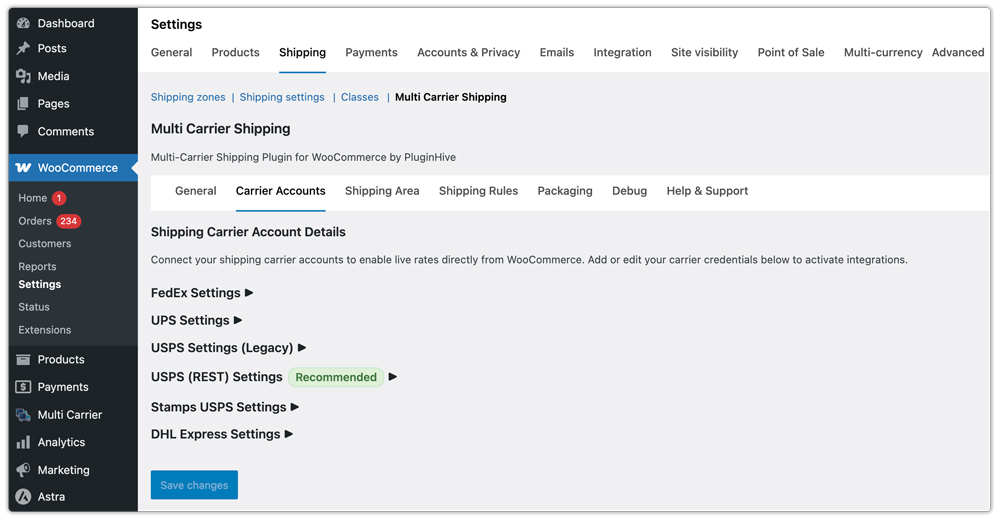
- Multi-Carrier Shipping Plugin for WooCommerce: Let you integrate with multiple carriers, create custom rate rules, and display live rates on the checkout page.
B. Carrier-Specific Automation Plugins
If you prefer to use one primary carrier, these plugins automate that carrier’s shipping workflow:
- WooCommerce UPS Shipping Plugin with Print Label: Shows UPS rates, prints UPS labels, and adds tracking automatically.
- WooCommerce FedEx Shipping Plugin with Print Label: Adds FedEx live rates, label generation, and tracking into your WooCommerce admin.
- PH Australia Post MyPost Business Shipping for WooCommerce: Displays Australia Post MyPost Business rates, prints labels, and adds tracking automatically.
- USPS / Canada Post / Royal Mail Shipping Plugin: Provide similar automation for these respective carriers with live rates and label printing.
Replacing Sendle is not just about selecting another carrier, but about restoring the same checkout visibility and fulfillment automation your WooCommerce store previously relied on.
If you need help selecting or configuring the right shipping solution for your store, you can reach out directly to the support team: PluginHive Support.
Final Thoughts
Sendle’s shutdown in 2026 has created immediate operational gaps for WooCommerce stores that depended on it for shipping. However, you can resolve these gaps with immediate actions. By updating your shipping methods promptly and moving to a supported alternative, you can continue fulfilling orders without disruption and maintain a reliable shipping experience for your customers.
