


Selling to European customers adds tasks that domestic orders never require, such as customs forms, duties, and VAT. If you ship from Canada to Europe with Canada Post, each parcel needs the right service, accurate customs details, and a clear plan for who pays the import charges. However, handling all these tasks manually for every order can take time and lead to mistakes.
This guide explains why Canada Post is a practical choice for European orders and how its international services compare. It also covers the EU customs basics and shows how to manage the whole process from WooCommerce using the Canada Post Shipping Plugin for WooCommerce with Print Label.
On This Page
- Why Ship from Canada to Europe with Canada Post?
- Understanding Canada Post Services for Europe
- Understanding EU Customs, HS Codes, and VAT Requirements
- Streamlining Canada Post International Fulfillment in WooCommerce
- Best Practices for Shipping from Canada to Europe
- Conclusion
- FAQs
Why Ship from Canada to Europe with Canada Post?
Europe is a big market. The EU has a combined population of over 509 million people. Moreover, Canada Post is Canada’s national postal operator, making it a practical option for reaching customers across many European destinations. Here is what makes it a suitable choice for WooCommerce store owners:
- Delivery by the local postal service: After your parcel leaves Canada, it is accepted by a foreign postal administration, and final delivery is typically handled by the local national postal service in the destination country.
- Customs data sent ahead: Canada Post sends your customs declaration data electronically to the destination before the parcel leaves Canada, so customs authorities have the details before it arrives.
- Prepaid duties through Zonos: Canada Post works with Zonos, a duty and tax service. For supported EU destinations, duties and taxes are paid before shipping, so your customer is not asked to pay at delivery.
- Flexible account options: you can ship with a contract or a non-contract account. A contract account lets you print and ship parcels without buying individual labels, while a non-contract account lets you buy labels one at a time and still provide tracking information.
Once you know how Canada Post gets parcels to European customers, the next step is choosing the right service for each order.
Understanding Canada Post Services for Europe
Choosing the right service means your customers get their orders when they expect them, and your shipping costs stay in check. Canada Post lists these delivery standards for international parcel services. They are expected transit times in business days, counted from the day of deposit to the first delivery attempt.
| Service | Delivery Speed | Best For |
|---|---|---|
| Xpresspost International | 4 to 7 business days (most destinations) | Faster delivery with tracking |
| Tracked Packet International | 6 to 10 business days | Small, lightweight packages under 2 kg |
| International Parcel (Air) | 6 to 10 business days | Mid-weight orders where speed still matters |
| International Parcel (Surface) | 4 to 12 weeks | Non-urgent orders when low cost is the priority |
| Small Packet International (Air) | 6 to 12 business days | Small, low-value items |
For a closer look at services you can offer, read our guide on Canada Post shipping services for WooCommerce.
Understanding EU Customs, HS Codes, and VAT Requirements
After picking a service, you need to know what the EU expects for each parcel. These are the rules that decide whether it clears customs.
- No more €150 duty-free limit: since July 1, 2026, the EU has removed the €150 threshold, so parcels under €150 carry VAT and a flat customs duty of €3 per item.
- “Item” means product type: multiple units of the same product in the same tariff category count as one charge. For instance, three bars of the same soap count once, while a candle in the same parcel adds a second charge.
- HS codes: An HS code is a standard number that tells customs what a product is. Therefore, each unique type of goods in a shipment needs its own code.
- Clear descriptions: Generic words such as “gift,” “clothes,” or “sample” are considered non-compliant, and the declaration must be in English or French.
- Product identifiers: From November 1, 2026, the EU requires product identifiers (your SKU, model or part number, and barcode if available) on shipments from a business to a consumer worth €150 or less.
- Prepaying duties with Zonos: From November 4, 2026, the Zonos app supports Canada Post shipments to 16 EU destinations, including Germany, France, Italy, Spain, and the Netherlands. Businesses can use a free Zonos Verified Account linked to their Canada Post business account.
Not sure how to prepare your products for the new product identifier rule? Read our guide on EU product identifiers (PID) for ecommerce shipping to see what each identifier means and what to set up before you ship.
Streamlining Canada Post International Fulfillment in WooCommerce
Once you know the requirements, you can handle them in WooCommerce instead of doing paperwork order by order. Follow the setup guide and work through these steps:
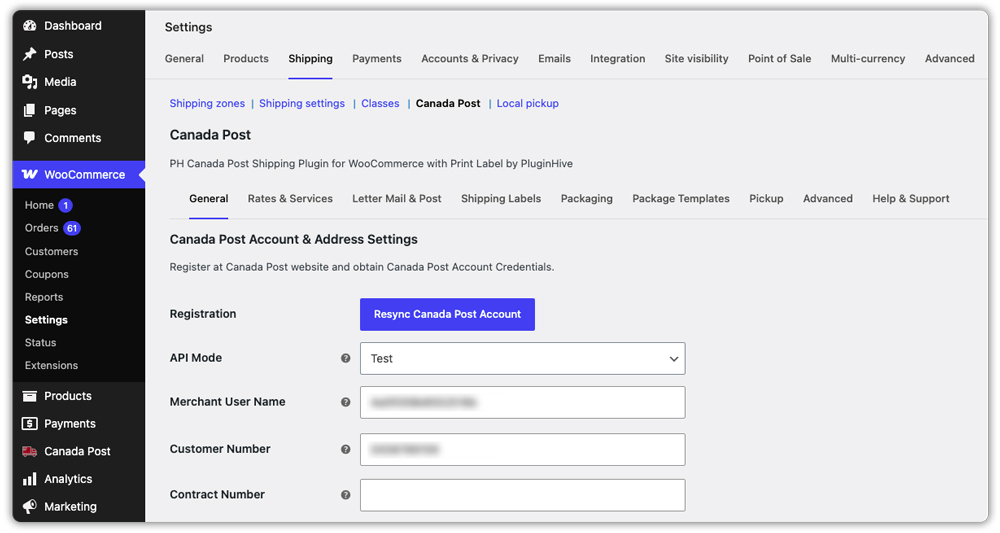
- Connect Your Canada Post Account: Go to WooCommerce > Settings > Shipping > Canada Post, open the General tab, and sign in to your Canada Post account directly from the plugin settings.
- Set Product-Level HS Codes and Customs Details: In each product’s Shipping tab, add the H.S. Tariff Number, Customs Description, and Country and Province of Manufacture. Canada Post reads only the first 45 characters of the Customs Description.

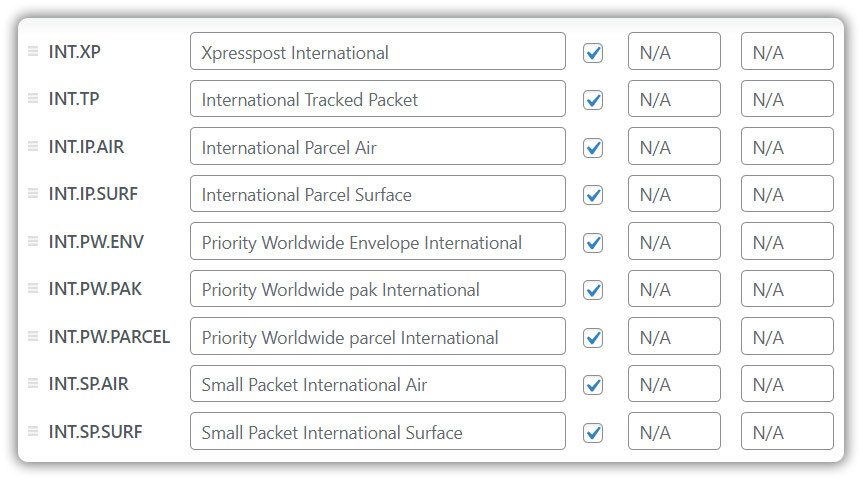
- Configure Live International Shipping Rates: Enable the international services you want to offer, and the plugin displays live Canada Post rates based on the destination address at cart and checkout. You can rename services for your customers.
- Generate Shipping Labels and Customs Documentation: Print official shipping labels individually from the order page or in bulk. The plugin automatically generates commercial invoices and shipping manifests for international orders. If you use Zonos, simply add your Zonos Account Key in the plugin settings to automatically pass required declaration details for European shipments.

- Automate Tracking for Your Customers: The plugin attaches the Canada Post tracking number when you generate the label and emails customers tracking details, including updates for delivery exceptions and delivery.

Best Practices for Shipping from Canada to Europe
Getting the setup right is half the job, and a few habits will keep your European orders running smoothly.
- Test before you go live. The plugin has a Test mode in its API settings, so you can generate sample labels without being charged.
- Keep weights and dimensions accurate. These are required for accurate rates, and missing values can cause incorrect prices or errors.
- Transmit your order on time. Canada Post needs your order data sent at or before drop-off, and items missing electronic customs data will not be dispatched. Our guide on Canada Post manifests for international shipments covers this.
- Show delivery dates. The plugin can display estimated delivery dates on your cart and checkout pages, which helps European customers know what to expect.
- Protect valuable orders. You can enable Canada Post insurance and enter a declared value for expensive items.
- Check service alerts before launching a country. Canada Post’s service alerts page lists any suspended destinations.
If you also ship to the US, read our guide on WooCommerce shipping to the US with Canada Post for a similar workflow.
Conclusion
To ship from Canada to Europe with Canada Post, you need the right service for each order, accurate customs details, and a plan for duties and VAT. With the Canada Post Shipping Plugin for WooCommerce with Print Label, rates, labels, customs documents, and tracking are all live inside WooCommerce, so European orders become part of your normal routine. If you need help with setup, contact PluginHive Support.
FAQs
1. Does Canada Post deliver to Europe?
Yes. Canada Post’s international services ship to more than 193 countries worldwide, including EU countries. Service to individual destinations can change, so check Canada Post’s service alerts page before you ship.
2. How much does it cost to ship to Europe from Canada?
The price depends on the service you choose, the parcel’s weight and dimensions, and the destination country. The Canada Post Shipping Plugin for WooCommerce with Print Label shows live Canada Post rates based on the destination address at checkout, so you see the exact price for each order.
3. How much to ship from Canada to Europe?
Along with the shipping rate, budget for import charges. Since July 1, 2026, parcels under €150 carry VAT and a flat €3 customs duty per item. Duties can be prepaid through Zonos for supported EU destinations, so your customer is not asked to pay at delivery.
4. What is the cheapest way to ship internationally from Canada?
For small, lightweight items, Small Packet is the lowest-cost option, though it has no tracking. If you need tracking, Tracked Packet International is a budget-friendly choice. Our guide on Canada Post shipping services for WooCommerce compares them.
