


Shipping frozen food presents unique challenges for WooCommerce store owners. Maintaining product quality and safety requires fast, reliable delivery and proper packaging to keep items frozen throughout transit. UPS offers express shipping solutions designed to meet these needs, helping merchants deliver frozen goods quickly and securely. This article will guide you through the essential steps to ship frozen food with UPS in your WooCommerce store using the PH WooCommerce UPS Shipping Plugin to ensure a smooth shipping experience.
In This Article
- Key Challenges of Shipping Frozen Food in WooCommerce
- Best UPS Services for Frozen Food
- Packaging Guidelines for Shipping Frozen Food with UPS in WooCommerce
- Ship Frozen Food With UPS in WooCommerce
- Cost-Saving Tips for Express Frozen Food Shipping
- Conclusion
- FAQs
Key Challenges of Shipping Frozen Food in WooCommerce
Shipping frozen food through WooCommerce isn’t as straightforward as regular products. Several unique challenges must be addressed to ensure your customers receive their orders safely and in optimal condition:
1. Maintaining Proper Temperature:
Frozen food requires consistent cold temperatures during transit to prevent spoilage. Any delay or temperature fluctuation can compromise product quality and safety.
2. Fast Delivery Requirements:
Because frozen goods are perishable, shipping speed is critical. Delays can lead to thawed or spoiled products, resulting in customer dissatisfaction and returns.
3. Specialized Packaging Needs:
Standard packaging won’t suffice. Frozen food demands insulated packaging, dry ice, or gel packs to maintain the right temperature throughout the shipping journey, which can increase costs and complexity.
4. Higher Shipping Costs:
Due to the need for expedited services and special packaging, shipping frozen food tends to be more expensive compared to non-perishable items.
5. Limited Shipping Service Options:
Not all carriers or shipping services support frozen or temperature-sensitive shipments. WooCommerce store owners must carefully select carriers that provide suitable express options.
6. Managing Returns and Customer Expectations:
Handling returns of frozen items can be tricky, and clear communication with customers about shipping timelines and product handling is essential to build trust.
Understanding these challenges is the first step toward optimizing your frozen food shipping process and delivering a great customer experience.
Best UPS Services for Frozen Food Shipping
Shipping frozen food requires fast, reliable services that ensure your products maintain their quality and safety during transit. UPS offers several expedited shipping options designed to meet these demands, both domestically and internationally.
Domestic UPS Services
For shipping frozen food within the U.S., UPS provides several express options optimized for time-sensitive and temperature-controlled shipments:
- UPS Next Day Air Early: Guarantees early morning delivery the next business day, ideal for extremely time-sensitive frozen food shipments that require delivery before business hours.
- UPS Next Day Air: Delivers by 10:30 a.m. or noon the next business day to most U.S. addresses. This service is ideal for frozen food shipments that require expedited delivery within 24 hours.
- UPS Next Day Air Saver: Provides next-day delivery by the end of the day, a cost-effective option for shipments that need fast delivery but not necessarily early morning arrival.
- UPS 2nd Day Air AM: Ensures delivery by 10:30 a.m. or noon on the second business day. This is a great option for frozen food shipments that require expedited delivery but not overnight while maintaining product integrity with early delivery on day two.
International UPS Services
For UPS international shipping of frozen food, it offers fast and reliable services to reduce transit time and preserve product quality:
- UPS Worldwide Express: Guarantees delivery within 1-3 business days to most international destinations. This service provides fast customs clearance and is suitable for urgent frozen food shipments abroad.
- UPS Worldwide Express Plus: Offers early morning delivery to select international destinations, ideal for the most time-critical frozen food shipments.
- UPS Worldwide Saver: Delivers by the end of the next business day to major global markets, offering a balance of speed and cost for international frozen food shipping.
UPS also provides temperature-controlled logistics and compliance support to ensure frozen products reach global destinations safely.
Packaging Guidelines for Shipping Frozen Food with UPS
Proper packaging is essential to ensure frozen food arrives in optimal condition. UPS advises the following:
1. Use Insulated Containers:
Employ EPS foam containers for their insulating properties, placing them inside sturdy, corrugated cardboard boxes to maintain low temperatures during transit.
2. Incorporate Effective Coolants:
Utilize dry ice or gel packs to keep items frozen. Dry ice is suitable for longer durations, while gel packs work well for shorter transit times. Ensure compliance with UPS regulations when using dry ice.
3. Secure and Seal Products:
Wrap food containers with ample bubble wrap and stabilize them in the center of the shipping box, ensuring at least 2 inches of space from the outer walls. This helps prevent movement and potential damage.
4. Prevent Leaks:
Line the interior of the package with waterproof materials to contain any potential leakage from melted ice or condensation.
5. Label Clearly:
Mark packages with appropriate labels such as “ISC (International Special Commodities),” “RFG (Refrigeration),” and, if using dry ice, include necessary hazard labels as per UPS and IATA regulations.
By following these packaging and labeling guidelines, WooCommerce merchants can ensure that their frozen food shipments are safe and handled correctly during transit. For more details on proper packaging and shipping regulations, check out this guide on understanding UPS packaging charges.
Ship Frozen Food with UPS in WooCommerce Seamlessly
The WooCommerce UPS Shipping Plugin makes it easy to ship frozen food from your store. Start by installing and configuring the plugin. For step-by-step help, refer to the UPS Shipping Plugin Setup Guide.
Once the plugin is set up, follow these steps to configure frozen food shipping:
Configure The Special Service Settings
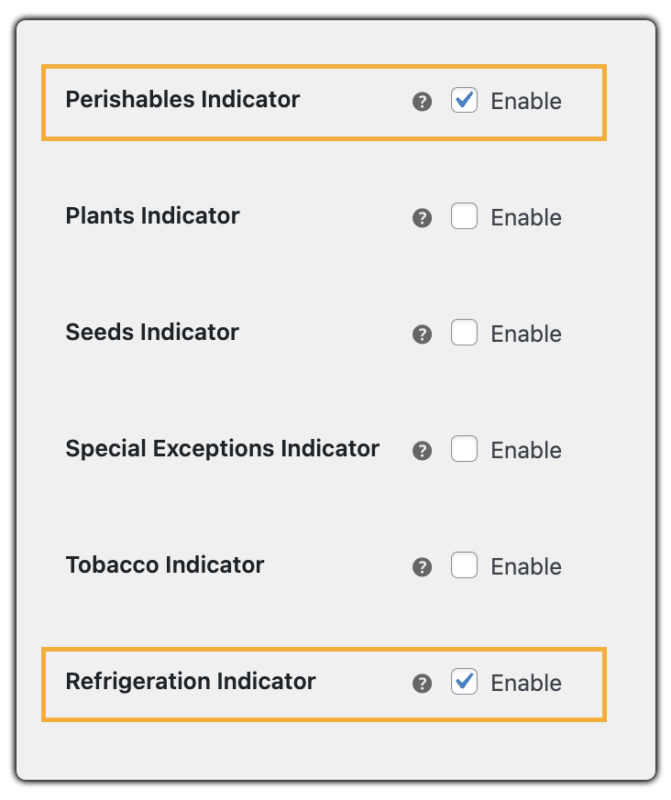
Make sure to enable International Special Commodities and mark the shipment with Perishable and Refrigeration Indicators to ensure proper handling of frozen goods during international transit.
Mark Frozen Products Properly in WooCommerce
Mark each frozen product as Perishable under “Restricted Article” and enable the Refrigeration Indicator as well.

This ensures that UPS recognizes the product as time-sensitive and requiring cold chain support.
Ship with Accurate UPS Services and Labels
Once configured:
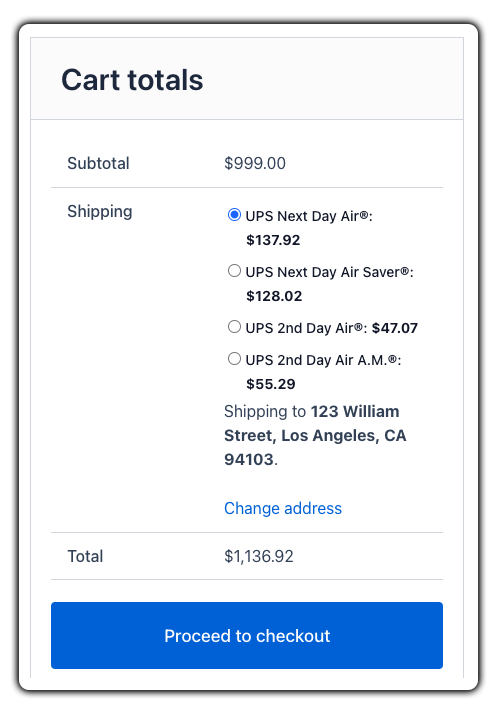
- Select expedited UPS services to avoid delays. The plugin will automatically show live rates at checkout, including all applicable frozen food surcharges.
Once an order is placed, you can print UPS shipping labels from the WooCommerce orders page. Labels will include ISC (International Special Commodities) and RFG (Refrigeration) indicators for frozen goods.

After generating the label, you can schedule UPS pickups and track, and fulfill your orders from your store WooCommerce store itself.
To learn more about tracking and managing UPS orders, check out How to Track UPS Orders in WooCommerce.
Cost-Saving Tips for Express Frozen Food Shipping
Express shipping for frozen food can be costly, but you can save smartly with these tips:
- Use Negotiated UPS Rates: Activate discounted rates in the PH WooCommerce UPS Shipping Plugin to lower shipping costs.
- Optimize Packaging: Use compact, insulated boxes to reduce dimensional weight charges.
- Schedule Pickups Strategically: Ship only on necessary days to avoid daily pickup fees and keep items fresh.
- Use Refrigeration Indicator Only When Needed: Avoid extra charges by enabling it only for truly frozen items.
- Ship Early in the Week: Send orders Mon-Wed to avoid weekend delays and extra fees.
These tips help keep express shipping fast, efficient, and affordable for your WooCommerce frozen food business.
Conclusion
Shipping frozen food with WooCommerce is simpler with the right setup. UPS Express services, proper packaging, and the WooCommerce UPS Shipping Plugin ensure fast, safe deliveries. Applying cost-saving tips like optimized packaging, smart scheduling, and negotiated rates keeps shipping efficient and affordable.
For support, visit PluginHive Support.
FAQs
- How long can frozen food stay frozen during UPS shipping?
The time frozen food stays frozen depends on the packaging, the coolant used, and the shipping speed. Using dry ice and express UPS services can keep products frozen, typically up to 48-72 hours.
- Can I insure my frozen food shipments with UPS?
Yes, UPS offers shipping insurance to protect against loss or damage. It’s recommended for high-value frozen food shipments.
- Can I ship alcohol using UPS from my WooCommerce store?
Yes, but you must be a licensed alcohol shipper and comply with all federal, state, and UPS-specific regulations. For detailed guidance on shipping regulated products like alcohol, check out the UPS Alcohol Shipping in WooCommerce Guide.
- Do I need special permission to ship frozen food through UPS?
For most domestic shipments, no special permissions are needed. However, for international shipments, UPS may require you to register under the International Special Commodities (ISC) program. Always verify with your UPS account representative
