


Shipping jewellery and high-value items requires careful handling since they are small, expensive, and prone to tampering. FedEx provides reliable delivery, making it ideal for high-value shipments. For WooCommerce store owners, selecting the right FedEx service, packaging, and insurance is key to preventing loss or damage. When integrated with WooCommerce, you can easily automate jewellery shipping.
This guide explains the best FedEx services, packaging methods, security tips, and how to ship jewellery effectively through WooCommerce.
On This Page
- Challenges of Shipping High-Value Items in WooCommerce
- Best FedEx Services for Jewellery Shipping in WooCommerce
- Packaging Guidelines for Jewellery & High-Value Items in WooCommerce
- Security Practices for High-Value WooCommerce Shipments with FedEx
- How to Ship Jewellery Using FedEx in WooCommerce
- Real-World WooCommerce Jewellery Store Scenario
- Conclusion
- FAQs
Challenges of Shipping High-Value Items in WooCommerce
Shipping high-value products such as Jewellery, watches, and collectibles involves more risk than standard eCommerce orders. WooCommerce store owners must address several challenges to keep these shipments safe and compliant.
- Higher Risk of Theft and Loss: High-value items are small, easy to conceal, and commonly targeted during transit. Any visible branding or indication of expensive contents can increase this risk.
- Strict Packaging Requirements: These items require strict packaging. Even minor packaging mistakes can lead to damage or misplacement during transit.
- Carrier Limitations and Insurance Rules: Not all FedEx services accept or insure Jewellery or high-value shipments. Store owners must choose the correct service and maintain documentation to ensure claims are valid.
- Need for Enhanced Tracking & Delivery Controls: High-value shipments should always include services like Adult Signature or Direct Signature. Without proper WooCommerce automation, these safeguards may not be applied consistently.
- Complex International Regulations: Shipping precious metals or gemstones internationally involves customs rules, restricted items, duty requirements, and detailed product declarations.
Best FedEx Services for Jewellery Shipping in WooCommerce
When shipping Jewellery and high-value items from your WooCommerce store, choosing the right FedEx delivery service is essential for speed, security, and careful handling. Here are the best FedEx services specifically suited for valuable shipments:
| FedEx Service | Delivery Speed | Best For |
|---|---|---|
| FedEx Priority Overnight® | Next-business-day morning | Very high-value jewellery, urgent shipments |
| FedEx Standard Overnight® | Next-business-day afternoon | High-value items needing secure overnight delivery |
| FedEx 2Day® / 2Day® A.M. | Within 2 business days | Mid-value jewellery, cost-efficient shipping |
| FedEx International Priority® | 1–3 business days (global) | International high-value shipments |
| FedEx International Economy® | 2–5 business days (global) | Non-urgent but valuable international shipments |
Packaging Guidelines for Jewellery & High-Value Items in WooCommerce
Proper packaging is essential when shipping Jewellery and high-value items through FedEx. Here’s how WooCommerce stores should package these sensitive shipments:
1. Use Strong, Rigid Boxes
- Always pack Jewellery in a rigid, corrugated cardboard box, never envelopes or soft mailers.
- If you’re part of FedEx’s high-value Jewellery program, you can use Security Box Kits designed to suspend and cushion the item inside a FedEx Medium or Large box.
2. Double-Box for Extra Protection
- Place the Jewellery inside a small, padded inner box.
- Then place this inner box inside a larger FedEx box with cushioning around it.
- Double-boxing reduces shock, prevents tampering, and protects against crushing during transit.
3. Cushion and Secure the Item
- Use materials like foam inserts, bubble wrap, or moulded cushioning to ensure the Jewellery doesn’t shift.
- Make sure all empty spaces are filled so the item stays fixed and stable.
4. Keep Packaging Discreet
- Use plain, unbranded outer boxes with no indication of Jewellery, gemstones, or high-value contents.
- Avoid using branded Jewellery boxes or store names on the outer label.
5. Seal the Box Properly
- Use strong packing tape (at least 3 inches wide) and seal the box in an H-pattern across all seams.
- Ensure all flaps are secure to prevent accidental opening or tampering.
7. Include Documentation Inside, Not Outside
- Place a packing slip inside the package.
- Do not list Jewellery details or values on the outside label.
Security Practices for High-Value WooCommerce Shipments with FedEx
- Use Declared Value for Protection: Enter an accurate declared value for Jewellery and expensive items. This sets FedEx’s maximum liability if the shipment is lost or damaged.
- Add Additional Insurance When Needed: For items worth more than FedEx’s standard liability, you should purchase extra insurance. This ensures full coverage for luxury Jewellery, diamonds, gold items, or premium accessories during transit.
- Enable Signature Options: FedEx mandates signature services for high-value shipments. This prevents packages from being left unattended.
- Use Clear & Accurate Shipping Labels: Ensure the label is clear, scannable, and accurate, but do not mention Jewellery or high-value contents anywhere on the outer label.
- Hand Off Packages Securely: For Jewellery and high-value parcels, FedEx recommends handing shipments directly to a FedEx employee, not using drop boxes.
And the best part?
All these security steps, declared value, insurance, signatures, and delivery notifications, can be handled inside WooCommerce and automated with the right FedEx shipping plugin.
How to Ship Jewellery Using FedEx in WooCommerce
Integrating FedEx shipping for Jewellery and high-value items in WooCommerce is easy with the right setup. The WooCommerce FedEx Shipping Plugin with Print Label allows you to ship high-value Jewellery securely and automate the entire fulfillment workflow.
For detailed instructions on installing and configuring the plugin, refer to the FedEx Shipping Guide for WooCommerce.
With the plugin, you can:
- Enable Declared Value Coverage in the product or shipment settings to protect Jewellery shipments against loss or damage by entering the correct value for each item.

Offer FedEx Shipping Insurance for complete protection and configure signature options like Direct Signature or Adult Signature to ensure secure delivery confirmation.
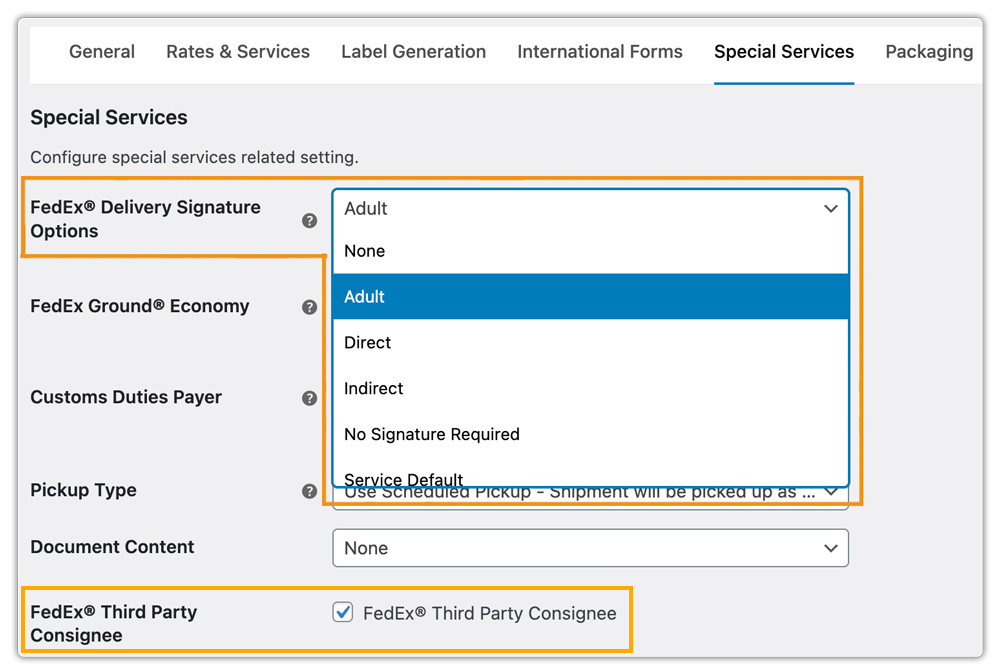
Allow customers to view live FedEx shipping rates at checkout, including any additional surcharges based on declared value or signature requirements.

Print FedEx shipping labels directly from the WooCommerce order dashboard with signature details included on the label.

With this plugin, you can also request FedEx Pickups and track shipments directly inside WooCommerce, making it simple to manage high-value Jewellery orders from start to finish.
Real-World WooCommerce Jewellery Store Scenario
Let’s say you run a WooCommerce store that sells luxury Jewellery, diamond earrings, gold necklaces, and premium gemstone pieces. Every order is high-value, so you need a secure and automated shipping process to avoid risks.
A customer purchases a $1,200 gold necklace. As soon as the order is placed, you use the WooCommerce FedEx Shipping Plugin with Print Label to manage the shipment directly from your WooCommerce dashboard:
- The plugin automatically applies Declared Value based on the product price, ensuring full coverage in case of loss or damage.
- Since the order meets the high-value threshold, FedEx Shipping Insurance is added automatically for extra protection.
- You enable Signature Required to ensure the package is delivered only to the recipient and not left unattended.
- You generate the FedEx shipping label inside WooCommerce, with declared value and signature details clearly displayed.
- You request a FedEx Pickup through the plugin, and a FedEx courier collects the shipment from your address.
- The customer receives real-time tracking updates, letting them follow the package until it’s safely delivered.
With everything, from label creation to pickup to tracking, handled inside WooCommerce, the entire process becomes fast, secure, and reliable for high-value Jewellery shipments.
If you want to ship jewellery using other carriers like UPS, USPS, or DHL, you can use the Multiple Carrier Shipping Plugin for WooCommerce. While it won’t offer the deep, carrier-specific flexibility that individual plugins like FedEx provide, it does allow you to access multiple major carriers from a single plugin, making it convenient for stores that need broader carrier options.
Conclusion
Shipping Jewellery and other high-value items with FedEx requires secure packaging, correct documentation, and controlled delivery options. For WooCommerce stores, using FedEx-approved packing methods, declaring value, adding insurance, enabling signature requirements, and keeping labels discreet greatly reduces shipping risk. These steps help protect valuable items, build customer trust, and keep fulfillment smooth.
Need help setting up secure FedEx shipping in WooCommerce? Contact PluginHive Support.
FAQs
- Can I show estimated delivery dates for FedEx Freight in WooCommerce?
Yes. FedEx Freight provides transit times that can be displayed at checkout. For greater flexibility, such as adding cut-off times, holidays, and custom delivery rules, you can use the Estimated Delivery Date Plugin for WooCommerce.
- Can I create custom shipping rules for jewellery shipments in WooCommerce?
Yes. If you want to set up custom rules, such as charging extra for high-value jewellery, restricting FedEx services for certain products, or offering free shipping above a certain cart value, you can use the WooCommerce Table Rate Shipping Pro Plugin.
- What’s the most affordable FedEx international service?
FedEx International Connect Plus (FICP) offers reliable international delivery at a lower cost than premium options. Learn more in the FedEx International Connect Plus for WooCommerce Guide.
- How can I notify customers automatically when their Jewellery order is shipped?
You can automate FedEx shipment updates with the plugin, but if you want more flexibility in how tracking details are shared, you can use WooCommerce Shipment Tracking Pro.
- Can I manage multi-vendor Jewellery shipping with FedEx in WooCommerce?
Yes. If your Jewellery store has multiple vendors, you can use the WooCommerce Multi-Vendor Shipping Addon with the FedEx Plugin to allow each vendor to generate FedEx shipping from their own location.
