


Ski and snowboard schools often manage lesson bookings and rental gear through scattered tools, spreadsheets, WhatsApp messages, and last-minute phone calls. It works, but just barely. During peak season, it leads to double bookings, missed time slots, and frustrated customers.
With WooCommerce and the Bookings And Appointments for WooCommerce plugin by PluginHive, you can accept online bookings for both lessons and gear rentals, manage availability, assign instructors, and collect payments all from your website. In this article, we’ll explore how ski businesses like yours can streamline bookings and deliver a smooth experience, both for you and your customers.
Table of Contents
- Key Challenges Faced by Ski Schools and Rental Providers
- Simplify Ski and Snowboard Lessons Bookings with WooCommerce
- Real-World Example
- Final Thoughts
- FAQs
Key Challenges for Ski and Snowboard Businesses
Ski and snowboard schools and rental providers face unique operational hurdles:
- Instructor Overbooking & Conflicts: Manually managing instructor availability across different lesson types often leads to scheduling clashes and unhappy customers.
- Limited Gear Inventory: Without a real-time inventory system, the risk of double-booking skis, snowboards, boots, or helmets is high, leading to frustrated renters.
- Missed Upselling Opportunities: Add-ons like helmets, goggles, or premium gear are often forgotten at the time of booking and never offered again.
- Lack of Calendar Transparency: Customers can’t see what’s available, leading to constant inquiries and a poor booking experience.
- Complex Group Bookings: Booking for families or groups becomes a convoluted process when there’s no streamlined way to manage multiple students and their gear in one go.
- No Automated Communication: Lack of automated confirmations and reminders leads to increased no-shows and missed appointments.
- Time Zone & Language Gaps (for Tourists): Tourists booking from abroad may struggle with time zone differences or unclear availability, leading to misaligned expectations on arrival.
These issues don’t just impact efficiency; they affect your customer experience, staff morale, and ultimately, your bottom line. That’s why ski and snowboard businesses need a booking solution that can handle both lessons and rentals in one place, with automation built in.
Simplify Ski and Snowboard Rentals and Lesson Bookings with WooCommerce
Make ski lesson scheduling and gear rentals a breeze with WooCommerce Bookings, all from your own store.
Automate Ski Lesson Bookings with WooCommerce
With the Bookings And Appointments for WooCommerce, you can fully automate the booking process for private or group ski lessons. Whether you offer hourly sessions or weekly programs, the plugin ensures smooth scheduling, easy add-ons, and instructor management all from your WooCommerce store.
Note: Make sure the Bookings And Appointments for WooCommerce plugin is installed and properly set up. Follow this setup guide.
- Specify Lesson Duration, Participant Limit & Buffer Time
Start by setting the lesson duration, whether it’s 1 hour or 90 minutes. Ski lessons often require time for equipment fitting, warm-up, and wind-down. You can also add buffer time before and after each session to ensure smooth transitions and prevent overlaps.

Learn how to configure buffer time between bookings.
You can also cap the number of participants per session to keep group sizes manageable or offer private lessons.

Learn how to manage participants.
- Define Availability Based on Season or Instructor Schedules
You can configure lesson availability for specific months (e.g., December to March), days (e.g., weekends only), or even hours in a day.
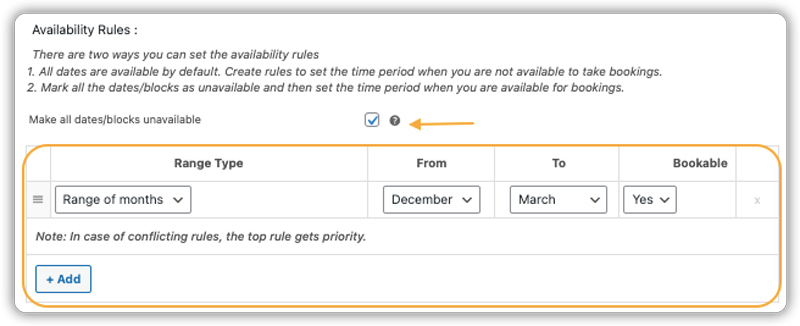
This ensures your calendar shows only slots that are actively being taught, no more back-and-forth calls to check timing.
See how to set booking availability.
- Set Dynamic Pricing for Each Lesson
Charge a flat rate per session or offer tiered pricing based on participant type adults, children, or group size. Prices can also vary by weekday, weekend, or special holidays.
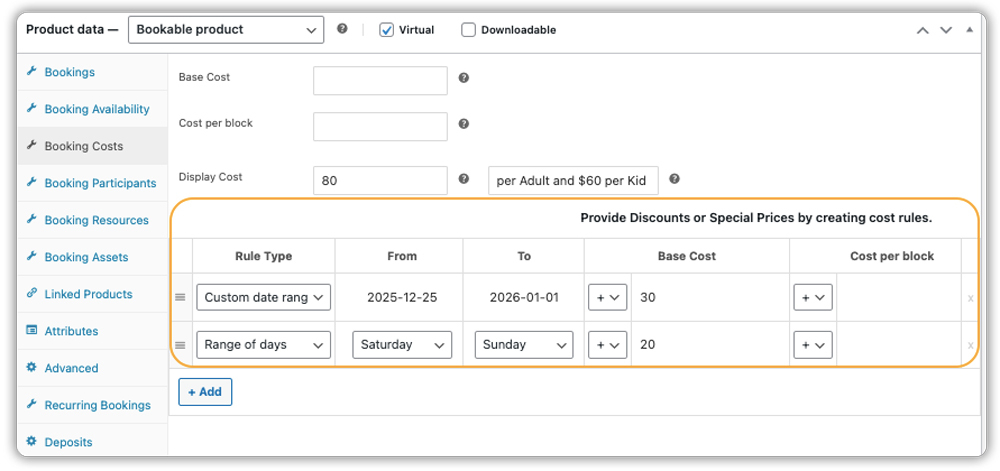
Learn how to configure pricing rules and booking costs.
- Assign Instructors with Booking Assets
You can assign specific instructors to ski lessons using booking assets. This helps manage instructor availability, prevents overbooking, and allows clients to choose their preferred trainer (if allowed).

See how to assign instructors using Booking Assets.
- Offer Equipment as Optional Add-ons
Ski schools typically include rental gear with lessons, especially for beginners. But if you offer optional upgrades (like premium equipment) or allow students to book without gear if they bring their own, use the PH WooCommerce Product Add-Ons or Booking Resources.
You can add checkboxes like:
- I need ski equipment (+$10)
- I need a snowboard set (+$15)
- I’ll bring my own equipment (no extra charge)

This gives you flexibility to accommodate tourists, locals, or repeat learners with their own gear.
See how to use booking resources.
This is exactly how the ski lesson booking experience will appear on your website’s frontend:

- Automatic Booking Emails
Send instant confirmations and timely reminders for every lesson, no manual follow-up needed.
Set up automated booking emails.

- Multilingual & Multi-Currency Support
This booking plugin works seamlessly with WPML, so international tourists can browse and book lessons in their own language and currency.
Need a multilingual setup? Check out this step-by-step guide.
Note: Want to offer weekly ski school batches or 5-day crash courses? With the PH Recurring Bookings Add-on, customers can book repeating sessions in one go. Explore how to offer recurring bookings.
Rent Ski and Snowboard Gear with WooCommerce Bookings
If you also rent out skis, snowboards, or boots, you can easily list them as separate bookable products using the WooCommerce Bookings plugin.
Each gear item can have:
- Hourly or daily rental durations
- Limited stock per day
- Rental windows (e.g., 8 AM to 6 PM)
- Seasonal availability
- Optional deposits or accessories
Customers can reserve equipment in advance, even without booking a lesson.
Want to offer full equipment rental separately? Check out our dedicated guide on Rent Equipment Online with WooCommerce Bookings.
With everything handled in one place, from lesson slots to gear rentals, your ski business runs smoother, even on the busiest weekends.
Real-World Use Case: Running a Ski School with WooCommerce Bookings
Let’s say you run a ski school that offers beginner and advanced ski lessons, snowboard training, and gear rentals, all bookable online through your WooCommerce store.
The Challenges You’ll Face
- Instructors often get overbooked due to a lack of real-time availability updates.
- Tourists from other time zones misunderstand lesson timings, leading to missed sessions or constant rescheduling.
- Managing equipment rentals and lessons manually creates scheduling conflicts.
- You collect payments offline, and sometimes customers cancel last minute without notice.
- Your staff spends hours responding to inquiries, confirming bookings, and sending reminders manually.
How It Can Be Solved
With the Bookings And Appointments for WooCommerce plugin by PluginHive, your ski school becomes fully automated:
- Let customers view real-time availability and book private or group lessons directly from your website, with time zone handling.
- Add buffer times between lessons for equipment setup and to avoid overlap between back-to-back sessions.
- Set instructor availability within the plugin so that only bookable time slots are shown to customers.
- Offer gear rentals with limited inventory and fixed rental windows (e.g., 8 AM – 6 PM), all managed through WooCommerce.
- Collect upfront payments or security deposits using the PH WooCommerce Deposits plugin to reduce no-shows.
- Send automated emails for booking confirmations, cancellations, and reminders without any manual effort.
With WooCommerce and PluginHive, you run a streamlined ski business that saves time, avoids booking conflicts, and delivers a smooth booking experience to every customer.
Final Thoughts
Streamlining your ski rentals and lesson bookings is essential to running a more organized and profitable ski business. With Bookings And Appointments for WooCommerce plugin, you can offer online reservations, display real-time availability, prevent overbookings, and automate customer communication all from your website.
Whether you’re managing ski gear rentals, private lessons, or group classes, this solution minimizes manual work and delivers a smooth booking experience to your guests.
Ready to upgrade your ski rental and lesson operations? Reach out to our support team for personalized support.
FAQs
Q1. Can customers book ski or snowboard lessons and rent gear in one place using Bookings And Appointments for WooCommerce?
Yes, with the Bookings And Appointments for WooCommerce, you can let customers schedule lessons and rent equipment in a single flow. You can either use Booking resources for gear or create standalone booking products for rentals like skis, boots, or helmets.
Q2. Does the Bookings And Appointments for WooCommerce plugin allow customers to choose a specific instructor for their lesson?
Yes, by setting up instructors as bookable resources, you can automatically assign them or allow customers to select their preferred instructor.
Q3. How does the Bookings And Appointments for WooCommerce plugin handle cancellations and no-shows for ski lessons?
You can define custom cancellation policies ( cancellation window) and use automated reminder emails to reduce no-shows.
Q4. Will the Bookings And Appointments for WooCommerce show available lesson times in the tourist’s local time zone?
Yes, WooCommerce Bookings detects the customer’s time zone based on your settings in the plugin, so international tourists see lesson availability in their time zone, avoiding confusion and missed sessions.
Q5. Can I offer recurring bookings for multi-day ski programs or weekly lessons?
Yes, with the PH Recurring Bookings add-on, you can allow customers to book packages like 3-day beginner courses or weekly snowboard coaching, all in one checkout.
Q6. Can I set different prices for kids’ ski lessons, adult sessions, or weekend rates?
Yes, you can configure dynamic pricing rules within the Bookings And Appointments for WooCommerce plugin. For example, charge less for kids, offer weekday discounts, or increase prices on weekends and holidays.
