



The global supplements and vitamins market is expanding rapidly as more consumers turn to online shopping for health products. In 2024, online dietary supplement sales crossed $38 billion worldwide and are projected to nearly double by 2030. As more WooCommerce stores enter this space, shipping becomes a key challenge due to product sensitivity and regulatory requirements.
FedEx provides reliable shipping options that help WooCommerce merchants ship supplements and vitamins safely and compliantly. This guide explains how to ship these products using FedEx in WooCommerce.
On This Page
- WooCommerce Shipping Requirements for Supplements & Vitamins
- FedEx for Supplements & Vitamins Shipping in WooCommerce
- How to Ship Supplements & Vitamins with FedEx in WooCommerce
- Best Practices for Supplements & Vitamins Shipping in WooCommerce
- Conclusion
- FAQs
WooCommerce Shipping Requirements for Supplements & Vitamins
Shipping supplements and vitamins through WooCommerce involves more than selecting a carrier. These products are often regulated and sometimes time-bound, making it essential for store owners to follow specific shipping and compliance requirements.
Product Compliance and Labeling
- Supplements must be clearly labeled with ingredient details, dosage instructions, and manufacturer information.
- For international shipments, certain countries may restrict specific ingredients or require additional documentation, so product data in WooCommerce should always be accurate and up to date.
Packaging and Protection
- Vitamins and supplements should be packaged to protect them from heat, moisture, and physical damage during transit.
- Using tamper-evident seals along with sturdy outer packaging helps maintain product integrity and reduces the risk of leakage, contamination, or returns.
Weight, Dimensions, and Accuracy
- Accurate product weight and dimensions in WooCommerce are critical for correct shipping rate calculations.
- Incorrect values can result in carrier surcharges, inaccurate checkout rates, or delivery delays, especially when shipping bulk supplement orders.
Shipping Speed and Shelf Life
- Some supplements have a limited shelf life or may degrade if exposed to long transit times.
- Offering faster shipping options helps ensure products reach customers in good condition and improves overall customer satisfaction.
Restricted and Cross-Border Shipping
- Not all supplements can be shipped to every destination.
- WooCommerce merchants should review country-specific restrictions and control shipping zones accordingly to avoid customs holds, rejected shipments, or returns.
Meeting these shipping requirements helps WooCommerce store owners ensure supplements and vitamins are delivered safely to customers.
FedEx for Supplements & Vitamins Shipping in WooCommerce
FedEx provides reliable shipping solutions for WooCommerce stores sending supplements and vitamins both domestically and internationally. Its wide network, range of services, and support for temperature-sensitive shipments make it ideal for products that require careful handling.
Choosing the Right FedEx Service Mix
Selecting the right FedEx service depends on product type, delivery urgency, and whether special handling is needed:
- FedEx Ground: Ideal for shelf-stable supplements such as tablets or capsules shipped domestically.
- FedEx Express (Priority, 2Day, Overnight): Best for liquid supplements, gummies, or products sensitive to transit time.
- FedEx International Priority & International Economy: Reliable options for cross-border supplement shipments with customs support.
- FedEx Temperature-Controlled Services: Maintains specific temperatures for sensitive products. Services cover room temperature (15-25°C), refrigerated (2-8°C), and frozen shipments.
- Dry Ice Shipments: For supplements or medicines that must remain frozen, FedEx allows dry ice shipments if properly declared and packaged. Packages must be ventilated, labeled with “Dry Ice / UN 1845,” and include the net weight of dry ice.
Packaging Best Practices with FedEx
Proper packaging is critical, especially for temperature-sensitive or dry-ice shipments:
- Standard Products: Use tamper-evident seals, sturdy cartons, and cushioning to protect products from moisture and impact.
- Temperature-Controlled Shipments: Use FedEx-approved cold packs, insulated boxes, or dry ice, depending on the required temperature range.
- Labeling: Clearly mark packages requiring special handling (temperature control or dry ice) so FedEx personnel can route them appropriately.
- Transit Considerations: Include enough dry ice or cold packs to last the entire transit time plus a buffer, since FedEx does not replenish them during shipping.
Following these packaging and service selection guidelines helps WooCommerce merchants ship supplements safely and meet delivery expectations.
How to Ship Supplements & Vitamins with FedEx in WooCommerce
The WooCommerce Shipping Plugin for FedEx with Print Label makes it easy to ship supplements and vitamins from your store safely and efficiently.
Note: For step-by-step help to configure the plugin, refer to the FedEx Plugin Setup for WooCommerce.
Once the plugin is set up, you can:
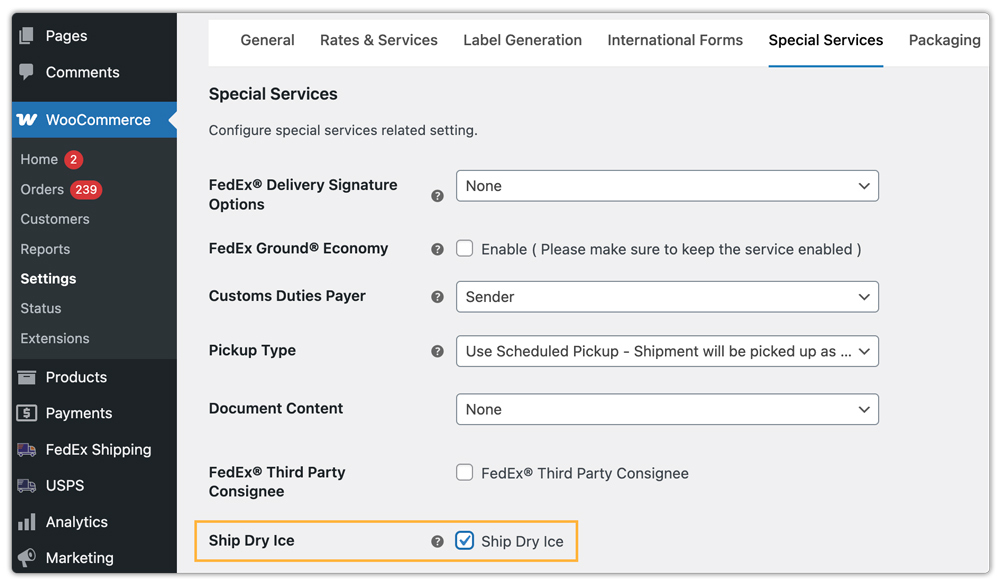
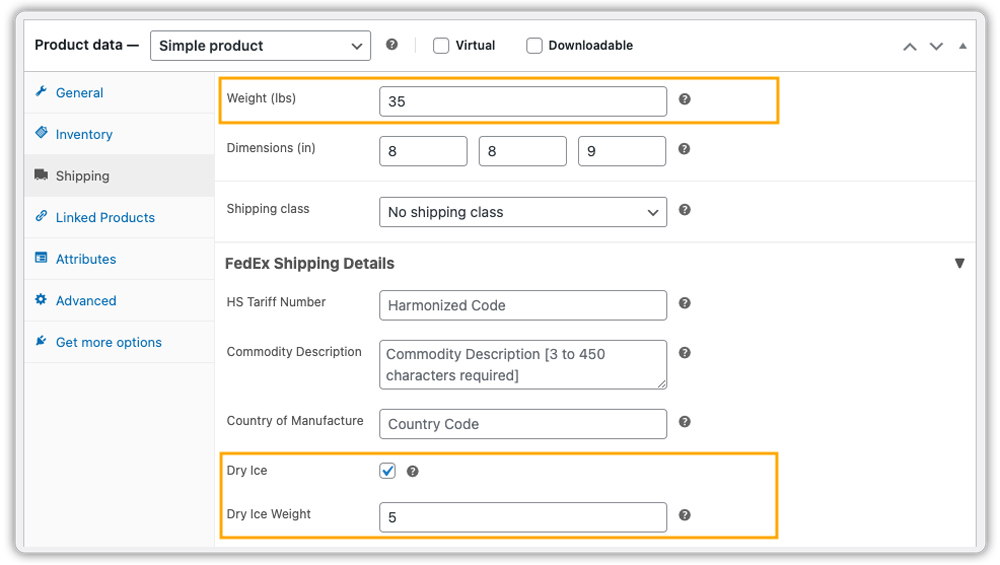
- Enable Dry Ice or Temperature-Controlled Shipping: For supplements that require frozen or refrigerated transit, enable Dry Ice in the plugin settings, and for the specific product. This helps FedEx identify temperature-sensitive products correctly and reduces the risk of delays or product damage during transit.
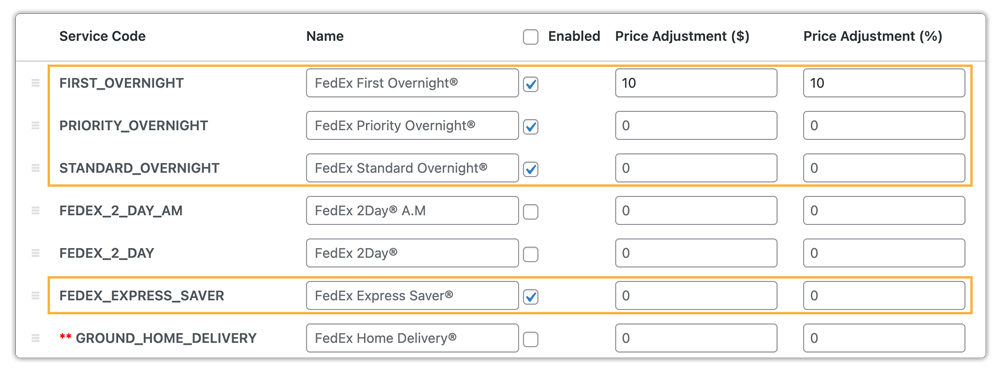
- Select Suitable FedEx Services: Choose which FedEx services you want to display at the cart and checkout pages.
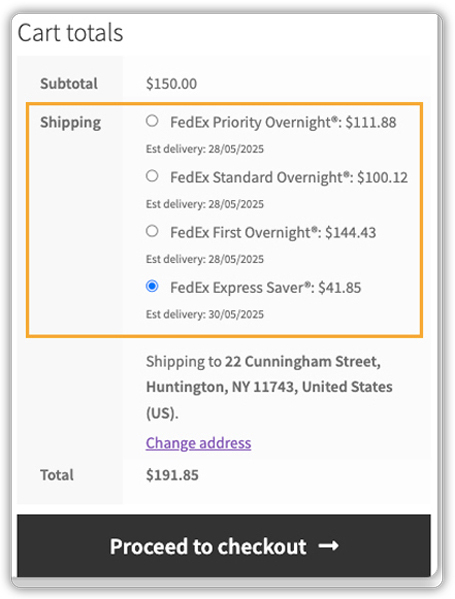
- Display Live Rates to Customers: The plugin automatically shows live FedEx rates at the cart and checkout, allowing customers to select the service that best fits their delivery needs and urgency.
- Print FedEx Shipping Labels: After an order is placed, you can print FedEx shipping labels directly from the WooCommerce orders page. Labels include all required shipment details, including dry ice handling or temperature control instructions.
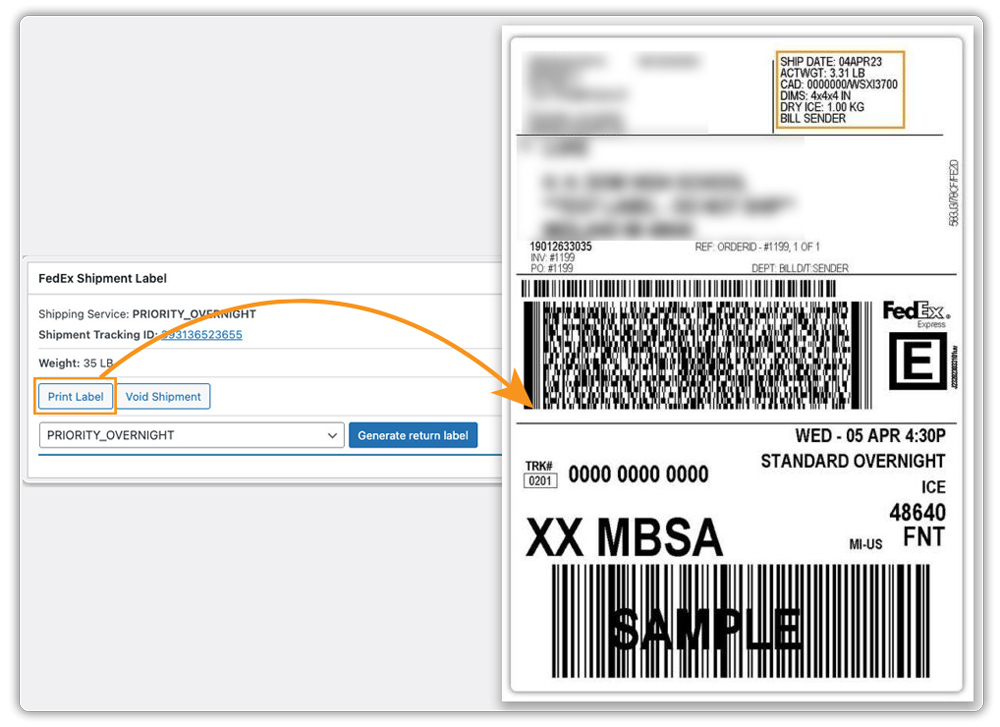
The plugin also allows you to schedule FedEx pickups and track shipments directly from your WooCommerce dashboard.
Best Practices for Supplements & Vitamins Shipping in WooCommerce
Here are some practical tips to improve how you ship supplements and vitamins through WooCommerce using FedEx:
Tip 1: Provide Real-Time Shipment Tracking
Clear tracking is especially important for health-related products. You can track FedEx shipments using the WooCommerce FedEx Shipping Plugin, and for enhanced customer visibility, you can use the WooCommerce Shipment Tracking Pro plugin.
Tip 2: Display Accurate Delivery Estimates
Delivery timelines matter for time-sensitive supplements. While basic delivery estimates can be shown with the FedEx plugin, for more flexibility, such as handling cutoff times, holidays, and custom rules, use the Estimated Delivery Date Plugin for WooCommerce.
Tip 3: Offer Flexible Shipping Rates
Different supplements may require different shipping strategies. Using the WooCommerce Table Rate Shipping Pro Plugin, you can set flexible shipping rules based on cart value or destination, making pricing clearer and more predictable for customers.
Tip 5: Show Only Relevant Shipping Methods
Too many shipping choices can confuse buyers at checkout. For supplements and vitamins, it’s often better to show only the most reliable FedEx services. The PH Hide WooCommerce Shipping Methods & Rate Adjustment Plugin allows you to hide unnecessary options or adjust rates for specific products or categories.
Conclusion
Shipping supplements and vitamins via WooCommerce with FedEx requires careful attention. Using the right services ensures products arrive safely and on time. A smart shipping strategy reduces delays and returns while building customer trust in the health and wellness market.
For help setting up reliable FedEx shipping workflows, contact PluginHive Support.
FAQs
- Can I offer FedEx Hold at Location or pickup options to my customers?
Yes, WooCommerce stores can provide FedEx pickup or Hold at Location options, allowing customers to collect packages at convenient FedEx locations. Learn more at WooCommerce FedEx Hold at Location.
- How do I offer multiple shipping carriers, including FedEx, in WooCommerce?
Using a multi-carrier shipping plugin, you can display FedEx alongside UPS, USPS, or other carriers, giving customers more delivery choices. See Multiple Carrier Shipping Plugin for WooCommerce.
- Can FedEx shipping be integrated for multi-vendor WooCommerce stores?
Yes, you can manage FedEx shipping for multiple vendors in a WooCommerce marketplace setup using the Multi-Vendor Shipping Addon, ensuring each vendor can ship their products efficiently.
- Can I insure my supplements shipment with FedEx?
Yes, FedEx offers shipping insurance for valuable products. You can declare the value when creating the shipment in WooCommerce to protect against loss or damage.
