



Running a Shopify store means managing a lot at once: incoming orders, customer expectations, and a fulfillment process that needs to run without delays. Shipping with TNT is where it all comes together. Using the correct TNT service with accurate TNT labels can make or break your customer experience.
TNT has been delivering customers’ promises for over 70 years, connecting people and businesses all over the planet every single day. The challenge for most Shopify store owners is that shipping with TNT typically means bouncing between platforms, opening Shopify to check order details, then logging into TNT separately to generate a label. That back-and-forth leads to manual errors, wasted time, and inconsistency in your fulfillment process. Printing TNT shipping labels directly in Shopify solves all of that. It keeps your orders, labels, and tracking in one place so you can fulfill faster and ship with confidence.
In This Article:
- Why Ship with TNT from Your Shopify Store
- TNT Shipping Services Available for Shopify Merchants
- Benefits of Printing TNT Shipping Labels Directly in Shopify
- How to Print TNT Shipping Labels in Shopify
- How to Affix Your TNT Label Correctly
- Conclusion
- FAQs
Why Ship with TNT from Your Shopify Store
TNT is built for businesses that need reliable, time-definite delivery, whether they’re shipping locally or sending orders across borders. For Shopify merchants, a few things make TNT stand out as a carrier of choice.
- TNT offers door-to-door shipping to more than 200 countries, connecting people and businesses all over the world. That global reach means you can use a single carrier for both your domestic and international customers.
- TNT’s Express service includes online tracking, basic customs clearance, and a range of additional services, all with next-business-day delivery worldwide. TNT customers get transparency at every stage of their delivery, and you get the reliability of a carrier with decades of operational experience.
- TNT delivers millions of parcels, documents, and freight consignments with care and attention because they understand how important every parcel is. That philosophy aligns directly with what Shopify merchants want: a carrier that treats their customers’ orders with the same seriousness they do.
TNT Shipping Services Available for Shopify Merchants
TNT offers two core service families, Express and Economy Express, each with distinct tiers designed to match different delivery urgencies and budget requirements.
Express: Next Possible Business Day
With TNT’s Express service, shipments are delivered worldwide on the next possible working day with door-to-door coverage, online tracking, basic customs clearance, and optional guaranteed morning deliveries.
There are four Express tiers:
- 9:00 Express: Delivery before 9 am. Available for documents and parcels in major cities across 40+ countries, up to 210 kg. It makes sure your shipment is there at the very start of the working day.
- 10:00 Express: Delivery before 10 am for an early morning delivery. For documents and parcels in major cities across 45+ countries, up to 210 kg.
- 12:00 Express: Delivery by noon, offering the perfect balance between urgency and budget. Covers documents, parcels, and pallets in major cities across 60+ countries, up to 500 kg.
- Express: Delivery before 6 pm on the next possible working day, before the close of business. For documents, parcels, and pallets, available worldwide, up to 500 kg.
Economy Express: Day-Definite, Cost-Effective
Economy Express allows you to control your costs on less urgent parcels and freight, while still being sure they’ll arrive on a specified day.
- 12:00 Economy Express: For the most economical guaranteed delivery by noon, this service utilizes the fastest road network in Europe. Covers parcels and freight in major business areas across 25+ European countries, up to 500 kg.
- Economy Express: For less urgent parcels and freight, this economical, day-definite delivery service covers worldwide shipments up to 500 kg and across Europe up to 7,000 kg.
Benefits of Printing TNT Shipping Labels Directly in Shopify
Generating TNT labels directly from Shopify rather than through a separate TNT platform has a clear and immediate impact on how efficiently your store operates.
- No More Switching Between Platforms. Every time you leave Shopify to generate a TNT label elsewhere, there’s an opportunity for errors, a wrong address, an incorrect service selection, or a missed order. Keeping label generation inside Shopify eliminates that risk entirely.
- Faster Fulfillment. Generating a label from within Shopify takes a fraction of the time compared to logging into a separate system, searching for the order details, copying them across, and downloading the label. The time savings add up significantly across dozens or hundreds of orders per week.
- Bulk Label Printing for High-Volume Stores. For stores processing large numbers of orders at once, the ability to select multiple orders and generate all their labels in one action, rather than going order by order, is a meaningful operational advantage.
- Automatic Customer Tracking Notifications. As soon as a TNT label is generated, a tracking number is attached to the order. Customers receive shipment notifications automatically, reducing the volume of “where’s my order?” enquiries your team has to handle.
How to Print TNT Shipping Labels in Shopify
To print TNT labels directly from Shopify, you’ll need the PH Multi-Carrier Shipping Label app. The app integrates TNT into your Shopify dashboard, letting you manage rates, labels, pickup, and tracking.
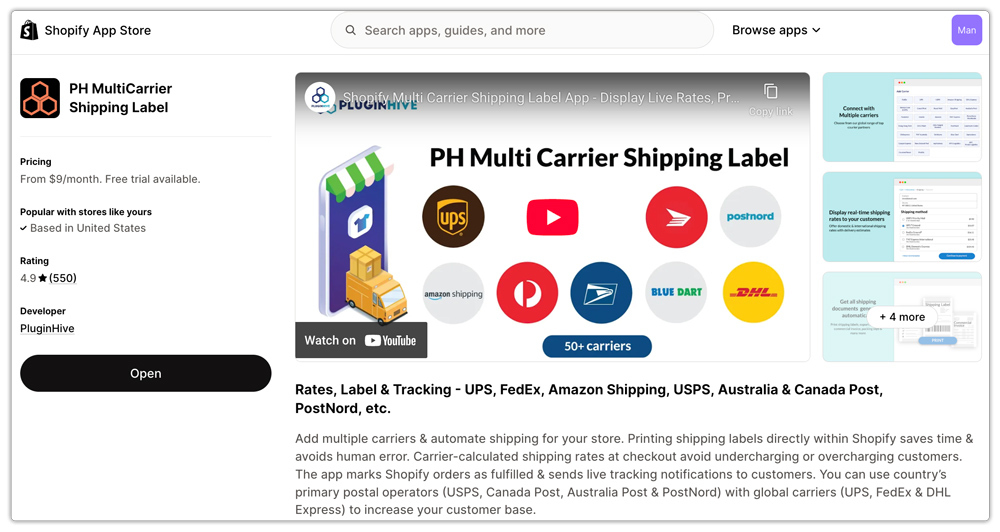
- Step 1: Install the PH Multi-Carrier Shipping Label App
Install the PH Multi-Carrier Shipping Label app from the Shopify App Store. Once installed, the app automatically configures your store location as the shipping origin.
- Step 2: Connect Your TNT Account
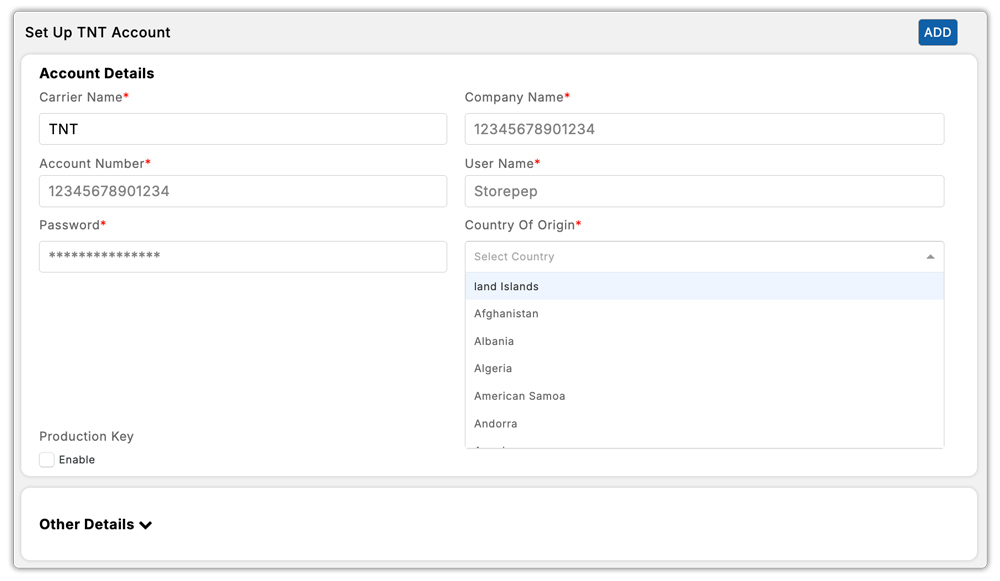
Navigate to Settings → Carriers → TNT. Enter your TNT account credentials. You can also set your preferred Pickup Time and Company Close Time here. Once verified, the app is ready to fetch live TNT rates and generate labels on your behalf.
- Step 3: Set Up Package Defaults
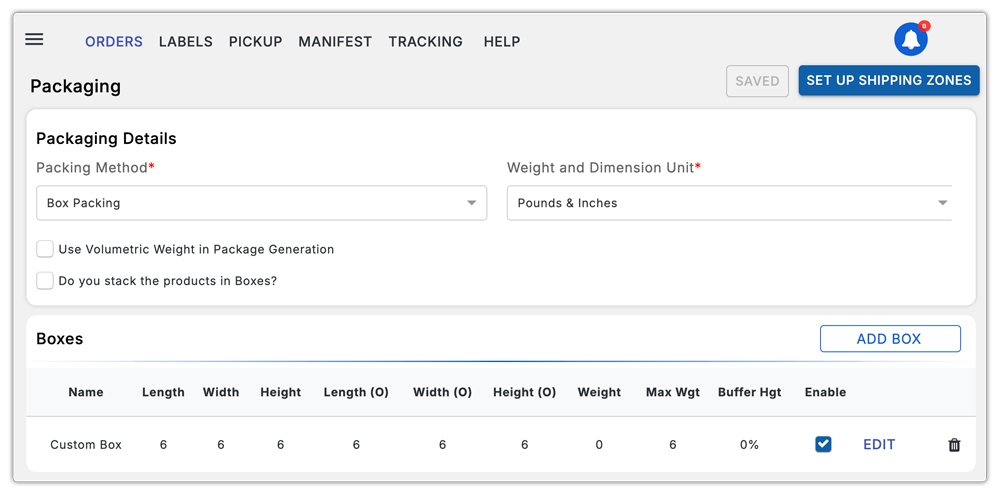
Add your standard package sizes and weights. This ensures rate calculations are accurate at checkout and that every label generated reflects the correct package information.
- Step 4: Generate and Print Your TNT Label
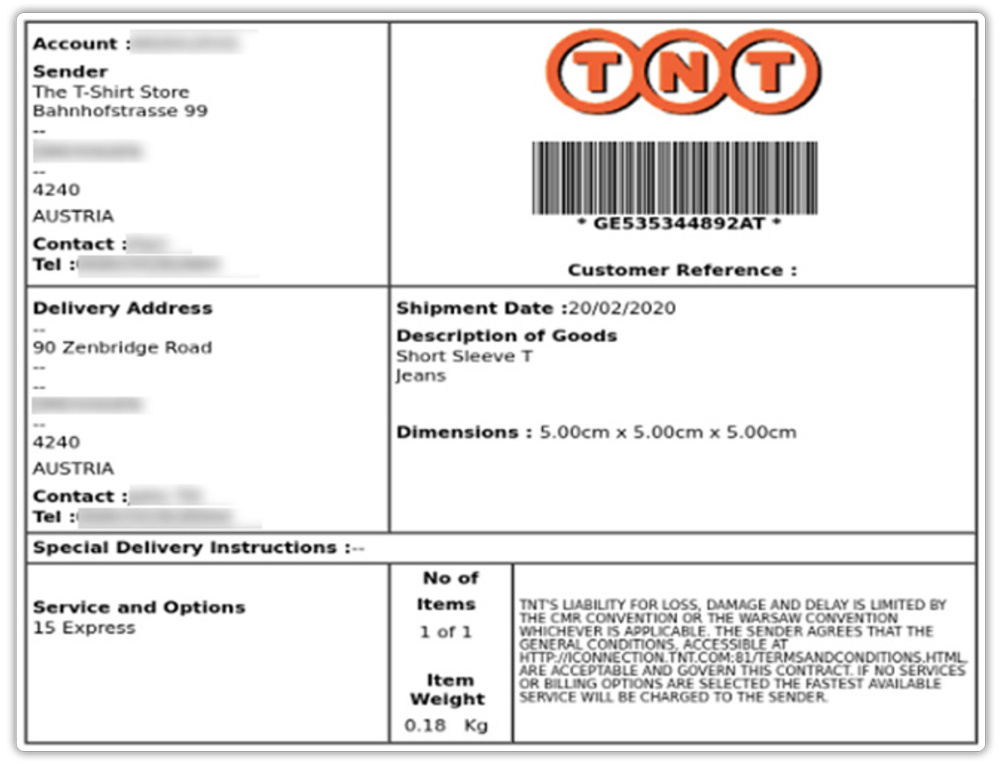
When an order comes in, go to the Orders section and select the order you want to ship. The app automatically selects the cheapest available TNT service, or uses the service the customer chose at checkout. Click to generate the TNT shipping label, print it, and attach it to your package.
- Step 5: Print Labels in Bulk
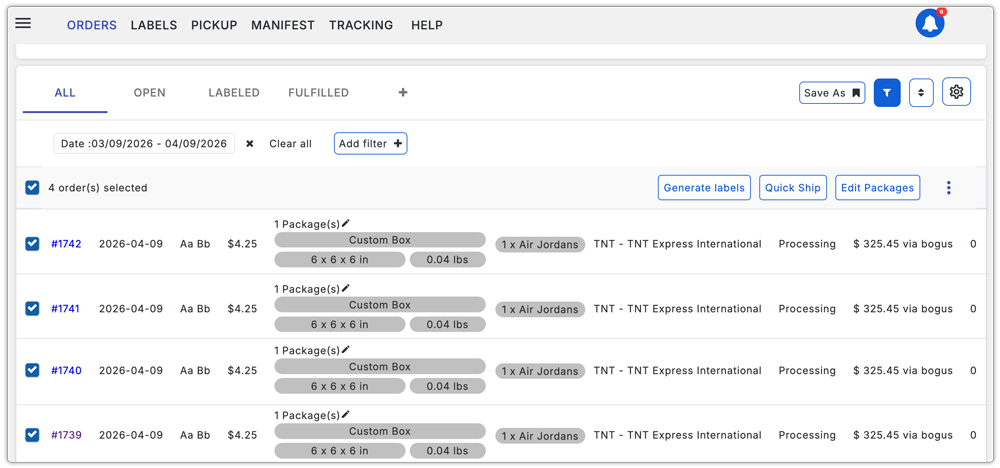
For multiple orders, select all the orders you want to fulfill and generate their TNT labels at once. The app supports batch printing, so you can print all the TNT labels in a single action rather than processing them one by one.
How to Affix Your TNT Shipping Labels Correctly
Printing the label is only half the job. How you attach it determines whether TNT’s system can read it correctly at every checkpoint in the delivery journey. TNT provides clear guidance on this directly.
- Use self-adhesive paper to print your routing labels if possible. If plain paper is used instead, place it in a document pouch. Your TNT driver can supply pouches upon collection.
- Never stick new labels on top of old ones. Too many labels risk confusion. Always remove old labels first before applying a new one.
- Affix routing labels on the top surface of boxes or the side of pallets, making sure the barcode is fully flat and visible, not bent over the edge. Apply labels after taping or wrapping so they are not obscured.
- Do not wrap over or obscure your TNT labels in any way. Even if you can see through plastic wrapping, TNT’s scanners may not be able to read the barcode.
- Getting this right means fewer scanning failures, fewer delivery delays, and a cleaner handover to the TNT driver every time.
Conclusion
TNT gives Shopify merchants access to a reliable, time-definite delivery network that spans more than 200 countries with clear service tiers for both urgent and budget-conscious shipments. Whether you need guaranteed next-day delivery before 9 am or a day-definite economical service for less urgent freight, TNT has a service designed for it.
Printing those labels directly in Shopify without switching platforms, copying order details manually, or managing separate systems is what turns a good carrier into a truly efficient part of your fulfillment workflow. When orders, labels, tracking, and pickup scheduling all live inside your Shopify dashboard, you move faster, make fewer mistakes, and give your customers a consistently better experience.
If you’re still managing TNT shipments outside of Shopify, it’s worth making the switch. The difference in time and effort becomes apparent from the very first order you fulfill.
FAQs
Q. Can I print TNT shipping labels directly from Shopify?
Yes. Using the PH Multi-Carrier Shipping Label app, you can generate and print TNT shipping labels from within your Shopify dashboard without logging into a separate TNT platform.
Q. Does TNT support both domestic and international shipping from Shopify?
Yes. TNT’s Express services are available worldwide with door-to-door delivery, and Economy Express covers both European and worldwide shipments.
Q. What is the maximum weight TNT supports per service?
9:00 and 10:00 Express support up to 210 kg. 12:00 Express and standard Express support up to 500 kg. Economy Express supports up to 500 kg worldwide and up to 7,000 kg across Europe.
