


Choosing the right shipping service is important for WooCommerce stores that sell both domestically and internationally. TNT, now part of the FedEx network in many regions, is widely used for reliable road and air shipping across Europe and global markets. Understanding the TNT domestic and international services helps store owners set clear delivery expectations and avoid fulfillment issues.
In this article, we’ll explore TNT shipping services and how WooCommerce stores can use them effectively for smooth order fulfillment.
On This Page
- Overview of TNT Shipping Services
- How to Offer TNT Shipping in WooCommerce
- Real-World WooCommerce Use Case
- Conclusion
- FAQs
Overview of TNT Shipping Services
TNT offers a comprehensive range of domestic and international shipping services designed to support time-sensitive and cost-effective eCommerce deliveries. As part of the FedEx network, TNT focuses on time-definite, door-to-door express solutions, making it a reliable carrier for WooCommerce stores handling both local and cross-border orders.
TNT Domestic Shipping Services for WooCommerce
TNT domestic shipping services are designed for fast and predictable deliveries within the same country, making them suitable for WooCommerce stores serving local or regional customers.
TNT’s domestic delivery options include:
- TNT 9:00 Express – Delivery by 9:00 AM on the next business day
- TNT 10:00 Express – Delivery by 10:00 AM
- TNT 12:00 Express – Delivery by 12:00 PM
- TNT Express – Guaranteed delivery by the end of the next business day
- TNT Economy Express – A cost-effective option for non-urgent shipments, typically delivered within 2+ business days
TNT International Shipping Services for WooCommerce
TNT’s international shipping services are designed for speed, reliability, and global reach, supporting WooCommerce merchants who sell across borders. TNT delivers to major business centers in 65+ countries, with strong customs and tracking support.
TNT international service options include:
- TNT 9:00 Express – Delivery before 9:00 AM on the next business day
- TNT 12:00 Express – Delivery before 12:00 PM on the next business day
- TNT Express – Delivery by the end of the next business day
- TNT Economy Express – Day-definite delivery at a more economical rate
- TNT IDE (Integrated Direct Express) – Consolidated international shipments delivered to multiple addresses
- Freight services – Air and sea freight options for heavier or bulk shipments
How to Offer TNT Shipping in WooCommerce
Offering TNT shipping services in your WooCommerce store becomes straightforward with the right shipping integration. The WooCommerce Shipping Services Plugin allows you to connect your store directly with TNT and manage shipping operations from one place.
For a step-by-step walkthrough, refer to the setup guide for the WooCommerce Shipping Services plugin.
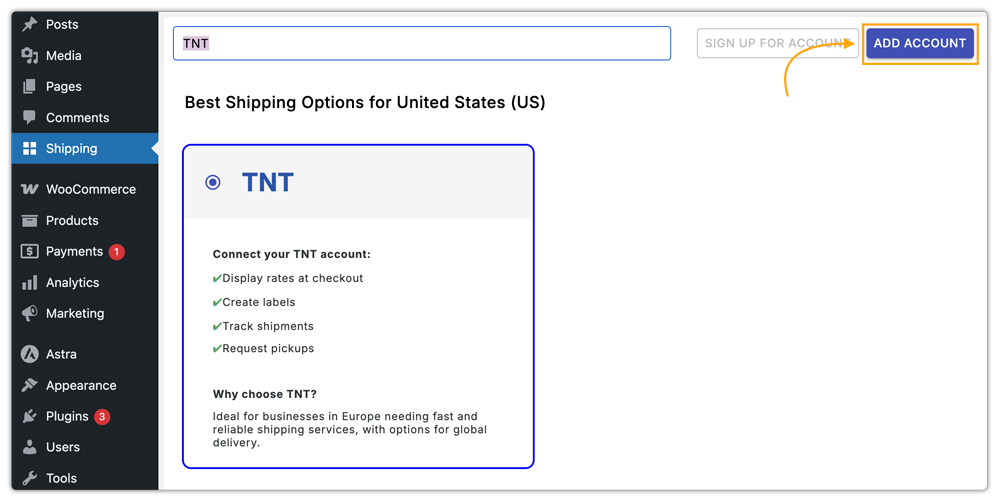
Once the plugin is installed, you can add TNT as a carrier from the plugin’s carrier settings.
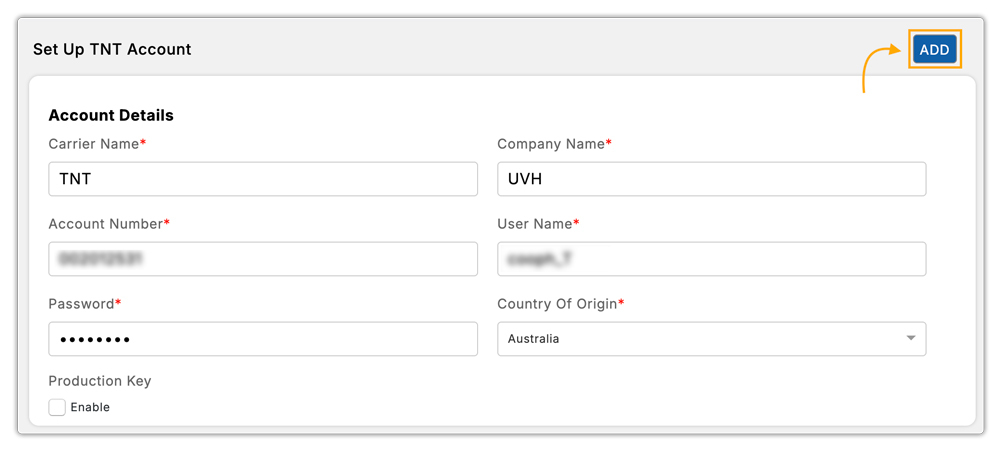
Next, connect your TNT account by entering your TNT credentials in the plugin settings. This enables your store to communicate with TNT for rate calculation, label generation, and tracking.
Within the rate automation and label automation settings, you can choose which TNT domestic and international services should be available for live rates and label printing.

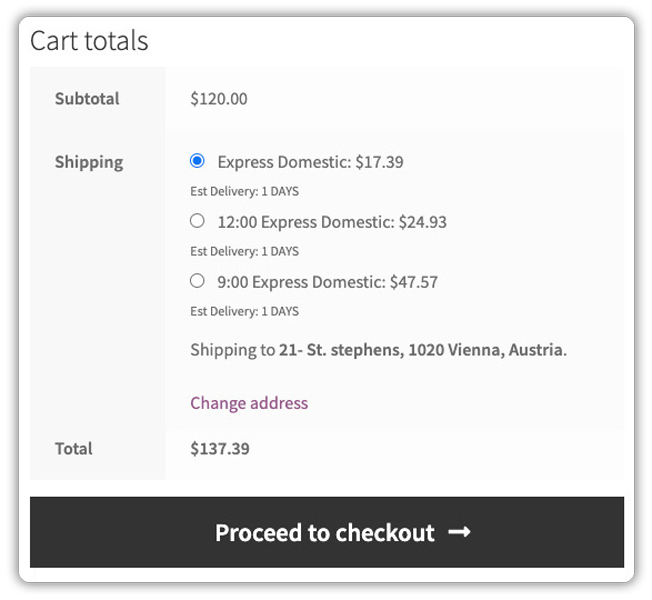
After configuration, your WooCommerce store will display real-time TNT shipping rates at checkout, calculated based on package weight, dimensions, and delivery location. This ensures customers see accurate pricing before placing an order.
To further optimize fulfillment, you can hide slower or unsuitable TNT services for certain package sizes or conditions. This helps prevent delays and ensures customers only see reliable delivery options at checkout. The PH Hide WooCommerce Shipping Methods & Rate Adjustment Plugin can assist with this customization.
Real-World WooCommerce Use Case
A mid-sized WooCommerce store based in Texas, selling premium fitness accessories, faced challenges managing both domestic and international shipments. On average, the store processed 120 orders per day, with international shipments accounting for nearly 40% of the total orders.
Before integrating TNT shipping automation, staff manually calculated shipping rates, generated labels on the TNT portal, and updated tracking in WooCommerce. Each order took 5-6 minutes to process, leading to fulfillment delays of 12–24 hours, missed delivery expectations, and an increase in support requests.
After implementing the WooCommerce Shipping Services Plugin for TNT services in WooCommerce, the store experienced significant improvements:
- Faster Fulfillment: Processing time dropped by 60%, from 6 minutes to about 2-3 minutes per order.
- Accurate Delivery Estimates: Real-time TNT domestic and international rates at checkout reduced order-related confusion.
- Improved On-Time Deliveries: Automated label generation and scheduled pickups increased on-time deliveries from 80% to 95%.
- Better Customer Satisfaction: Reliable shipping and clear communication led to higher repeat purchase rates.
This example shows that WooCommerce merchants can efficiently manage shipping with TNT, ensuring reliable deliveries, accurate rates, and improved customer satisfaction.
Conclusion
Choosing the right TNT shipping service, whether domestic or international, can help WooCommerce stores ensure timely deliveries, accurate rates, and reliable order fulfillment. By understanding the available services and planning shipments effectively, merchants can reduce delays, improve customer satisfaction, and maintain smooth operations across local and global markets.
For additional guidance or support, reach out to PluginHive Support.
FAQs
- Can I set different shipping rates based on cart weight, quantity, or product type?
Yes. WooCommerce orders vary depending on items, from small products to bulky shipments. Using the WooCommerce Table Rate Shipping Pro Plugin, you can set flexible shipping rates for different weights, quantities, or product types.
- How can I customize estimated delivery dates for TNT shipments?
You can adjust delivery estimates based on handling time, extra processing days, or store-specific policies using the Estimated Delivery Date Plugin for WooCommerce.
- Can I offer TNT shipping for multi-vendor WooCommerce stores?
Yes. With the WooCommerce Multi-Vendor Shipping Addon, vendors can configure TNT shipping rates, labels, and options individually for their products.
- How can I provide end-to-end tracking for TNT shipments to customers?
For advanced tracking notifications, automated updates, and better communication with customers, consider using the WooCommerce Shipment Tracking Pro Plugin.
