



Shipping costs directly impact WooCommerce sales and profitability. Instead of paying standard UPS published rates, store owners can save money by using UPS negotiated rates, which are discounted based on shipping volume and account agreements. These rates can be 10%- 30% lower than published prices, helping reduce checkout costs and cart abandonment.
This guide explains how UPS negotiated rates work in WooCommerce and how to use them to lower shipping expenses.
On This page
- What Are UPS Negotiated Rates?
- Why WooCommerce Stores Should Use UPS Negotiated Rates
- Types of Discounts Available with UPS Negotiated Rates
- How To Display UPS Negotiated Rates in WooCommerce
- Real-World Example
- Conclusion
- FAQs
What Are UPS Negotiated Rates?
UPS negotiated rates are account rates/ discounted shipping rates offered by UPS to businesses that have a contract or agreement with the carrier, instead of the standard published (retail) rates available to everyone. These negotiated rates reflect the pricing terms agreed upon between UPS and a shipper based on factors like shipping volume, frequency, service types, and business relationship.
Here’s how they differ from standard rates:
- Published (Retail) Rates: These are the default UPS prices listed publicly for services like UPS Ground, Air, and International shipments. They apply to occasional shippers who don’t have a negotiated contract with UPS.
- Negotiated Rates: Custom, often lower, rates tied to your UPS account. They reflect discounts UPS offers for volume, loyalty, or contractual commitments and are retrieved when your account is authenticated in a shipping system or API.
To use negotiated rates, your UPS account needs to be set up and authenticated (often through UPS tools or by entering invoice details online) so that the system knows you’re eligible for your contract pricing.
Why WooCommerce Stores Should Use UPS Negotiated Rates
For WooCommerce store owners, shipping costs directly affect profitability and conversions. UPS negotiated rates help solve this by allowing you to charge customers and pay UPS, based on your actual contracted prices, not the higher published rates.
They matter because of:
- Lower Shipping Costs: Negotiated rates are usually cheaper than UPS’s published rates, helping you save on every order and improve overall margins.
- Better Checkout Conversion Rates: High shipping fees are a common reason for cart abandonment. Showing lower, negotiated UPS rates at checkout makes customers more likely to complete their purchase.
- Accurate, Real-Time Pricing: WooCommerce can display the exact rates UPS will bill your account, reducing pricing mismatches and unexpected shipping losses.
- Competitive Advantage: Offering affordable and reliable UPS shipping options helps your store compete with larger marketplaces that already benefit from discounted shipping.
- Scales with Business Growth: As your shipping volume increases, UPS may offer better negotiated discounts, meaning your savings grow along with your store.
Types of Discounts Available with UPS Negotiated Rates
| Discount Type | Description |
|---|---|
| Discounted Base Shipping Rates | Reduced base charges compared to UPS published (list) rates for services like UPS Ground, Air, and International shipping. These are the actual rates billed to your UPS account. |
| Volume-Based Discounts | Businesses that ship regularly or in higher volumes may receive better negotiated pricing as part of their UPS agreement. |
| Service-Specific Discounts | Lower pricing may apply to selected UPS services based on your shipping patterns and contract terms. |
| Account-Specific Contract Pricing | Rates are tied to your UPS account and billing agreement, allowing shipping systems to retrieve contracted pricing instead of public list rates. |
Important: UPS does not publicly disclose exact discount percentages, as negotiated rates vary by account and contract terms.
How To Display UPS Negotiated Rates in WooCommerce
Setting up UPS negotiated rates in WooCommerce is simple with the WooCommerce UPS Shipping Plugin with Print Label, which ensures customers see accurate, discounted shipping costs at checkout.
For step-by-step instructions on setting up UPS shipping, visit the PluginHive WooCommerce UPS Shipping Guide .
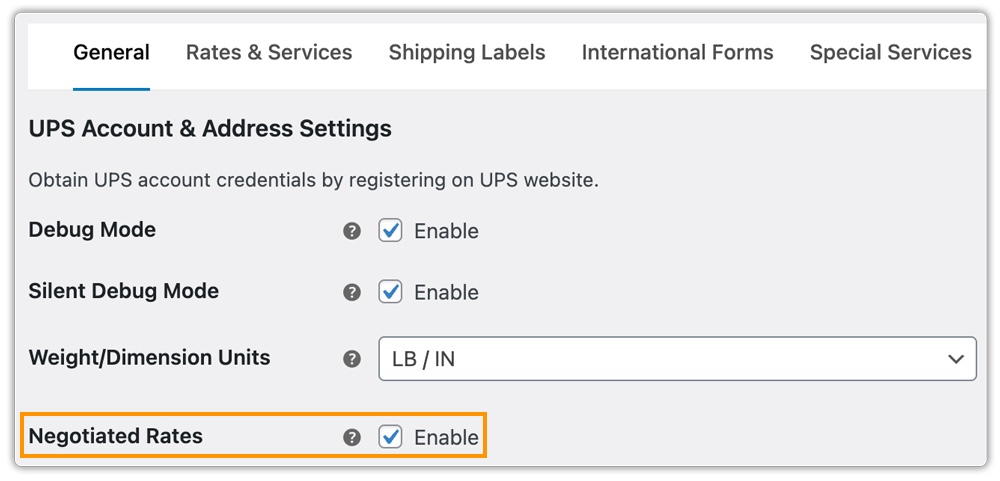
Enable negotiated rates in the plugin settings to fetch discounted UPS rates if your UPS account supports them.
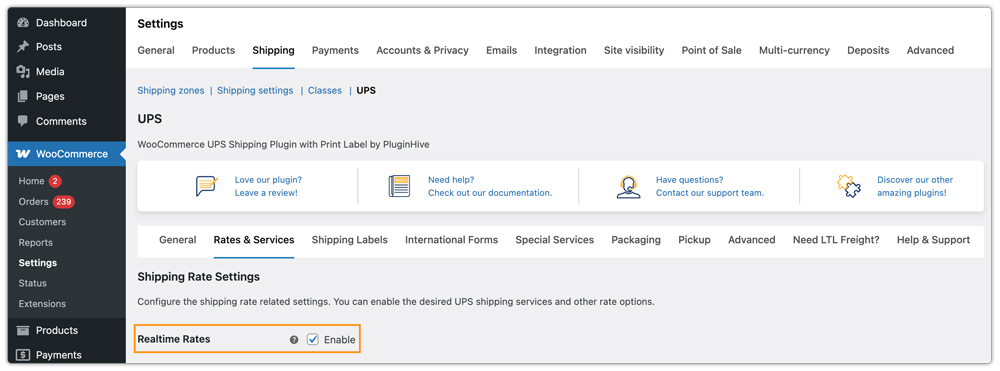
Enable real-time UPS rates so shipping costs are calculated based on the customer’s delivery location, package weight, and dimensions.
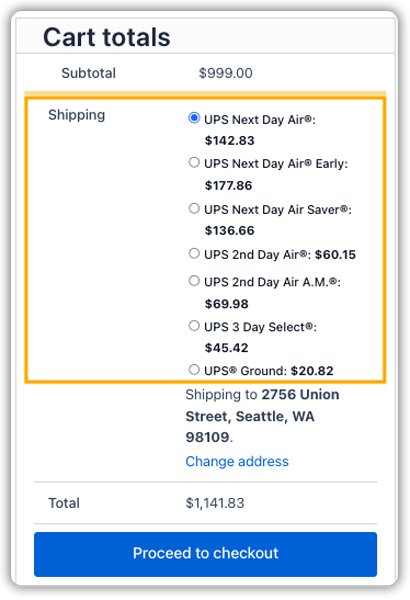
Select the UPS services you want to display at checkout to keep shipping options clear and relevant.

Once configured, live UPS negotiated rates are displayed on both the cart and checkout pages, improving pricing transparency and customer trust.
To learn more in detail about the UPS shipping plugin, watch this video.
Real-World Example: WooCommerce Store Saving Money with UPS Negotiated Rates
Consider a mid-sized WooCommerce store selling consumer electronics within the US and internationally. The store ships around 400-500 orders per month, primarily using UPS Ground and UPS 2nd Day Air. Initially, the store relied on UPS’ published rates shown at checkout.
Before Using UPS Negotiated Rates:
- Average UPS Ground shipment cost: $12.40
- Average UPS 2nd Day Air shipment cost: $28.60
- Monthly UPS shipping spend: ~$6,100
- Frequent cart abandonment due to high shipping charges
After enabling UPS Negotiated Rates via the WooCommerce UPS Shipping Plugin:
- Average UPS Ground shipment cost reduced to $9.80
- Average UPS 2nd Day Air shipment cost reduced to $22.90
- Monthly UPS shipping spend reduced to ~$4,700
- Check out shipping prices dropped by 15-25%
Results:
- Monthly savings: ~$1,400
- Annual shipping savings: ~$16,800
- Improved checkout conversion rate due to lower shipping costs
- More predictable UPS invoices with fewer rate mismatches
By using UPS negotiated rates in WooCommerce, the store aligned checkout prices with actual UPS billing, reduced shipping expenses, and improved customer satisfaction, all without changing carriers or delivery speed.
Conclusion
UPS negotiated rates are an effective way for WooCommerce stores to reduce shipping costs without compromising on delivery speed or reliability. As shipping volume grows, these savings can scale with the business, making negotiated rates a smart long-term strategy for cost control and customer satisfaction.
Need help or have questions about UPS shipping in WooCommerce? Reach out to PluginHive Support.
FAQs
Q. Can I hide certain UPS shipping methods based on package size or weight?
Yes. You can hide slower or unsuitable shipping methods for specific package conditions. The PH Hide WooCommerce Shipping Methods & Rate Adjustment Plugin can help you manage this effectively.
Q. Can I set different UPS shipping rates based on cart weight, quantity, or product type?
Absolutely. Using the WooCommerce Table Rate Shipping Pro Plugin, you can define flexible UPS shipping rules based on weight, quantity, destination, or product category.
Q. Can I offer multiple carriers along with UPS?
Yes. With tools like the Multi-Carrier Shipping Plugin, you can offer UPS alongside FedEx, USPS, and DHL, reducing dependency on a single carrier.
Q. Can I provide advanced shipment tracking and delivery notifications for UPS orders?
Yes. You can track orders with the UPS plugin, but for advanced tracking features, you can use the WooCommerce Shipment Tracking Pro Plugin, which helps keep customers informed throughout the delivery process.
