


For WooCommerce store owners in the US, choosing the right shipping service is crucial to ensuring timely delivery, controlling costs, and providing a great customer experience. UPS, one of the leading carriers in the country, offers a wide range of domestic shipping options that cater to different delivery speeds and budgets.
In this guide, we’ll break down UPS domestic shipping services, highlight the best options for different business needs, and show you how to integrate them seamlessly into your WooCommerce store.
On This Page
- Why UPS Is a Top Choice for US Domestic Shipping
- Overview of UPS Domestic Shipping Services
- Best UPS Services for Different WooCommerce Store Needs
- How to Offer UPS Shipping Service in WooCommerce
- Tips to Make WooCommerce Shipping More Flexible with UPS
- Conclusion
- FAQs
Why UPS Is a Top Choice for US Domestic Shipping
For WooCommerce store owners, UPS is a trusted carrier that combines speed, reliability, and nationwide coverage. Here’s why it stands out:
- Nationwide Coverage: Delivers to urban and remote areas across the US, ensuring all customers are reachable.
- Reliable Delivery: Consistently meets delivery promises, reducing delays and complaints.
- Comprehensive Tracking: Real-time updates and notifications improve transparency and customer trust.
- Flexible Services: Options range from economical ground shipping to expedited and overnight delivery.
- Cost-Effective: Negotiated rates and shipping tools help manage costs without compromising quality.
- Enhanced Customer Experience: Fast, reliable shipping with clear tracking boosts satisfaction and repeat purchases.
- WooCommerce Integration: Supports plugins and apps for automated rates, label printing, and tracking.
UPS offers reliable, flexible, and cost-effective domestic shipping, helping WooCommerce stores deliver products efficiently and maintain customer trust.
Overview of UPS Domestic Shipping Services
UPS provides a variety of domestic shipping services to meet different delivery speed and reliability needs. Here’s an overview of the main options:
- UPS Ground
Standard delivery service within 1-5 business days, depending on distance. Ideal for general shipments of any weight (up to 150 lbs) with full tracking and delivery confirmation.
- UPS 3 Day Select®
Guaranteed delivery within 3 business days. Offers predictable transit times and tracking for time-sensitive deliveries that don’t require overnight shipping.
- UPS 2nd Day Air®
Delivery in 2 business days, with tracking and insurance options. Provides faster service than ground while still being cost-effective for quicker shipments.
- UPS 2nd Day Air AM®
Delivery by the morning of the second business day. UPS ensures early delivery for packages requiring priority handling, including optional Saturday delivery in some locations.
- UPS Next Day Air Saver®
Next-business-day delivery by the end of the day. Designed for expedited shipments where early delivery is not critical but speed is important.
- UPS Next Day Air®
Guaranteed next-business-day delivery, typically by mid-day. UPS provides detailed tracking, delivery confirmation, and optional Saturday delivery.
- UPS Next Day Air® Early
Early morning next-day delivery (as early as 8 a.m. in major cities). Perfect for urgent shipments requiring guaranteed delivery at the start of the business day.
- UPS Ground Saver® (Economy Ground)
A cost-effective ground service for less time-sensitive packages. Transit times are slightly longer than standard UPS Ground, but it offers reliable delivery with tracking at a lower cost.
Let’s now explore which types of WooCommerce stores benefit most from each UPS shipping service.
Best UPS Services for Different WooCommerce Store Needs
Choosing the right UPS service depends on your WooCommerce store’s shipping priorities, customer expectations, and product type. The table below summarizes the best services for common scenarios:
| UPS Service | Best Use Case / When to Use |
|---|---|
| UPS Ground | Cost-effective standard shipping for non-urgent orders; ideal for heavy or bulky items. |
| UPS 3 Day Select® | Mid-speed option when delivery time matters but budget is still important. |
| UPS 2nd Day Air® / 2nd Day Air A.M.® | Time-sensitive shipments requiring guaranteed 2-day delivery. |
| UPS Next Day Air Saver® | Overnight delivery at a lower price compared to standard Next Day Air. |
| UPS Next Day Air® / Next Day Air Early® | For urgent, time-critical orders requiring earliest next-day delivery. |
| UPS Ground Saver® | Ultra low-cost, low-urgency deliveries where savings matter more than speed. |
How to Offer UPS Shipping Services in WooCommerce
The WooCommerce UPS Shipping Plugin with Print Label makes it easy to integrate UPS domestic services into your store, allowing you to offer flexible shipping options that meet varying customer needs for speed and cost.
To get started with the UPS plugin, visit the WooCommerce UPS Shipping Guide for detailed setup instructions.
- Once configured, you can choose which UPS services to display at checkout.

- The plugin automatically retrieves live shipping rates from your UPS account. Customers can then select from the available services based on their delivery preferences and budget.

- You can also generate UPS shipping labels directly from WooCommerce orders. These labels include all necessary shipment details.
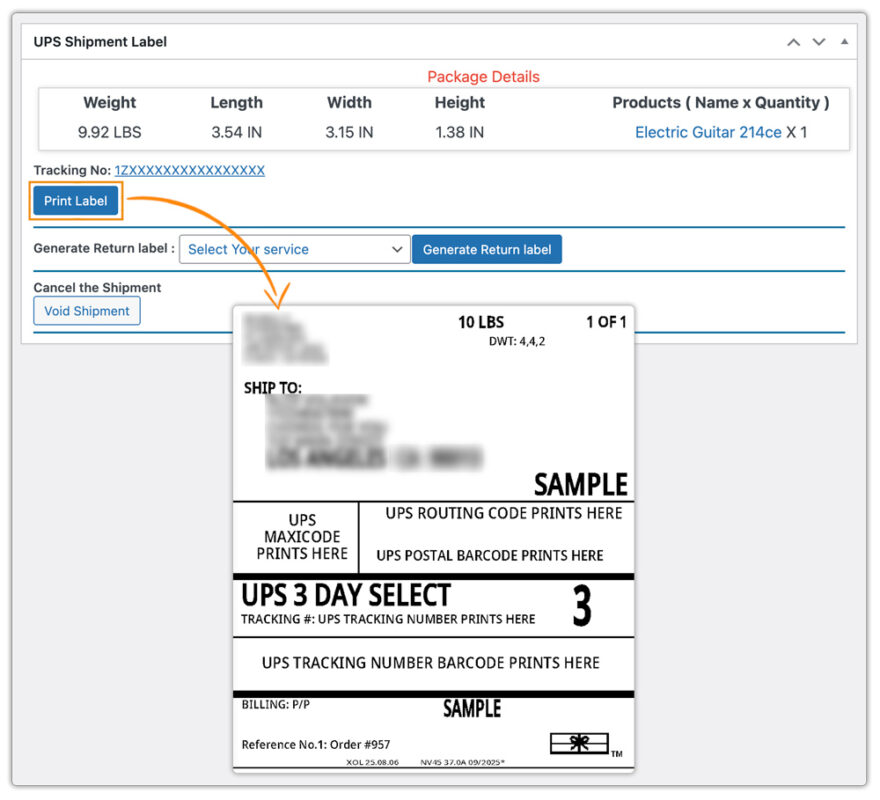
Additionally, the plugin allows you to schedule UPS pickups and track shipments directly from your WooCommerce dashboard, keeping both you and your customers updated with real-time tracking information.
For international shipments, check out the setup guide for WooCommerce UPS International Shipping.
Tips to Make WooCommerce Shipping More Flexible with UPS
Here are some practical tips to enhance your WooCommerce shipping experience with UPS:
Tip 1: Offer Multiple UPS Service Options:
Let customers choose between standard, 2-day, and overnight services to match their urgency and budget.
Tip 2: Provide Real-Time Shipment Tracking
You can track your WooCommerce shipments with the UPS Shipping Plugin, but for more flexibility, use the WooCommerce Shipment Tracking Pro plugin to automatically send UPS tracking IDs and allow customers to track shipments directly from your store.
Tip 3: Display Accurate Delivery Estimates
You can display estimated delivery dates with the default plugin, but for more flexibility, such as handling cutoff times, holidays, and custom rules, use the Estimated Delivery Date Plugin for WooCommerce.
Tip 4: Offer Flexible Shipping Rates
Simplify checkout with customized rules that benefit your store. The WooCommerce Table Rate Shipping Pro Plugin helps configure these rules effectively.
Tip 5: Show Only Relevant Shipping Methods
Avoid overwhelming customers with too many options. The Hide WooCommerce Shipping Methods & Rate Adjustment Plugin lets you hide unnecessary UPS services or adjust rates for specific products, categories, or customer groups.
Combining these best practices with the right plugins allows your WooCommerce store to offer flexible and reliable, enhancing the overall customer experience.
Conclusion
Choosing the right UPS domestic shipping service helps WooCommerce stores deliver on time, manage costs, and improve customer satisfaction. Aligning UPS options with your store’s needs, speed, cost, or reliability ensures smooth operations and happy customers.
For more guidance on setting up UPS shipping in WooCommerce, visit PluginHive Support.
FAQs
- How can I find the cheapest UPS shipping rate in WooCommerce?
You can compare UPS domestic shipping services and use live rate calculation to find the most cost-effective option for your orders. For detailed guidance, check out UPS Cheapest Rate in WooCommerce.
- Can I offer UPS Access Point delivery options to my customers?
Yes, WooCommerce stores can provide UPS Access Point pickup options, allowing customers to collect packages at convenient locations. Learn more at WooCommerce UPS Access Point.
- How do I offer multiple shipping carriers, including UPS, in WooCommerce?
Using a multiple carrier plugin, you can display UPS alongside FedEx, USPS, or other carriers, giving customers more delivery choices. See Multiple Carrier Shipping Plugin for WooCommerce.
- Can UPS shipping be integrated for multi-vendor WooCommerce stores?
Yes, you can manage UPS shipping for multiple vendors in a WooCommerce marketplace setup using the Multi-Vendor Shipping Addon.
