


Running a WooCommerce store that sells food, especially perishable or frozen items, comes with a specific set of challenges. Unlike regular products, food shipments demand the right carrier services, precise packaging, and store-side configuration to ensure every order arrives fresh and safe. UPS is one of the most reliable options for food shipping, offering a range of express services and compliance support.
This article walks you through UPS food shipping rules, costs, packaging guidelines, and how to set everything up seamlessly in WooCommerce.
On This Page
- UPS Food Shipping Rules and Restrictions in WooCommerce
- Best UPS Services for Food Shipping in WooCommerce
- UPS Packaging Best Practices for WooCommerce Food Shipments
- How to Set Up UPS Food Shipping in WooCommerce
- Conclusion
- FAQs
UPS Food Shipping Rules and Restrictions in WooCommerce
Before you ship food with UPS in WooCommerce, you need to understand what’s allowed and what’s not, and what conditions apply.
- Perishable foods are accepted on a contractual basis. Shipping perishables, including food, is available on a contractual basis with UPS for shippers with regular volumes who comply with the applicable requirements, including any interstate rules and regulations.
- Maximum transit time is 30 hours for perishables. For best results, UPS recommends planning for a maximum transit time of 30 hours. UPS Next Day Air is the recommended service, though UPS 2nd Day Air may be suitable for foods that require minimal temperature control.
- Dry ice has strict quantity limits. UPS allows up to 200 lbs of dry ice per package on domestic ground and cargo-only flights. Packages with more than 5.5 lbs of dry ice are restricted from passenger aircraft, per DOT regulations. Every UPS package containing dry ice must display a UN 1845 Class 9 miscellaneous hazardous material label.
- International food shipments require an ISC contract. For international shipments for frozen items, UPS requires a signed International Special Commodities (ISC) contract between your business and UPS before it will accept perishable goods for international routes. This contract outlines both parties’ responsibilities for temperature maintenance, documentation, and liability, and the process typically takes one to two weeks.
- Avoid weekend shipping. Ship early enough in the week so that your package will not sit over a weekend. Products stuck in transit over Saturday and Sunday risk spoilage, especially without active refrigeration.
Best UPS Services for Food Shipping in WooCommerce
Choosing the right UPS service is the single most important decision for WooCommerce food shipping. The faster the transit, the lower the risk of spoilage.
Domestic Services
- UPS Next Day Air: Delivers by 10:30 AM or noon the next business day. Best for frozen and highly perishable items where freshness is non-negotiable.
- UPS Next Day Air Early: Guarantees early morning delivery the next business day. Ideal for time-critical shipments like fresh seafood or raw meat.
- UPS Next Day Air Saver: End-of-day next-day delivery at a lower shipping cost than standard Next Day Air. Works well for items with slightly more temperature tolerance.
- UPS 2nd Day Air AM: Delivers by 10:30 AM or noon on the second business day. A cost-effective middle ground for foods requiring moderate temperature control.
International Services
- UPS Worldwide Express: Delivers within 1–3 business days to most international destinations with fast customs clearance.
- UPS Worldwide Express Plus: Early morning delivery to select international destinations; best for the most urgent cross-border food shipments.
- UPS Worldwide Saver: End-of-next-business-day delivery to major global markets; a good balance of speed and cost for international food orders.
Packaging Best Practices for UPS Food Shipments in WooCommerce
Proper packaging is what keeps your food safe in transit. UPS recommends the following:
- Use insulated EPS foam containers inside sturdy corrugated cardboard boxes. The foam insulates; the outer box protects against handling damage.
- Choose the right coolant. If you’re using dry ice, use sturdy insulated foam packaging. You should also include padding, such as bubble cushioning or foam wrap, to minimize movement. Adding gel packs can help keep food cool for shorter transit times.
- Seal all seams completely. Always pack perishable foods in a new, sturdy corrugated box and seal all seams of the box completely on top and bottom with pressure-sensitive packing tape.
- Line the interior with waterproof material to contain any leakage from melting ice or condensation.
- Label clearly. Mark packages as “Perishable.” For frozen shipments going internationally, add ISC and RFG (Refrigeration) labels. Clearly label your shipments as “Perishable” and declare any dry ice to ensure compliance with UPS’s regulations.
- Insulation thickness matters for frozen items: 1.5-inch foam walls are standard for overnight shipping, while 2-inch walls are recommended for two- or three-day transit or summer shipping.
How to Set Up UPS Food Shipping in WooCommerce
WooCommerce doesn’t natively support perishable or food-specific shipping configurations. The WooCommerce UPS Shipping Plugin with Print Label bridges that gap. Here’s how to configure it for food shipments:
Install and connect the plugin to your UPS account. Refer to the UPS Shipping Plugin Setup Guide for step-by-step instructions.
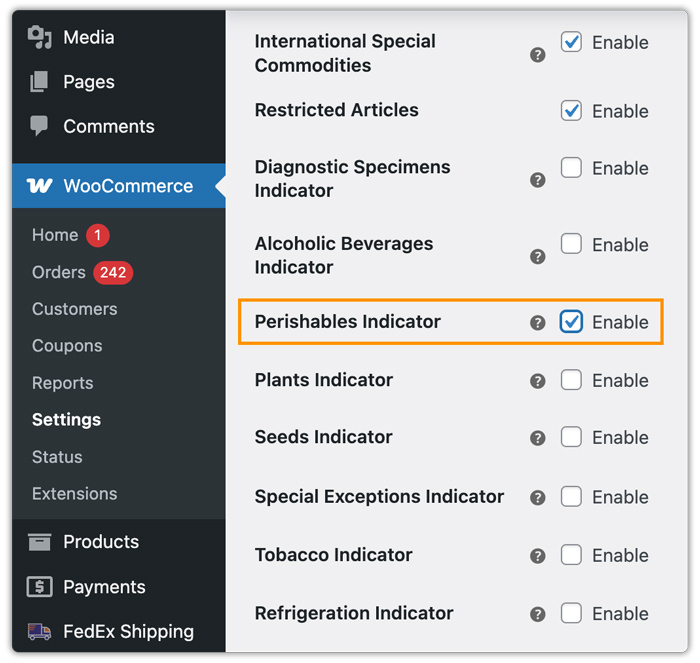
- Enable perishable indicators in plugin settings: Under Special Services, enable the Perishable Indicator. This ensures UPS treats your shipment as sensitive and spoilable throughout its journey. (If your shipment requires refrigeration, you can enable the Refrigeration indicator in the plugin settings.)
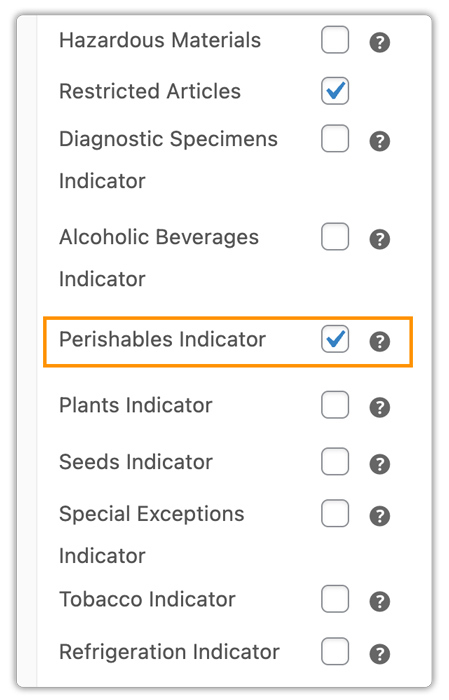
- Mark individual products as perishable: On each food product’s page, go to Product Data → Shipping, set the Restricted Article to “Perishable” Indicator.
- Select and display UPS services: Enable Next Day Air or 2nd Day Air in the plugin settings. The plugin will automatically display live rates at checkout, including food surcharges.

- Generate compliant shipping labels. Once an order is placed, print labels directly from the WooCommerce Orders page. Labels will automatically include ISC indicators for flagged perishable products.

After generating the label, you can schedule UPS pickups, track, and fulfill your orders from your store’s WooCommerce store itself.
To learn more about tracking and managing UPS orders, check out How to Track UPS Orders in WooCommerce.
Conclusion
UPS food shipping is entirely manageable for WooCommerce stores when you pair the right services with proper packaging and store-level configuration. Following UPS rules on perishable handling keeps your shipments compliant. And the WooCommerce UPS Shipping Plugin with Print Label handles everything from live rate display to label generation with perishable indicators, so your food products reach customers fresh, every time.
For setup help or plugin questions, visit PluginHive Support.
FAQs
Q. Can UPS ship all types of food?
UPS accepts most food products, including frozen, refrigerated, and non-perishable items. Perishable food shipping operates on a contractual basis, meaning regular-volume shippers need a UPS account agreement. Some items, like raw meat and seafood, require express services and specific packaging to meet transit time limits.
Q. Can I ship alcohol using UPS from my WooCommerce store?
Yes, but you must be a licensed alcohol shipper and comply with all federal, state, and UPS-specific regulations. For detailed guidance on shipping regulated products, such as alcohol, check out the UPS Alcohol Shipping in WooCommerce Guide.
Q. Can multi-vendor WooCommerce stores use the UPS shipping plugin?
Yes. With the PH Multi-Vendor Shipping Addon for WooCommerce, each vendor in your store can manage UPS shipments independently, with labels and tracking automatically assigned per order.
Q. How can I avoid UPS surcharges in WooCommerce?
Ensure customer addresses are accurate at checkout, minimize package size where possible, and plan shipments ahead of peak seasons to avoid additional handling and peak surcharges.
